
If you're still relying on a patchwork phone setup, you're probably feeling it every day. A property manager takes tenant calls on a personal cell phone, the office line rings unanswered when staff are out, and transferring a call to someone working from home turns into a callback game. In a small accounting office, one bad internet day or one aging phone cabinet can disrupt client conversations at the worst possible time.
That’s usually when business owners start looking at nextiva ip phones. Not because they want new desk hardware, but because they want a phone system that stops getting in the way. They want calls to route correctly, remote staff to sound like they’re in the office, and the front desk to handle volume without putting people on hold for too long.
Nextiva has the scale to make that conversation worth having. Its platform powers over 150,000 businesses and more than 1 million users globally, according to this Nextiva review from Crazy Egg. For a small business owner, that matters. You're not betting your operations on an obscure vendor or a one-off app. You're buying into a communications platform that a lot of businesses already trust for day-to-day operations.
Why Local Businesses Are Upgrading to Nextiva IP Phones
A lot of local upgrades start with the same problem. The old system still works, technically, but it doesn't work the way the business works anymore. Staff move between the office, home, and the road. Clients expect fast transfers, clear voicemail, and one business number that always reaches the right person.

In Henderson-area businesses, that usually shows up in familiar ways:
- Front desk overload: A receptionist is juggling calls, handwritten notes, and staff who aren't always at their desks.
- Remote work friction: Someone at home can answer calls on an app, but the desk system in the office doesn't feel connected to them.
- Aging landline costs: The business keeps paying for a setup that offers less flexibility each year.
- Missed opportunities: Calls go to voicemail when they should've been routed to another employee.
Nextiva IP phones solve a practical problem. They turn the desk phone from an isolated device into part of a cloud phone system. That means a business number, call routing, voicemail, video meetings, and user management can work together instead of being spread across separate tools.
Businesses usually don't replace phones because the handset is bad. They replace phones because the current system no longer matches how their team actually works.
That matters in industries with distributed staff, such as property management, real estate, accounting, legal services, and administrative public sector offices. A desk phone still has value. It gives employees a reliable, familiar endpoint. But with Nextiva, that desk phone isn't tied to a fixed old-school phone closet. It's part of a broader communications platform designed for modern operations.
Understanding Nextiva's VoIP Phone System
A Henderson medical office with two front-desk staff, one biller working from home, and a practice manager splitting time between locations does not need a phone system that only works well at one reception desk. It needs calls to ring the right person, voicemail to land in the right inbox, and changes to happen without waiting on a phone vendor to rewire the office.
That is the practical difference with Nextiva. The desk phone is only one endpoint. The actual phone system lives in the cloud, and each handset, mobile app, or desktop app connects to that service through your network. If you want a plain-English primer on the underlying technology, this guide on what VoIP is and how it works is a useful starting point.
What the phone is really doing
A Nextiva IP phone converts voice into data and sends it over your internet connection to Nextiva's hosted platform. That sounds technical, but the business impact is straightforward. Users still pick up a handset and make calls the way they always have, while the system handles routing, voicemail, user profiles, and remote access in the background.
For regulated and hybrid-work SMBs, that matters because the phone system stops being tied to one office suite. Staff can keep the same business identity whether they are at the main desk, in a branch office, or working from home. Reception can transfer calls without guessing who is available. Managers can make changes in an admin portal instead of paying for another on-site service visit.
Common functions usually include:
- Call routing and auto-attendants so incoming calls reach the right team faster
- Voicemail tied to user accounts instead of a single shared mailbox
- Desktop and mobile access for employees who split time between office and home
- Centralized user management when you add staff, remove staff, or change roles
- Desk phone support alongside apps for businesses that still want physical handsets at key positions
Why deployment matters as much as the platform
A lot of owners focus on the handset model first. I usually start with the network.
VoIP quality depends heavily on how the office is set up. If phones share a congested internet connection with guest Wi-Fi, large file backups, or unmanaged video traffic, call quality suffers. In smaller offices around Henderson, I also see businesses rely on Wi-Fi for desk phones because it is convenient. That can work in limited cases, but wired connections are usually the better choice for front desks, medical admins, legal assistants, and anyone who handles calls all day.
The same goes for remote employees. A cloud phone system gives them access, but it does not fix weak home internet, consumer-grade routers, or poor headset choices. Good deployment means checking bandwidth, prioritizing voice traffic, validating firewall settings, and deciding which users need a physical phone versus an app.
A reliable VoIP system starts with a reliable network. The handset comes later.
Where Nextiva fits best
Nextiva works well for businesses that want one phone system across office staff, remote employees, and shared roles such as reception or dispatch. That is especially useful in regulated environments where call handling needs to be consistent and admin access needs tighter control.
A few examples:
- Healthcare and dental offices that need front-desk coverage, clear call routing, and controlled user access
- Accounting and legal firms that want desk phones in the office but need staff reachable during remote work days
- Local government and administrative offices that manage shared numbers, departmental routing, and staff changes
- Multi-site SMBs that want one system instead of separate phone setups at each location
Nextiva is not a cure for every phone problem. If the business has poor network design, unclear call flows, or no policy for securing remote users, those issues will show up fast. The platform is strong. The result still depends on how well the system is configured, secured, and supported.
Choosing Your Nextiva IP Phone Model Lineup
Phone selection gets confusing fast because buyers often compare spec sheets instead of workflows. The right question isn't "Which model has the most features?" It's "Which employee needs what kind of call handling?"
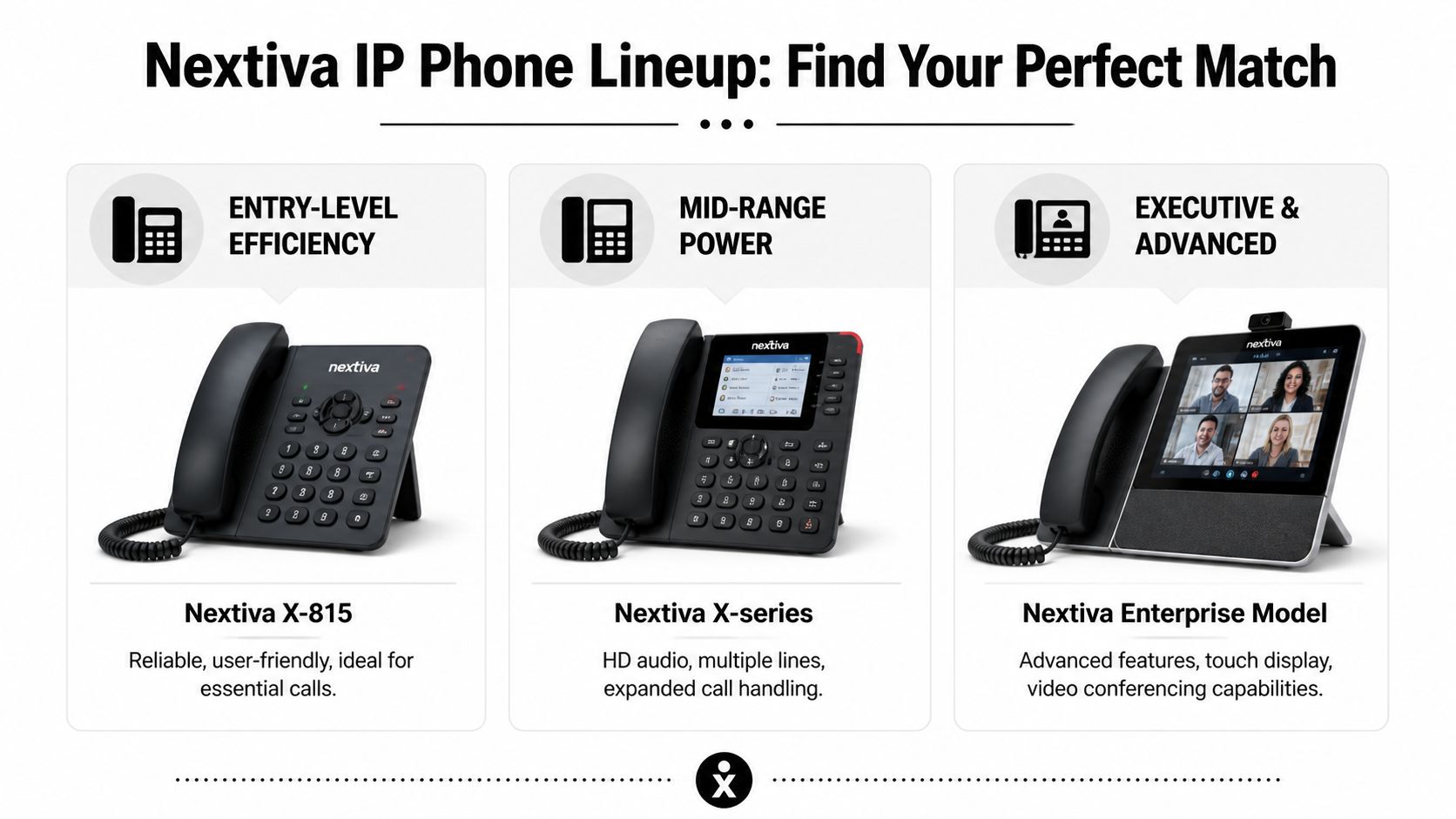
For many small businesses, three tiers usually make sense. Basic desk users need a dependable phone with simple controls. Front-desk and admin staff need line visibility and faster call handling. Executives, supervisors, and power users need better displays, more flexible connectivity, and easier headset support.
Entry level phones for basic users
An entry-level phone such as the Nextiva X-815 makes sense for users who mostly place and receive direct calls. Think private offices, back-office administrative staff, or team members who don't need to monitor multiple lines all day.
These phones work best when the goal is consistency, not complexity. They keep training simple and reduce the number of buttons users can misconfigure. In smaller offices, that matters more than flashy hardware.
What works well:
- Standard office call handling
- Users who prefer a physical handset over an app
- Simple deployment across multiple desks
What doesn't:
- Heavy receptionist workloads
- Shared line monitoring for a busy front desk
- Supervisors who need broader visibility into call activity
Mid range phones for front desk and admin teams
The Nextiva X-835 distinguishes itself. It supports up to 12 simultaneous lines and includes programmable keys that can reduce call hold times by 30 to 40 percent in busy environments, according to this X-835 review from Rich Technology Group. That same source notes its PoE compatibility can cut deployment costs by 15 to 20 percent because you don’t need separate power adapters.
Those numbers matter in a real office. A receptionist doesn't care about abstract SIP capacity. They care about seeing line status quickly, parking a call without fumbling, and getting callers to the right person without creating a bottleneck.
The X-835 is a good fit for:
- Reception desks: Multiple incoming calls, transfers, and visible line status
- Property management offices: Shared calls across leasing, maintenance, and admin staff
- Accounting or legal admin roles: Staff who juggle several internal and external conversations at once
Executive and advanced user phones
The Nextiva X-885 fits users who need a larger display, stronger line visibility, and more connectivity options. In practice, that often means managers, supervisors, or high-volume coordinators who are on calls throughout the day and benefit from quick access to presence and transfer functions.
Its advantages are practical rather than cosmetic. Better screen visibility helps with faster navigation. Bluetooth support can make headset use cleaner. Gigabit pass-through is useful where the phone shares a desk drop with a workstation.
That said, not every owner or manager needs an executive phone. In many SMB environments, putting a premium handset on every desk adds cost without improving operations. The best use of the X-885 is targeted placement.
A common mistake is standardizing on one premium phone model for everyone. Most teams do better with a mixed deployment based on role.
Compatible models beyond Nextiva branding
Some businesses also consider certified Poly and Yealink options. That can be smart when a team already knows those handsets or wants a specific form factor. The trade-off is support consistency. A mixed hardware environment can work well, but it usually needs tighter provisioning standards and clearer firmware management.
If the office values simplicity, fewer phone models usually means fewer headaches. If the office has varied workflows, a mixed model lineup often delivers a better result.
Nextiva IP Phone Model Comparison
| Model | Ideal User | Line Keys | Display | Gigabit Ethernet | PoE Support |
|---|---|---|---|---|---|
| Nextiva X-815 | Basic office user | Basic role dependent | Standard business display | Varies by model setup | Supported in certified deployments |
| Nextiva X-835 | Receptionist, admin, busy office staff | 12 | 2.8-inch color LCD | Yes | Yes |
| Nextiva X-885 | Executive, supervisor, high-volume user | Multi-page line keys | 4.3-inch color LCD | Yes | Yes |
| Poly or Yealink certified models | Businesses with existing handset preferences | Varies by model | Varies by model | Varies by model | Varies by model |
Use the table as a starting point, not the final answer. If one person handles overflow calls for the whole office, that user needs a different phone than the person in a private office who mostly takes direct calls.
Deploying Nextiva Phones Across Your Network
A smooth phone rollout starts before the first handset is unboxed. Most VoIP problems blamed on the phone are really network problems, provisioning problems, or expectation problems. If the network is noisy, overloaded, or inconsistent, even a good phone system will feel unreliable to users.
Start with a readiness check
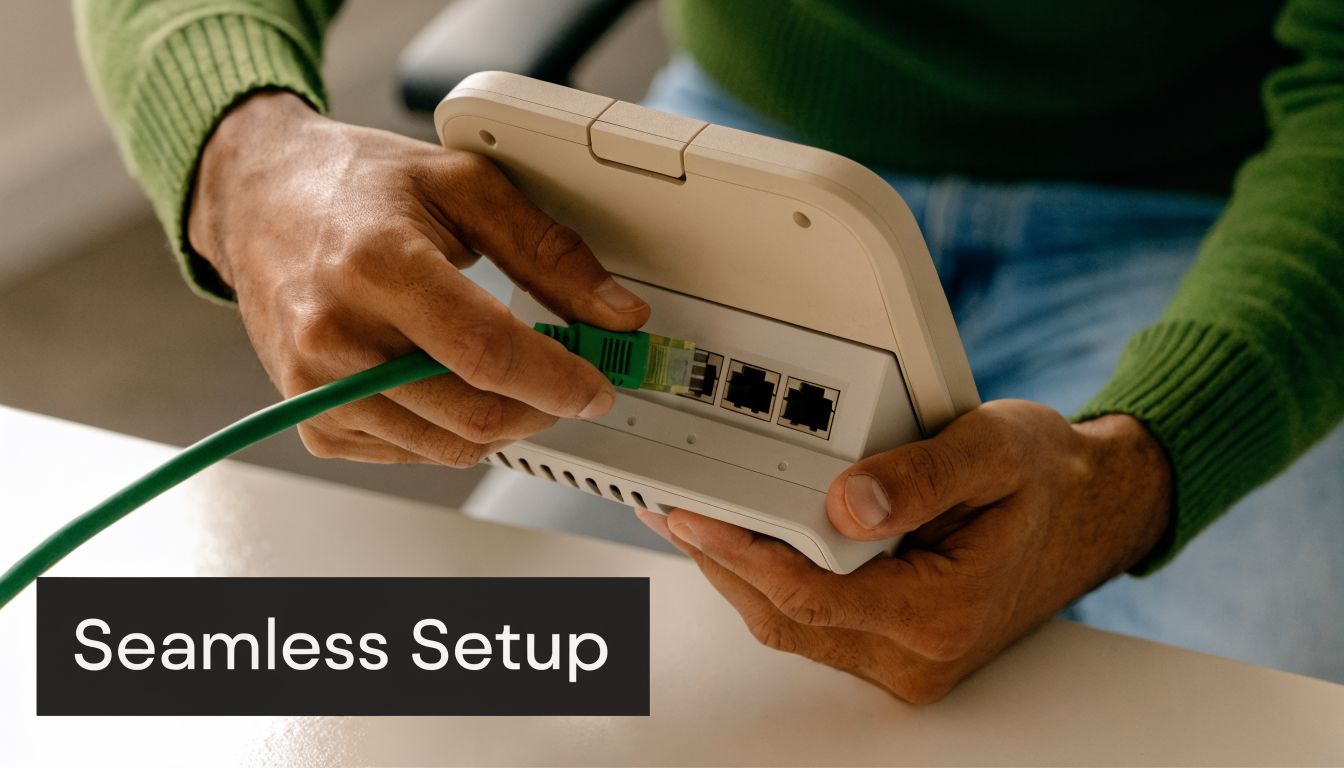
Before deployment, look at the network the same way you’d inspect wiring before installing new equipment. Phones need stable switching, clean cabling, and predictable traffic flow. In hybrid offices, you also need to think about remote users and whether they’ll rely on home internet, mobile apps, or shipped desk phones.
A practical pre-deployment checklist looks like this:
- Check switch capacity: Make sure your switching environment can support the number of phones you plan to install, especially if you want PoE.
- Review cabling paths: Phones placed on aging or improvised drops often create avoidable support calls.
- Map user roles: Decide who needs a desk phone, who needs a softphone, and who needs both.
- Define call flow first: Auto-attendants, hunt groups, voicemail routing, and business hours should be designed before users go live.
Microsoft 365 and hybrid work need extra attention
This is one area where small businesses get tripped up. The phone system may work fine by itself, but once it's part of a broader cloud stack, friction shows up. Shared calendars, Teams usage, remote laptops, and identity controls all affect the user experience.
A common challenge for SMBs is integrating VoIP with cloud tools. According to IP Phone Warehouse’s page on Nextiva phones, optimizing firmware for Nextiva phones such as the T8X series can improve Microsoft 365 Teams interoperability by up to 25%, and that matters because the same source projects 47% of SMBs will operate in a hybrid model by 2026.
That doesn't mean every deployment needs a complex Teams phone strategy. It means firmware, compatibility, and user workflow choices should be intentional. If employees already live in Microsoft 365, the phone deployment should support that habit instead of fighting it.
The best hybrid deployment isn't the one with the most devices. It's the one where staff know exactly when to use the desk phone, the mobile app, or the desktop client.
A short setup walkthrough can help business owners understand the physical side of installation before rollout:
What works in real deployments
For most SMBs, these practices produce the cleanest rollouts:
- Use wired desk phones where call quality matters most. Reception, finance, and admin teams usually do better on wired connections than on Wi-Fi.
- Standardize firmware and templates. That reduces strange one-off behavior between users.
- Separate user training by role. A receptionist needs different training than a manager with a direct line.
- Pilot with a small group first. It's easier to fix routing or provisioning mistakes before every phone is live.
What usually doesn't work is rushing deployment because the hardware arrived. If your call flow, user assignments, and network policies aren't settled, you'll spend the first few weeks reacting instead of benefiting from the new system.
Securing and Managing Your VoIP Communications
For regulated businesses, voice security isn't a side topic. It's part of your operating risk. If your phones carry client details, payment conversations, internal case discussions, or administrative public sector traffic, then phone security belongs in the same conversation as endpoint protection, identity controls, and backup planning.

Why regulated businesses need a stricter standard
Many small businesses assume a hosted phone system is secure by default. That's not a safe assumption. The platform may include strong built-in protections, but the deployment still needs sound network design, careful admin controls, and ongoing management.
For teams in finance, accounting, legal support, and public administration, I usually recommend treating the phone system as a managed business application, not a utility. That means controlling who can administer it, how devices are segmented, and how traffic is isolated from the rest of the network.
One useful starting point is reviewing broader network security for small business practices, because your VoIP system is only as safe as the network it rides on.
Security practices that actually help
These are the controls that tend to make the biggest difference in SMB environments:
- Separate voice traffic: Put phones on a dedicated voice VLAN so they aren't sharing the same trust boundary as every workstation and printer.
- Lock down admin access: Limit who can change routing, user assignments, or device settings.
- Standardize provisioning: Random manual tweaks across phones create support and security gaps.
- Monitor for unusual behavior: Unexpected registration issues, failed device activity, or odd routing changes should be investigated quickly.
A secure phone system isn't just encrypted. It's well segmented, well documented, and hard for the wrong person to change.
Management matters after go-live
The admin side of a VoIP platform is where businesses either stay organized or drift into chaos. Moves, adds, and changes happen constantly. A new employee starts, someone changes roles, office hours shift, or a department needs a different call queue.
When management is disciplined, those updates are routine. When management is sloppy, call routing breaks and people start creating workarounds. That’s how businesses end up with unofficial forwarding rules, personal cell phone dependence, and no one fully sure where after-hours calls are going.
Good management also supports business continuity. If a location has a problem, an organized cloud phone environment gives you more options for rerouting than a legacy, fixed system ever could. But that flexibility only helps if the system has been set up cleanly and maintained consistently.
Navigating Nextiva Costs Purchase vs Lease Options
A Henderson medical office with two front-desk phones and eight hybrid staff members usually asks the same question first. Do we buy the handsets now, or spread the cost out over time? The right answer depends less on the sticker price and more on cash flow, replacement planning, and how much disruption the business can tolerate if a phone fails.
For regulated SMBs, that decision also affects standardization. A leased or bundled phone rollout usually makes it easier to keep models consistent across the main office, remote users, and any spare devices kept for emergencies. Buying outright can lower long-term equipment spend, but only if someone is tracking inventory, firmware compatibility, warranty status, and replacement timing.
What you are really paying for
Phone costs are only one part of the budget. The larger expense is the full calling environment: user licenses, handset deployment, porting, setup time, and the support work that follows every employee change.
Published pricing can shift based on user count, contract term, and feature tier. The practical takeaway is simple. Compare total monthly service costs against your current phone bill, then add the hardware strategy on top of that. A low handset price does not help much if the wrong phones create transfer issues at reception, poor remote-user experience, or extra admin work for your team.
That matters more in hybrid offices. A business with a front desk, a few private offices, and several remote employees rarely needs the same device for every person.
When leasing makes sense
Leasing is often the better fit if the business wants to preserve cash, avoid a large upfront purchase, or expects staffing changes over the next year. I usually recommend it when growth is uneven or when the company does not want to own a pile of aging desk phones five years from now.
It also fits businesses that need predictable budgeting. Monthly hardware costs are easier to plan around than surprise replacements after warranty issues, shipping delays, or accidental damage.
A structured hardware as a service approach can work well here, especially for firms that want scheduled refreshes and simpler replacement planning.
When buying is the better fit
Buying phones outright works well for stable offices with low turnover and a clear understanding of who needs a desk phone. An accounting firm with fixed desks, consistent call flows, and light handset churn can often justify ownership more easily than a multi-site or heavily hybrid business.
There is a trade-off. Once the phones are yours, lifecycle management is yours too. That includes spares, failed handset replacement, model consistency, and the labor required when a device needs to be reset or swapped. If no one owns that process, the savings disappear in small but expensive ways. Missed calls, emergency overnight shipping, and avoidable support time.
For regulated businesses, there is one more consideration. Standardized leased deployments are often easier to document and keep aligned across users and locations. Purchased environments can be just as effective, but only if the business is disciplined about keeping the phone estate current and consistent.
The better choice is the one your business can support operationally, not just financially.
Recommended Nextiva Setups for Your Business
The best setup isn't built around a vendor catalog. It's built around the way your team answers, transfers, escalates, and documents calls. For SMBs in regulated or hybrid environments, role-based planning matters more than buying one phone for every desk.
Property management and real estate offices
This group usually has a split workforce. Leasing staff and field personnel are mobile. The office still needs a stable front desk and clear shared call handling.
A practical setup often includes:
- X-835 at the front desk: The extra line handling is useful when maintenance, tenant, vendor, and leasing calls all hit the same office.
- Basic desk phones for admin staff: Keep the back office reachable without overcomplicating devices.
- Softphone or mobile app for field users: Agents and managers don't need to be tied to the office to stay on the business number.
- Strong call routing: Separate paths for maintenance issues, leasing inquiries, and office administration reduce confusion.
What doesn't work well is forcing every field user to depend on a desk phone they rarely sit at. In these offices, mixed endpoint strategy is usually better than uniform hardware.
Financial services and accounting firms
These firms care about professionalism, call clarity, and controlled processes. Reception needs to move callers efficiently. Staff handling sensitive information need a system that fits broader compliance and security practices.
A useful design often looks like this:
| Role | Recommended approach | Why it works |
|---|---|---|
| Reception or office manager | X-835 | Better line visibility and faster transfer handling |
| Advisors or accountants | Standard desk phone plus softphone access | Direct office presence with flexibility during remote work |
| Leadership | X-885 if call volume and oversight justify it | Easier monitoring and convenience features for heavier users |
The compliance angle matters here. A 2025 Nemertes Research survey found only 42% of VoIP systems in regulated sectors were fully compliant, and Nextiva’s platform can support standards such as PCI-DSS and CJIS through call encryption and secure network integration when properly configured, according to Nextiva’s virtual phone system page.
That’s the difference between buying phones and deploying a communications system responsibly. In regulated environments, the configuration matters as much as the provider.
If your firm handles sensitive financial or legal information, the phone system should follow the same discipline as the rest of your IT stack.
Public safety administrative offices
Administrative public sector and support offices need reliability, clarity, and straightforward user operation. Staff often don't want feature overload. They want a phone that answers quickly, routes correctly, and remains easy to use under pressure.
For these environments, I’d usually lean toward:
- Desk phones for fixed administrative positions
- Clear role-based routing for departments and shared functions
- Minimal customization on user interfaces
- Documented backup call handling procedures
The biggest mistake here is making the call flow too clever. Complex menus and inconsistent routing create friction for staff and callers alike.
Small manufacturing and service businesses
These businesses often have a front office, a noisy operational area, and a mix of desk-based and mobile employees. They need dependable calling, but they also need practical deployment. Cable paths, headset choices, paging considerations, and workstation placement matter more than brochure language.
A solid setup usually includes a heavier desk-phone presence in the office and selective app use for managers or supervisors. Keep the frontline call handling simple, and avoid overengineering the plant or shop floor unless the workflow clearly demands it.
Partner with Cyberplex for Your Nextiva Solution
Nextiva IP phones make sense for small businesses that need dependable calling, cleaner call handling, and better support for hybrid work. The platform can fit a lot of environments, from front-desk-heavy offices to regulated firms that need stronger operational discipline around communications.
The difference between a successful rollout and a frustrating one usually comes down to design choices. Phone model selection matters. Network readiness matters. Security controls matter. User training matters. If those pieces are handled well, the phones feel simple to the people using them. If they aren't, even good hardware starts collecting complaints.
A professionally managed deployment gives you better odds of getting the business outcome you want:
- Reliable call quality
- Clean routing and voicemail behavior
- A better fit for remote and office staff
- Fewer support issues after go-live
- More confidence in security and administration
That matters even more in small markets, where many organizations don't have telecom specialists on staff. They need a practical plan, not just a shipment of handsets. They need someone to decide which users need an X-835, which users should stay with a simpler phone, how to support Microsoft 365 workflows, and how to avoid turning the phone system into another management burden.
If you're comparing nextiva ip phones, keep the focus on outcomes. Buy for the way your team works. Design for security and support. And don't treat phone hardware as the whole project, because it isn't.
If you're ready to sort out whether Nextiva IP phones are the right fit for your office, Cyberplex Technologies LLC can help you plan the full solution, from network readiness and phone selection to deployment, security, and ongoing support. Reach out for a no-pressure conversation about what your business needs now and what will still work as your team grows.


