
A managing partner calls after hours because she can’t open a deposition folder from home. The VPN keeps timing out. The file server in the office is still running, but it’s slow, no one wants to reboot it remotely, and the one person who “knows the server” is unavailable. That’s not a technology problem in isolation. It’s a client service problem, a billable time problem, and a risk problem.
Small law firms run into this every week. Attorneys need case files in court, from home, from a client site, or while traveling. Staff need to scan, tag, share, and retrieve documents without guessing which version is current. Partners need confidence that confidential matter data isn’t sitting in a patchwork of desktops, shared drives, personal file-sharing apps, and aging hardware in a back closet.
The practical question isn’t whether cloud solutions for law firms are real or mature enough anymore. It’s whether your firm has a sensible plan for using them without creating new cost and compliance headaches.
The Modern Legal Practice's Tipping Point
The old model still looks familiar in a lot of firms. One office server. One remote access method that works fine until everyone needs it. Shared folders named by year, client, or initials depending on who created them. Email used as a fallback document system. That setup can limp along for years, right up until it doesn’t.
A common breaking point is remote access. A partner needs a pleading at night, a paralegal needs to upload exhibits from home, or an associate needs to search a matter file while in transit. If the process depends on a VPN to a local server, every weak point matters. Office internet matters. Firewall configuration matters. The age of the server matters. So does whether someone remembered to maintain it.
By 2019, 78% of law firms were already storing client data in the cloud, and 31% of lawyers believed cloud services offered greater security than their own firms' systems, according to Aderant’s summary of law firm cloud migration trends. That matters because it reflects a shift in legal culture, not just a shift in infrastructure. Firms stopped treating cloud as experimental and started treating it as standard operating reality.
What the tipping point looks like in practice
When a firm reaches that point, the signs are usually obvious:
- Access friction: Lawyers can’t get to files quickly outside the office.
- Version confusion: Staff keep multiple copies of the same document in email threads and local folders.
- Support dependency: One internal “IT person” or outside break-fix vendor becomes a bottleneck.
- Security inconsistency: Permissions are informal, not structured by matter, role, or need-to-know.
- Upgrade avoidance: The firm postpones replacing hardware because the process feels disruptive.
Practical rule: If your firm has to plan legal work around the limits of a server, the server is no longer supporting the practice. The practice is supporting the server.
For a small firm, this isn’t about chasing technology trends. It’s about removing daily friction without losing control over confidentiality, responsiveness, or cost discipline.
Decoding the Cloud for Legal Practices
For most law firms, “the cloud” gets used as a catch-all term. That creates confusion. Some products are fully managed software. Some are hosted infrastructure. Some are development platforms that sit in between. If you don’t separate those models, it’s hard to budget correctly or assign responsibility.

SaaS for firms that want finished tools
Software as a Service, or SaaS, is the simplest model to understand. You subscribe to a finished application that the vendor hosts, secures, updates, and supports. In legal terms, this often includes practice management, document collaboration, email, calendaring, and secure file sharing.
Microsoft 365 is a straightforward example. So are legal practice platforms such as Clio. Your firm doesn’t buy the underlying server stack. You use the software through a browser or app, and the vendor handles the heavy lifting behind the scenes.
This model fits most small and midsize firms because it reduces internal maintenance. You’re not patching operating systems or replacing failing disks. You’re focusing on users, permissions, workflows, retention, and training.
IaaS for firms with custom needs
Infrastructure as a Service, or IaaS, is closer to leasing a secure digital warehouse. The provider supplies computing, storage, and networking. Your firm, or your IT partner, still decides what goes in that environment and how it’s configured.
This makes sense when a firm has a legacy application it can’t replace yet, a specialized litigation support environment, or a large archive that needs more control than a standard file-sharing tool provides. IaaS offers flexibility, but it also shifts more responsibility back to the customer. If your team doesn’t have in-house IT depth, that flexibility can become overhead.
PaaS as the middle ground
Platform as a Service, or PaaS, sits between those two. The provider manages the infrastructure and the platform layer, while your developers or software vendors build on top of it. Most small law firms won’t buy PaaS directly as a strategic choice, but they may benefit from it indirectly when a legal software vendor uses it to deliver integrations, automation, portals, or custom workflows.
That distinction matters because not every “cloud” offering includes the same level of support. One vendor may give you a finished legal workflow. Another may give you a hosted environment and expect your consultant to build the workflow.
Why architecture now matters to legal AI
The cloud offers capabilities far beyond simple hosted storage. Cloud-native solutions allow AI tools to connect directly to firm data, enabling context-aware research and analysis, rather than forcing staff to manually upload documents into isolated tools, as explained in Clio’s discussion of AI in cloud-based law firm systems.
That difference is practical. If an attorney has to export a motion, upload it to a separate tool, copy the result back, and repeat that process matter by matter, adoption will stall. If the AI capability sits inside the same environment as the case files, notes, and document history, the workflow is more usable and easier to govern.
A good cloud setup for a law firm doesn’t just move files off a local server. It puts email, documents, collaboration, permissions, and matter data into a system that works together.
For most firms, the right answer isn’t one model exclusively. It’s usually a mix. SaaS for everyday operations, limited hosted infrastructure where necessary, and clear ownership over security, access, and support.
The Tangible Benefits Beyond Remote Access
Remote access gets the attention because it’s easy to understand. But that’s not the main business case. The stronger case is that cloud solutions for law firms remove operational drag that eats time every day.
A firm with modern cloud systems responds faster because the information is easier to find, share, and update. Staff can work on the same matter without emailing attachments back and forth. Intake can move faster because documents and communication live in one system instead of several. Billing gets cleaner when time entries, matter notes, and supporting records aren’t scattered across disconnected tools.
Where firms actually feel the difference
The benefits show up in ordinary work:
- Document handling gets tighter: Teams can work from one live file instead of several emailed versions.
- New matters ramp faster: User accounts, folders, and templates can be created without waiting for hardware changes.
- Support interruptions drop: Fewer office-bound systems means fewer single points of failure.
- Budgeting gets simpler: Monthly subscriptions are easier to forecast than emergency server replacements.
- Client communication improves: Lawyers can retrieve records and respond without waiting to return to the office.
That last point matters more than firms sometimes admit. Clients don’t care whether your limitation is a VPN appliance, an old file server, or a cluttered shared drive. They care whether you can act promptly.
Revenue follows usable systems
There’s also a growth angle. Growing law firms that use cloud-based technologies have nearly doubled their revenues over the last four years and expanded their client bases by approximately 50%, according to the Software Finder summary of the Clio Legal Trends Report 2025. That doesn’t mean cloud software automatically creates growth. It means firms that use these systems well tend to operate in ways that support faster service, cleaner workflows, and broader client capacity.
A small firm doesn’t need to become a technology company to benefit from that. It needs systems that don’t consume attorney attention.
Predictable operations beat heroic fixes
On-premise environments often create irregular spending. One quarter is quiet. The next quarter includes a server issue, storage problem, backup problem, and emergency consultant visit. That pattern is familiar and expensive, even when the invoice line items seem manageable one by one.
Cloud services shift much of that into a recurring operating model. That doesn’t make every cloud option cheap. It does make the spending pattern easier to plan around when the environment is selected and managed properly.
If your firm can add a user, open a new matter workspace, enforce access rules, and keep attorneys productive without touching office hardware, you’ve gained more than convenience. You’ve gained operating leverage.
Navigating Security Compliance and Client Confidentiality
Law firms usually raise the same objection first. “We can’t put confidential client data in the cloud.” The concern is valid. The conclusion often isn’t.
A server in your office isn’t automatically safer because it’s physically nearby. It may feel more controlled, but control without disciplined administration is often just exposure in a different form. Most small firms don’t run enterprise-grade monitoring, layered access controls, formal audit review, or around-the-clock security oversight on a local server stack.

Confidentiality depends on controls, not location
The right way to evaluate cloud security is to ask how confidentiality is enforced. For legal work, that means looking at permissions, authentication, audit trails, document history, sharing rules, and administrative accountability.
A well-designed cloud environment can improve all of those. It can centralize logs, enforce multi-factor authentication, reduce shadow file-sharing, and make it easier to remove access when staff roles change. It can also narrow who sees what within the firm, which is critical in multi-matter and multi-practice environments.
Ethical walls and conflict controls
This is one of the strongest legal-specific arguments for cloud adoption. Cloud-based legal practice management systems can integrate automated conflict checking and digital ethical walls, using role-based access controls to restrict access to sensitive case information and create an auditable digital record of compliance, as described in Cloudvara’s overview of cloud systems for law firms.
That’s a major improvement over manual conflict review tied to disconnected file systems, local spreadsheets, or institutional memory. When access is role-based and tied to the matter, the firm has a clearer record of who could see what, when access changed, and how restrictions were applied.
For firms that handle sensitive employment matters, family law disputes, corporate disputes, or related-party conflicts, those controls aren’t just useful. They’re defensible.
The compliance side firms often miss
Security conversations in law firms often stop at encryption. Encryption matters, but it isn’t the full story. A defensible environment also needs:
- Matter-based access governance: Permissions tied to role and case involvement.
- Auditability: Logs that show access, changes, and sharing activity.
- Version control: A record of document history that supports discovery and internal accountability.
- Retention structure: Clear handling for closed matters, archived files, and legal hold scenarios.
- Shared responsibility discipline: A clear line between what the vendor secures and what the firm must manage.
A lot of firms buy a cloud platform and assume compliance is now “handled.” It isn’t. The platform may give you strong tools, but someone still has to configure them correctly, monitor usage, and train staff to use them consistently.
Security failures in legal environments usually happen in the gaps between policy and behavior. The cloud can narrow those gaps, but only if access, sharing, and retention rules are deliberate.
For firms that want a legal-specific support model rather than a generic IT setup, it helps to work from a framework built around IT solutions for law firms instead of adapting general business tooling with no matter-level governance.
A short explainer on cloud security helps illustrate the difference between vendor marketing and practical controls:
What doesn’t work
The weak version of cloud adoption is common. A firm keeps its old file structure, adds a basic file-sharing app, lets people create ad hoc folders, and assumes that because files are online they are now secure. That setup often creates just as much confusion as the old server, with new exposure layered on top.
The stronger version is structured. Matter naming is standardized. Permissions are role-based. Client sharing is controlled. Email, documents, and collaboration tools are connected. Offboarding is documented. Audit logs are available when needed. That’s the version that supports confidentiality and reduces risk.
Your Practical Cloud Migration and Vendor Checklist
Cloud migration goes badly when firms treat it as a file move. It’s not. It’s an operating model change. The technical transfer matters, but the bigger issues are scope, sequencing, access design, and adoption.
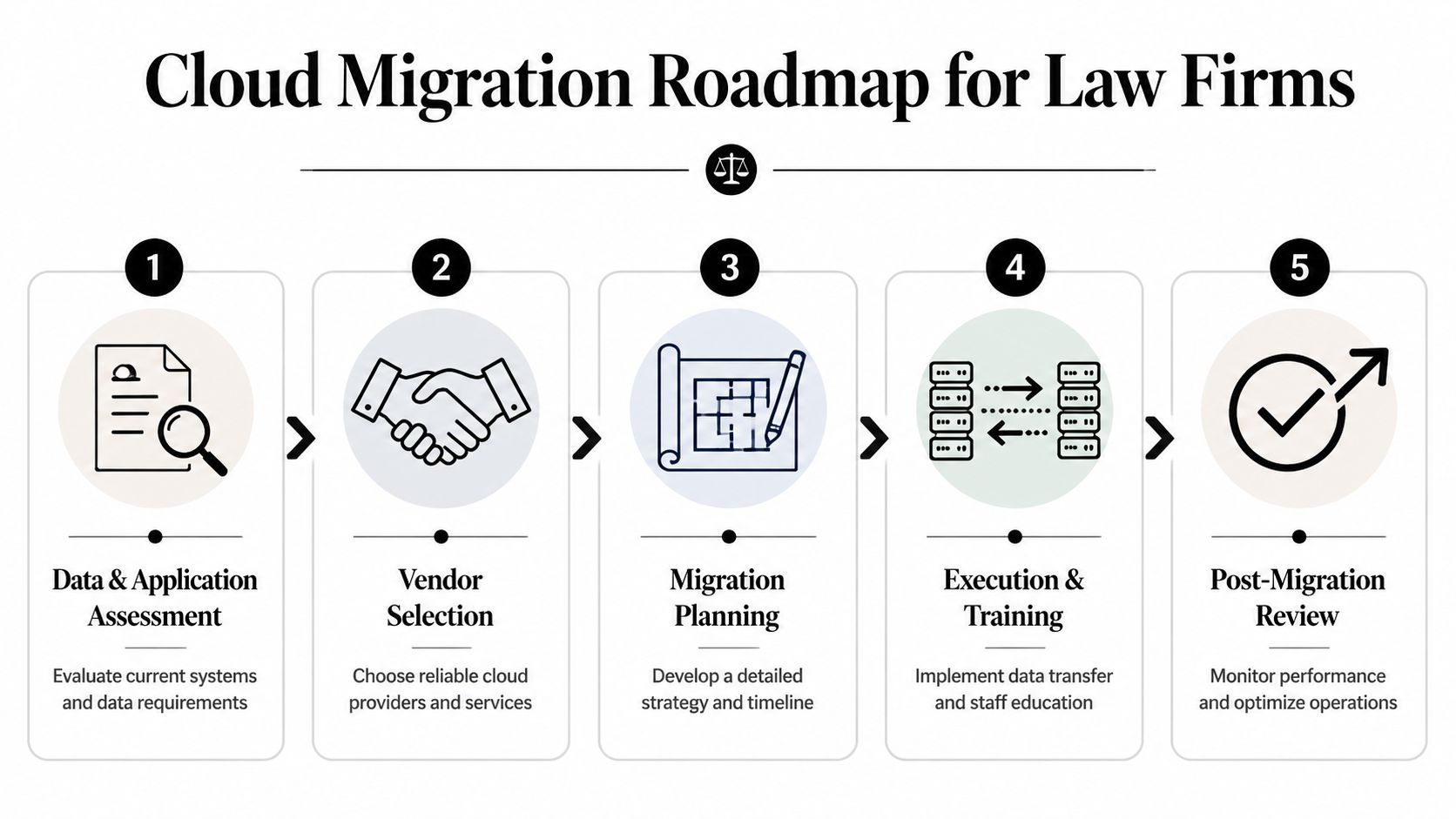
Start with the data and application inventory
Before choosing a platform, identify what the firm uses. Not what’s listed on an old IT spreadsheet. What people use in live practice.
That includes matter files, email, billing systems, case management, scan workflows, archives, templates, court filing tools, mobile access patterns, and any legacy applications a partner refuses to give up. If you skip this step, migration plans become guesswork.
Look for four categories:
- Core systems that must be available every business day.
- Sensitive repositories that need stricter access segmentation.
- Legacy tools that may require hosting rather than replacement.
- Redundant or abandoned data that should be archived or retired.
Choose vendors based on fit, not logo recognition
A cloud product can be popular and still be wrong for your firm. A small law office doesn’t need the broadest stack. It needs the right stack.
Ask who handles migration assistance, what legal-specific controls exist, how permissions map to matters, how backups work, how support is delivered, and what happens if you need your data out later. If Microsoft 365 is part of the target environment, make sure the partner understands both the technical setup and the governance layer around document libraries, Teams, email retention, and user permissions.
If your firm wants outside help with planning and execution, cloud migration support for small businesses is one example of the kind of service model to evaluate. The key is whether the provider can translate cloud architecture into an operating plan your staff can live with.
Build the migration plan before touching production data
A good migration plan answers practical questions:
- What moves first: Email, files, case systems, or collaboration tools.
- What stays temporary: Legacy applications that need a phased retirement.
- Who approves access design: Managing partner, office manager, practice leads, or all three.
- What the fallback is: If a cutover causes disruption, how work continues.
- How users are trained: Not generic tutorials, but matter-based workflows tied to the firm’s real work.
Migration discipline: Never move bad structure into a new platform unchanged. Clean naming, access, and ownership before the move, not after.
Vendor and solution selection checklist for law firms
| Criteria | What to Ask/Verify | Red Flags |
|---|---|---|
| Legal workflow fit | Does the system support matter-based organization, secure document sharing, and role-based access by case? | Generic business storage with no legal structure |
| Data ownership | How do we export our data if we leave? What format is it in? | Vague answers about extraction or transition support |
| Security controls | How are MFA, permissions, logging, and administrative roles managed? | Security features available only as costly add-ons without clarity |
| Compliance support | What audit trails, retention controls, and access records are available? | No clear explanation of logs or retention capabilities |
| Migration support | Who handles planning, test migrations, cutover, and rollback steps? | “We’ll help if needed” without named responsibilities |
| User training | What does onboarding look like for attorneys, staff, and administrators? | One-time demo with no workflow training |
| Support model | How is support delivered, during what hours, and by whom? | Ticket-only support with no escalation clarity |
| Integration capability | How does the platform connect with Microsoft 365, billing, and practice tools? | Manual workarounds for common legal workflows |
| Backup and recovery | What is backed up, how often, and how is restoration requested? | Backups described generally with no operational detail |
| Contract flexibility | What are renewal terms, price changes, and exit conditions? | Long lock-ins with opaque pricing changes |
Execution and post-migration review
Once the move happens, the project isn’t done. The post-migration period is where firms find permission mistakes, outdated shared links, user confusion, and workflow gaps. That review should happen quickly while issues are visible.
A sound review checks access by matter, confirms staff can find what they need, tests restore procedures, validates mobile use, and fixes workarounds before they become habits.
Understanding True Cloud Costs and Service Level Agreements
The most misleading sentence in cloud sales is “it’s cheaper.” Sometimes it is. Sometimes it isn’t. Usually, the honest answer is that the cost profile changes, and whether that change helps depends on your firm’s structure, data volume, software mix, and support model.
Small firms often encounter difficulties. They compare a monthly subscription against the cost of a server and assume the analysis is complete. It isn’t. A comprehensive comparison involves total operating cost, including migration labor, cleanup work, security configuration, licensing overlap during transition, integration work, training time, support coverage, and the cost of getting data back out later.
Hidden expenses that show up after signing
The sharpest example is vendor exit cost. A 2025 ABA survey found that 42% of small law firms exceeded their cloud migration budgets by 30-50% due to unanticipated egress fees and compliance audits when switching providers, according to Sync’s discussion of cloud services for law firms. That should change how every managing partner reads a proposal.
If a vendor makes it easy to move data in but expensive or complicated to move data out, your pricing risk doesn’t disappear after implementation. It gets deferred.
Build a real cost model
A practical cost review should include at least these categories:
- Platform licensing: User subscriptions, storage tiers, and premium security features.
- Migration labor: Data mapping, testing, cutover support, and cleanup.
- Parallel operations: Temporary overlap while old and new systems run together.
- Integration work: Connecting Microsoft 365, billing, scan workflows, or legacy apps.
- Training time: Non-billable hours spent changing habits and procedures.
- Vendor exit risk: Egress fees, export limitations, and reconfiguration costs.
- Compliance work: Policy review, retention setup, and access control design.
A proposal that only highlights the monthly fee is incomplete.
Read the SLA like an operations document
A Service Level Agreement, or SLA, is not marketing copy. It’s the document that defines what happens when things go wrong.
Look closely at:
- Uptime language: What counts as downtime, and what doesn’t.
- Support scope: Which problems are included, and which are billable extras.
- Response commitments: How quickly critical issues are acknowledged and escalated.
- Backup responsibilities: Whether backups are included, how recovery works, and who requests restores.
- Maintenance windows: When the vendor can interrupt service for planned work.
- Data recovery terms: What help you receive during a corruption, deletion, or ransomware event.
- Termination clauses: What happens to your data and access at contract end.
A law firm should never sign a cloud contract without understanding two things clearly. How support works during a live client matter, and how the firm gets its data back if the relationship ends.
The cheapest subscription can become the most expensive environment if the SLA is weak, the support model is vague, or exit costs are buried in the fine print.
The Managed Service Advantage for North Carolina Law Firms
Most small and midsize law firms don’t need to become experts in cloud architecture, access governance, licensing, retention, backup design, and vendor negotiation. They need those areas handled competently so attorneys can focus on practicing law.
That’s where a managed service model makes sense. Instead of stitching together a cloud vendor, a telecom provider, a break-fix technician, an office manager, and whoever on staff is “good with computers,” the firm works through a single operating relationship. That changes the day-to-day experience more than people expect.

What managed support changes
With the right partner, the firm gets structure around decisions that often drift unattended:
- User lifecycle management: Onboarding, offboarding, and permission changes.
- Security operations: Monitoring, patching, endpoint protection, and account controls.
- Backup oversight: Verification, restore testing, and continuity planning.
- Vendor coordination: One team dealing with cloud apps, Microsoft 365, and line-of-business tools.
- Strategic planning: Deciding what to retire, what to keep, and what to standardize.
That matters in Henderson and across North Carolina because many firms operate lean. They don’t have internal IT management sitting down the hall. The office manager is already handling billing questions, intake interruptions, and vendor issues. The managing partner doesn’t want to arbitrate storage policy between lawyers.
Why local context still matters
Cloud systems are remote by design, but support shouldn’t feel distant. A local managed provider can understand how your office operates, who needs what access, which workflows are slowing the firm down, and where the handoff points break. That’s especially useful when a firm is balancing hybrid work, confidentiality requirements, and existing Microsoft 365 use.
For firms evaluating outside IT help, managed IT services in North Carolina is the kind of support category that fits this role. The value isn’t that someone can name cloud products. It’s that they can plan, implement, secure, and support the environment as part of the firm’s daily operations.
What works best for smaller firms
The firms that handle cloud migration well usually make three decisions early. They standardize on approved tools. They define who owns access and policy decisions. They choose a support model before problems force the issue.
What doesn’t work is partial modernization. Keeping the old server as the primary system, adding scattered cloud tools around it, and hoping people follow unwritten rules usually creates more complexity, not less.
A law firm needs technology that supports matter work cleanly, protects confidentiality, and stays understandable to the people using it every day. That’s the primary objective. Not “moving to the cloud” for its own sake.
If your firm is weighing cloud solutions for law firms and wants a practical plan instead of a generic sales pitch, talk with Cyberplex Technologies LLC. The team works with small and midsize organizations on cloud migration, Microsoft 365 integration, security, backup, and ongoing managed IT support, with a service model built for firms that need reliable systems without building an in-house IT department.


