
A lot of Henderson business owners don't think they have an IT problem. They think they have a productivity problem, a customer service problem, or a staffing problem.
The front desk can't log in. A property manager in the field can't open files from a tablet. A finance office worries about whether client data is protected well enough for the next audit. Someone's email goes down, and suddenly the whole morning shifts from serving customers to chasing a password reset or waiting on a computer guy to call back.
That's where managed it services north carolina stops being a technical phrase and starts being a business decision. Instead of waiting for systems to break, a managed services provider watches, maintains, secures, and improves the technology your business depends on every day.
Businesses are moving this direction for a reason. The global managed services market is projected to grow from $161.37 billion in 2021 to $311.32 billion by 2027, driven by SMBs outsourcing cybersecurity, backups, and cloud management to reduce downtime and improve efficiency, according to EkoCyber's market overview.
Is Your Technology Helping or Hurting Your Business
If your staff hesitates before opening a line-of-business application because "it freezes sometimes," technology is hurting your business. If your team keeps private work files on a mix of desktops, phones, and personal cloud accounts because nobody set up a better process, technology is hurting your business. If you only call for IT help after an outage, you're paying for disruption instead of stability.
In North Carolina, that often shows up in ordinary ways. A manufacturing office loses access to a shared drive right before a purchasing deadline. A legal team works from home but still has to text each other to confirm which document version is current. A public-sector office wants stronger security but doesn't have internal staff to keep patching, permissions, backups, and user access under control.
The real problem isn't the server
Most local businesses don't lose sleep over firewalls or device management. They lose sleep over missed deadlines, billing delays, and whether one bad click could create a much bigger problem.
Managed IT changes the model. Instead of reacting to symptoms, you put someone in charge of the underlying systems: laptops, servers, Microsoft 365, phones, backups, and security controls. That means issues get caught earlier, changes are documented, and your employees have a clear place to go when something isn't working.
Practical rule: If your business depends on technology every hour of the day, your support model can't depend on waiting until something breaks.
What this looks like in real life
A good managed support setup usually solves problems that business owners have accepted as normal:
- Slow user onboarding: New hires wait too long for email, file access, and software setup.
- Patchy remote work: Staff can technically work from anywhere, but it's clumsy and inconsistent.
- Security guesswork: You have antivirus, maybe. But no one is clearly accountable for reviewing risks, enforcing access rules, and checking backups.
- Vendor chaos: Internet provider, copier company, phone vendor, software vendor, and nobody owns the whole picture.
When that sounds familiar, the issue isn't that your business is "bad at IT." The issue is that you've outgrown break-fix support.
What Exactly Are Managed IT Services
Think of managed IT like having a property manager for your technology. You still own the building. They make sure the lights stay on, the locks work, the maintenance gets done, problems are handled quickly, and larger improvements are planned before they become emergencies.
That's the simplest definition of managed IT services. You pay an outside team to proactively maintain and support your systems instead of calling somebody only when a computer, server, network, or cloud app fails.
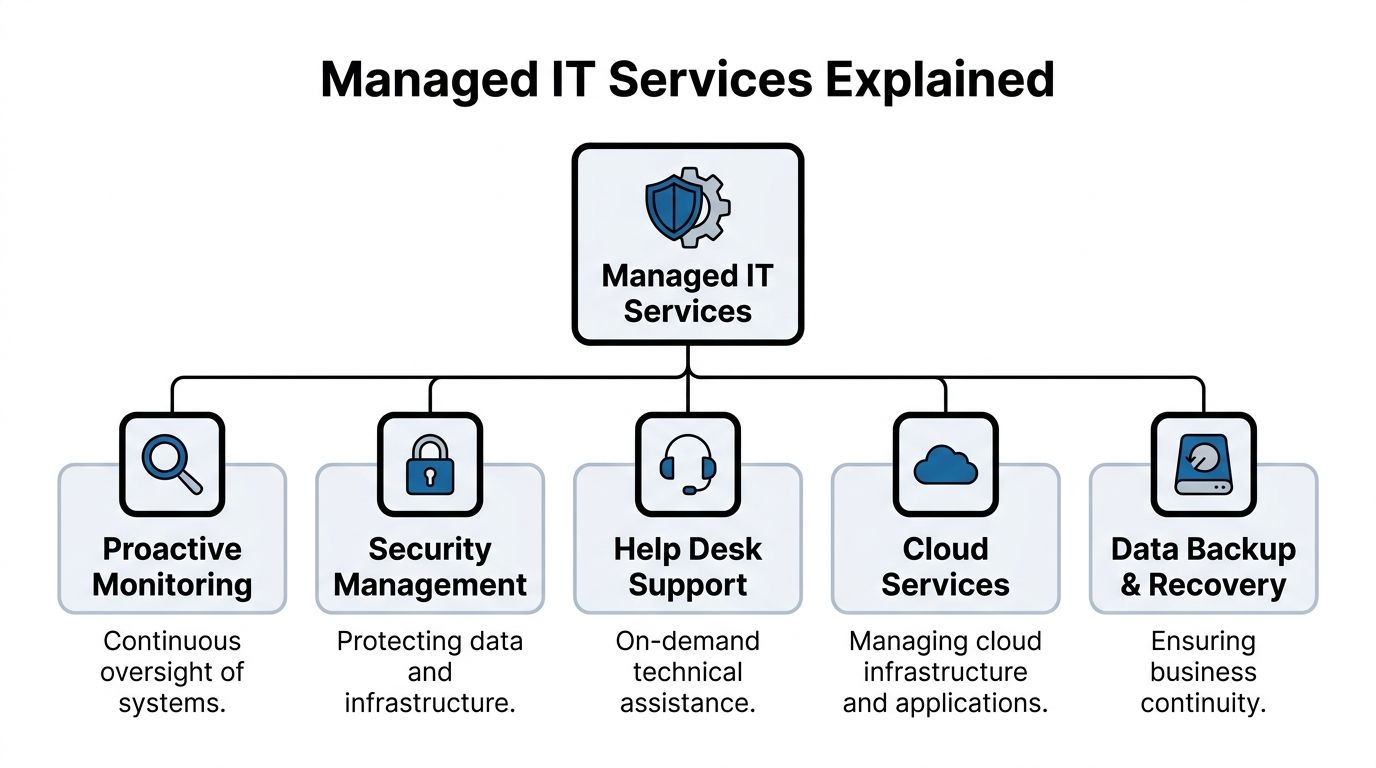
The core difference from break-fix support
Break-fix support is event-driven. Something breaks, you call, and the clock starts running. That model can work for very small organizations with almost no complexity, but it usually falls apart once you rely on shared files, cloud apps, mobile staff, cybersecurity controls, and business continuity.
Managed support is ongoing. The provider monitors systems, applies updates, checks backups, responds to tickets, and helps plan upgrades. The value isn't just repair. It's prevention, consistency, and accountability.
Here are the main pieces most businesses should expect.
Proactive monitoring and maintenance
A managed provider keeps an eye on the systems people often forget about until they're down. That includes servers, workstations, network devices, cloud identities, storage, and backup jobs.
The practical benefit is simple. Instead of discovering a failed backup during a crisis, someone catches the failure and fixes it earlier. Instead of waiting for users to report performance issues, monitoring tools flag system problems before they hit everybody.
This is especially important in small offices where nobody internally has time to check logs, review update status, or verify whether security tools are running on every device.
Help desk support for real users
Most employees don't need a lecture on technology. They need to get back to work.
A managed help desk handles the day-to-day support issues that eat up time and morale:
- Access problems: Password resets, account lockouts, missing permissions.
- Device issues: Printer problems, laptop setup, Wi-Fi instability, software glitches.
- Application support: Microsoft 365, file access, collaboration tools, and common business apps.
Good support isn't just about being available. It's about having documented systems, knowing your environment, and resolving issues without making your staff repeat the same story to three different people.
A weak support model trains employees to work around technology. A strong one lets them trust it.
Security management that goes beyond antivirus
Security management should include more than installing a product and hoping for the best. A practical managed security approach usually covers identity controls, patching, endpoint protection, email security, backup verification, and user access review.
For many local businesses, the most important shift is ownership. Someone is responsible for asking hard questions. Who has admin rights? Are old user accounts disabled? Are mobile devices protected? Are backups isolated enough to help after a ransomware event? If no one owns those questions, the risk doesn't disappear. It just sits there.
Cloud and backup services
Cloud services usually mean support for tools such as Microsoft 365, SharePoint, OneDrive, Teams, cloud backups, and hosted infrastructure. This isn't just migration work. It includes day-to-day administration, permissions, security settings, and user support.
Backup and recovery matter just as much. Backups aren't valuable because they exist. They're valuable because they can be restored correctly and quickly when a file gets deleted, a device fails, or a larger incident hits.
Strategic guidance from a vCIO
A lot of small businesses need planning even more than they need tech support. That's where a vCIO, or virtual Chief Information Officer, comes in. This role helps tie technology decisions to business goals.
That might include deciding whether to replace an aging server, whether to move a team fully into Microsoft 365, whether your office can support hybrid work securely, or how to prepare for insurance and compliance reviews. Without that layer, many businesses end up buying tools one at a time with no clear roadmap.
The Business Case for North Carolina SMBs
North Carolina isn't short on IT options. That's a good thing for SMBs, because it means you're not choosing between doing everything in-house or settling for a one-person computer shop. The local market is established enough to support specialized help across industries and business sizes.
According to Clutch's overview of North Carolina MSPs, the state's IT Consulting industry includes 15,172 businesses in 2026, growing 3.8% annually from 2021 to 2026, and employs over 58,000 professionals. For a business owner, the takeaway isn't abstract market growth. It's that North Carolina has a mature support ecosystem, and you can be selective.

Where managed services pay off
The return on managed IT usually shows up in avoided friction, not flashy dashboards.
A manufacturing company cares about whether purchasing, production scheduling, and shared files stay available. A law office cares about secure access to documents and dependable communication with clients. A property management firm cares about keeping field staff connected without exposing company data on unmanaged devices.
In each case, the business value comes from the same shift. Employees spend less time fighting systems and more time doing billable, operational, or customer-facing work.
What works better than hiring ad hoc help
Many SMBs try to solve growth-stage IT pain with a mix of internal effort and occasional outside support. That can work for a while, but it tends to create blind spots. One person knows how the phones are set up. Another handles the backup appliance. A software vendor manages one cloud app. Nobody owns the full environment.
Managed services work better when your business depends on connected systems. That includes:
- Shared accountability: One provider coordinates support, vendors, updates, and documentation.
- Consistent user experience: Staff know where to go for help and what response process to expect.
- Forward planning: Replacements, upgrades, and security improvements happen on a schedule instead of during a crisis.
For small businesses weighing whether to outsource, this practical guide on why small businesses should outsource information technology services covers the operational side well.
Local examples that matter
A Henderson business doesn't need an enterprise-scale IT strategy. It needs the right level of reliability and control.
That could mean secure remote access for a bookkeeping team, stable Wi-Fi and device support for a busy office, or documented backup and recovery procedures for a public-sector department. Managed IT isn't valuable because it's complex. It's valuable because it removes recurring obstacles from daily work.
The strongest business case for managed IT is usually simple. Your team stops improvising around recurring technology problems.
A practical way to judge value
If you're trying to decide whether managed support makes financial sense, ask these questions:
- How often does work stop because of avoidable IT issues
- How much owner or manager time gets pulled into technology decisions
- How many systems are running without clear documentation
- How confident are you in your current security and recovery process
If those answers feel uncomfortable, the business case is already there.
Navigating Security and Compliance in North Carolina
Security is where generic IT advice usually breaks down. A Henderson accounting office, a financial services firm, and a public agency don't face the same risks, and they shouldn't buy the same support package.
In North Carolina, that matters even more because regulated organizations often need to satisfy more than one standard at the same time. A business may be thinking about client privacy, payment handling, records access, remote work controls, and cyber insurance requirements all at once.

One of the biggest gaps in local content is that it rarely gets specific about compliance. As noted by VC3's North Carolina managed services page, 68% of NC financial breaches involved unpatched systems in a 2025 Verizon DBIR reference. That's a plain example of where routine patching, asset visibility, and documented maintenance aren't optional.
Compliance isn't just paperwork
For finance and accounting firms, security controls often support client trust as much as regulation. For healthcare-adjacent businesses, HIPAA shapes how data is accessed and protected. For public safety and law enforcement environments, CJIS requirements raise the bar on identity, device security, and access controls. Payment-handling businesses also need to think carefully about PCI-DSS.
The North Carolina Identity Theft Protection Act adds another layer to the conversation. Even if your operation isn't large, you still need sensible handling of sensitive information, clear controls around access, and a response plan if data is exposed.
A managed provider helps by turning broad requirements into day-to-day operational controls. That includes patching schedules, endpoint management, user access standards, backup review, MFA enforcement, and audit-friendly documentation.
What strong security support looks like
Businesses often ask for "better cybersecurity," but that request is too broad to be useful. A more practical checklist looks like this:
- Identity controls: MFA, account lifecycle management, and restrictions on admin access.
- Patch management: Operating systems, endpoints, and critical software updated on a controlled schedule.
- Endpoint oversight: Laptops and desktops monitored, secured, and tracked consistently.
- Email protection: Policies and tools that reduce phishing exposure and account takeover risk.
- Backup discipline: Verified backups, tested restores, and a clear recovery sequence.
If your provider can't explain who handles each of those items and how they're documented, the support is probably thinner than it looks.
For a more focused overview of regulated environments, this article on compliance and IT regulation for businesses is worth reading.
Security becomes manageable when responsibilities are specific. Who patches. Who approves access. Who reviews logs. Who verifies recovery.
Cyber insurance is now part of the IT conversation
A lot of small businesses still treat cyber insurance as a separate purchase handled by the insurance agent. That's outdated. The technical controls behind the policy now matter just as much as the paperwork.
Insurers want evidence that your environment is governed, not guessed at. That usually means clear user policies, secure access controls, managed endpoints, documented backup practices, and a provider who can explain what protections are in place. Businesses that can't produce those basics often discover the problem during application review or after an incident.
This short overview is useful if you want a visual explanation of how managed security practices support compliance and readiness.
Industry-specific trade-offs in Henderson
Different industries need different compromises.
A small financial office may prioritize locked-down access and documentation over maximum user flexibility. A property management firm may need stronger mobile device controls because staff are always moving between sites. A public-sector office may accept a slower change process because approvals and audit trails matter.
What doesn't work is copying another company's setup without considering your own obligations. The right MSP should be able to discuss trade-offs in plain language. If they only talk about tools and never about policy, user behavior, or audit expectations, that's a warning sign.
Modernizing Operations with Cloud and VoIP
A Henderson office feels the cost of bad systems fast. One person saves files to a desktop, another uses OneDrive, the front desk misses calls when someone steps away, and remote staff start using personal phones because the business line is tied to a desk. Work still gets done, but it takes longer and creates more room for mistakes.
Cloud and VoIP projects fix those operational gaps when they are planned around how your business runs. For North Carolina firms dealing with client records, public-facing communication, or staff spread across offices and job sites, the goal is consistency. People should know where files live, how they log in, how calls get answered, and what happens if the internet drops at one location.

Microsoft 365 works best with structure
A Microsoft 365 rollout starts with decisions, not licenses. Set account rules first. Decide which devices can access company data. Decide whether files belong in SharePoint, Teams, or OneDrive based on how your staff operates.
Analysts at Insight Tech Advisors' Microsoft 365 services overview found that managed Microsoft 365 implementations can reduce downtime and speed up account provisioning when identity and device controls are configured correctly. That improvement usually comes from standardization, not from the software alone.
The rollout should follow a practical order:
Review the current environment
Check email, file storage, shared accounts, printers, mobile devices, and any business app that depends on Microsoft login.Set access and device rules
Define MFA, role-based access, approved devices, and the exception process before the migration starts.Move services in stages
Migrate email first or files first based on your risk tolerance and staff capacity. A small accounting office may prefer a slower cutover outside tax deadlines. A field-based contractor may need mobile access fixed early.Train people on the new workflow
Show staff where to save files, how Teams fits into daily work, and what should never be shared by personal email or text.
If you're comparing cloud projects at a broader level, this article on the top benefits of moving your business to the cloud gives a useful business-focused overview.
Common cloud mistakes that create extra work
Cloud tools do not clean up a messy process by themselves. They can spread the mess faster if nobody sets rules.
The problems I see most often are familiar:
- Old access carries over: Former roles still have permission to financial files, HR folders, or shared mailboxes.
- Company data lands on unmanaged devices: Staff sign in from home laptops or personal phones with no policy behind it.
- SharePoint and OneDrive get mixed together: Files end up in three places, and nobody is sure which version is current.
- New users are built from memory: Every employee gets a different setup, which creates support issues and audit headaches later.
That matters for more than convenience. If a finance firm in North Carolina is trying to satisfy client expectations and keep cyber insurance eligibility intact, inconsistent access and unmanaged devices become a real business problem.
Field advice: If one employee is still the person who "knows where everything is," the system is not modernized. It is just living in a different place.
VoIP affects more than the phone bill
VoIP changes how calls are handled, documented, and rerouted during normal business hours and during outages. That matters if your front desk takes payments, your office handles appointment scheduling, or your staff works between Henderson, Raleigh, and client locations.
According to BrightFlow's managed services overview, managed VoIP reliability depends on controls such as SIP trunking with SRTP encryption and quality-of-service settings. Business owners do not need to manage those settings themselves, but the provider should be able to explain how call quality, failover, and security are handled.
For local businesses, the practical value usually looks like this:
- Staff can answer from anywhere: Calls reach the right person without forcing employees to hand out personal cell numbers.
- Routing stays organized: Front desk, billing, support, and after-hours calls follow a defined path instead of landing wherever someone happens to be available.
- Outages are easier to handle: If one office loses service, calls can be redirected to another location or mobile app.
- Call records are easier to track: That helps with accountability and can support documentation needs in regulated environments.
The trade-off is that VoIP depends on network quality and clear setup standards. If your office Wi-Fi is unstable, your internet connection is undersized, or nobody has mapped call flows before go-live, the phone system will expose those weaknesses quickly. A good MSP says that up front and fixes the network piece before promising a better phone experience.
Understanding Pricing Models and Service Agreements
Managed IT pricing gets confusing when providers bundle different things under similar labels. One proposal includes support but not security tools. Another includes monitoring but bills projects separately. A third looks expensive until you notice it includes services the cheaper one left out.
You don't need to memorize every pricing model. You need to know what you're buying.
Common pricing approaches
Here's how the most common structures usually work in practice.
Per-user pricing
This model fits offices where each employee uses several devices and cloud services. It's easier to budget because support is tied to people, not to every individual laptop, tablet, or phone.Per-device pricing
This can work for environments with shared workstations, specialty equipment, or limited user counts. It can also become messy if your team uses many endpoints and nobody is sure what counts as billable.Flat-rate managed services
This approach is often easiest for planning when the scope is clearly defined. The key question is whether "all inclusive" really includes help desk, monitoring, patching, backup oversight, security tooling, vendor coordination, and routine support.
What the SLA needs to say
The Service Level Agreement, or SLA, is where vague promises should become measurable responsibilities.
If a provider offers VoIP, reliability claims should be grounded in the agreement. As noted in the earlier cloud and communications section, managed VoIP services can be built to deliver high uptime and controlled call quality. What matters contractually is whether your provider commits to response times, escalation paths, and service expectations when issues occur.
A solid SLA should clearly define:
- Response windows: How quickly critical, high, and routine tickets get acknowledged.
- Coverage hours: Whether support is business-hours only or broader.
- Escalation process: What happens if a problem isn't resolved promptly.
- Included services: Which tasks are covered by the monthly agreement and which trigger project fees.
- Client responsibilities: What your team must do, such as approving changes or maintaining supported hardware.
What doesn't work in contracts
Watch for agreements that sound reassuring but stay vague.
"Unlimited support" means very little if projects, after-hours incidents, security work, and vendor coordination all sit outside the contract.
Also be careful with low monthly prices attached to narrow scope. Cheap support often becomes expensive support once recurring exceptions start showing up on invoices.
The goal isn't to find the lowest number. It's to find a model your business can understand, budget, and hold accountable.
How to Choose the Right MSP in North Carolina
Most MSPs sound similar during the first call. They all mention support, security, monitoring, and responsiveness. The difference shows up when you ask specific questions about your environment, your industry, and how they operate when something goes wrong.
For a Henderson business, the right provider usually isn't the one with the longest list of services. It's the one that can support your actual mix of users, devices, compliance needs, vendors, and growth plans without making every change feel complicated.
Start with business fit, not brand fit
A manufacturing office, a financial advisor, and a town department should not evaluate providers the same way.
You want to know whether the MSP understands your risk profile, your support expectations, and the pace your team can handle. If your staff needs on-site support sometimes, ask how they cover that. If you operate in a regulated field, ask who handles documentation and review. If you rely on a line-of-business application, ask how they coordinate with that software vendor.
MSP vetting checklist
| Category | Question to Ask | What a Good Answer Looks Like |
|---|---|---|
| Industry experience | Have you supported businesses like ours before | They can describe your type of environment in practical terms, including compliance, workflow, and common support issues |
| Local support | How do you handle on-site needs in the Henderson area | They explain when remote support is used, when on-site is appropriate, and who coordinates visits |
| Security operations | Who owns patching, endpoint protection, access reviews, and backup verification | They assign responsibility clearly and describe a repeatable process |
| Compliance support | How do you help clients prepare for audits, policy reviews, or insurance questionnaires | They talk about documentation, control mapping, and evidence, not just products |
| Help desk process | What happens when one of our employees opens a ticket | They outline intake, prioritization, escalation, communication, and closure clearly |
| Strategic planning | How do you help us plan upgrades and budget for changes | They describe regular review meetings, lifecycle planning, and business-aligned recommendations |
| Vendor coordination | Will you work with our software, internet, phone, and copier vendors | They say yes and explain how they document and manage those interactions |
| Scope clarity | What isn't included in the monthly agreement | They answer directly and don't dodge project boundaries or after-hours conditions |
Good answers sound specific
A strong provider usually gives direct answers. They can explain onboarding, ticket flow, security ownership, and change management without resorting to buzzwords.
Weak answers sound polished but slippery. "We customize everything" can be fine, but only if they can also tell you exactly how they handle user onboarding, MFA enforcement, backup review, and escalation. If every answer depends on "it varies," you'll probably feel that same ambiguity after you sign.
Ask for process, not promises
This is the simplest screening tactic I know. Ask each MSP to walk you through three ordinary events:
- A new employee starts next Monday
- A staff member clicks a suspicious email link
- Your internet provider has an outage and phones are affected
The best provider won't just say "we handle that." They'll tell you who does what, in what order, and what your team should expect.
That's usually where the field narrows quickly.
Your Practical Next-Steps Checklist
If your business has been living with recurring IT friction, you don't need to solve everything this week. You do need a clear starting point.
Use this short checklist to get moving:
List your recurring problems
Write down the issues that keep interrupting work. Slow onboarding, file access confusion, weak remote access, vendor finger-pointing, backup uncertainty, phone problems, and security concerns all count.Define what better looks like
Decide what you want technology to do for the business. That might mean fewer support interruptions, stronger compliance posture, smoother remote work, or clearer budgeting.Map your risk areas
Identify where sensitive data lives, which systems are critical, and where you lack confidence. Don't overcomplicate it. A plain-language list is enough to start.Review your current support model
Note who handles help desk, patching, backups, vendor calls, security decisions, and documentation today. Any blank spaces are useful.Talk to a small number of providers
Meet with two or three MSPs that understand North Carolina SMB environments. Ask the same questions, compare the answers, and pay attention to clarity.Read the agreement carefully
Make sure scope, response expectations, exclusions, and escalation paths are easy to understand before you commit.
A good managed services relationship should make your business calmer, not more complicated.
If you're evaluating options for managed IT support in Henderson or the surrounding area, Cyberplex Technologies LLC is one North Carolina-based provider to consider. The company works with small and midsize organizations on managed and co-managed IT, Microsoft 365, VoIP, security, backup and recovery, and day-to-day support, with a focus on practical service delivery and clear SLAs.


