
A lot of small business owners first deal with endpoint security when something goes wrong. It’s often late, someone can’t open files, a laptop is acting strange, or Microsoft 365 starts throwing sign-in alerts that don’t look right. At that moment, endpoint protection stops being an abstract IT purchase and becomes a business continuity issue.
When people search for the best endpoint protection for small business, they usually expect a simple product roundup. That’s not enough. The better question is which protection strategy fits your business, your staff, your compliance requirements, and your tolerance for downtime. That’s where most buying mistakes happen.
Your Business Is a Target What You Need to Know
A Henderson business owner gets a security notification after hours. An employee laptop has triggered suspicious activity, shared files won’t open, and nobody is sure whether the problem started with email, a bad download, or a compromised login. By the next morning, the issue isn’t just technical. Staff can’t work, customers are waiting, and leadership has to decide whether this is a nuisance or a crisis.

That scenario is common because small companies are targeted more often than many owners realize. Ransomware attacks on small businesses surged 37% year-over-year from 2024 to 2025, with endpoints as the primary vector in 82% of cases, costing SMBs an average $2.73 million per incident including recovery and lost productivity according to Deel’s endpoint protection analysis. For most small firms, that kind of event isn’t a bad quarter. It’s an existential problem.
Why endpoint protection matters to business owners
An endpoint is any device people use to access company systems. Laptops, desktops, mobile devices, and sometimes specialized workstations all count. If your team works in Microsoft 365, uses cloud apps, connects from home, or takes devices into the field, your endpoints are part of your attack surface.
That’s why we treat endpoint protection as part of operational resilience, not just malware cleanup. A good strategy blocks common threats, catches suspicious behavior quickly, and gives you a way to contain damage before one infected device spreads the problem.
Practical rule: If a device failure can stop payroll, billing, tenant communication, dispatch work, or access to client records, that device needs more than basic antivirus.
Many business owners already know they need “better security,” but they don’t know what to buy or what level they need. If that sounds familiar, start with a broader look at how your attack surface expands as your business adds cloud apps, remote work, and connected devices. It helps frame why endpoint protection now sits at the center of small business security planning.
What usually goes wrong
Small businesses rarely fail because they bought nothing. More often, they buy a tool that doesn’t match the way they operate.
- They pick too low a tier. Basic antivirus may stop known malware but miss suspicious behavior that matters in modern attacks.
- They buy advanced tooling without staffing it. An alert-heavy platform won’t protect much if nobody reviews and responds.
- They ignore recovery workflow. Blocking malware is only part of the job. Isolation, rollback, investigation, and user support matter just as much.
The right decision starts with understanding the tiers.
Understanding Your Protection Options Beyond Antivirus
Most endpoint buying confusion comes from product labels. Vendors use AV, EPP, NGAV, EDR, MDR, and XDR interchangeably in marketing, even though they solve different problems. If you strip away the buzzwords, the tiers are easier to understand.
Small businesses face disproportionate risks, with 43% of all cyberattacks targeting them. Tiered solutions address this: basic EPP costs $3–6 per user per month, NGAV $5–8, EDR $8–15, and MDR $15–25 according to this endpoint protection tier guide for small businesses.
Here’s the quick comparison most owners need early in the process:
| Protection tier | What it does best | Where it falls short | Good fit |
|---|---|---|---|
| Traditional AV | Blocks known malware with signatures | Weak against unknown behavior and modern ransomware techniques | Very simple, low-risk environments |
| EPP | Adds policy controls and broader device protection | Still may miss stealthy behavior without deeper detection | Basic business environments |
| NGAV | Looks for suspicious behavior, not just known files | Can stop threats without giving much investigation depth | Small teams that need stronger prevention |
| EDR | Records activity, detects movement, supports response | Needs someone to watch alerts and act on them | Firms with client data or higher risk |
| MDR | Adds 24/7 monitoring and human response on top of EDR | Higher monthly cost | Regulated, lean, or high-consequence businesses |
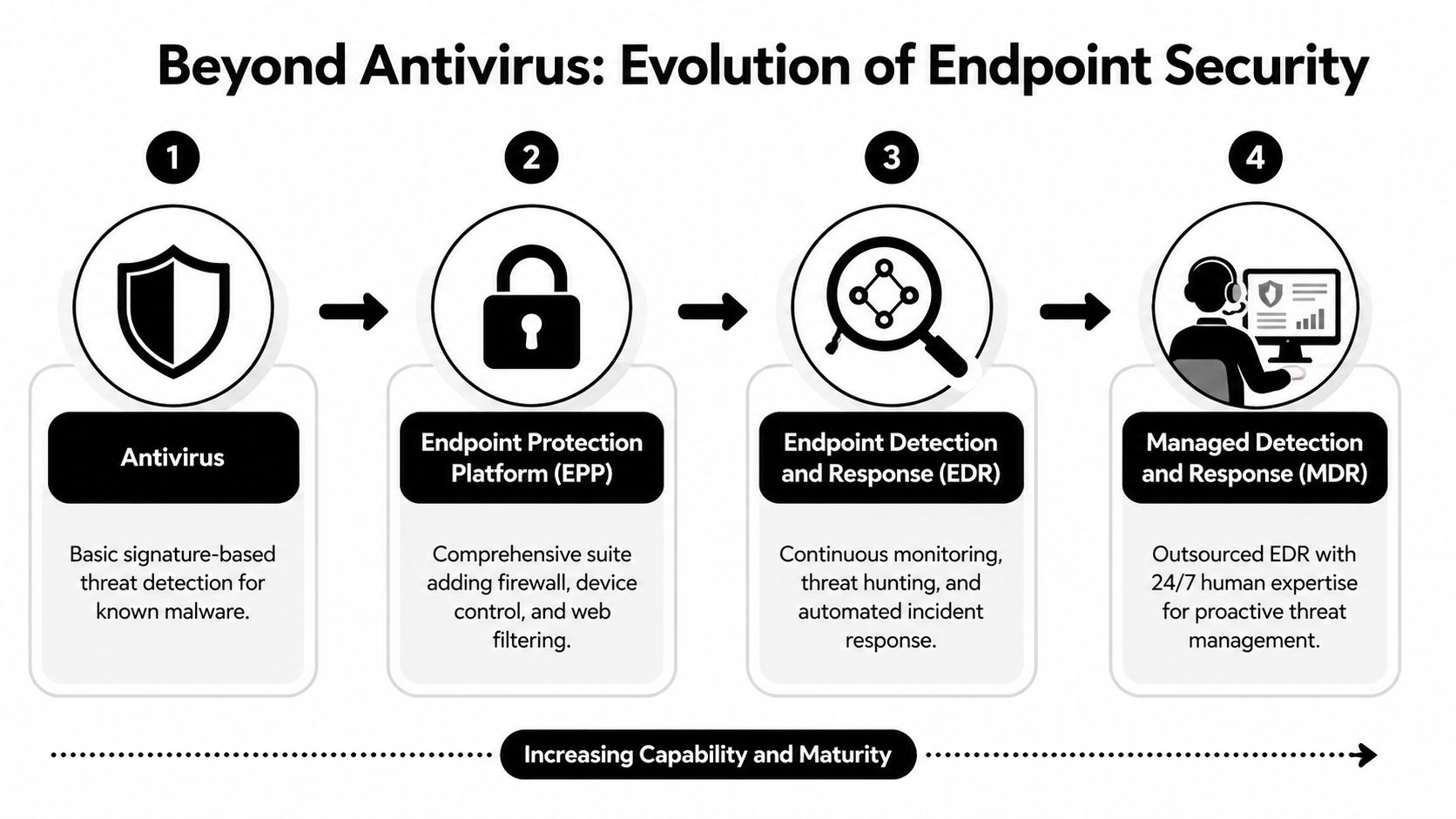
Traditional AV and EPP
Think of traditional antivirus as a front-desk guard with a printed list of known troublemakers. If malware matches a known signature, it gets blocked. If the attack behaves in a new way, the guard may wave it through.
Endpoint Protection Platforms, often shortened to EPP, expand on that by adding controls like firewall management, web filtering, or device restrictions. That can be enough for simple setups such as fixed-purpose machines or very small offices with limited exposure. It’s still mostly a prevention layer.
What doesn’t work well is expecting basic AV or EPP to handle modern ransomware behavior across remote workers, cloud app usage, and identity-based attacks.
NGAV and EDR
Next-Gen Antivirus is the first tier that feels modern to most small businesses. Instead of only matching known files, it watches behavior. That means unusual encryption activity, exploit behavior, suspicious processes, or patterns associated with zero-day attacks can trigger a response even when the exact malware hasn’t been seen before.
Products like Sophos Intercept X fit this category well for many SMBs because they blend strong prevention with rollback features and manageable administration. If you’re still comparing baseline antivirus tools, this guide to small business antivirus software options and trade-offs is a useful companion.
EDR, or Endpoint Detection and Response, goes further. It doesn’t just block. It records what happened, helps isolate a device, shows process history, and gives technicians the forensic detail needed to understand whether the threat spread. This is the point where endpoint protection becomes part of incident response.
EDR is valuable when you need answers, not just pop-up warnings.
MDR and XDR
Managed Detection and Response adds people to the equation. The tooling may look similar to EDR on paper, but the operating model changes. Someone is actively reviewing, triaging, and responding to suspicious activity. That’s why MDR makes sense for regulated firms, businesses without in-house security staff, and organizations where downtime has a hard business cost.
XDR, or Extended Detection and Response, pulls in more signals. Email, cloud workloads, identity events, and endpoint activity get correlated in one place. For a business that lives in Microsoft 365, that context matters. A suspicious sign-in, malicious inbox rule, and odd endpoint behavior may all be part of the same incident.
What works in practice
A few practical examples:
- Basic AV works for isolated, low-risk devices with minimal user activity.
- NGAV works for very small teams that need stronger prevention without a full security operation.
- EDR works when a company handles client data and needs evidence, response controls, and visibility.
- MDR works when no one on staff can realistically monitor security alerts around the clock.
The mistake is buying for features instead of operating reality.
Managed Protection vs DIY Which Approach Is Right for You
The next decision isn’t just which product to buy. It’s who will run it well enough to matter. That’s where many endpoint projects succeed or fail.

A self-managed endpoint platform can absolutely be the right choice. But only under the right conditions. If a business owner installs a powerful tool and assumes it will solve security on its own without policy tuning, alert review, incident response, and ongoing maintenance, they’ve bought software, not a protection program.
When DIY can make sense
DIY is usually reasonable when you already have someone internal who owns security operations as part of their role and has time to do it properly.
You may be a good fit for self-managed AV, NGAV, or EDR if:
- You have dedicated IT capacity. Someone can review alerts, tune policies, and investigate suspicious events without dropping everything else.
- Your environment is stable. Device count, app stack, and user behavior don’t change constantly.
- Your compliance needs are limited. You don’t need extensive reporting, audit evidence, or industry-specific controls mapped by an outside team.
For a small engineering office or a tightly run professional firm with a capable internal administrator, DIY can keep costs controlled and still provide solid protection.
Where DIY usually breaks down
The failure point isn’t installation. It’s operations.
Gartner’s 2025 SMB Security Report shows endpoint tools cut breach downtime by 65% in co-managed setups. The same analysis notes that user reviews often point to a 20-30% higher total cost of ownership from poor Microsoft 365 integration and training needs in self-managed deployments, as summarized in this review of endpoint protection products and TCO issues.
That matches what we see in the field. A small business buys a capable tool, then runs into practical problems:
- Alerts pile up and no one knows which ones matter.
- Policy tuning gets deferred because everyone is busy.
- Integration with Microsoft 365, email security, or backup workflows is partial.
- Nobody tests isolation, rollback, or recovery steps until an incident happens.
The hidden cost of DIY isn't the license. It's the time your team spends trying to become a security operations center.
A managed or co-managed approach is usually the better fit when your office manager doubles as IT contact, your internal admin handles everything from printers to onboarding, or your business has any meaningful compliance pressure.
What managed protection changes
Managed protection changes more than staffing. It improves decision speed.
With a managed model, the goal isn’t just to deploy an agent. It’s to define what triggers isolation, who gets called, how quickly incidents are escalated, how Microsoft 365 events are reviewed alongside endpoint activity, and how remediation gets documented.
That’s especially important for firms evaluating providers. If you’re comparing outside partners, look closely at how to choose a managed service provider based on response processes, escalation paths, and service clarity, not just monthly price.
A short explainer can help frame the difference between software ownership and security operations:
A practical fit check
Use this quick self-test.
DIY is more realistic if your team already handles endpoint administration well, documents changes, and has someone comfortable making response calls after hours.
Co-managed protection is stronger if you have internal IT but want outside help with monitoring, escalation, and vendor management.
Fully managed protection is the safer choice if your business handles regulated data, can’t tolerate downtime, or doesn’t have staff who can watch security events consistently.
In small business security, the best endpoint protection for small business often isn’t the most advanced product. It’s the product and management model your team can sustain.
A Practical Framework for Choosing Your Endpoint Solution
Most buying guides rank products. That helps less than people think. The better approach is to score solutions against the way your business operates.
The baseline matters. The February 2026 AV-TEST evaluation showed top solutions achieving perfect scores in Protection, Performance, and Usability, including 100% block rates on zero-day malware, zero system impact, and zero false positives in AV-TEST’s business Windows endpoint evaluation. That tells you modern behavioral protection can be both effective and lightweight. It doesn’t tell you whether a given tool fits your staff, your workflows, or your compliance obligations.
Use this comparison first
| Feature | Traditional AV | Next-Gen AV (NGAV) | Endpoint Detection & Response (EDR) | Managed Detection & Response (MDR) |
|---|---|---|---|---|
| Detection method | Signature-based | Behavioral and AI-assisted prevention | Behavioral detection plus deep telemetry | EDR plus human monitoring |
| Ransomware resilience | Basic | Better prevention and some rollback options | Stronger containment and investigation | Strongest operational response |
| Investigation depth | Minimal | Limited to moderate | High | High, with analyst support |
| Alert handling | Local or simple console | Console-based | Requires active review | Reviewed by a provider |
| Best for | Low-complexity environments | Small teams needing stronger prevention | Higher-risk firms with internal capability | Lean teams and regulated organizations |
An unmonitored EDR solution is just an expensive, noisy antivirus. Don't pay for features you don't have the expertise to manage.
Evaluate the detection model
The first question is simple. How does the product decide something is dangerous?
Signature-only tools still have a role, but they’re no longer enough for many businesses. If a vendor can’t clearly explain how it handles suspicious behavior, exploit techniques, fileless attacks, and ransomware activity, keep looking.
What you want in practice:
- Behavioral detection that spots suspicious actions, not just known bad files.
- Exploit prevention for common attack techniques.
- Rollback or remediation so a bad event doesn’t automatically become a rebuild.
Products differ in meaningful ways. Sophos Intercept X is often appealing to SMBs that want strong ransomware protection and rollback. Microsoft Defender for Endpoint is a practical option in Microsoft-heavy environments because it fits naturally into existing workflows. SentinelOne Singularity stands out when autonomous response is a priority. CrowdStrike Falcon is strong for organizations that want deep EDR visibility and have the expertise to use it.
Judge response, not just prevention
A lot of owners ask, “Will it stop the threat?” That’s the right instinct, but it’s only half the question. Ask what happens next.
If an endpoint gets compromised at 9:40 p.m., can the tool isolate the device? Can it kill malicious processes? Can it show what user actions, scripts, or parent processes were involved? Can someone trace whether the issue spread to another machine or started with a cloud credential event?
A mature endpoint strategy includes both prevention and response. If a product demo spends all its time on dashboards and very little on isolation, rollback, and root-cause review, that’s a warning sign.
Check administration burden
Small businesses often underestimate the management load. The cleanest interface isn’t automatically the easiest platform to operate.
Look for:
- Clear alert prioritization so your team can tell nuisance from urgency.
- Usable policy management for different device groups.
- Good multi-tenant or centralized views if an MSP or co-managed team will support it.
- Reporting that leadership can understand without translating raw event logs.
This is also the point where service model matters. A good product with poor operational ownership becomes shelfware quickly.
Verify integration before you buy
If your business uses Microsoft 365, cloud storage, VoIP systems, line-of-business apps, and remote devices, endpoint tooling has to fit that reality.
Ask direct questions:
- How does it integrate with Microsoft 365 identity and device workflows?
- Can it support remote isolation without requiring a user on-site?
- Does it create useful evidence for compliance reviews?
- Will it affect endpoint performance enough for accounting software, legal tools, property management platforms, or CAD-style workloads?
Buy for your risk profile
The best endpoint protection for small business isn’t one universal product. It’s usually one of these paths:
- Low-risk and simple. Solid NGAV with straightforward management.
- Data-sensitive and growing. EDR with documented response workflow.
- Regulated or operationally lean. MDR with clear escalation and reporting.
- Cloud-centric business. Consider whether XDR-style correlation across endpoint, identity, and email matters.
One sentence can save a lot of money here. Don’t buy your endpoint tier based on fear. Buy it based on what would happen if one device went bad tomorrow.
Recommended Configurations for Henderson Businesses
The framework matters, but owners usually want a direct answer. What should a business like mine deploy?
That depends on the type of business, how staff work, and how much risk the organization can absorb before operations slow down or stop. In Henderson, we see the biggest differences in compliance expectations, mobility, and tolerance for disruption.
Only 23% of small financial firms report full endpoint compliance, and recent NIST updates emphasize endpoint logging for audits. MSP-partnered solutions can automate compliance reporting, helping businesses avoid fines and reduce audit costs by 30-40% according to this endpoint security compliance guide.
Financial services and accounting firms
This group should usually start at managed EDR or MDR, not basic AV.
The issue isn’t just malware blocking. It’s audit evidence, endpoint logging, response workflow, and proof that policy is enforced consistently across laptops and remote devices. If the firm handles financial records, tax data, payment information, or client documentation, the endpoint platform needs to support a compliance conversation, not just a security conversation.
A practical recipe:
- Use Microsoft Defender for Endpoint if the firm is already standardized on Microsoft 365 and wants native workflow alignment.
- Use Sophos Intercept X when ransomware rollback and layered prevention are priorities.
- Move to MDR if the firm doesn’t have internal staff to review security alerts and document incidents.
Property management and real estate teams
These teams usually have a different problem. Devices are spread across offices, homes, vehicles, and managed properties. Staff move fast, use cloud apps constantly, and often connect from networks the business doesn’t control.
For this type of environment, I’d usually prioritize:
- Cloud-native NGAV or EDR
- Strong remote device visibility
- Lightweight endpoint performance
- Easy isolation if a laptop starts behaving suspiciously
Autonomous tools can shine because they reduce reliance on constant manual intervention. A platform that’s too heavy, too noisy, or too complex won’t last in a mobile workforce.
For distributed teams, the best endpoint platform is the one that can contain one bad laptop before it turns into a file-sync problem across the company.
Public safety and legal offices
These organizations often need stronger forensic capability than people expect. Even when the user count is modest, the sensitivity of the data and the need to reconstruct events change the recommendation.
For public safety, chain of evidence, logging, and access control matter. For legal offices, confidentiality, document integrity, and response discipline matter. In both cases, stronger EDR or MDR usually makes more sense than a prevention-only approach.
Key priorities here are:
- Endpoint logging that supports investigation
- Clear response history
- Consistent policy enforcement across field and office devices
- Strong integration with identity and Microsoft 365 workflows
Manufacturing and operational offices
Manufacturing firms and mixed office-floor environments are often caught between old and new. They may have legacy systems that can’t tolerate aggressive change, along with newer cloud-connected endpoints used by leadership, accounting, and operations.
That usually calls for segmentation in the endpoint plan rather than a single blanket answer. Front-office systems may justify EDR or MDR, while fixed-purpose systems may need carefully controlled protection with policy exceptions and tight change management.
This is also one place where outside operational support can help. Cyberplex Technologies LLC provides managed and co-managed IT support for organizations in the Henderson area, including endpoint deployment, centralized monitoring, Microsoft 365 integration, and broader business continuity planning. In practical terms, that matters when a business needs endpoint security tied to help desk, backup, VoIP, and day-to-day support rather than handled as an isolated tool.
The simplest way to choose
If you want a short rule set:
- Finance and accounting. Start with managed EDR or MDR.
- Property management. Favor cloud-native NGAV or EDR with strong remote control.
- Public safety and legal. Lean toward EDR or MDR with robust logging and investigation support.
- Manufacturing. Match the endpoint plan to the actual device role, not just the company name.
That approach is far more reliable than picking whichever vendor has the most features on a comparison grid.
Deployment and Integration Best Practices
Buying the platform is only the beginning. Most endpoint projects succeed or fail during rollout, policy tuning, and integration with the rest of the business environment.
A strong example of what modern response can look like is SentinelOne Singularity, which neutralizes 99.8% of exploits autonomously with a response time under 5 seconds, integrates with Microsoft 365, and maintains under 2% CPU overhead during scans according to SentinelOne’s small business EDR benchmark summary. Those kinds of numbers matter because they show why endpoint protection has to work efficiently in the background while still responding fast.
Roll out in phases
Don’t push a new endpoint platform to every device at once unless the environment is tiny and highly predictable.
Start with a pilot group that represents how your business works. Include one or two users who travel, someone in administration, and at least one device tied to a critical workflow. That will surface policy conflicts, performance issues, and application exceptions before they affect the whole company.
A phased approach also gives you time to validate:
- Policy behavior on Windows and any other supported operating systems
- User impact on business-critical apps
- Alert quality before your team gets flooded
- Remediation workflow when a real incident or test event occurs
Tie endpoint protection to identity and cloud tools
Endpoint protection shouldn’t live in its own silo. For most SMBs, Microsoft 365 is where identity, email, collaboration, and device management overlap. If your endpoint stack doesn’t connect well to that environment, you’ll have blind spots during incidents.
Look for integrations that help your team correlate endpoint activity with user sign-ins, email events, and device status. That shortens investigation time and makes it easier to decide whether you’re dealing with malware, credential misuse, or both.
Good endpoint security gets stronger when it shares context with email, identity, and backup systems.
Build response around backups and business continuity
Even strong endpoint protection doesn’t eliminate the need for recovery planning. You still need tested backups, documented isolation procedures, and a clear call tree when something suspicious happens.
At minimum, define:
- Who approves device isolation
- How users report suspicious behavior
- What gets checked after an alert, including cloud account activity
- When a system is restored versus rebuilt
- How incident details are documented for management or audit review
Train users on the right behaviors
User training doesn’t need to be dramatic. It needs to be specific.
Teach staff what a real security prompt looks like, what to do if files suddenly change or disappear, how to report suspicious emails, and why delaying a report can turn one bad click into a multi-device problem. Endpoint tools are stronger when users know how to escalate quickly instead of trying to “fix” things themselves.
The businesses that get the most value from endpoint protection treat it as part of daily operations. It’s connected to identity, cloud workflows, backups, and support processes. That’s what turns a product into a usable defense.
If you're comparing endpoint protection options and want a practical recommendation for your environment, Cyberplex Technologies LLC can help you evaluate the right tier, whether that's NGAV, EDR, or a managed approach tied to Microsoft 365, backup, and day-to-day support. The goal isn't to buy the most complex tool. It's to put a protection strategy in place that your business can operate with confidence.


