
Most small business owners don't set out to run IT by emergency. It just happens. A workstation dies the morning payroll needs to go out. Microsoft 365 renews and nobody's sure which licenses are still in use. A new employee starts Monday, but the laptop isn't ready, the VPN account wasn't created, and the office internet drops every time a storm rolls through.
That pattern is expensive, but not just in money. It slows decisions, frustrates staff, and turns every technology choice into a rushed reaction. In non-metro areas like Henderson, NC, the problem gets sharper. You may have fewer local specialists to call, older equipment hanging on longer than it should, and internet reliability that changes from one building or road to the next.
A technology strategy plan fixes that by replacing improvisation with priorities. It doesn't need to look like a corporate binder built for a Fortune 500 boardroom. For a small or midsize business, it should be practical. It should show what you have now, what the business needs next, what can wait, and who is accountable.
Beyond IT Chaos A Smarter Path Forward
A property manager with three offices doesn't experience IT problems as "infrastructure issues." They experience them as missed calls, delayed lease paperwork, and agents using personal apps because the approved tools are too unreliable. A financial firm doesn't call it a "systems alignment problem." They call it a bad day when staff can't access files securely or a compliance task gets delayed because records are scattered across inboxes, desktops, and shared folders.

Much generic IT advice falls short. It assumes stable connectivity, deep internal IT benches, and room for trial and error. That isn't the reality for many SMBs outside major metros. Existing content on IT strategy often targets large enterprises, but businesses in rural North Carolina have to make decisions around local constraints. According to Future Processing's discussion of IT strategic planning for resource-constrained organizations, only 78% of rural areas had high-speed coverage in FCC 2025 data, and generic cloud strategies fail 40% of SMBs when latency gets overlooked.
A plan that ignores local internet conditions, staffing limits, and support gaps isn't strategy. It's paperwork.
A good technology strategy plan starts with the business you run. If your team works across job sites, properties, patrol vehicles, or client offices, your plan has to account for weak signals, remote support, secure mobile access, and backup ways to keep operating when the connection is unstable.
That's the shift. Technology stops being a pile of separate purchases and starts becoming an operating model. You don't need more tools than everyone else. You need the right sequence, the right safeguards, and a roadmap that fits how your business works on a normal Tuesday, not just during an ideal demo.
What a Technology Strategy Plan Really Is
A technology strategy plan is the business version of a GPS. It tells you where you are, where you're trying to go, and which route makes sense given your budget, risk tolerance, and operational realities.

Without that map, businesses buy technology one problem at a time. They add a firewall after a scare. They move files into the cloud because a vendor suggested it. They renew software because nobody has time to review whether it still fits. The result is a stack of tools that may all work individually but don't work well together.
A technology strategy plan is a living document that aligns technology initiatives, investments, and resources with your overarching business goals.
What the plan should answer
A useful plan isn't abstract. It answers plain questions:
- What are we trying to improve. Faster onboarding, better uptime, stronger security, easier remote work, cleaner reporting, or less downtime.
- What do we have today. Hardware, software, internet dependencies, business applications, licensing, support arrangements, and security controls.
- Where are the risks. Aging servers, weak backup routines, single points of failure, poor documentation, or unmanaged Microsoft 365 settings.
- What should happen first. Not everything belongs in quarter one.
Businesses that define this well tend to outperform those that don't. According to ITONICS' technology strategy guide, organizations with a well-defined technology strategy plan achieve 40% faster decision-making and 30% better ROI from technology investments. The same source states that companies with written strategic plans that include technology components grow 30% faster, and 71% of fast-growing companies use strategic plans.
Those numbers matter because they point to a practical truth. Clarity speeds decisions. When you already know which systems are critical, which upgrades matter, and which risks are unacceptable, you stop debating the basics every time an issue comes up.
What it is not
A technology strategy plan is not a shopping list. It is not a vendor quote dressed up as advice. It is not a one-time cloud migration spreadsheet that gets forgotten after the rollout.
It also shouldn't be full of enterprise language that nobody on your leadership team would ever use. If a plan doesn't clearly connect technology decisions to staffing, customer service, compliance, communication, and continuity, it won't guide much of anything.
A short explainer is worth watching if you want the concept in a more visual format.
What a smart SMB owner should expect
For a smaller organization, the best plan is usually concise. It should be detailed where risk lives and simple where action is obvious.
Look for these qualities:
- Business-first language so owners and managers can use it.
- Clear priorities instead of a long wish list.
- Named responsibilities so work doesn't stall between vendors, staff, and leadership.
- Measures of success so you know whether the investment helped.
If the plan can't help you decide whether to replace a server, standardize laptops, tighten Microsoft 365 governance, improve backup recovery, or keep a key application on-premise, it isn't finished.
The Core Components of an Effective Plan
Most weak plans fail for one reason. They jump straight to tools. Strong plans move in order. They start with the business, examine the current environment objectively, identify the gaps, then turn that into a roadmap with accountability.
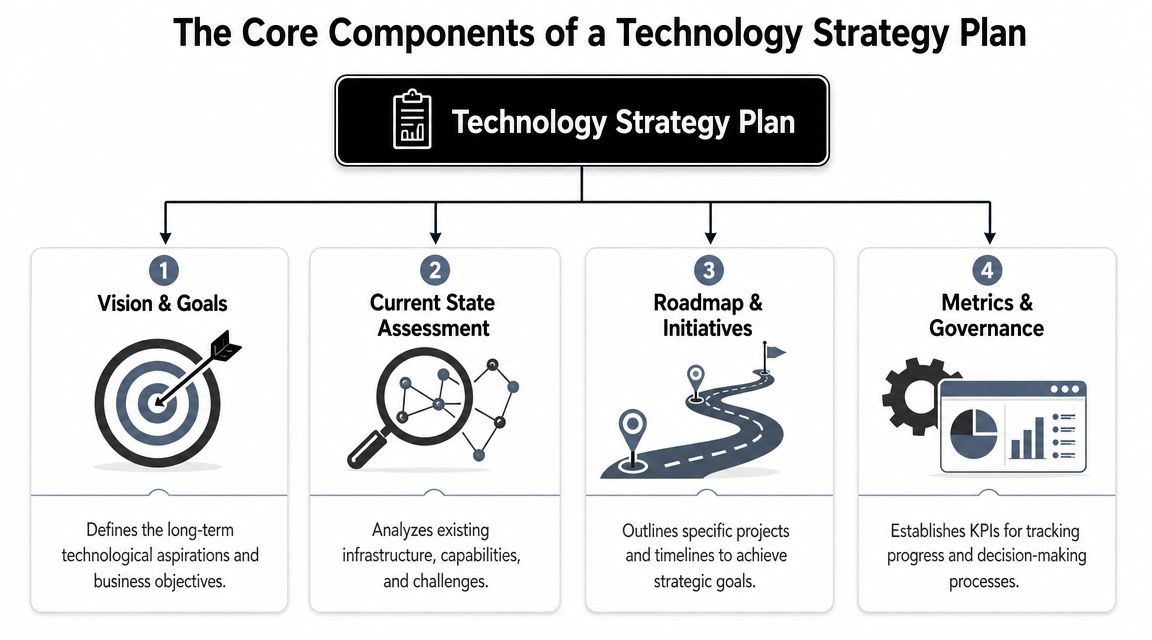
Current state assessment
This is the part many businesses rush through, and it's usually where hidden cost lives.
A real assessment documents the systems your team depends on every day. That includes internet connections, wireless coverage, line-of-business apps, file storage, backup routines, Microsoft 365 setup, endpoint protection, licensing, device age, and who currently supports what. It should also capture operational facts, like whether your office loses productivity during internet outages or whether remote staff rely on inconsistent home connections.
A candid assessment should surface questions like these:
- Which systems would stop revenue or operations if they failed
- Where do staff create workarounds because the approved process is too slow
- Which devices or servers are old enough to become a planning issue, not just a maintenance issue
- Which security settings exist on paper but aren't consistently enforced
At this point, owners often discover they have more technical debt than they realized. Not because anyone was careless, but because businesses grow faster than documentation.
Future state vision
A plan also needs a target. Not a vague aspiration like "modernize IT," but a description of what the business should be able to do within the next few years.
For a financial office, that may mean secure remote access, documented retention policies, standardized laptops, and cleaner audit readiness. For a property management company, it may mean dependable VoIP, mobile access to files, and fewer software silos. For public-sector teams, it may mean better uptime, stronger device control, and documented continuity procedures.
A future-state vision should define capabilities, not just products. Good examples include:
- Teams can work securely from any approved location
- Critical records are recoverable without guesswork
- New employees can be onboarded in a consistent way
- Leadership can approve IT spending against a known roadmap
Practical rule: If the future state only names products and doesn't describe business capability, the plan is still too shallow.
Gap analysis
Gap analysis is where strategy becomes useful. You compare today's environment with tomorrow's operating needs and identify the missing pieces.
That gap may be technical. Maybe your current internet and firewall setup can't support reliable voice traffic across multiple offices. It may be procedural. Maybe nobody reviews access rights when employees change roles. It may be staffing-related. Maybe internal admin staff are carrying unofficial IT responsibilities without enough time or expertise.
The point isn't to list every imperfection. It's to isolate what blocks the business from operating safely and efficiently.
A gap analysis often reveals trade-offs like these:
| Current condition | Future need | Likely decision |
|---|---|---|
| File sharing happens through email attachments | Controlled document access and versioning | Standardize SharePoint or OneDrive usage with governance |
| Staff use mixed personal and company devices | Consistent security and supportability | Move to managed endpoints and approved mobile access |
| One internet provider supports a critical office | Better resilience during outages | Add failover planning or keep some local capabilities in place |
| IT purchases happen ad hoc | Planned spending | Tie projects to a budget cycle |
If you're trying to make the budget side more predictable, this is also where businesses benefit from thinking through how to approach budgeting for IT before purchases start stacking up.
Actionable roadmap and governance
The roadmap is the execution layer. It turns findings into a sequence of projects, owners, timelines, and measures.
That sequence matters. If identity and access controls are weak, don't start with advanced automation. If internet reliability is poor, don't assume a cloud-only workflow will solve everything. If backup recovery hasn't been tested, don't postpone that because a phone system refresh feels more visible.
Governance belongs here too. Someone has to approve priorities, review risk, and decide when exceptions are allowed. In smaller businesses, governance can be lightweight, but it can't be absent. Without it, the roadmap turns into a list of intentions that gets replaced by the next emergency.
Building Your Technology Roadmap Step by Step
A roadmap works when it reflects business decisions, not just technical preferences. The cleanest way to build one is to move from alignment to measurement to budget to sequencing. Skip that order and projects start because they're interesting, urgent, or pushed by a vendor.
Start with stakeholder alignment
The owner, office manager, finance lead, operations lead, and anyone responsible for compliance or field operations should all have input. Not equal input on every item, but real input.
Ask each person a short set of questions:
- Where does technology slow your team down most
- Which failure would hurt the business fastest
- Which manual task should be simpler than it is
- What upcoming business change will put pressure on current systems
These conversations usually uncover the difference between visible problems and expensive problems. Staff may complain most about printer issues, but leadership may realize the larger risk is inconsistent file retention, weak device onboarding, or dependence on one flaky connection.
Define KPIs before projects begin
You can't judge a technology strategy plan by whether the project went live. You judge it by whether business operations improved.
Useful KPIs are simple, operational, and tied to outcomes. Depending on the business, that might include onboarding speed, ticket response time, system uptime, incident response time, document retrieval consistency, or recovery readiness.
Here is a practical starting point.
| Business Goal | Relevant KPI | Example Target (2026) |
|---|---|---|
| Improve support responsiveness | Help desk response time | Faster first response during business hours |
| Reduce disruption from outages | System uptime | More consistent availability for critical systems |
| Strengthen issue handling | Incident response time | Quicker containment and escalation |
| Improve service restoration | Mean Time to Resolution (MTTR) | Shorter time to restore business-critical issues |
| Support secure remote work | MFA and access policy adoption | All approved users enrolled and governed |
| Standardize onboarding | New user setup completion | Accounts, device access, and apps ready by start date |
The exact target should fit your environment. The point is to define success before anyone orders hardware or signs migration paperwork.
If you can't explain how a project will change one operating metric, it's probably not ready for the roadmap.
Build a budget that reflects priorities
Most SMBs don't need a huge annual transformation budget. They need fewer surprises. That comes from separating work into categories such as maintenance, risk reduction, operational improvements, and growth initiatives.
A simple approach works well:
- Keep the lights on for support, licensing, warranty coverage, and routine replacements.
- Reduce risk with security controls, backups, documentation, and access governance.
- Improve operations with workflow fixes, standardized hardware, or communications upgrades.
- Enable growth with systems that support new locations, remote staff, or service expansion.
That structure keeps one flashy project from consuming money that should have gone to more basic resilience.
Put strategy before migration
Cloud projects are where businesses most often confuse motion with progress. They build a roadmap to "move to the cloud" before they've defined why, what belongs there, what must stay local, and how success will be measured.
According to VaraTech UK's analysis of cloud migration planning, the number one mistake is creating a roadmap before a documented business-cloud strategy. The same source says organizations that spend 4 to 6 weeks on foundational planning, including application inventory, gap analysis, and KPI definition, typically reduce implementation delays by 30% to 40% and achieve faster ROI.
That sequence matters even more in smaller markets where internet conditions vary. A hybrid design may be the smarter choice for a specific office, workflow, or application. "Cloud-first" sounds modern. "Business-first" works better.
Phase the roadmap
Not every initiative belongs in the same quarter. A realistic roadmap usually has:
- Near-term items that reduce immediate risk or stabilize operations
- Mid-term projects that improve consistency and user experience
- Longer-term investments that depend on budget, staffing, or earlier cleanup work
A roadmap should be specific enough to act on but flexible enough to absorb changes. New locations open. Regulations change. A key vendor gets replaced. The plan shouldn't collapse every time business conditions shift. It should give leadership a way to adapt without starting over.
Key Strategic Decisions for Modern SMBs
Most SMB owners don't struggle because they lack options. They struggle because every option has a trade-off. The right technology strategy plan helps you choose deliberately instead of inheriting a patchwork of half-decisions.

Security and compliance
Basic antivirus and a good password policy aren't a strategy. For firms handling client financial records, sensitive reports, internal investigations, or regulated data, the real decision is how much control and visibility you need over identity, data access, retention, and recovery.
That usually leads to practical choices around:
- Identity controls such as multi-factor authentication and conditional access
- Data handling such as retention settings, version control, and audit trails
- Endpoint discipline such as managed laptops, approved mobile access, and patching
- Response readiness such as knowing who investigates, who contains, and who communicates
The trade-off is straightforward. Looser controls may feel easier in the short run, but they create exceptions, shadow processes, and cleanup work later.
Cloud and hybrid design
Cloud is not a yes-or-no decision. It's a placement decision.
Some workloads belong in Microsoft 365 because collaboration, mobility, and managed identity make sense there. Some systems may still need local presence because of line-of-business software, device dependencies, or connectivity concerns. In places where internet quality is uneven, hybrid planning is often more practical than ideology.
For many SMBs, Microsoft 365 becomes the center of that conversation. But deployment alone doesn't deliver full value. According to the Miami-Dade Bar's discussion of Microsoft 365 management for law firms, deploying Microsoft 365 without strategic configuration and governance creates significant compliance risk. The same source notes that firms with governance-first Microsoft 365 implementations report 40% to 60% faster case management cycles and stronger compliance posture than those with basic deployments.
That matters outside legal offices too. The practical lesson is the same. Configuration is strategy. A tenant with poorly managed SharePoint permissions, weak retention settings, and no app governance can become a source of operational risk fast.
Continuity planning
Most owners think about continuity after a close call. A storm knocks out internet. A server fails. A ransomware scare forces everyone to ask whether backups are current and recoverable.
A continuity decision usually comes down to two questions. How long can this process be unavailable, and how much data can we afford to lose? Once leadership answers that realistically, the technology choices get clearer. You can decide where local failover matters, where cloud access helps, where offline procedures are needed, and which systems deserve testing instead of assumptions.
Good backup design isn't just about storing data. It's about restoring operations in a way your staff can actually execute under pressure.
In-house, co-managed, or outsourced support
This decision is rarely ideological. It's operational.
A small internal admin team may know the business well but lack time for roadmap work, documentation, security hardening, vendor coordination, and after-hours issues. A fully outsourced arrangement can add coverage and depth, but some businesses still want internal ownership for day-to-day coordination. Co-managed support often works well when the business has internal staff who need strategic backup and specialized expertise.
If leadership needs planning guidance without hiring a full-time CIO, virtual CIO services can fill that gap by turning support conversations into business planning conversations.
The right answer depends on complexity, regulatory pressure, internal capacity, and how much risk leadership is willing to carry on its own.
Plan in Action Examples for Local Sectors
A technology strategy plan becomes real when it solves a business problem that leadership already feels. The details differ by industry, but the pattern stays the same. Define the operational need, identify the blockers, then build the technology around that reality.
Financial services firm
A small financial office often needs three things at once. Secure client data handling, reliable access for staff, and audit-friendly processes that don't depend on one employee remembering every step.
In practice, the plan may call for standardized laptops, enforced MFA, controlled access to shared files, documented retention settings, and a clear process for onboarding and offboarding users. It may also keep certain workflows more tightly controlled instead of pushing every function into the cloud immediately. That matters when compliance requirements are strict and downtime affects both client trust and internal productivity.
The plan helps leadership decide what must be locked down first and what can be phased in later.
Property management company
Property management teams live in motion. Staff move between office desks, properties, maintenance requests, leasing conversations, and vendor coordination. When systems don't travel well, people start texting photos from personal phones, forwarding documents through email, or using whatever app gets the job done fastest.
A solid plan addresses that by standardizing mobile access, documenting which files belong in Microsoft 365 versus line-of-business platforms, tightening permissions, and deciding whether VoIP is dependable enough at each site. If some locations face connection issues, the roadmap may favor a more hybrid setup instead of forcing every workflow into a browser.
For firms supporting industrial or multi-site facilities, the same planning logic often overlaps with the operational discipline seen in managed IT services for manufacturers, where uptime, documentation, and connectivity planning directly affect day-to-day performance.
Public safety agency
Public safety environments are less forgiving. Records, communications, and mobile device access have to work consistently, and they have to stay controlled.
A practical technology strategy plan in this setting often prioritizes resilient backups, documented recovery procedures, secure device management for field staff, and clear ownership over critical systems. It also forces leadership to ask harder questions. Which systems must remain available during an outage? Which records need stricter access control? Which workflows can continue if the primary connection drops?
In high-stakes environments, "we've never had a problem before" is not a continuity plan.
The value of the plan isn't just the final architecture. It's that the agency or business makes decisions before the crisis, not during it.
From Plan to Peace of Mind
A technology strategy plan is not about buying more technology. It's about making fewer bad technology decisions.
When a business works from a real plan, it stops treating every outage, renewal, migration, and security concern as a separate event. Leadership can see what matters now, what can wait, where the risks are, and how each investment supports operations. That changes IT from a source of friction into part of how the business grows and protects itself.
For SMBs in places like Henderson, NC, this matters even more. Local realities such as limited in-house expertise, mixed connectivity, distributed teams, and tighter budgets leave less room for trial and error. A practical plan gives structure to those constraints instead of pretending they don't exist.
The payoff is simple. Fewer surprises. Better decisions. Clearer priorities. More confidence that your systems will support the business when it counts.
Frequently Asked Questions
Can I create a technology strategy plan myself, or do I need an expert
You can absolutely start it yourself. In fact, leadership should own the business side of it. Nobody outside your company can decide which workflows matter most, what level of downtime is acceptable, or where growth is heading.
Where outside help becomes useful is in the technical assessment, gap analysis, roadmap sequencing, and governance design. Many businesses can identify pain points on their own. Fewer can accurately judge whether those issues come from internet design, identity controls, aging hardware, poor Microsoft 365 governance, backup gaps, or vendor sprawl.
A practical middle ground works well. Leadership defines business priorities, then an experienced advisor validates the technical path.
How much does it cost to develop a plan with a consultant
The answer depends on scope, complexity, and how much assessment work is needed. A small office with a straightforward setup will need less effort than a regulated firm with multiple locations, mobile users, compliance obligations, and aging infrastructure.
The better question is what level of planning you need. Some businesses need a focused roadmap around Microsoft 365, security, and device standards. Others need a full review of infrastructure, continuity, vendor relationships, and long-range budgeting. If a proposal skips discovery and jumps straight to recommendations, that usually means the planning won't be deep enough to trust.
How long does the planning process typically take
For many SMBs, the timeline depends on how quickly leadership can provide access to systems, documents, stakeholders, and decision-makers. A plan moves faster when software inventory, licensing details, vendor contracts, and operational pain points are easy to gather.
If cloud migration is part of the picture, the planning phase shouldn't be rushed. As noted earlier in the article, organizations that spend dedicated time on business-cloud strategy tend to reduce implementation delays. That doesn't mean every planning engagement should drag on. It means the sequence matters.
How often should we review and update our technology strategy plan
Review it whenever the business changes in a meaningful way. A new office, major staffing change, compliance requirement, software replacement, acquisition, or shift to remote work all justify an update.
Even without a major event, leadership should revisit the plan on a regular cadence. The roadmap, budget assumptions, hardware lifecycle, security priorities, and vendor mix all need a fresh look over time. A technology strategy plan should stay current enough to guide decisions. If it only comes out during a crisis, it's already stale.
What if our internet connectivity is inconsistent
Then your strategy has to be built around that fact, not around generic best practices. Some offices can operate smoothly with cloud-heavy workflows. Others need hybrid options, failover planning, or local process adjustments because a perfect connection isn't guaranteed.
This is one reason small businesses in non-metro areas need planning that reflects actual conditions. A strategy that looks efficient on paper can create daily friction if it assumes bandwidth, coverage, or support availability you don't have.
What should be the first priority if everything feels urgent
Start with what would hurt the business fastest if it failed. That usually means one or more of these areas: identity and access, backups and recovery, internet reliability, core line-of-business applications, or lack of documentation.
After that, focus on standardization. Unsupported devices, inconsistent onboarding, scattered file storage, and unclear ownership create drag everywhere else. Stability first. Optimization second.
If your business needs a practical technology strategy plan instead of more reactive fixes, Cyberplex Technologies LLC can help you turn day-to-day IT stress into a clear roadmap. Their team supports small and midsize organizations across North Carolina with managed IT, co-managed IT, cloud planning, Microsoft 365 guidance, security, continuity planning, and responsive local support built for real operating conditions.


