
A record system is your business’s official memory. In modern practice, that can mean anything from a formal Records Management System with 18 to 24 month typical ROI and $25K to $50K upfront cost ranges for SMBs to a Microsoft Teams Phone setup that stores recorded communications with retention policies for up to 10 years, depending on what records you need to control.
If you're running a business in Henderson, you probably already have records everywhere. Contracts in email. Invoices in QuickBooks. HR forms in a shared folder. Lease documents in SharePoint. Call notes in someone's notebook. Meeting recordings in Teams. Photos on phones. Scanned PDFs on a front desk computer nobody wants to touch.
That doesn’t mean you have a record system.
A real record system is more than digital filing. It’s the structure, rules, and technology that decide what counts as an official business record, where it lives, who can access it, how long it stays, and how you prove it hasn’t been altered. That matters for compliance, security, and everyday decisions. If you can't find the right version of a signed agreement, prove who changed a file, or recover documents after an incident, your business is operating without a reliable memory.
For small and midsize organizations, that gap shows up fast. Audits get stressful. Staff waste time hunting for documents. Sensitive files end up in the wrong hands. Retention rules become guesswork. And when a ransomware event or accidental deletion hits, the business learns the hard way which records were mission critical.
The Hidden Costs of Disorganized Records
A business owner calls at 4:30 on a Friday. A client wants a copy of a signed agreement. The office manager thinks it’s in a shared drive. The accountant says the final version was emailed. Someone in operations finds a scan, but it’s missing a page. Another employee has a printed copy in a desk drawer.
Nobody is lazy in that situation. The problem is the business never built a reliable system for records.

What disorder looks like in real life
For a property manager, disorder might mean staff in the field saving lease renewals to personal devices and emailing them later.
For a legal office, it might mean case notes living in separate folders with inconsistent names.
For a finance team, it might mean retention practices that depend more on habit than policy.
The hidden cost isn't just time. It’s hesitation. People stop trusting the files in front of them because they aren’t sure what’s current, what’s complete, or what should have been deleted years ago. Once that happens, every decision slows down.
Practical rule: If two employees can answer “Where is the official copy?” differently, you have a records problem.
Why backups alone don’t solve it
Many owners assume backups cover this issue. Backups matter, and they absolutely should. But a backup restores what you had. It doesn’t decide what the official record is, who should see it, or whether a document should have been retained or destroyed under policy.
That’s why good backup planning and good records management work together, not interchangeably. Cyber incidents make this even more obvious. If every duplicate, draft, and misfiled document is scattered across systems, recovery gets messy. A clean retention structure makes recovery faster and less risky, which is one reason strong backup practices matter for business continuity.
The shift from chaos to control
A record system fixes the confusion by answering a few basic questions consistently:
- What counts as a record: Not every file is a record, but signed contracts, employee files, invoices, and incident reports usually are.
- Where it belongs: Records have an approved home, not five possible homes.
- Who controls it: Access follows job role and policy, not office folklore.
- How long it stays: Retention isn’t random.
- How it’s recovered: If something goes wrong, the business can restore the record and trust it.
That’s the practical answer to what is record system. It’s not just software. It’s the discipline that turns scattered files into business evidence you can rely on.
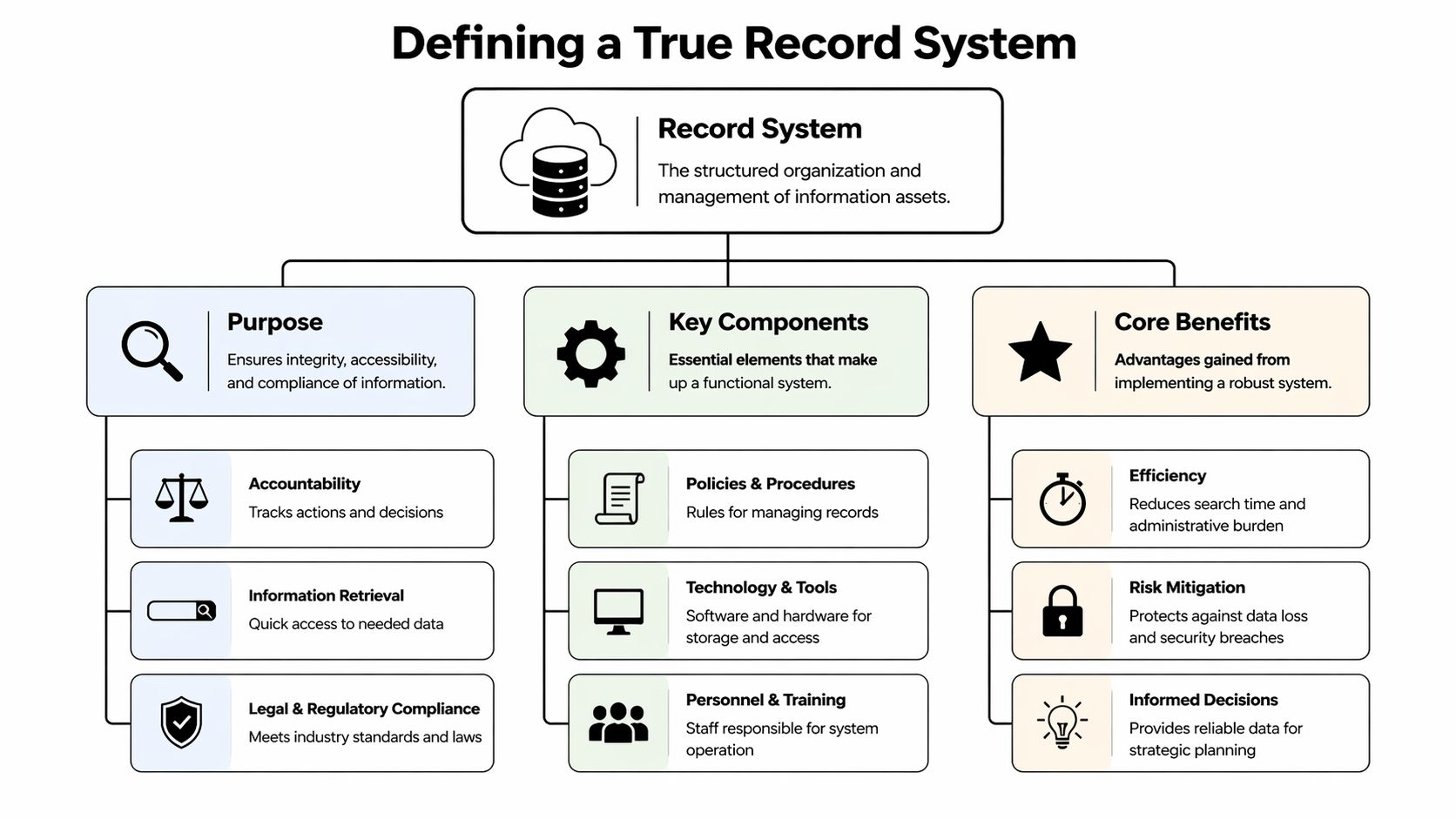
Defining a True Record System
A shared drive is like a public bookshelf in a break room. People toss things on it, move things around, rename folders, and sometimes remove items without telling anyone. You can store a lot there, but it’s hard to know what’s official.
A true record system is more like a secure library with a meticulous librarian. The librarian knows which copy is the official one, who checked it out, who changed it, how long it must be kept, and when it can be archived or destroyed. That’s the mental model needed.
What makes it different
A record system manages the integrity and lifecycle of official records. That includes capture, classification, access control, retention, retrieval, and defensible disposal. It treats records as evidence of what the business did.
That’s why a record system usually combines three elements:
- Policy: Rules for what counts as a record and how it must be handled.
- Process: Steps for storing, reviewing, retrieving, and disposing of records.
- Technology: Tools such as SharePoint, Microsoft 365 retention features, line-of-business apps, cloud storage, and specialized Records Management Systems.
What it is not
People often confuse a record system with other common business tools. They overlap, but they don’t do the same job.
| Tool | What it does | What it doesn't do well on its own |
|---|---|---|
| Shared file storage | Stores files and folders | Enforce record lifecycle consistently |
| Database | Holds structured data in fields and tables | Manage unstructured business evidence like signed PDFs and recorded calls |
| ERP or accounting platform | Runs transactions and business processes | Serve as a complete records policy framework across the organization |
| Email archive | Preserves messages | Organize all official records across departments |
A database might be the system that stores invoice transactions. A file repository might hold scanned contracts. An ERP might track purchasing. But the record system answers the bigger governance question: Which information is official, retained, protected, and discoverable?
Why this idea is older than software
Systematic record-keeping didn’t start with cloud platforms. The historical roots go deep. The term statistics originally referred to data collected by states, and ancient governments such as the Han Dynasty (206 BCE–220 CE) and the Roman Empire (27 BCE–476 CE) used large-scale censuses to track population, land, and taxable resources. By 1749, Gottfried Achenwall used Statistik, and in 1791 Sir John Sinclair brought the term into English with the Statistical Account of Scotland, a detailed parish-by-parish compilation of economic and population data, as described in the history of statistics overview.
That history matters because the core problem hasn’t changed. Organizations need trustworthy records to govern themselves, make decisions, and prove what happened.
A short visual can help connect the idea to modern practice.
The simplest plain-English definition
If I were explaining what is record system to a local owner over coffee, I’d say this:
A record system is the set of rules and tools that keeps your official business information accurate, secure, searchable, and retained for the right amount of time.
That’s the difference between “we save files” and “we manage records.”
The Anatomy of a Modern Record System
A modern record system has two layers. The first is the record lifecycle. The second is the control features wrapped around that lifecycle.
If you only build the first layer, you get storage. If you build both, you get accountability.
The five lifecycle stages
Take a simple example: a new employee contract.
Capture
The contract enters the business. Maybe HR uploads a signed PDF from Adobe Acrobat, or the employee signs electronically through a document platform. The key point is that the record enters an approved system, not a random desktop folder.Classification
The file gets tagged correctly. It becomes an employee record, perhaps under HR, confidential, retention required. Without classification, retrieval and retention become guesswork.Storage
The record lives in an approved location with controls around it. That might be SharePoint, a document management platform, or a specialized RMS. Storage is where many businesses stop. A record system keeps going.Retrieval
Authorized staff can find it fast. Search should work by name, date, category, employee, or other metadata, not only by remembering the exact folder path.Disposition
At the right point, the record is archived or destroyed according to policy and legal requirements. Keeping everything forever sounds safe, but it often creates legal and operational risk.
The control features that make it trustworthy
Now follow that same employee contract through the controls that matter.
- Access control: HR should see it. The whole company should not.
- Version control: If someone updates the agreement, the system should preserve the history and identify the latest approved copy.
- Audit trail: You need a record of who viewed, edited, moved, or exported the file.
- Retention policy: The system should apply a rule so the record stays available as long as required.
- Encryption and secure storage: The record should remain protected at rest and in transit.
- Backup and recovery alignment: If the system fails or a file is corrupted, the business should restore the record without compromising integrity.
Good records management doesn't just ask, “Can we save this?” It asks, “Can we prove this is complete, protected, and the right copy?”
What healthcare teaches the rest of us
Healthcare gives one of the clearest examples of a mature record system because the stakes are so high. The shift to Electronic Health Records accelerated after the 2009 HITECH Act, and by 2015 EHR adoption reached 96% in U.S. hospitals. These systems show what modern records management looks like in practice: HIPAA-compliant retention that is typically 7 years, strong access controls, and e-prescribing that reduced errors by 50%, according to the EHR adoption and impact research.
That example matters even if you’re not in healthcare. The same design principles apply to accounting files, legal matters, safety reports, and tenant records. Sensitive information needs controlled access. Important records need retention rules. Staff need a reliable way to find the right information without digging through inboxes.
A record is only useful if it survives a bad day
Many businesses often discover the gap between “stored” and “managed.” A file that exists only in one cloud folder without broader continuity planning is still vulnerable. Accidental deletion, sync errors, insider mistakes, ransomware, and retention misconfiguration can all turn stored files into missing records.
That’s why the records conversation belongs next to continuity planning. For many SMBs, the practical next step is tying records policy to cloud backup for small business environments so official records remain recoverable and verifiable.
A simple test for your current setup
Ask these questions about one important document type, like employee contracts, invoices, or signed client agreements:
- Can staff identify the official copy immediately?
- Can you tell who accessed or changed it?
- Can you retrieve it without calling three people?
- Do you know how long it must be retained?
- Can you restore it confidently after an incident?
If the answer is “sometimes” or “it depends,” your business may have storage tools but not a complete record system.
Record Systems in Your Industry
A record system only matters if it solves real business problems. For SMBs, that usually means one of three things: avoid compliance trouble, protect sensitive information, or stop wasting staff time.
Those goals show up differently by industry. The same concept applies, but the pressure points change.

Financial services and accounting
In finance, records are evidence. You need to know which client communication is official, which file version was approved, and how long supporting documents must remain available.
Common records include:
- Client agreements
- Advisory notes and communications
- Supporting tax documents
- Internal approvals
- Billing records
When these records live across email, desktops, and ad hoc folders, audit preparation becomes a scramble. A formal Records Management System can change the economics of that problem. A 2025 IDC study reported that SMBs save an average of $150,000 annually in compliance fines, with a 35% reduction in legal penalties, and that upfront costs average $25K to $50K with typical ROI in 18 to 24 months, according to this records management ROI summary.
That doesn’t mean every firm needs the same platform. It does mean a finance office should calculate records management as risk reduction plus labor savings, not just as software spend.
Legal offices and firms
Legal teams need clear chain of custody, access limits, and confidence that matter-related records haven’t been altered inappropriately. That includes pleadings, discovery files, correspondence, signed statements, and internal work product.
The practical challenge in small firms isn’t understanding the need. It’s consistency. One attorney saves to the document system. Another keeps key notes in email. A paralegal scans exhibits into a folder with a naming pattern nobody else follows.
In legal work, a record system protects both the document and the story around the document. Who had it, who changed it, and whether the right version is in front of the team.
For firms in regulated environments, technology choices should line up with retention and discovery needs, not just convenience.
Public safety and local government
For public safety agencies, records can’t be “mostly available.” Case data, reports, logs, and supporting materials need secure access and dependable uptime because people use them at odd hours, under pressure, and often from multiple locations.
A strong record system helps agencies:
- Limit access by role: Patrol, administration, investigations, and command staff shouldn't all have the same visibility.
- Preserve chain of custody: Sensitive records need documented handling.
- Support continuity: If a device fails or a site loses access, operations still need a path to critical records.
- Apply retention rules: Government records often require clear retention and disposal practices.
This is one area where IT planning and records planning should be done together. That’s also why many agencies and regulated businesses bring in firms that understand both policy and infrastructure, including compliance and IT regulation support for SMBs and public sector teams.
Property management and real estate
Property management teams often feel the pain first. They work across offices, buildings, phones, maintenance teams, and leasing staff. Records pile up fast: leases, inspection photos, maintenance approvals, payment records, incident notes, vendor contracts.
A formal system creates immediate operational value here. The same IDC-backed summary cited above notes that property management organizations can see a 60% reduction in document retrieval time and a 15% productivity boost when records are managed formally.
That’s easy to believe in day-to-day work. When a tenant disputes a repair notice or a manager needs the latest signed lease, fast retrieval is not a luxury. It’s customer service, legal protection, and staff efficiency all at once.
Manufacturing and distributed operations
Manufacturing shops and distributed field teams usually have a mix of quality records, vendor documents, safety procedures, and maintenance logs. The risk is fragmentation. The office uses one system. The floor uses another. Supervisors keep paper binders. Photos live on phones.
A record system creates one operating rule: official records go to approved locations with approved naming, retention, and access policies. That reduces confusion during audits, investigations, and insurance conversations.
Choosing Your Deployment and Integration Path
Once you know what records you need to control, the next decision is where the system should live. For SMBs, the usual choices are on-premise, cloud, or hybrid.
There isn’t one right answer for every business in Henderson. The better question is this: which model fits your compliance needs, IT capacity, remote work habits, and tolerance for complexity?
Record System Deployment Models Compared
| Criterion | On-Premise | Cloud (SaaS) | Hybrid |
|---|---|---|---|
| Control over infrastructure | Highest direct control | Lower direct control, vendor-managed | Shared control |
| Upfront cost profile | Usually heavier hardware and setup burden | Usually lower upfront infrastructure burden | Mixed |
| Maintenance responsibility | Internal IT or outside partner handles more | Vendor handles more platform maintenance | Split between internal and vendor responsibilities |
| Remote access | Can be more complex to deliver securely | Usually simpler for distributed teams | Flexible if designed well |
| Customization | Often strong | Depends on vendor limits | Good balance in some environments |
| Compliance fit | Useful where direct environment control matters | Useful where policy and vendor controls align | Helpful when some records need tighter handling |
| Scalability | Slower, tied to infrastructure planning | Easier to expand | Moderate |
| Integration complexity | Depends on existing systems | Depends on vendor APIs and connectors | Often highest because it spans both worlds |
When each model makes sense
On-premise can still make sense when an organization wants more direct control over where records live and how infrastructure is managed. Some public sector environments and firms with legacy application dependencies prefer this model.
Cloud SaaS works well for businesses that need easier remote access, less infrastructure maintenance, and tight integration with tools like Microsoft 365.
Hybrid is often the practical middle ground. Some records stay under tighter local control while collaboration and search features extend into cloud services.
The Microsoft 365 question most owners ask
Many SMBs don’t start from zero. They already use Teams, SharePoint, Outlook, OneDrive, and Microsoft 365 security features. So the practical question becomes: can your record system work with the tools people already use every day?
Often, yes. But only if you plan the integration carefully.
For example, communications can become official records. In Microsoft Teams Phone, the integrated record system supports tenant-specific encryption for recorded calls stored in a chosen Azure region, helps support GDPR and HIPAA requirements, and uses automatic transcription for 90% faster retrieval than legacy PBX systems. For regulated sectors, compliance recording policies can enforce retention for up to 10 years, cutting legal review times by an estimated 60%, according to this Microsoft Teams call recording overview.
That’s not just a phone feature. It’s a records feature.
A practical example with Teams Phone
Say a financial office uses Teams Phone for client calls. Some conversations contain instructions, approvals, or compliance-sensitive details. A basic setup records the call. A better setup does more:
- Stores the recording in the right region
- Limits access by role
- Connects retention to policy
- Uses transcription for search
- Links the communication to the client matter or account
That turns communication into a governed business record instead of an isolated audio file.
The strongest record systems meet staff where they already work. If employees live in Microsoft 365, forcing them into a separate island usually creates workarounds.
One practical route for SMBs
A common path is to keep Microsoft 365 as the user-facing layer while connecting it to a broader records framework. That might include SharePoint libraries for document classes, retention labels, secure backup, and line-of-business integrations. For organizations that need outside help, Cyberplex Technologies LLC is one option that supports Microsoft 365 migrations, cloud integration, VoIP, business continuity, and strategic IT consulting for SMBs in North Carolina.
The key is fit. Don’t buy a record system that ignores how your staff work.
Implementation Best Practices and Common Pitfalls
Most record system projects don't fail because the software is weak. They fail because the business skips policy work, rushes migration, or underestimates integration.
That’s especially true when Microsoft 365, SharePoint, OneDrive, Teams, phone systems, and line-of-business apps all need to cooperate.
What to do first
Start with decisions, not tools.
Identify your record classes
List the big categories first: contracts, HR files, billing records, case files, tenant records, incident reports, call recordings.Set retention rules before migration
If you migrate messy data into a new platform without rules, you just create a cleaner-looking mess.Define the official system for each record type
One record type should have one primary home. Staff can view or reference copies elsewhere, but they need clarity on the official version.Map permissions by role
Don’t copy old access rights blindly. Promotions, department changes, and legacy shortcuts often leave too many people with too much access.Train staff using their real tasks
Don’t train in abstract terms. Show HR how to file employee records. Show property managers how to upload lease renewals. Show leadership how to retrieve records during an audit or dispute.
The integration problem many guides skip
Generic articles usually stop too early. They say “integrates with Microsoft 365” as if that solves the hard part.
It doesn’t.
A 2025 Gartner report found that 68% of SMBs experience integration failures when connecting Records Management Systems with cloud platforms. For 42% of those businesses, API incompatibilities with tools like OneDrive and SharePoint are the primary issue, creating a 25% higher audit risk because retention policies no longer match across distributed systems, according to this RMS and cloud integration risk summary.
Those numbers ring true in practice because integration problems are rarely dramatic at first. They show up as quiet inconsistencies:
- Files sync, but metadata doesn’t
- Permissions carry over incorrectly
- Retention labels apply in one platform but not another
- Users rename documents outside the intended workflow
- Search finds duplicates but not the official copy
Common mistakes to avoid
Buying software before defining policy
The tool can’t decide your compliance obligations for you.Migrating everything at once
A phased rollout works better. Start with one record class or one department, then expand.Ignoring paper and hybrid records
Many SMBs still have signed paper documents, printed packets, or field notes that need a controlled intake process.Treating records as only an IT issue
Operations, finance, HR, legal, and leadership all have to agree on the rules.Skipping retrieval testing
Don’t just test uploads. Test whether a manager can find the correct record under pressure.
A record system is only successful when the business can trust it on an ordinary Tuesday and on its worst day of the year.
A rollout approach that works better
Use a phased model:
| Phase | Focus |
|---|---|
| Phase 1 | Audit current records, systems, and risks |
| Phase 2 | Define policy, owners, and retention rules |
| Phase 3 | Pilot one department or record class |
| Phase 4 | Fix integration and permission issues |
| Phase 5 | Expand gradually and review regularly |
That approach takes longer than a rushed deployment. It usually creates less disruption and fewer surprises.
Taking Control of Your Business Records
By this point, the answer to what is record system should feel less abstract. It’s your organization’s method for deciding what information counts as an official record, where it lives, who can use it, how long it stays, and how you protect it.
For a small business, that has direct value. It reduces compliance exposure. It gives staff faster access to the right information. It improves continuity when systems fail or someone deletes the wrong file. It also reduces the daily friction that comes from duplicate documents, mystery folders, and version confusion.
A lot of owners assume they need a giant enterprise platform to get there. Usually, they don’t. They need a sensible records policy, the right deployment model, careful Microsoft 365 integration, and a rollout that respects how their team works.
A simple three-step starting checklist
Audit what you already have
Pick a few critical record types. Contracts, HR files, invoices, leases, incident reports, or client communications are good starting points. Find out where the official copy lives today, who accesses it, and whether anyone agrees on the answer.Identify your top one or two risks
Maybe your biggest issue is audit readiness. Maybe it’s ransomware resilience. Maybe it’s a field team working from scattered devices. Don’t try to solve everything at once.Get a practical design before you buy more tools
A short planning session can save months of cleanup later. You want a map for retention, permissions, integrations, and recovery before full deployment starts.
For Henderson-area organizations, the most effective record systems are rarely the most complicated. They’re the ones that fit the business, support real workflows, and hold up when someone urgently needs the right document, the right call recording, or the right version of the truth.
If your business needs help turning scattered files, Microsoft 365 data, VoIP communications, and compliance requirements into a workable record system, Cyberplex Technologies LLC can help you evaluate your current setup, identify integration risks, and design a practical path forward for secure, searchable, and reliable records management.


