
If you think ransomware is a problem only for giant corporations, think again. Preventing these attacks means building a defense that combines smart tech, consistent team training, and a solid backup plan. It's all about making your business too tough—and not profitable enough—for cybercriminals to bother with.
Why Ransomware Is a Reality for Your Business
These days, attackers are specifically gunning for small and midsize businesses (SMBs). They see businesses like yours as the perfect target: you hold sensitive client and financial data but often don’t have the massive security budgets of a Fortune 500 company.
This isn’t just a possibility; it’s a growing reality. In 2025, global ransomware incidents shot up by 32% to a staggering 7,419 attacks. The biggest entry point? Phishing emails are still the culprit, kicking off over 70% of the breaches that end in ransomware.
If you want to brush up on the fundamentals, our guide on Cyber Security 101 is a great place to start.
How an Attack Unfolds
A ransomware attack isn't one single event. It’s a chain reaction that usually starts with a simple mistake—like a busy employee clicking a convincing but malicious link in an email. That's all it takes to open the door.
Once they're in, the attackers move silently through your network, grabbing higher-level permissions and hunting for your most valuable data. Think client lists, financial records, and operational files. After they’ve copied what they want, they pull the trigger and encrypt everything.
This diagram breaks down the simple, yet devastating, process.
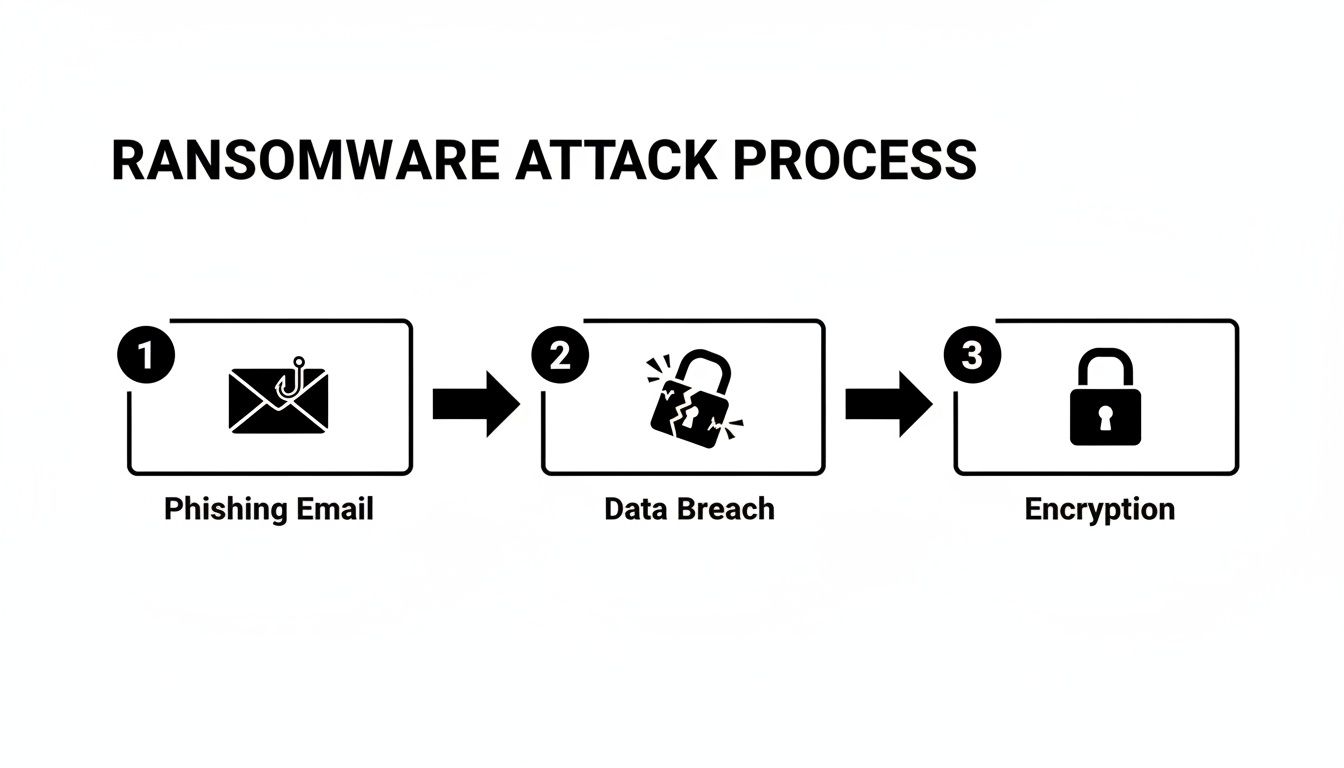
As you can see, the attack starts with a human element and quickly spirals into a full-blown technical crisis. This is why stopping it at the very beginning is so critical.
Ransomware Prevention Cheat Sheet
You can't rely on a single tool or policy to stop these attacks. A strong defense has multiple layers. This quick-reference table summarizes the essential strategies every SMB needs to have in place.
| Defense Layer | Key Action | Practical Example |
|---|---|---|
| The Human Firewall | Ongoing user security training | Run monthly phishing simulations to train employees to spot fake "urgent" invoices or password reset emails. |
| Technical Controls | Implement MFA, patch management, and firewalls | Enable MFA on your email service (e.g., Microsoft 365) to block attackers even if they steal a password. |
| Recovery & Response | Maintain and test offline backups | Restore one random file from your cloud backup every week to ensure it's working and the data isn't corrupted. |
Think of it this way: attackers only need to find one way in, but you need to defend every possible entry point. For example, at Cyberplex, we’ve seen that simply implementing automated patch management can block up to 80% of known exploits before they ever become a problem.
Hardening Your First Line of Technical Defense
Once you’ve wrapped your head around the very real danger of ransomware, it's time to act. The first order of business is to immediately shrink your attack surface. This isn’t about boiling the ocean; it’s about putting a few non-negotiable technical controls in place that give you the biggest bang for your buck.
Think of these as the digital deadbolts and alarm systems for your network. They make breaking in a whole lot harder for attackers. While there’s no magic wand, layering these foundational defenses creates a barrier that will frustrate, expose, and ultimately convince most ransomware groups to go looking for an easier payday.
The Power of Multi-Factor Authentication
If you only do one thing from this entire playbook, make it this: enable multi-factor authentication (MFA) everywhere you can. MFA forces users to prove their identity in more than one way before granting access to an application, account, or VPN. It’s a simple concept that completely shuts down the most common way attackers get in—stolen passwords.
Here’s how it plays out every day. An employee reuses a password, and that password gets stolen from a breach on some other, less-secure website. Without MFA, the attacker just waltzes right into your cloud email. But with MFA, their login attempt hits a brick wall because they don't have that second factor, like a code popping up on your employee's phone.
MFA is, without a doubt, one of the most effective security controls you can have. It’s proven to block over 99.9% of account compromise attacks, turning what could be a business-ending disaster into a simple, blocked login alert.
Actionable Insight: Where to Implement MFA Right Away
- Microsoft 365 / Google Workspace: Turn on Security Defaults or set up Conditional Access policies to force MFA for every single user, especially your admins.
- VPN Access: Lock down your VPN so it requires an MFA token. This stops attackers from using stolen credentials to tunnel directly into your private network.
- Critical Software: For anything touching money or sensitive data (like your accounting software), use app-based authenticators like Google Authenticator or Microsoft Authenticator. They're far more secure than SMS text codes.
Consistent and Timely Software Patching
Running outdated software is like putting out a welcome mat for ransomware gangs. They use automated scanners to constantly search the internet for unpatched systems with known weak spots. The moment they find one, the exploit is often immediate. Patching isn’t just "good IT hygiene"—it’s a critical security mission.
Here's a practical example: An accounting firm is running an older server for a key application. The vendor announces a vulnerability and releases a patch. The firm puts off the update, and within days, an attacker exploits that exact flaw, gets in, and encrypts years of sensitive client financials.
This isn’t a made-up story. Not long ago, threat actors hit organizations by exploiting known vulnerabilities in on-premises SharePoint servers. The businesses that hadn't applied Microsoft's security updates were left wide open. The lesson is clear: patching isn't a task for next quarter's to-do list. It has to be a continuous, high-priority process.
Securing Remote Access Points
With so many people working remotely, tools like Remote Desktop Protocol (RDP) and VPNs are more important than ever. They’re also a massive target. Leaving an RDP port open to the internet is basically leaving your office front door unlocked with a sign that says, “Rob Me.”
Attackers are constantly scanning for exposed RDP ports. When they find one, they hammer it with brute-force attacks, trying millions of common passwords until they get a hit. Once they're in, they have the keys to a machine inside your castle walls.
Actionable Steps to Secure Remote Access:
- Never Expose RDP Directly: Absolutely do not allow RDP connections straight from the public internet. Practical Action: Configure your firewall to block all incoming traffic on port 3389. All remote access should go through a secure gateway, like a VPN that requires MFA.
- Use Strong, Unique Passwords: This is non-negotiable. Practical Action: Implement a password policy that requires 12+ characters, including symbols, and use a password manager to avoid reuse.
- Implement Network Level Authentication (NLA): Make sure NLA is turned on for all RDP connections. Practical Action: In Windows, you can enable this via System Properties > Remote tab. This simple setting forces users to authenticate before a full remote session is established, which helps shut down many brute-force attacks.
Building Your Ultimate Safety Net with Backups
Even with the best defenses, you have to operate on the assumption that a determined attacker might one day find a way in. This is where your backup strategy stops being just an IT task and becomes your single most important weapon in the fight against ransomware.
It’s the ultimate safety net. It’s the one thing that guarantees you can get back to business without ever having to entertain the idea of paying a criminal.
A modern, tough-as-nails backup plan isn't just about copying files to an external drive. It's a full-blown business continuity strategy, designed from the ground up to get you back on your feet—fast. It completely neutralizes the attacker's main point of leverage.
Adopting the 3-2-1-1-0 Rule
You’ve probably heard of the classic 3-2-1 rule for backups, and it’s a great place to start. It states you should always have:
- Three separate copies of your data.
- On two different types of media (like a server and a cloud service).
- With one copy stored safely off-site.
But to make that safety net truly ransomware-proof, we add two more critical layers. This gives us the 3-2-1-1-0 rule.
- One of those copies must be offline or "air-gapped," meaning it's physically disconnected from your network.
- And you must have zero errors after recovery testing. If you haven't tested your backup, you don't really have one.
Practical Example: A local public sector agency here in Henderson that handles sensitive citizen data. They keep their primary data on-site (Copy 1), back it up to a network storage device (Copy 2), and then send a third copy to the cloud (Copy 3, off-site). That nails the basic 3-2-1.
The real magic, though, is in that "1-0." That cloud backup is configured to be immutable.
The Power of Immutable and Air-Gapped Backups
Immutability is a total game-changer. An immutable backup is one that, once it's written, cannot be changed or deleted for a set amount of time. Even if an attacker gets full admin rights to your network, they simply can't touch these protected backup files.
It’s like the difference between a document written in pencil and one carved in stone. Ransomware can easily find and encrypt traditional backups sitting on connected drives, but it hits a brick wall when it tries to mess with an immutable copy.
An air-gapped backup gives you a similar level of protection, just through physical separation. This can be as simple as backing up your data to an external drive that you then unplug and store securely somewhere else. It is physically impossible for an online attacker to access a drive that isn't even connected.
From File Backup to Business Continuity
Having your files backed up is good. Having a full Business Continuity and Disaster Recovery (BCDR) plan is what saves a business. A file backup might restore your spreadsheets, but a BCDR plan restores your entire operation—server settings, applications, and all the complex connections that make your business actually run.
This is where real planning comes into play. For instance, we work with Henderson's public sector and accounting firms to build BCDR plans that go way beyond simple data. We use air-gapped and immutable tech, sure, but we also create a clear, tested roadmap to bring critical systems back online in a specific order to slash downtime. You can see how we map this out in our full guide on Backup and Disaster Recovery services.
With ransomware appearing in 44% of data breaches and victims paying $813.5 million in 2024, a tested recovery plan is non-negotiable. While 97% of organizations hit by attacks in 2025 recovered via backups, surveys show that untested plans fail up to 40% of the time, leading to weeks of devastating downtime. Discover more insights about these ransomware statistics from VikingCloud.
The Critical Need for Regular Testing
This all leads to the final, and most frequently ignored, piece of the puzzle: testing your recovery plan. A backup you haven’t tested is just a hope, not a strategy. You have to regularly prove that your backups are not only running correctly but are also fully restorable.
Actionable Insight: What Real-World Testing Looks Like
- File-Level Restores (Monthly): Every month, grab a few random files from your backup and restore them. Open them up. Make sure they work and aren't corrupted. Example: Restore last month's payroll spreadsheet and an important client contract.
- Full-System Restores (Quarterly): At least once a quarter, you should do a full test recovery of a non-critical server. You can spin this up in an isolated virtual environment so you don’t disrupt anything. Example: Restore your print server to a virtual machine and confirm you can print a test page. The goal is to walk through a real disaster scenario and document every single step.
- Time Your Recovery (During Tests): While you're running these tests, get out a stopwatch. Time how long it actually takes to get a system back online. This gives you a real-world Recovery Time Objective (RTO) and helps manage expectations if a crisis ever hits.
Without these regular fire drills, you won’t find the hidden problems—like a misconfigured backup job or missing software dependencies—until it’s far too late. Testing is what turns hope into certainty. It ensures your safety net will actually hold when you need it most.
Shift to Proactive Security Monitoring
Once you’ve hardened your defenses, the next move is to go on the offensive. It’s not enough to build a fortress; you need guards on the walls actively looking for trouble. That’s what proactive security monitoring is all about—spotting attackers before they can lock down your business.
For a lot of small and midsize companies, the idea of 24/7 monitoring feels like a luxury reserved for big corporations. But that’s not the case anymore. Modern tools have made this level of vigilance both affordable and accessible, giving you a real shot at catching ransomware in its tracks.
Endpoint Detection and Response (EDR)
Think of Endpoint Detection and Response (EDR) as a smart security system for every device in your company—laptops, desktops, and servers. Your old antivirus software is like a bouncer with a list of known troublemakers. EDR, on the other hand, is the savvy security guard who watches for suspicious behavior.
For instance, an EDR tool doesn't just scan files; it watches what they do. It sees a trusted program like Microsoft Word suddenly trying to encrypt thousands of files on your shared drive and knows something is deeply wrong. That’s textbook ransomware behavior. A good EDR solution is designed to spot that, shut it down instantly, and alert the right people.
Here’s what a solid EDR brings to the table:
- Behavioral Analysis: It looks for tell-tale signs of an attack, like weird file encryption activity or attempts to turn off your security tools.
- Real-Time Monitoring: EDR keeps a constant watch on every endpoint, logging activity so you can trace an attack right back to how it started.
- Automated Response: When it spots a threat, it can automatically quarantine a compromised machine, cutting it off from the network before the damage spreads.
This is a non-negotiable layer in your defense. It’s what catches the new, sneaky threats that traditional antivirus completely misses.
Use Strategic Network Segmentation
Another incredibly powerful strategy is network segmentation. All this means is carving up your network into smaller, isolated zones. It’s like having locked, watertight doors on a ship—if one section floods, the whole vessel doesn't sink.
Practical Example: Imagine you run a small manufacturing business. You can put the operational technology (OT) network that runs your factory floor in a completely separate zone from your front-office administrative network, where people are checking email and browsing the web. If someone in the office clicks on a phishing link, the ransomware can’t jump over to the critical machinery and shut down your entire production line.
While ransomware payments are projected to hit $820 million in 2025, a shocking 85% of attacks go unreported. And if you pay? You have an 83% chance of being hit again. Smart prevention, like segmentation, is a much better bet. In fact, data shows that segmented networks can cut the lateral spread of ransomware by 70-90%. You can dig into more of these trends and what they mean over at DeepStrike.io's cybercrime statistics report.
Why 24/7 Monitoring Is a Game-Changer
Let's be real—hackers aren't working a 9-to-5 schedule. They love to launch their attacks on nights, weekends, and holidays, precisely when they know your IT team is probably at home. This is why having someone watching your back 24/7 is no longer a "nice-to-have." It's essential.
This is where working with a partner like Cyberplex makes a huge difference. We provide that round-the-clock monitoring and EDR management, giving you the kind of security a massive enterprise would have, but without the cost of building your own in-house security operations center. When we deploy EDR, we're not just installing software. We're actively hunting for red flags—like exposed RDP ports, which have been behind 60% of attacks, or the first signs of a ransomware payload activating.
That proactive stance lets us shut down 95% of common ransomware behaviors before they ever become a full-blown crisis. Your business stays protected, even when you’re asleep.
Turning Your Team into a Human Firewall
All the best security software in the world can't protect you if an employee clicks the wrong link and unknowingly invites an attacker in. We've seen it happen. This is why the single most effective move you can make is turning your staff from a potential vulnerability into a vigilant "human firewall."
Cybercriminals know that tricking a person is often far easier than breaking through a complex technical defense. Their entire business model often relies on that one moment of human error. The goal isn't to just check a box with a boring, once-a-year training session everyone forgets. It's about building a real, lasting culture of security awareness.
Moving Beyond Annual Training
A one-off training seminar is like going to the gym once and expecting to be fit for a year—it just doesn't work. To build a truly resilient team, security has to become a regular, bite-sized part of your company's rhythm.
It's all about consistent practice and reinforcement.
An employee doesn't have to be a cybersecurity expert to be an effective part of your defense. They just need to be trained to have a healthy dose of skepticism and know who to call when something feels "off." A simple, "Hey, this email looks weird" can stop a multi-million dollar ransomware attack in its tracks.
The Power of Phishing Simulations
The best way to get your team ready is to let them practice in a safe environment. Think of regular phishing simulations as the fire drills for your human firewall. We send controlled, fake phishing emails to your staff to see who takes the bait.
This isn’t about shaming anyone who clicks. It’s an incredibly powerful educational tool that provides an immediate, teachable moment when it matters most. When someone clicks a simulated phish, they can be instantly sent to a micro-training module that breaks down the red flags they missed.
Practical Example: A Classic Phishing Scenario
- The Lure: An email pops up, seemingly from HR, announcing a surprise "end-of-quarter bonus" with a link to claim it. It’s designed to create excitement and urgency.
- The Trap: The employee, thinking about the bonus, clicks the link without a second thought. They don't check the sender's address or hover over the link to see its true destination.
- The Lesson: Instead of a virus, they hit a landing page that says, "You've been phished (don't worry, this was a test)!" The page then highlights how the sender's email was slightly misspelled or how the link pointed to a suspicious website.
This kind of immediate, real-world feedback is infinitely more effective than a PowerPoint slide. It transforms a theoretical risk into a personal, memorable lesson.
Empowering Your Team with Clear Policies
Alongside training, your people need simple, clear rules to follow. Good policies eliminate the guesswork and give employees the confidence to make the right call when it comes to security.
Actionable Insight: Key Policies to Implement
- Data Handling: Clearly define what data is sensitive and spell out exactly where it can and cannot be stored. For example, a policy might state that client financial records must never be saved to a local desktop.
- Password Management: Mandate strong, unique passwords for every service and require the use of a company-approved password manager. This single step crushes the risk of credential stuffing attacks.
- Reporting Protocol: Create a dead-simple, no-blame process for reporting suspicious activity. Practical Action: Make it as easy as forwarding a weird email to a dedicated address like
security@yourcompany.comwhere it can be analyzed.
Ultimately, you want every person on your team to feel like they are part of the solution. When your staff is trained, tested, and empowered, they become your most valuable security asset in the fight against ransomware.
Finding the Right Partner for Your Security
Let's be honest. For most small and midsize businesses, trying to manage cybersecurity on your own is like trying to build a house with a single screwdriver. It's a full-time job you simply aren't staffed for.
This is exactly where partnering with a Managed Service Provider (MSP) stops being a "cost" and becomes one of the smartest strategic moves you can make to prevent ransomware attacks.
An MSP instantly gives you a bench of specialized security pros, 24/7 monitoring, and the kind of powerful tools that are usually reserved for large enterprises—all for a predictable monthly fee. It's the most direct path to a robust security posture without the headache and expense of hiring an entire in-house IT department.
Customizing a Layered Strategy
A good MSP never hands you a one-size-fits-all package. Instead, they get to know your business, figure out where your real risks are, and build a security strategy just for you. The entire game is about proactive prevention, not just cleaning up messes.
Think about it in real-world terms.
Practical Example (Law Office): For a law office handling sensitive client files, we'd start with tight access controls, enforcing the principle of least privilege. We'd also deploy data loss prevention (DLP) tools to flag any unusual file activity, shutting down a data leak before it ever leaves your network.
Practical Example (Remote Team): For a property manager with a team working from home, the focus shifts to securing those remote connections. That means a mandatory MFA policy on a properly configured VPN and endpoint detection and response (EDR) on every company laptop, protecting them no matter what coffee shop Wi-Fi they're using.
A partnership with the right MSP delivers more than just technology; it provides genuine peace of mind. You gain a dedicated team whose sole job is to stay ahead of threats, allowing you to focus on running your business.
Choosing the right partner is absolutely critical to building a defense that actually works. If you're starting to explore this option, you might find our guide on how to choose a managed service provider for your business incredibly helpful.
Ultimately, working with an MSP like Cyberplex gives you a fighting chance. You get the expertise, the tools, and the constant vigilance you need to keep sophisticated attacks from shutting down your organization.
Frequently Asked Questions
When we talk with business owners about preventing ransomware, the same few questions almost always come up. It's completely understandable—this stuff can feel overwhelming. So, let's tackle some of the biggest concerns we hear every day.
"My Business Is Small. Am I Really a Target?"
This is probably the #1 myth we have to bust. The short answer is, yes, absolutely. Hackers often go after small businesses precisely because they think you're an easier target, maybe without a full-time IT security person on staff.
Practical Example: Think of it like this: automated hacking tools aren't looking for a specific company name. They're just scanning the internet for any open door or unlocked window they can find, like an unpatched server or an exposed remote desktop port. To a cybercriminal, a successful attack on your business is often just as profitable and a lot less risky than trying to crack a major corporation's defenses.
"Is a Good Antivirus Program Enough to Stop It?"
A solid antivirus is a great starting point, but on its own, it’s no longer enough. Years ago, it might have been, but modern ransomware is built to be sneaky and get around the kind of signature-based detection that most basic antivirus programs use.
Actionable Insight: True cyber defense is all about layers. Think of antivirus as one good lock on your front door. But for real security, you also need stronger doors (firewalls), window locks (patch management), and a full alarm system (EDR). That means regular software updates, smart email filtering, training for your team, and more advanced tools like Endpoint Detection and Response (EDR).
"We Have Backups, So We Don't Need to Worry, Right?"
Unfortunately, no. Backups are your critical safety net for getting back up and running, but they don't solve the whole problem. Today's ransomware gangs often use a "double extortion" tactic. First, they steal a copy of your sensitive data, then they encrypt it.
Practical Example: If you refuse to pay the ransom and just restore from your backup, they'll threaten to leak your stolen files—customer lists, financial records, employee information—all over the internet. This is why preventing the initial breach is everything. Your focus has to be on stopping them from getting in, not just on cleaning up the mess after they do.
Don't leave your company's security to chance. The team at Cyberplex Technologies LLC has been helping Henderson businesses build robust, layered defenses since 2008. Let's build a security plan that gives you true peace of mind.


