
A lot of Henderson business owners ask about IT only after something breaks.
A staff member cannot open Microsoft 365 before a client deadline. A property manager in the field cannot pull up lease files. A finance office loses half a day because the server slowed down and no one noticed until phones started ringing. In public safety and legal work, even a short outage can create a serious operational problem.
That is usually when people start searching what is msp in it.
The short answer is simple. An MSP, or Managed Service Provider, is a company that takes ongoing responsibility for your technology instead of waiting for you to call when something fails. The better answer is more useful. An MSP helps you prevent downtime, protect data, support employees, manage cloud tools, and plan technology around the way your business operates.
For small and midsize organizations in and around Henderson, that matters because local businesses often carry enterprise-level IT risk without enterprise-level staffing. You may have one office manager handling vendors, one internal IT person stretched thin, or no dedicated IT team at all. Yet you still have to keep systems secure, staff productive, and clients confident.
Beyond Break-Fix Your Introduction to Managed IT
Many small businesses start with break-fix IT. Something breaks. You call someone. They fix it. You get a bill.
That model can work when your business is small, your systems are simple, and downtime does not hit revenue right away. Most Henderson-area businesses are past that point. A property management company may need staff in the office and in the field to access shared files. A manufacturing firm may rely on connected equipment, email, VoIP, and vendor portals all day. An accounting office may need secure access to client records without delays during peak periods.
Break-fix support reacts to trouble after the business already feels it.
What the old model looks like in real life
A common pattern goes like this:
- Morning problem: Staff report slow systems or email issues.
- Urgent scramble: Someone starts calling a technician.
- Partial fix: The immediate issue gets patched.
- Same root cause: Updates, backups, security gaps, and aging hardware stay unaddressed.
That cycle drains time. It also creates a false sense of control because the business owner feels like support exists, but only after the damage starts.
An MSP changes the relationship. Instead of paying mainly for emergency rescue, you work with a team that watches, maintains, updates, documents, and supports your environment on an ongoing basis.
Why more SMBs are moving this way
This is not a niche model anymore. The U.S. managed services market is projected to reach $116.25 billion by 2030, and nearly 90% of SMBs already use or are considering MSPs for critical IT needs. Manufacturing is the largest MSP client sector at 61%, which fits what many local firms are experiencing as operations depend more heavily on connected systems and reliable support (Infrascale MSP statistics for the U.S. market).
For a Henderson business owner, that trend matters for one reason. Competitors are not waiting for things to break before they manage IT.
Tip: If your team only talks about IT when email is down, printers fail, or files disappear, you are probably still operating in a break-fix mindset.
What managed IT changes
Managed IT turns technology into an operating function, much like bookkeeping or facilities. It becomes scheduled, visible, and accountable.
That means:
- Problems get spotted early: Monitoring tools can catch warning signs before users flood the front desk with complaints.
- Routine work gets handled consistently: Patching, backups, user support, and device oversight stop depending on memory and luck.
- Leadership gets room to focus: Instead of chasing outages, owners can spend more time on staffing, service delivery, and growth.
For industries common in the Henderson area, that shift is practical, not abstract. Finance firms need dependable access and tighter controls. Property managers need secure mobility. Public agencies need continuity and predictable support. Manufacturers need systems that stay available during production hours.
What Exactly Is a Managed Service Provider
An MSP is a third-party company that remotely manages a customer’s IT infrastructure and end-user systems, usually for small and midsize organizations. If that feels broad, it is. The MSP is often the single partner coordinating daily IT operations across devices, networks, cloud tools, support requests, and security.
A simple analogy helps.
Think of an MSP like a general contractor for IT
If you renovate a building, you usually do not hire and coordinate every specialist yourself. You work with one contractor who manages electricians, schedules, inspections, materials, and timelines.
An MSP plays a similar role for business technology.
Instead of you juggling the firewall vendor, internet provider, Microsoft 365 issues, endpoint updates, backup checks, and user support, the MSP oversees the whole system and keeps those moving parts working together.
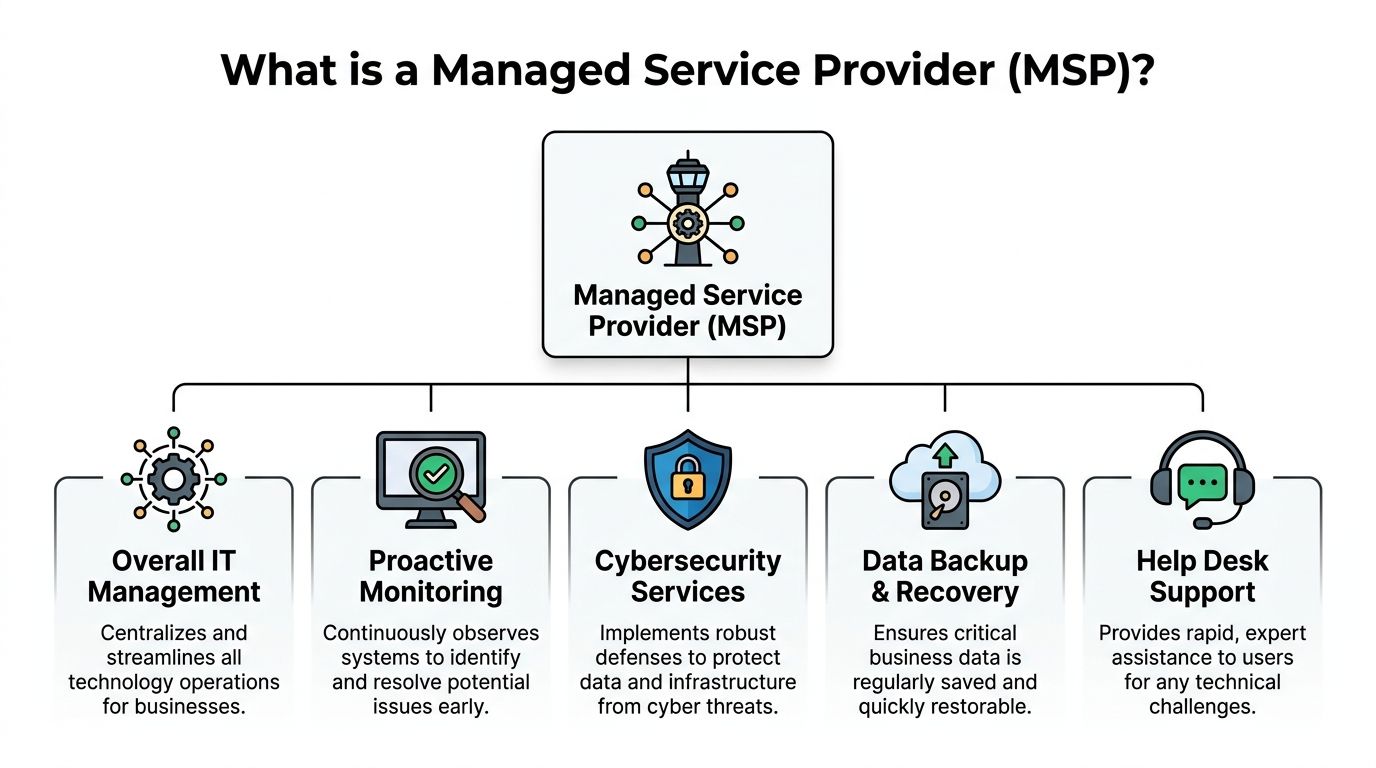
How an MSP works behind the scenes
Many hear “managed services” and picture a help desk. Help desk support is part of it, but not the full picture.
The engine behind the model usually includes two important platforms:
- RMM, or Remote Monitoring and Management: This lets technicians monitor systems, deploy patches, track device health, and respond to issues without waiting for someone to notice a problem first.
- PSA, or Professional Services Automation: This handles the service workflow behind the scenes, such as tickets, documentation, billing, project coordination, asset tracking, and service delivery.
Used together, these tools help an MSP stay proactive instead of reactive.
According to TechTarget’s definition of a managed service provider, MSPs use RMM and PSA to achieve up to 99.9% system uptime through proactive detection and resolution, and that operating model is a key reason they can deliver 30-50% lower IT costs than in-house teams.
Why that matters to a Henderson business owner
If you run a property management company, this could mean a technician sees that a workstation is missing updates before it becomes a security problem. If you run a small financial office, it could mean user access changes are documented and handled in a more controlled way. If your team relies on VoIP and Microsoft 365, it could mean someone notices service degradation before your front desk starts missing calls.
What an MSP is not
An MSP is not just:
- A repair shop
- A person you call for printer issues
- A software reseller
- A one-time project contractor
Those may all be useful services, but they do not create continuous oversight.
When people ask what is msp in it, the clearest answer is this: it is an ongoing service relationship where a dedicated provider manages, supports, and improves your technology environment so your business can operate with fewer surprises.
The Core Services an MSP Delivers
What you get from an MSP depends on the agreement, but most mature providers cover a set of core functions that keep daily operations stable.
For Henderson-area businesses, the easiest way to understand those services is to tie them to real workdays, not technical labels.

24 7 monitoring and maintenance
A strong MSP watches servers, workstations, networks, and business systems around the clock. That does not mean a person stares at one screen all day. It means monitoring tools are checking system health and alerting technicians when something falls outside normal patterns.
For a local accounting firm, that could mean the line-of-business application server starts running low on storage overnight. The issue gets flagged before staff arrive and discover they cannot save files.
This proactive approach matters because 70% of IT issues are resolved before users are even aware of them, according to NetGain’s explanation of managed services.
Cybersecurity that covers daily operations
Many owners hear “cybersecurity” and think only about antivirus. A modern MSP should be doing much more than that.
A layered approach often includes endpoint protection, patching, access controls, backup oversight, email security, and response planning. For a financial services office, baseline security work might involve tightening user access, protecting laptops used outside the office, and watching for suspicious events that internal staff may never notice.
For a public safety or legal organization, security also connects directly to continuity. If users lose access to systems or records, the problem is operational as much as technical.
Key takeaway: Good managed IT is not only about fixing devices. It is about reducing the chance that one bad click turns into a business-wide disruption.
Backup and disaster recovery
Backups are one of the most misunderstood parts of IT.
Many businesses assume data is protected because files are “in the cloud” or because someone set up a backup years ago. An MSP should verify that backups are running, restorable, and aligned with the business impact of downtime.
NetGain notes that managed backup services often follow the 3-2-1 rule, meaning 3 copies, 2 media, 1 offsite, with recovery point objectives of less than one hour. That matters when a property management office needs lease records, payment histories, and maintenance documentation available after a ransomware event or hardware failure.
The practical question is not “Do we have backups?” It is “How quickly can we restore the data we need to keep operating?”
Cloud management and Microsoft 365 support
Cloud tools reduce friction only when someone manages them properly.
A property manager with staff in multiple locations may rely on Microsoft 365 for email, file sharing, and collaboration. Without oversight, permissions become messy, devices fall out of compliance, and former employees may keep access longer than they should.
An MSP can manage user accounts, policies, licensing, file access, and cloud migrations so the platform supports the business instead of creating confusion.
This is especially useful for businesses that moved quickly into remote or hybrid work and never fully cleaned up their systems afterward.
VoIP and communications support
Phones are still mission-critical. They just look different now.
If your office uses VoIP, that service depends on the broader network, internet reliability, user setup, and device support. A manufacturing office that misses vendor calls or a front desk that drops client calls may not have a “phone” problem at all. They may have a network quality or configuration issue.
A managed provider can help keep those systems stable, support users, and coordinate with vendors when call quality or routing issues appear.
Help desk support for real employees
The help desk is where employees feel the MSP relationship most directly.
A staff member forgets a password. A laptop cannot connect to Wi-Fi. A Microsoft 365 app crashes before a meeting. The value of support often comes down to whether the user can quickly reach a capable person and get back to work.
For organizations comparing providers, managed help desk services are worth reviewing closely because response style, communication habits, and escalation processes differ a lot from one MSP to another.
Industry examples that make it concrete
- Property management: Field staff need secure access to documents, email, and phones without exposing tenant or owner data.
- Financial services: Offices need tighter control over devices, backups, user access, and support processes.
- Manufacturing: Production-adjacent systems, vendor communications, and network uptime carry direct business impact.
- Public safety and legal work: Reliability, documentation, and continuity matter as much as convenience.
An MSP bundles these functions into one operating model so the business is not left patching together five vendors and hoping they coordinate.
MSP vs In-House IT vs Co-Managed Models
Choosing an MSP does not automatically mean giving up your internal team. For some Henderson businesses, the right answer is fully outsourced support. For others, it is a hybrid model that fills gaps around security, monitoring, or after-hours coverage.
The best fit depends on staffing, complexity, and how much day-to-day responsibility you want inside the business.
IT management models compared
| Criteria | In-House IT Team | Co-Managed IT (Hybrid) | Fully Managed MSP |
|---|---|---|---|
| Daily support ownership | Internal staff handle most requests | Shared between internal staff and external partner | MSP handles ongoing support and oversight |
| Coverage outside business hours | Depends on staffing | External team can extend coverage | MSP typically provides broader continuous coverage |
| Specialized expertise | Limited to the team you hire | Internal knowledge plus outside specialists | Broad team across multiple disciplines |
| Control over systems | Direct internal control | Shared planning and shared execution | Strategic control stays with business, operations handled by MSP |
| Best fit | Larger organizations with ongoing internal demand | Businesses with one IT person or a small team | Businesses that want outsourced IT operations |
| Common challenge | Capacity and single-person dependency | Clear role definition | Choosing the right provider and SLA |
In-house IT works well when scale supports it
If you have enough users, locations, systems, and budget to justify multiple IT roles, an in-house team can be a strong option. That team learns your workflows closely and builds internal familiarity over time.
The challenge for many SMBs is depth. One or two internal staff members may be expected to handle help desk, cybersecurity, vendor coordination, server work, cloud administration, projects, and strategic planning. That is a lot to ask from a small team.
When that person is on vacation, overloaded, or focused on a major project, routine issues can pile up quickly.
Co-managed IT keeps internal ownership while adding bench strength
This model is often the most practical for growing firms.
A Henderson business may have one capable internal IT manager who knows the people, applications, and workflows better than anyone else. That person may still need outside help with around-the-clock monitoring, advanced security work, backup oversight, project implementation, or surge support during busy periods.
In a co-managed setup, the internal lead stays involved while the external provider fills specific gaps.
For example, a firm might keep user onboarding, vendor relationships, and internal planning in-house while outsourcing endpoint management, security monitoring, and after-hours incident response.
Tip: Co-managed IT works best when responsibilities are written down clearly. If both sides assume the other is handling backups, patching, or alerts, gaps appear fast.
Fully managed MSP support suits lean teams
A fully managed model makes sense when the business does not want to build a full internal department or when current support is inconsistent.
That often fits smaller finance offices, distributed property management teams, and organizations where leadership wants one accountable partner for daily support, system maintenance, and strategic guidance.
The common worry is loss of control. In practice, a good MSP should not take control away from the business. It should take operational load off the business while keeping decisions visible through documentation, reporting, and regular planning.
How to decide between the three
Ask three practical questions:
- Do we have enough internal capacity for daily support and specialized work?
- Do we need broader coverage than one person or small team can provide?
- Do we want to run IT, or do we want IT to run reliably while we focus elsewhere?
If your internal team is strong but stretched, co-managed support may be ideal. If IT keeps getting handled between other responsibilities, a fully managed model is often cleaner. If you already have mature staffing and broad expertise in-house, internal management may still fit.
The Tangible Business Benefits of Using an MSP
Business owners do not buy managed IT because they want more technology. They buy it because they want fewer interruptions, clearer budgeting, and less risk.
That is where the value becomes concrete.

Lower and more predictable IT spending
One of the biggest advantages is cost control.
Organizations that partner with an MSP achieve 20-30% reductions in overall IT costs and free up about 65% of IT budgets previously tied to routine maintenance, according to managed services market statistics published by Scoop Market.
For a local business, that can mean fewer surprise repair bills and a more stable monthly operating expense. Instead of funding repeated emergencies, the business invests in ongoing maintenance and support.
Better employee productivity
Downtime rarely affects only one person.
If a cloud app stalls, email stops syncing, or a shared drive becomes unreliable, multiple employees lose time at once. Those lost minutes spread through customer service, billing, scheduling, and internal communication.
The same source notes that MSP partnerships are associated with a 15-25% productivity increase from reduced downtime. For a property management office or legal team, that gain often shows up as smoother daily work rather than one dramatic moment.
Tip: Track where your team loses time today. Repeated password resets, slow computers, unstable phones, and file access issues are often signs that reactive IT is costing more than the invoice suggests.
A short explainer can help frame how businesses think about this shift:
Stronger protection against cyber disruption
Security is another area where the business case becomes direct.
The same verified data shows organizations working with MSPs can reduce cyberattack risk by up to 50%. That does not mean risk disappears. It means proactive management, updates, monitoring, backups, and layered defenses can shrink the exposure that grows when systems are left unmanaged.
For financial firms, that supports trust and operational continuity. For public-facing offices, it helps reduce the chance that one compromised device becomes a larger business event.
Leadership gets time back
This benefit is easy to overlook because it does not sit neatly in a spreadsheet.
When owners and managers stop acting as accidental IT coordinators, they get time back for hiring, customer relationships, compliance work, operations, and business development. A mature MSP model shifts technology from a recurring distraction to a managed function with clearer accountability.
That is often the primary benefit. Less chasing. Fewer surprises. More time spent on the business itself.
How to Choose the Right MSP for Your Business
Not every provider who says “managed IT” delivers the same thing. Some focus mostly on help desk. Some are stronger in security. Some are good at project work but weak on communication. The right fit comes from asking better questions before you sign anything.
Start with scope and service levels
A proposal should make it clear what is included, what is excluded, and how support is measured.
Look closely at:
- Response commitments: How quickly does the provider acknowledge critical issues?
- Resolution process: Who owns the problem until it is fixed?
- Monitoring coverage: Are servers, workstations, Microsoft 365, backups, and network devices all included?
- Escalation paths: What happens when the first technician cannot solve the issue?
You do not need perfect wording. You do need plain wording. If the contract is vague, support usually becomes vague too.
Watch for red flags early
Some warning signs show up before the technical conversation even gets deep.
- One-size-fits-all packages: Your needs differ if you run a finance office, a property management firm, or a public agency.
- Weak documentation habits: If a provider cannot explain how they track devices, users, vendors, and changes, handoffs get messy.
- No strategic conversation: If they only talk about tickets and devices, they may not be thinking about your business goals.
- Unclear security responsibilities: You should know who handles patching, backups, access reviews, and incident response coordination.
A provider can be competent and still be the wrong fit if they do not communicate in a way your team can work with.
Ask about industry fit and operating style
A good interview with an MSP should sound less like a sales pitch and more like a working session.
Useful questions include:
How do you support businesses in regulated or high-trust environments?
This matters for finance, legal, and public-sector organizations.How do you handle distributed teams?
Property managers and mobile staff often have different needs than office-only teams.What does onboarding look like?
You want a provider with a defined process, not a vague promise.How do you communicate during an incident?
Fast fixes matter. Clear updates matter too.How do you support co-managed relationships?
This is important if you already have internal IT.
If you want a deeper buyer checklist, this guide on how to choose a managed service provider is a practical place to compare evaluation criteria.
Ask one forward-looking question about AI
A strong question for 2026 is simple: How are you using AI inside your monitoring and patching process?
According to LogMeIn’s overview of MSP trends and AI use, AI-enhanced RMM tools have reduced downtime by an additional 37% and cut patch deployment times by over 50%, yet 29% of MSPs still lag in adoption.
That does not mean you need an MSP with flashy AI branding. It means you should look for a provider that can explain where automation helps, where human review still matters, and how they avoid creating new blind spots.
Key takeaway: Price matters, but fit matters more. The wrong low-cost MSP can cost more in confusion, slow response, and preventable downtime than a higher-quality partner with clear processes.
Onboarding and Building Your Strategic IT Partnership
The first month with an MSP should feel organized, not mysterious.
A proper onboarding process usually starts with discovery. The provider reviews your users, devices, networks, applications, vendors, and current pain points. They deploy management tools, gather documentation, and identify immediate risks such as unsupported systems, inconsistent backups, or access issues.
After that comes stabilization.
The early goal is not to redesign everything at once. It is to bring the environment under management, reduce obvious risk, and create a dependable support rhythm. For a Henderson property management team, that may mean cleaning up user access and device oversight first. For a finance office, it may mean backup validation, endpoint hardening, and documentation.
What a healthy onboarding experience includes
- A clear kickoff: You know who your contacts are and what happens first.
- Tool deployment with explanation: Users understand what is changing and what is not.
- Prioritized findings: The provider separates urgent fixes from longer-term improvements.
- Regular communication: Leadership gets updates without having to chase them.
The best partnerships keep building after onboarding. Technology changes. Staff changes. Business needs change. That is why the relationship should include recurring planning conversations, not only support tickets.
Moving from support vendor to strategic partner
An MSP becomes more valuable when it helps connect IT decisions to business decisions.
If your company plans to open another office, shift systems into Microsoft 365, improve remote access, or tighten compliance practices, those moves should not happen as isolated purchases. They should fit a broader roadmap.
That is where strategic guidance matters. Some businesses handle that through internal leadership. Others use an outside advisor model such as a virtual CIO service to align budgeting, security priorities, lifecycle planning, and growth decisions.
One practical example in this space is Cyberplex Technologies LLC, a North Carolina MSP that provides managed and co-managed IT, network support, cloud integration, business continuity, VoIP, and strategic consulting for SMBs and organizations in sectors such as property management, finance, public safety, and professional services.
When business owners ask what is msp in it, the most useful answer is no longer just a definition. It is this: an MSP is the structure that turns technology from a recurring interruption into a managed business function.
If your organization in the Henderson area is trying to decide whether managed IT, co-managed support, or a more strategic IT roadmap makes sense, Cyberplex Technologies LLC can help you evaluate your current setup, identify gaps, and talk through practical next steps without the jargon.


