
SharePoint consulting services are all about getting an expert to help you plan, build, and actually manage your SharePoint environment so it works for your business. It's how you turn this powerful, but notoriously complex, platform into a real strategic asset that's secure, easy for your team to use, and directly supports your goals. This guide provides actionable insights and practical examples to help you make the right choice.
Why Smart Businesses Use SharePoint Consulting Services
Think of SharePoint like a powerful, professional-grade kitchen. It comes with all the top-of-the-line appliances, but no instructions on how to arrange them or cook a five-star meal. Trying to set it up yourself can quickly lead to a disorganized mess where no one can find the right utensils, ingredients get left out to spoil, or the whole thing just doesn't work.
This is where a SharePoint consultant comes in—they’re the master chef. They don't just unbox the equipment; they design the entire workflow, organize the pantry, and create recipes tailored to what your team needs to cook up.
For a finance firm, that might mean designing a kitchen with ultra-secure cold storage for sensitive data. For a public works department, it might be a layout that gives crews instant access to emergency response plans on their mobile devices. The end goal is always the same: turn a complicated tool into a simple, effective solution.

Avoiding the Common DIY Pitfalls
We've seen it time and time again. Without an expert's eye, companies fall into the same traps that completely undermine their investment in SharePoint. These problems usually don't show up right away, but they cause major headaches down the road.
Here’s a quick look at what can happen when you go it alone versus bringing in a pro.
DIY SharePoint Setup vs Professional Consulting
| Area of Focus | Typical DIY SharePoint Outcome | Ideal Outcome with Consulting |
|---|---|---|
| Site Structure & Navigation | Confusing, inconsistent layouts. Users can't find files and give up. | A clean, intuitive structure that makes sense for how your team works. Actionable Insight: A consultant might recommend a "hub and spoke" model, with a central hub site for company news and departmental spoke sites for focused work. |
| Security & Permissions | Security gaps and overly broad permissions expose sensitive data. | Tightly controlled access ensuring the right people see the right information. Actionable Insight: Instead of direct user permissions, consultants often use Microsoft 365 security groups to make managing access scalable and auditable. |
| Feature Utilization | Used as a basic cloud folder, missing 90% of its potential. | Powerful automation, dashboards, and integrations are built in from day one. Actionable Insight: An expert can build a Power Automate flow that alerts a project manager whenever a new document is added to a critical client folder. |
| User Adoption | Frustrated teams revert to old, inefficient methods (email, local drives). | High adoption rates because the platform is easy to use and genuinely helpful. Actionable Insight: Consultants create custom training guides and host role-based workshops showing teams how SharePoint solves their specific pain points. |
| Long-Term Governance | "Digital sprawl" with no clear ownership, leading to chaos. | A clear governance plan that keeps the environment organized and secure over time. Actionable Insight: A governance plan should include a site lifecycle policy that automatically archives or deletes inactive sites to prevent clutter. |
Simply put, a consultant’s main job is to build a SharePoint environment that your employees will actually trust and use.
Practical Takeaway: Most SharePoint problems aren't about missing features. They come from a weak foundation, fuzzy ownership, and rushed decisions that create a system people can't stand to use. A consultant's first job is to build a solid blueprint before laying a single digital brick.
The Strategic Value of Expert Guidance
It’s no surprise that demand for this expertise is soaring. The SharePoint consulting market was valued at USD 13,750.45 million in 2026 and is expected to hit USD 26,500.78 million by 2032. That’s a steady growth rate of 8.9% a year, fueled by businesses everywhere needing better collaboration and workflow tools. For a closer look, you can read the full research about these market trends.
Hiring a consultant isn't just about fixing problems—it’s about preventing them from ever happening. An expert makes sure your SharePoint setup is a powerful asset from the very beginning, delivering a real return on your investment. They get it right the first time, saving you from the pain of a failed project and a frustrated team.
What a SharePoint Consultant Actually Delivers
When you hire a SharePoint consultant, you’re not just paying for advice. You’re investing in real, tangible results that fix actual business headaches. A true expert goes way beyond theory to deliver practical solutions that make your company more organized, secure, and efficient.
Their work isn't just about tech—it's about solving problems and delivering measurable improvements you can see every day.
So, let's get into what you should actually expect to receive.
Streamlined and Secure Migrations
One of the most common reasons businesses call us is for a migration. This is the process of moving all your company’s critical data from old, clunky systems—think messy local servers, Dropbox accounts, or an ancient version of SharePoint—into a modern, organized SharePoint Online environment.
But this is way more than just a "lift-and-shift" job. A good consultant designs the entire move to make your business run better from the moment you flip the switch.
Practical Example: A Henderson law firm has decades of case files spread across different servers. It’s a mess, searching is a nightmare, and the security is questionable. A consultant doesn’t just copy those files into the cloud. They get their hands dirty.
- Actionable Step 1: Analyze existing data to weed out and archive old, useless files (ROT: Redundant, Obsolete, Trivial), instantly reducing clutter and migration time.
- Actionable Step 2: Design a brand-new information architecture, creating specific libraries for active cases, closed cases, and firm administration, each with its own security trim.
- Actionable Step 3: Apply smart metadata tags (like
Case Number,Client Name, andMatter Type) so an attorney can find any file in seconds using search filters, instead of digging through endless folders. - Actionable Step 4: Set up strict permissions using security groups to guarantee only the lawyers assigned to a case can access its sensitive client information.
The real deliverable here isn't just "files in the cloud." It’s instant, secure access to the information your team needs to do their jobs, which means faster case prep and happier clients.
Airtight Governance and Compliance Frameworks
Governance is just a fancy word for the rules of the road—how your SharePoint system is managed, kept secure, and actually used by your team. Without a solid governance plan, even the most perfect SharePoint setup will eventually become a disorganized mess. A consultant’s job is to build a framework to stop that from ever happening.
After more than two decades of SharePoint consulting, one lesson stands out: most SharePoint problems are not caused by missing features. They come from weak structure, unclear ownership, and rushed governance decisions.
A consultant creates this essential structure by defining who’s in charge of what, setting clear policies, and automating security controls wherever they can.
Practical Example: A local financial services firm has to follow strict FINRA regulations for how they store, share, and retain client data. A SharePoint consultant delivers a governance plan that includes:
- Actionable Tactic: Implementing Automated Data Loss Prevention (DLP) policies that physically block an employee from accidentally emailing a document with Social Security numbers outside the company. The user gets a real-time warning explaining why the action was blocked.
- Actionable Tactic: Applying Mandatory retention labels that automatically archive or delete documents based on a legal schedule (e.g., "Client Contracts – Retain 7 years, then delete"), making compliance a hands-off process.
- Actionable Tactic: Enforcing Strict access controls for any site containing financial records, with routine automated audits that check who has access to what and flag any anomalies for review.
The deliverable is a system that enforces compliance for you, cutting down on human error and dramatically reducing regulatory risk.
Custom Solutions and Integrations
SharePoint isn’t a one-size-fits-all tool. The real magic happens when a consultant customizes and integrates it to match the way your business actually works. This is where you see massive jumps in efficiency. They can connect SharePoint to the other software you rely on every day, turning it into the central hub for your entire operation.
If you’re curious about how SharePoint plays with other tools, our article on essential Microsoft 365 Business Premium tools digs deeper into the ecosystem.

A clean, organized site like the one pictured above is the perfect foundation. From there, a consultant can build powerful, integrated workflows that are simple for your team to use.
Practical Example: A property management company is drowning in invoices, maintenance requests, and tenant emails. A consultant could:
- Actionable Integration: Integrate SharePoint with their accounting software. Now, when an invoice is approved in a SharePoint list, a Power Automate flow automatically creates a payable record in the accounting system. No more double entry.
- Actionable Customization: Build a custom Power App right inside SharePoint. Maintenance staff can now log completed work orders from their phones, attaching photos of the repair and capturing the tenant's signature on the spot, with the data saving directly to the correct SharePoint list.
The result is a single, unified system that saves the team countless hours of mind-numbing administrative work.
Effective Training and Ongoing Support
Finally, no technology is worth a dime if your team doesn't know how to use it. A critical deliverable from any SharePoint consulting service is solid training and support. This is what ensures your staff actually uses—and loves—the new platform.
Actionable Insight: This isn’t about a boring, one-off webinar. Good training is tailored to your team, showing them exactly how the new system makes their specific jobs easier. For example, the accounting team gets a session on invoice approval flows, while the sales team learns how to co-author proposals in real-time. It’s what turns resistance into real enthusiasm. From there, the consultant becomes your long-term partner, making sure the solution keeps delivering value long after the initial project wraps up.
Connecting Consulting Services to Your Bottom Line
Getting your SharePoint environment professionally configured isn't just a technical upgrade; it's a direct investment in your company's financial health. Bringing in expert SharePoint consulting services is all about connecting the platform's powerful features to your bottom line, turning organized data and smoother workflows into real, measurable returns.
The true value becomes clear when you see the tangible impact on productivity, risk, and day-to-day operational costs. Think about it: every minute an employee spends digging through folders for a document is a minute they aren't helping a customer or finishing a critical project. That lost time adds up fast, chipping away at your profitability.
From Wasted Minutes to Measurable Gains
One of the quickest wins we see is a massive drop in the time wasted on document retrieval.
Practical Example: For a public safety agency, this means pulling up critical incident reports in seconds using metadata search (e.g., search
Incident Type: "Traffic Accident" AND Date: "Last 7 Days"), not minutes digging through dated folders—a change that directly improves response times when every moment is crucial. The consultant’s work in building a logical structure with powerful search pays off immediately.Practical Example: Or, take a real estate company with agents scattered across North Carolina. By implementing a SharePoint site integrated with Microsoft Teams, a consultant helps agents access property files, co-author contracts in real-time, and get approvals via automated workflows faster than ever. This directly speeds up the deal-closing process, giving revenue a healthy boost.
Actionable Insight: The biggest returns from SharePoint consulting often come from the combined effect of all the small, daily efficiencies. It’s about eliminating friction—like automating a weekly report or simplifying a request form—so your team can work faster and smarter.
Mitigating Financial Risks Through Smart Governance
Beyond just making things faster, a core financial benefit is simply reducing risk. Without proper oversight, a tool as powerful as SharePoint can become a major liability. Over 200,000 organizations worldwide use Microsoft SharePoint, but a surprising number lack the governance to keep it secure.
This is a huge deal for regulated industries, where a poorly set up system can lead to crippling penalties. For example, a healthcare organization without expert planning could easily face HIPAA compliance remediation costs that average $75,000 to $200,000.
- Practical Example: A consultant can help an accounting firm, for instance, steer clear of six-figure fines by implementing a solid governance plan. They build a system that automatically enforces data security rules, turning compliance from a manual headache into a built-in feature. This includes setting up sensitivity labels so that a document tagged
Highly Confidential - Client Financialscannot be shared externally. This kind of proactive planning is a critical part of any strong technology strategy plan.
Visualizing the Return on Investment
The financial payback from a SharePoint project unfolds over time. It starts with immediate productivity gains and builds into long-term strategic advantages. This timeline shows exactly how those benefits stack on top of each other to create lasting value.
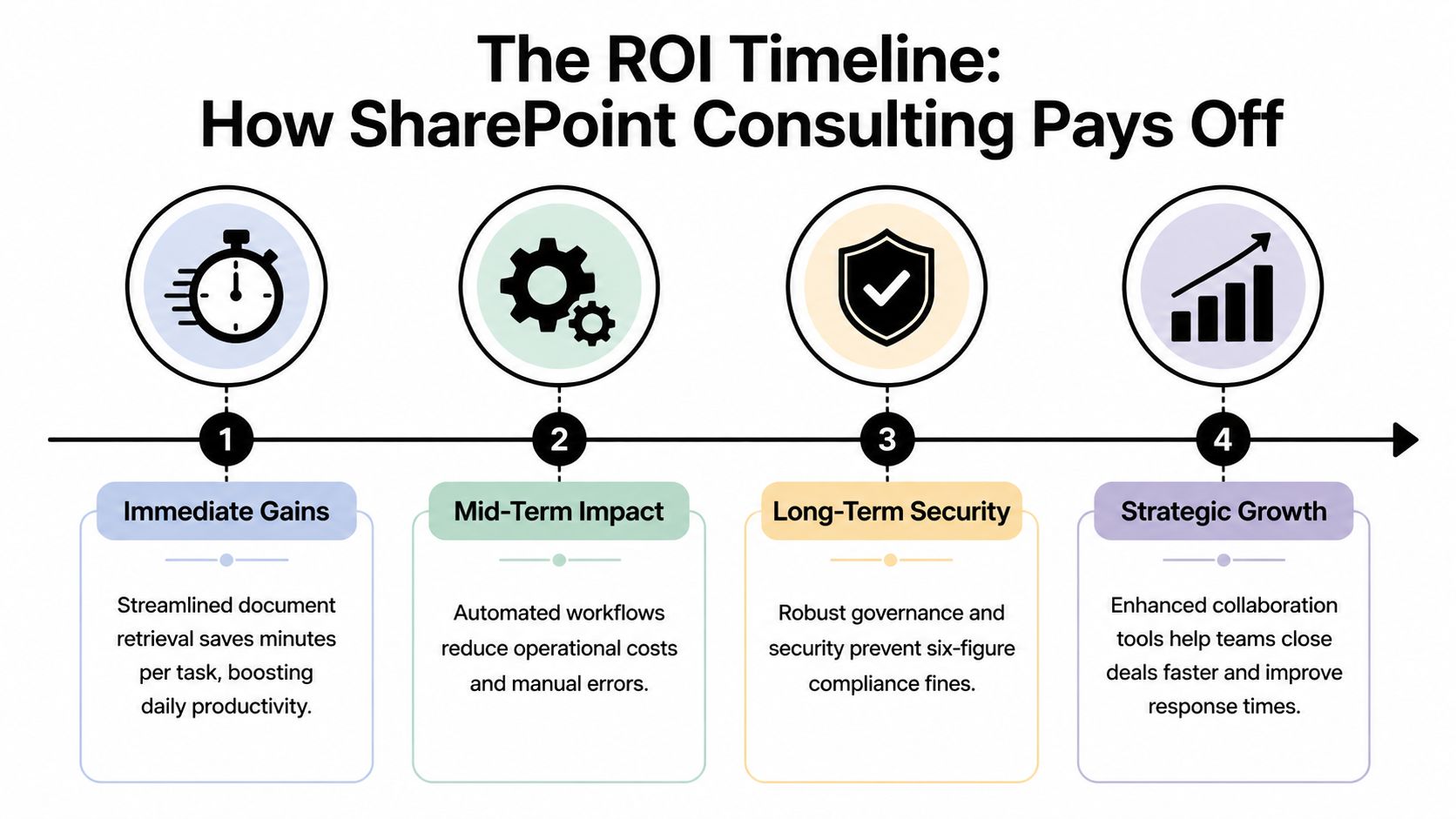
As you can see, the journey begins with quick wins in time savings and efficiency, then moves toward stronger security and strategic growth. It’s clear proof that expert guidance delivers returns that compound over time.
When you add it all up—reduced operational costs from automation, higher employee productivity, and lower financial risks from solid governance—it’s obvious that SharePoint consulting is a sound investment in your business’s future.
Understanding Engagement Models and Project Timelines
So, you’re thinking about bringing in a SharePoint consultant. One of the first questions people ask is, "What does that actually look like?" Let's pull back the curtain on how these projects work, from the different ways you can hire an expert to what a realistic timeline actually involves.
Getting the right kind of help is key. That’s why SharePoint consulting services aren't a one-size-fits-all deal. It's all about matching the support you get to your specific goals, timeline, and budget.
Think about it this way: Do you need someone to build something new from the ground up, someone to keep things running smoothly month after month, or an expert to parachute in and fix a specific problem? Your answer points you toward the right engagement model.
Finding Your Fit: Three Common Engagement Models
Most consulting relationships fall into one of three buckets. By getting a feel for how they work, you can figure out which one makes the most sense for you.
Project-Based Engagements: This is your classic, start-to-finish project. You have a clear goal, like moving all your company files to SharePoint Online or launching a brand-new intranet. We’ll map out a detailed plan with a set price and timeline to get it done. It's perfect for those big, one-time initiatives.
- Practical Example: A law firm has 1TB of sensitive client files stuck on an old server. A project-based engagement would cover the entire migration—from planning the secure architecture and setting up metadata, to moving the files and training the legal team on how to use the new search capabilities.
Retainer-Based Managed Services: Think of this as having a SharePoint expert on your team, without the full-time salary. For a predictable monthly fee, you get a dedicated block of hours for ongoing support, security checks, system tweaks, and strategic advice. This is a game-changer for businesses that need to keep their SharePoint environment secure and optimized.
- Practical Example: A financial services firm needs to make sure its SharePoint platform stays compliant and buttoned-up. A retainer gives them an expert on call to manage user permissions, run quarterly security audits, build small workflow automations as needed, and help staff with issues as they pop up.
Hourly Consulting (Time and Materials): This is the most flexible option and is perfect for smaller, targeted needs. You only pay for the hours you use. It's great for fixing a broken workflow, getting an expert opinion on your governance plan, or running a quick training session for your team on a new feature.
- Practical Example: Your marketing team built a project tracker in a SharePoint list, but the "Date" column is behaving strangely. You can bring in a consultant for a few hours to diagnose the issue, fix the column settings, and show the team how to create a "view" that filters by "Project Status."
Mapping a Realistic Project Timeline
Once you’ve settled on how you'll work together, it's time to talk about when things will get done. A well-planned SharePoint project doesn't happen overnight. It unfolds in phases to make sure every detail is handled correctly.
Actionable Insight: A common myth is treating a SharePoint migration like a simple file copy. Just "lifting and shifting" your data often means you're just moving your old problems to a new place. A proper project timeline accounts for planning, cleanup, and governance—that's where the lasting value comes from. You should insist on seeing these phases in any proposal.
While every project is unique, most follow a logical path. The time spent in each phase just depends on how complex your organization's needs are.
Here’s a simplified look at what a typical project roadmap might entail for a small or mid-sized business.
Sample SharePoint Project Timeline for an SMB
| Project Phase | Key Activities | Typical Duration |
|---|---|---|
| 1. Discovery & Strategy | Interviewing key stakeholders, analyzing existing data, defining business goals, and identifying risks. Actionable Output: A discovery report outlining what will be migrated, what will be archived, and the key business processes to be improved. | 1-2 Weeks |
| 2. Planning & Design | Creating the information architecture, designing the site structure, and defining the governance and security model. Actionable Output: A design document or "blueprint" showing the new site map, permissions model, and metadata strategy. | 2-4 Weeks |
| 3. Implementation & Migration | Building the sites, configuring permissions, migrating data, and developing any custom workflows or integrations. Actionable Output: A functional SharePoint environment with migrated data, ready for user testing. | 4-8 Weeks |
| 4. Training & Adoption | Conducting user training sessions tailored to different roles and creating support documentation to drive adoption. Actionable Output: "Quick start" guides, recorded training sessions, and a schedule of role-specific workshops. | 1-2 Weeks |
| 5. Go-Live & Support | Launching the new environment, gathering user feedback, and providing post-launch support to resolve any issues. Actionable Output: A live SharePoint environment with an active helpdesk or support channel for users. | Ongoing |
So, what does this all mean for your calendar? For a small business with straightforward needs, a full project might take just 2-4 weeks. But for a larger organization with terabytes of data and complex security rules, a 2-4 month timeline is much more realistic.
Knowing these phases helps you set clear expectations from the start and plan your own internal resources accordingly.
Choosing the Right SharePoint Consultant in North Carolina
Let’s be honest—picking the right SharePoint consultant is a make-or-break decision for your project. The right one feels like a part of your team, someone who actually gets what you’re trying to do. The wrong one? Well, that’s a path to blown budgets and a clunky system your employees will avoid at all costs.
To find a true partner here in North Carolina, you’ve got to look past the slick sales pitch and really dig in. It all starts with finding someone who understands our local business environment. Whether you're a financial firm in Henderson wrestling with FINRA rules or a public agency that needs to be CJIS compliant, a local expert just gets it. They've seen the challenges before and bring that experience to the table from day one.

A Practical Vetting Checklist
Use this checklist to sort the real experts from the pretenders when looking at SharePoint consulting services. Taking the time to properly vet your options now means you’ll build a partnership that pays off for years.
Verify Microsoft Certifications: Don't just take their word for it; ask to see their current Microsoft credentials. Actionable Tip: Look for certifications like "Microsoft 365 Certified: Teamwork Administrator Associate" or the "Microsoft Solutions Partner for Modern Work" designation. These aren't just fancy titles—they prove a commitment to keeping their skills sharp.
Request Local Case Studies: Ask them for real-world examples of work they've done with North Carolina businesses like yours. Actionable Tip: If they've already helped a local manufacturer migrate its data, they’ll have a head start on understanding your own project's hurdles and can provide specific, relevant insights.
Scrutinize Their Security Approach: Security can't be an afterthought. Ask them to walk you through how they lock down a new SharePoint environment right from the start. Actionable Tip: Their answer should include concepts like least-privilege access, multi-factor authentication (MFA), data loss prevention (DLP) policies, and setting up proper external sharing settings. A vague answer is a red flag.
Questions to Ask a Potential Consultant
Once you have your shortlist, it's time to get specific. These questions are designed to get past the generic sales talk and reveal how they actually operate and solve problems.
"A great consultant doesn't just answer your questions; they ask better ones. They should be probing to understand your business problems, not just your technical requests."
Here are a few powerful questions to have ready:
- "What's your game plan for migrating our old file server without bringing our daily operations to a screeching halt? Can you give me a step-by-step example?"
- "How will you guarantee our SharePoint setup is fully compliant with regulations like HIPAA or CJIS? What specific features would you implement?"
- "Walk me through your governance strategy. How do we prevent this from becoming an uncontrolled mess with security holes down the road? What's the first policy you'd recommend?"
- "How do you approach training and user adoption? We need our team to actually want to use this system. Can you share an example training agenda?"
The move to cloud-based SharePoint is happening, and it’s happening fast. The market is set to grow by 6.9% CAGR between 2025 and 2032. Here in North America, which accounts for a 38.7% market share, the big focus is on implementation and migrations to fix the messy governance problems that pop up in poorly planned systems. You can read more on these SharePoint consulting trends here. Finding a consultant who lives and breathes this stuff is the key to success.
To learn more about how expert IT partnerships function, check out our guide on managed IT services in North Carolina.
Answering Your SharePoint Consulting Questions
Even after seeing all the benefits, you probably have a few questions. That's smart. Investing in any professional service is a big decision, and you need straight answers before you commit. We get it.
This is where we clear the air on the most common questions we hear from business leaders just like you. Our goal is to give you the confidence to know what to expect and how to move forward.
Is SharePoint Consulting Too Expensive for a Small Business?
Not at all. There’s a common myth that consulting is just for big corporations with deep pockets. The reality is, a good consultant builds a project that fits your exact needs and your budget, making it one of the most affordable investments you can make in your company's efficiency.
Actionable Insight: Think about it this way: a small, focused project to set up a secure document library and train your team has a massive return. It’s far cheaper than cleaning up after a data breach, paying a compliance fine, or losing thousands in wasted staff time fighting a clunky, disorganized system. You're spending a little now to prevent a much bigger expense later. For example, an hourly engagement (see models above) can solve a critical pain point in just a few hours.
We Already Have Microsoft 365 Do We Still Need a Consultant?
Yes, and this is probably the most important question on the list. Having a Microsoft 365 license is like having a pile of top-quality lumber delivered to a job site. You still need an architect and a builder to turn it into a house. SharePoint is an incredibly powerful tool, but the consultant is the expert who knows how to build with it.
A consultant takes that raw platform and turns it into a real business advantage. They will:
- Structure your sites logically so people can actually find what they need.
- Set up security correctly from day one to protect your sensitive information.
- Automate your key processes to give your team back their time.
- Integrate SharePoint with other tools like Teams, making sure you’re using the whole M365 toolkit, not just one small piece.
How Long Does a Typical SharePoint Migration Project Take?
The timeline really depends on the project's complexity, how much data you have, and any custom work you need. But we can give you a pretty good idea.
Practical Estimates:
- A straightforward migration for a small business with a few hundred gigabytes of data can often be done in 2-3 weeks, from the first planning meeting to the day you go live.
- For a mid-sized company with terabytes of data and complex workflows to rebuild, you might be looking at 2-4 months.
Any reputable consultant will give you a detailed, phase-by-phase timeline after an initial discovery call.
Can SharePoint Be Used for More than Just File Storage?
Absolutely. In fact, if you're only using SharePoint to store files, you're missing out on its real value. This is where professional SharePoint consulting services truly make a difference.
The biggest mistake organizations make with SharePoint is treating it like a digital filing cabinet. Its real purpose is to be the central nervous system for your team's collaboration, processes, and knowledge.
Practical Examples of "More Than Storage":
We help businesses build powerful solutions right inside SharePoint, including:
- Company intranets: Communication hubs with news, events, and HR resources.
- Project management dashboards: Using SharePoint Lists to track tasks with real-time status updates and Gantt chart views.
- Employee onboarding portals: Central sites with automated checklists, training materials, and forms for new hires.
- Custom business apps: Using Power Apps embedded in SharePoint for everything from expense reports to equipment tracking and safety incident reporting.
Imagine all of that running on one secure, integrated platform. That’s how we turn SharePoint into the backbone of your business.
Ready to turn SharePoint into a strategic asset for your business? The team at Cyberplex Technologies LLC has been helping North Carolina businesses design, implement, and manage secure, efficient SharePoint environments since 2008. Contact us today to discuss your project.


