
You probably already track IT in the most common way possible. Someone can’t log in. The internet feels slow. Phones cut out. A file won’t sync. Then you ask a simple question: “What’s going on with our IT?”
What you get back is often vague. “Everything looks fine.” “We resolved the ticket.” “The firewall is up.” None of that tells you whether your systems are helping the business run better, whether your staff is losing time every week, or whether your security risk is steadily growing.
That gap is where information technology key performance indicators matter. They give you a way to measure technology the same way you’d measure payroll accuracy, rent collections, response time to customers, or production output. If IT supports the business, it should be measured like a business function.
For a small business owner in Henderson, that matters even more. You don’t have the luxury of wasting budget on tools nobody uses, recurring downtime, or support that sounds busy but doesn’t improve anything. You need a short list of metrics that answer practical questions. Are our systems available when people need them? How fast do issues get fixed? Are we getting value from Microsoft 365? Are we reducing risk, or just paying for software and hoping for the best?
Beyond 'Is the Internet Working' Measuring IT Success
Monday starts at 8:00. By 8:20, two people cannot get into Microsoft 365, calls are choppy, and a shared file takes a full minute to open. The internet is technically up, but work is already slipping.
That is how a lot of small businesses in Henderson experience IT problems. There is no dramatic outage. There is a steady drag on productivity that shows up in missed calls, delayed approvals, frustrated staff, and security shortcuts people take when systems feel unreliable.

I see this often with growing companies. A property management office says the internet is "mostly fine," yet leasing staff lose time every morning to slow sign-ins, dropped VoIP calls, and lag when opening cloud files. An accounting firm may avoid a full outage and still get hit with repeated workstation issues during month-end close. A public sector team may meet its vendor uptime target and still be exposed if backups are weak or ransomware protection is inconsistent.
Reactive IT misses those costs because it waits for a complaint. KPI-driven IT measures whether technology is supporting the business day to day.
What business owners are really asking
Small business owners usually do not want more technical noise. They want clear answers they can act on:
- Can employees work without losing time in the office, from home, or in the field?
- Are support problems being resolved fast enough to protect productivity?
- Are we getting value from Microsoft 365 and other cloud tools or paying for licenses that sit idle?
- Are we reducing security risk or just adding software and hoping it helps?
Those are business questions. They affect revenue, customer response time, compliance exposure, and staff morale.
Practical rule: If an IT report does not help you decide where to spend, fix, or tighten control, it is reporting activity, not performance.
KPIs turn "seems fine" into something you can manage
A useful KPI gives you a clear operating signal. Network uptime works like keeping the lights on in your office. If it drops often, people stop working, calls get missed, and cloud apps become unreliable.
Many IT teams target 99.9% uptime or better, which means no more than 8.76 hours of downtime across a year. Some businesses that rely heavily on cloud platforms and phones push higher because even short interruptions create real operational cost. The point is not to chase a pretty number. The point is to set a standard that matches how your business operates.
Once you start measuring IT this way, the conversation gets sharper. Instead of hearing "everything looks good," you can ask why remote access failed three times this month, why ticket resolution slowed during payroll week, or why half your Microsoft 365 licenses are barely used. That is how small businesses get control of IT spend, reduce avoidable risk, and protect productive hours.
Understanding Information Technology KPIs
A metric is any measurable data point. A key performance indicator is a metric that matters enough to guide decisions.
That distinction sounds minor, but it changes how you manage technology.
Think of KPIs like the dashboard in your car
Your vehicle gives you a lot of information. Engine temperature. RPM. Fuel level. Tire pressure. Odometer. Not every number deserves the same attention. Some readings are background data. Others tell you whether you can keep driving, whether you need maintenance, or whether a bigger problem is coming.
IT works the same way.
A firewall log entry is a metric. Ticket volume is a metric. CPU usage is a metric. Those may be useful, but they don’t automatically qualify as KPIs. A KPI earns that status when it answers a business question such as:
- Are employees staying productive?
- Are systems available when clients need service?
- Are we controlling support costs?
- Are we reducing compliance and security risk?
- Are our cloud investments being used effectively?
What makes a metric “key”
A practical IT KPI has a few traits:
- It connects to a business outcome. Faster repair time matters because staff get back to work sooner.
- It can trigger action. If remote access success drops, someone can investigate authentication, network paths, or user training.
- It has a clear owner. Someone should be responsible for reporting it and improving it.
- It can be understood without translation. A small business owner shouldn’t need a glossary to see what’s improving or slipping.
Here’s the simplest test. If a number changes, would you do anything differently? If the answer is no, it’s probably just a metric.
Why small businesses need fewer KPIs, not more
Many SMBs make one of two mistakes. They either track almost nothing, or they pull every number they can find from Microsoft 365, their firewall, their ticketing system, and their backup tools. Both approaches create confusion.
Most businesses need a focused set of information technology key performance indicators that cover availability, support speed, security, adoption, and cost alignment.
Good KPIs reduce noise. They don't create another reporting chore.
The payoff in plain business terms
When the right KPIs are in place, you can:
- Control downtime before it becomes a staff-wide problem
- Justify IT spending with evidence instead of gut feel
- Spot weak adoption after a cloud migration
- Catch service issues early instead of hearing about them from frustrated employees
- Hold internal teams or providers accountable using clear measures
That’s the core value. KPIs turn technical data into business intelligence you can act on.
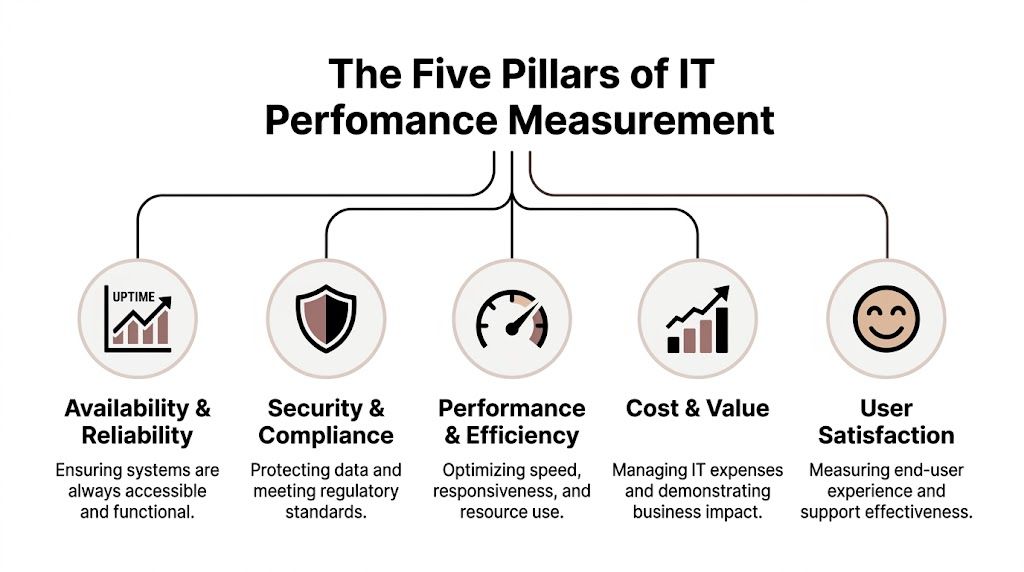
The Five Pillars of IT Performance Measurement
Most business owners don’t need a giant catalog of IT metrics. They need a manageable framework. The easiest way to build one is to group your measurements into five pillars that reflect how technology supports the company day to day.
Service desk and end user support
This pillar measures how quickly your staff gets help and whether the help restores productivity.
If employees wait too long for support, the damage shows up as delayed work, frustrated clients, and internal workarounds. A ticket may be “closed,” but that doesn’t mean the problem was solved well. This category usually includes repair time, first response quality, recurring issue trends, and backlog patterns.
For many SMBs, this is the pillar they feel first. When support is weak, everyone notices.
Infrastructure and cloud performance
This is the “keeping the lights on” pillar. It covers network availability, server health, VoIP reliability, remote access stability, and cloud service performance.
For businesses that have moved into Microsoft 365, hosted applications, and distributed work, this pillar matters more than it did a few years ago. The office internet line is no longer the whole story. Identity systems, device performance, cloud connectivity, and authentication paths all affect whether people can work.
A simple way to think about it is this. If your team depends on it every hour, it belongs here.
Cybersecurity and risk management
Security metrics tell you whether your defenses are active, whether incidents are getting contained, and whether recovery is realistic.
This pillar matters most in firms where compliance, sensitive records, or public trust are central to operations. Finance, legal, public sector, and public safety teams can’t treat security as a background function. They need visibility into endpoint protection, incident handling, recovery readiness, and audit posture.
A useful companion topic is disaster recovery. If you want a plain-English explanation of recovery targets, this guide to disaster recovery time objective planning helps connect technical recovery goals to business expectations.
IT project and change management
A business can have stable systems and still struggle with IT because changes are poorly executed.
This pillar tracks whether migrations, upgrades, policy changes, and rollouts are working. For SMBs, the biggest blind spot here is user adoption. A Microsoft 365 migration isn’t successful just because the mailboxes moved. It’s successful when staff uses the tools correctly and the business gets the intended return.
Projects fail quietly when teams only measure go-live and ignore adoption.
Business and financial alignment
This pillar asks whether IT spending matches business value.
That includes license utilization, tool overlap, support cost patterns, and whether technology is reducing friction or adding it. Owners then start asking harder questions: Are we buying software because it helps, or because nobody reviewed the renewal? Are we funding resilience where it matters most? Are the numbers tied to operations, not just technology activity?
Together, these five pillars give you a balanced view. You’re not just tracking outages or ticket counts. You’re measuring whether IT is reliable, secure, usable, and worth the investment.
Actionable IT KPIs Your Business Should Track
A Henderson office loses internet access at 10:15 on a Tuesday. Phones drop, Microsoft 365 stalls, remote staff cannot sign in, and nobody knows whether the issue is the firewall, the ISP, or a bad change made the night before. By noon, the owner is not asking for technical detail. They want to know how much work stopped, how fast it will be fixed, and whether this keeps happening.
That is why IT KPIs matter for small businesses. The right metrics turn vague frustration into decisions you can make this month, whether that means replacing weak Wi-Fi, tightening support response, or getting more value from Microsoft 365.
For SMBs, the best KPIs are practical. They should connect directly to uptime, staff productivity, cloud adoption, security exposure, and support quality.
A quick reference table
| KPI | Category | Formula | Practical SMB target |
|---|---|---|---|
| Network Uptime | Infrastructure | (Total available time – downtime) / total available time | Track monthly and quarterly. For many SMBs, 99.9% or better is a reasonable starting point |
| Mean Time to Repair | Service Desk | Total downtime across incidents / number of incidents | Lower is better. Set a target based on how much downtime your business can absorb |
| Microsoft 365 License Utilization Rate | Business Alignment | Active users / total licenses | Review for unused or mismatched licenses every month |
| Remote Access Success Rate | Cloud and User Productivity | Successful remote sessions / total remote login attempts | Aim for a consistently high success rate with minimal sign-in friction |
| Ransomware Recovery Time Objective | Security and Resilience | Time to restore critical operations after a ransomware event | Set this by business impact. Critical functions should come back fast enough to avoid major operational loss |
| Compliance Audit Pass Rate | Security and Compliance | Passed controls or audits / total required controls or audits | Track by framework, client requirement, or insurance obligation |
| Endpoint Detection Response Time | Security Operations | Time from threat detection to containment or response | Shorter response times reduce exposure and cleanup cost |
Network uptime
Network uptime is the “lights on” metric. If the internet, core network, or a key cloud service is unavailable, work stops.
This KPI answers a basic business question. How often are the systems your team depends on available during working hours?
For a small accounting firm, that may mean internet access, Microsoft 365, line-of-business apps, and phones. For a property management company in Henderson, it may include remote access for field staff, cloud file access, and VoIP.
Track uptime for the services that affect revenue and daily operations, not just the firewall or internet circuit in isolation. A connection can be technically up while staff still cannot reach the apps they need.
Mean Time to Repair
Uptime only tells part of the story. You also need to know how long outages and major issues last once they start.
Mean Time to Repair, or MTTR, measures the average time from incident detection to full restoration. If a file share goes down three times in a month and the combined disruption is six hours, your MTTR is two hours.
For small businesses, MTTR often says more than ticket volume. A provider can close a large number of tickets and still leave your team waiting on the issues that hurt most.
Use MTTR to test whether support is reducing downtime:
- Are urgent issues escalated quickly
- Are repeat failures being fixed at the root
- Are remote staff getting the same response quality as office staff
- Are technicians restoring service, not just updating the ticket
If you rely on outsourced support, this is one of the clearest ways to judge whether the relationship is helping the business. A related operational view is how helpdesk performance supports growth. This overview of managed helpdesk services and business growth connects support quality to employee output and customer responsiveness.
Microsoft 365 license utilization rate
Small businesses waste money here all the time.
The formula is simple. Active users divided by total licenses. The value is in what it reveals. You may be paying for accounts assigned to former employees, giving users higher-tier licenses they do not need, or rolling out Microsoft 365 features that staff never adopted.
This KPI matters because cloud spend creeps up. Owners see the monthly bill, but they do not always see whether the tools are being used well enough to justify the cost.
For SMBs adopting Microsoft 365, I usually look beyond assigned licenses and ask three practical questions:
- Are people signing in and using the tools included in the plan
- Are we paying for duplicate apps that Microsoft 365 already covers
- Are staff workflows improving, or did the migration only change where email lives
That is the SMB difference. Enterprise KPI lists often stop at licensing. Small businesses need to know whether cloud tools are improving daily work.
Remote access success rate
Cloud adoption is not complete just because mail migrated and files moved.
Remote access success rate measures successful remote sessions divided by total login attempts. It shows whether staff can reliably get into the systems they need from home, the field, or while traveling.
This KPI is especially useful for companies with hybrid teams, satellite staff, and mobile decision-makers. A poor result often points to MFA issues, device compliance gaps, VPN instability, bad user setup, or confusion about where to access files and apps.
If remote access fails often, productivity drops in small bursts all day. Staff lose time retrying sign-ins, calling support, and working around systems that should have been simple to use.
Ransomware Recovery Time Objective
Security tools help prevent incidents. Recovery metrics show whether the business can survive one.
A ransomware Recovery Time Objective measures how quickly you plan to restore critical operations after an attack. The right target depends on the business. A medical office, law firm, or dispatch-driven operation will usually need faster recovery than a company that can tolerate a day of partial disruption.
The practical question is straightforward. How long can your business afford to operate without email, files, phones, accounting access, or line-of-business software?
That answer should drive backup design, recovery testing, and priority order. If your stated recovery target is aggressive but your backups have never been tested, the KPI is just a promise on paper.
Compliance audit pass rate
This KPI gives owners a clear view of whether required controls are being maintained.
Track it by audit cycle, framework, client requirement, or internal policy review. For some businesses, that means cybersecurity insurance controls. For others, it means client security questionnaires, financial controls, or documented safeguards around sensitive data.
A weak pass rate usually points to process gaps, not just technical gaps. Missing reviews, poor documentation, inconsistent user offboarding, and untested backups all show up here.
That makes this KPI useful even for businesses that are not heavily regulated. It creates accountability before a client issue, insurance problem, or security incident forces the conversation.
Endpoint detection response time
Antivirus installed does not mean security is under control.
Endpoint detection response time measures how quickly a threat on a laptop, desktop, or server is detected and contained. In practical terms, this tells you whether suspicious activity sits unchecked long enough to spread, steal data, or disrupt operations.
For SMBs, this metric is valuable because it reflects actual response, not just tool ownership. You want to know whether someone reviews alerts, isolates affected devices, and takes action fast enough to limit damage.
Shorter times reduce business risk. They also reduce cleanup cost, user downtime, and the odds that one infected device turns into a company-wide event.
How to choose your starting set
Start with a short list you can review consistently.
A good SMB dashboard usually includes one metric for availability, one for support performance, one for security, one for cloud adoption, and one for user productivity. For many Henderson businesses, that means network uptime, MTTR, ransomware recovery time objective, Microsoft 365 license utilization, and remote access success rate.
That set is enough to spot problems early without burying the owner in charts. If a KPI does not lead to an action, it does not belong on the dashboard.
Aligning IT KPIs with Your SLAs and Business Goals
A Henderson business can have a provider contract that looks solid on paper and still lose a day of work when staff cannot log in, files cannot be restored, or Microsoft 365 is barely being used. That happens when the SLA is measured, but the business outcome is not.
Start with the business goal
Start with what the business is trying to protect or improve. Revenue. Staff productivity. Client response times. Security. A KPI should show whether IT is helping those goals or getting in the way.
For example, if the goal is to let employees work securely from anywhere, the KPI set should measure whether that experience holds up in daily use. That usually means remote access success rate, time to fix login and MFA issues, and adoption of the Microsoft 365 tools you are already paying for. For a small business, that is more useful than a generic infrastructure report because it ties directly to billable hours, missed calls, and employee frustration.
If the goal is to keep operations running during a cyber incident, use resilience metrics. Uptime still matters, but it does not answer the main question. The main question is how fast the business can contain the problem and get back to work.
KPI and SLA serve different jobs
An SLA is a service commitment. A KPI is a management tool.
The SLA says what your provider is supposed to do, such as respond to a critical ticket within 15 minutes or restore a failed server within a defined window. The KPI tells you whether that service level is producing the business result you need.
That distinction matters for SMBs adopting cloud platforms like Microsoft 365. A vendor can meet an SLA for ticket response while employees still waste time on repeated sign-in failures, poor SharePoint adoption, or backup gaps that slow recovery. In practice, I advise owners to read SLAs as the floor and KPIs as the scorecard.
A practical alignment model
Use a simple chain that starts with the business outcome and ends with the service promise supporting it.
Business goal
Support secure remote and hybrid work without dragging down productivityRequired IT capability
Reliable cloud access, protected identities, stable collaboration tools, and fast supportUseful KPI
Remote access success rate, mean time to resolve access issues, Microsoft 365 active usage by roleSupporting SLA
Response and restoration commitments for access, identity, and collaboration incidents
A second example is more security-focused.
Business goal
Reduce the business impact of ransomwareRequired IT capability
Threat containment, tested backups, documented recovery steps, and clear escalationUseful KPI
Recovery time objective for critical systems, endpoint detection response time, backup restore success rateSupporting SLA
Incident response obligations, escalation timelines, and recovery support commitments
For recovery time objectives, use a target that matches the cost of downtime in your business. A medical office, accounting firm, and local contractor do not need the same recovery window. Four hours may be reasonable for one company and far too slow for another. The point is to set the target deliberately, test against it, and confirm your provider can support it.
An SLA states what your IT provider owes you. A KPI shows whether your business is actually protected and productive.
Budget and prioritization follow the metrics
Once KPIs are tied to business goals, budget decisions get easier. You can explain why a backup upgrade matters, why MFA support needs to improve, or why cleaning up unused Microsoft 365 licenses saves money without weakening security.
This is also where small businesses avoid a common mistake. They renew tools every year because they already have them, not because the tools are improving uptime, recovery, or staff output. A practical budgeting for IT plan that ties spend to business outcomes helps you decide what to keep, what to replace, and what deserves more investment.
For many Henderson SMBs, this is the shift that makes KPI reporting useful. The numbers stop being technical trivia and start becoming decision tools.
How to Implement and Report KPIs in Your Business
Most SMBs don’t need a dedicated analyst or a complicated BI project to get started. They need a simple process, a few reliable data sources, and a reporting habit that people will maintain.

Pull data from systems you already have
Most of the raw information already exists somewhere in your stack.
Your ticketing platform can show repair times and recurring incidents. Microsoft 365 admin tools can show license activity and user adoption patterns. Firewalls, endpoint tools, backup systems, and remote access platforms can reveal security events, service availability, and connection success trends.
The mistake is waiting for perfect reporting. Start with what you can measure consistently.
Build a starter dashboard
A good first dashboard fits on one page. It should be readable by an owner, operations manager, or department head without a technical translator sitting next to them.
Include:
- Availability such as network uptime
- Support efficiency such as MTTR
- Security resilience such as ransomware RTO or endpoint response time
- Cloud adoption such as M365 license utilization
- User productivity such as remote access success rate
For each KPI, define four things:
- What it measures
- How it’s calculated
- Who owns it
- What action gets triggered if it slips
That last part matters most. Reporting without action rules becomes background noise.
Review on a set cadence
Weekly may make sense for service desk and incident handling. Monthly is often best for the main dashboard. Quarterly works well for trend review, budgeting, and larger planning decisions.
Use monthly reviews to ask questions like:
- Did we improve or decline
- What caused the change
- Was it a one-off event or a pattern
- What are we doing next
Here’s a short explainer that works well for teams starting this process:
Keep the report useful
A useful KPI report is brief, visual, and tied to business language.
Use red, yellow, and green status indicators if that helps your team scan quickly. Add one sentence of commentary under each KPI when something changes. If uptime dropped, say why. If MTTR improved, note the operational change that drove it. If M365 utilization is weak, identify whether the issue is licensing, training, or process confusion.
Field advice: Consistency beats complexity. A simple dashboard reviewed every month is more valuable than a sophisticated report nobody reads.
Common implementation mistakes
- Tracking too many KPIs so nothing gets attention
- Using only lagging measures and missing early warning signs
- Reporting technical jargon instead of business impact
- Failing to assign ownership for follow-up
- Skipping trend analysis and treating each month as isolated
The goal isn’t perfect measurement. It’s better management.
Putting Your IT Data to Work
The point of tracking information technology key performance indicators isn’t to create another report for a folder nobody opens. It’s to run the business with less guesswork.
When you know how available your systems are, how quickly problems are repaired, whether your cloud tools are being used, and how prepared you are to recover from a serious incident, IT stops being a black box. It becomes measurable. That changes conversations at the leadership level.
Instead of reacting to the latest complaint, you can spot patterns early. Instead of debating whether a tool or service is worth the budget, you can review actual utilization and impact. Instead of hoping your security stack is enough, you can track whether your response and recovery posture matches the risk your business carries.
Small businesses benefit from this discipline as much as large enterprises do. In many cases, they benefit more because every hour of downtime, every unused license, and every unresolved security weakness has a bigger operational impact on a lean team.
Good KPIs create accountability. Great KPIs create confidence.
If your current IT reporting tells you what happened but not what to do next, it’s time to tighten the list, focus on business outcomes, and measure the parts of technology that affect growth, productivity, and resilience.
Frequently Asked Questions about IT KPIs
How many IT KPIs should a small business track
Start with a small set. For most SMBs, five to seven KPIs is enough to create visibility without overload.
A practical mix covers availability, support, security, cloud adoption, and user productivity. If you track too many at once, your team will spend more time collecting numbers than improving performance.
What’s the difference between a metric and a KPI
A metric is any measurable data point. A KPI is a metric tied directly to an important business outcome.
For example, ticket count is a metric. Mean Time to Repair becomes a KPI when you use it to measure how quickly employees get back to work after an issue.
How often should we review IT KPIs
Review cadence depends on the KPI.
Service and support measures often deserve weekly attention. Most business-level KPIs are best reviewed monthly. Strategic trends, budget alignment, and policy changes usually make sense in quarterly reviews.
Which KPI should we start with first
If you’re starting from scratch, begin with one KPI in each of these areas:
- Availability such as network uptime
- Support such as MTTR
- Security such as ransomware RTO
- Adoption such as Microsoft 365 license utilization
- Productivity such as remote access success rate
That mix gives you a balanced view without making reporting too heavy.
Are SLAs enough to manage IT performance
No. SLAs are useful, but they don’t replace KPIs.
An SLA tells you the service level a provider promises. A KPI tells you whether the business is getting the outcome it needs. You need both.
What if we don’t have perfect data yet
That’s normal. Most SMBs start with incomplete reporting.
Use the data you already have from your helpdesk, Microsoft 365 admin tools, backup platform, security tools, and network monitoring systems. Define the KPI clearly, track it the same way each month, and improve data quality over time.
Should cloud adoption really be measured as a KPI
Yes, especially for SMBs.
A migration isn’t successful because the technical project finished. It’s successful when people use the tools properly, the business reduces friction, and the spend is justified. That’s why license utilization and remote access success are so useful.
Which KPIs matter most for regulated businesses
If you handle sensitive data or operate in a compliance-heavy environment, focus on resilience and accountability. Ransomware recovery objectives, endpoint response time, compliance audit pass rate, and repair time for critical incidents are usually more meaningful than generic activity counts.
If you want help turning IT from a reactive expense into a measurable business function, talk with Cyberplex Technologies LLC. Their team helps small and midsize organizations build practical KPI reporting, improve uptime, strengthen security, and align technology decisions with real business goals.


