
The only real way to prevent data loss is to build a layered defense. Think of it as a combination of smart tech, solid processes, and a team that puts security first. This isn't just a checklist; it's a blueprint for turning a potential business-ending catastrophe into a risk you can actually manage.
The True Cost of Data Loss for Your Business
Picture this: You walk into the office one morning and your entire business has ground to a halt. Every file, every client record, every invoice—gone. For small companies, this isn't just a bad day. It’s a direct threat to your survival.
When we talk about preventing data loss, the headlines are always about massive corporations. But the truth is, the impact is far more devastating for small and medium-sized businesses (SMBs). For an SMB, a data disaster isn't a line item on a quarterly report. It's an existential crisis.
It's More Than Just Lost Files
I’ve seen it firsthand. A local contractor loses their project blueprints and change orders. Suddenly, they can't invoice accurately, manage their subs, or even prove the work was completed. The financial fallout can derail entire projects, sparking disputes and destroying a reputation that took years to build.
Or consider a small accounting firm that gets hit. The consequences are immediate. They’re not just dealing with the chaos of missing financial records; they're staring down the barrel of crippling compliance fines and lawsuits from clients whose sensitive data was just exposed.
For small businesses, the cost of a data incident isn't just about recovery expenses. It’s about the lost business, customer churn, and operational downtime that follow. In fact, 60% of small businesses close within six months of a significant data loss event.
The Hidden Operational Toll
What often does the most damage are the hidden costs. Every hour your team spends trying to recreate lost work or calm down angry clients is an hour they aren't generating revenue. It’s a paralyzing ripple effect.
- Productivity Plummets: Work stops. Your team is forced back to inefficient manual processes, and all business momentum is lost. Actionable Insight: Calculate your downtime cost. If your 10-person team is idle for one day, and your average loaded labor cost is $50/hour, that's $4,000 in lost productivity alone, not counting lost sales or opportunities.
- Client Trust Evaporates: It only takes one incident to erase years of goodwill. If clients can't trust you to protect their information, they’ll find a competitor who can. Practical Example: A small marketing agency lost its client campaign data. When they informed their clients, two major accounts immediately pulled their contracts, citing a breach of trust.
- Morale Suffers: The sheer stress and frustration of cleaning up a data disaster takes a huge toll on your team, leading to burnout and high turnover.
Understanding these very real, business-ending risks is the first step. It’s not a question of if you'll face a data loss threat, but when.
Conducting a Practical Data Risk Assessment
Before you can protect your data, you have to know what you’re protecting and what you’re up against. So, let's start with two simple questions: What data is most important to your business, and where is it all living?
A "data risk assessment" sounds like something that requires a team of expensive consultants, but for a small business, it’s really just a practical exercise. Think of it as creating a treasure map of your most critical information. This isn't just about files and folders; it's about seeing your business through the eyes of someone who wants your data, or imagining the chaos if it all just disappeared one day.
Identify Your Most Valuable Data Assets
First things first, you need to identify your business's "crown jewels." Sit down and ask yourself: "If we lost this information right now, would it put us out of business?" We're not just talking about a financial hit, but the kind of operational paralysis or reputational damage that you can't easily recover from.
You have to get specific. "Client data" is way too broad. What does that actually mean for your company?
- Customer Relationship Management (CRM) Database: This is your entire sales pipeline—all your contacts, communication logs, and sales history. If it vanishes, your sales team is flying blind.
- Financial Records: This is everything in your QuickBooks or Xero, plus all your payroll info and tax documents. A loss here is a nightmare for obvious reasons.
- Intellectual Property (IP): For a contractor, this could be your project blueprints and detailed bid estimates. For a marketing agency, it's your creative assets and campaign strategies. This is the stuff that makes you unique.
- Employee and HR Records: This is incredibly sensitive personal data. If this gets out, you're not just dealing with an internal mess; you're looking at serious legal and compliance penalties.
Actionable Insight: Create a simple spreadsheet with three columns: "Data Asset," "Business Impact if Lost," and "Location." Filling this out with your team is a fast, effective way to build your initial asset list.
Map Where Your Data Lives and Who Can Access It
Okay, you've got your list of critical assets. The next step is to figure out where they are. In 2026, data isn't just sitting on a server in the back closet anymore—it's scattered everywhere.
Go through your list and pinpoint every location for each asset. It might look something like this:
- CRM Database: Hosted on Salesforce, accessed by the sales team on their laptops and phones.
- Financial Records: Stored on an office server, backed up to an external drive, and accessed only by the owner and the bookkeeper.
- Project Blueprints: Lives in a shared Microsoft 365 folder that project managers and a few outside contractors can get into.
I can't tell you how many times this simple mapping exercise uncovers huge security gaps. It's common to find sensitive reports being synced to someone's personal Dropbox or, even worse, discover that ex-employees still have full access to critical project files.
This isn't just about location; it's about control. You need to know who can see the data, who can change it, and who can delete it. This is key to stopping data loss from simple human error or a disgruntled employee, which, believe me, happens more often than you'd think.
Pinpoint and Prioritize Your Biggest Threats
Now it's time to connect the dots. You have the "what" (your assets) and the "where" (their location). The final piece is the "how"—as in, "how could we actually lose this data?"
You don't need a crystal ball. Just think through the most common scenarios and rank them based on how likely they are to happen and how badly they would hurt your business. This will give you a clear, prioritized action plan.
Most threats for businesses your size fall into a few buckets:
- Hardware Failure: That old server in the closet finally gives up, or a laptop with the only copy of a critical file gets dropped.
- Human Error: An employee accidentally deletes a master folder in Microsoft 365 or emails the entire client list to the wrong "John Smith." It happens.
- Ransomware Attack: A malicious email is opened, and suddenly all your files are encrypted with a demand for a crypto payment you can't afford.
- Insider Threat: A bitter employee decides to delete your customer database on their way out the door.
By matching these threats to your data assets, you can see where your real risks lie. The table below gives you a simple framework for thinking this through.
Data Loss Risk Matrix for SMBs
This matrix is a simplified tool to help you visualize your risks. By filling this out for your own key assets, you'll quickly see where you need to focus your prevention efforts first.
| Data Asset Example | Potential Threat | Likelihood (Low/Medium/High) | Business Impact (Low/Medium/High) | Priority |
|---|---|---|---|---|
| QuickBooks Company File | Hardware Failure (Old PC) | Medium | High | High |
| Client CRM Database | Ransomware Attack | High | High | High |
| Project Blueprints (M365) | Accidental Deletion | Medium | Medium | Medium |
| Employee HR Files | Insider Threat (Disgruntled employee) | Low | High | Medium |
| Marketing Brochures | File Corruption | Low | Low | Low |
As you can see, a QuickBooks file on an old, un-backed-up computer represents a high-priority risk because of its high business impact and the medium likelihood of hardware failure. In contrast, losing marketing brochures is a low-impact problem. This simple prioritization is the foundation of an effective and affordable data loss prevention strategy.
Building a Modern Backup and Recovery Strategy
Alright, you’ve pinpointed your most critical data and know exactly where it lives. What’s next? You need to build a safety net. That’s what a backup and recovery strategy is, but here’s a common mistake I see all the time: businesses think "having backups" is enough.
A backup you haven't tested is just a prayer. A real strategy shifts your focus from hope to having a verified, actionable recovery plan.
This is where so many businesses get it wrong. While almost half of tech leaders (48.5%) say they use offsite backups, a jaw-dropping 67.7% of businesses still suffered major data loss last year. That statistic, from recent research by Infrascale, shows a massive gap between having a backup policy and having a strategy that actually works when you need it.
The core of a solid strategy is moving past a single backup drive. It's about creating layers of protection to make sure your copies are available, uncorrupted, and safe from the very threats you're trying to defend against.
Mastering the 3-2-1-1-0 Rule
Today, the gold standard for protecting your data is the 3-2-1-1-0 Rule. It sounds technical, but it’s a simple framework that dramatically increases your odds of a successful recovery, no matter what disaster hits.
Let’s use a real-world example. Say your most important asset is your QuickBooks company file, which sits on your main office server. Here’s how you’d apply the rule:
Three Copies of Your Data: This means the original file plus at least two backups.
- Copy 1 (Production): The live QuickBooks file on your server.
- Copy 2 (Local Backup): A daily backup to a Network Attached Storage (NAS) device in your office.
- Copy 3 (Offsite/Cloud Backup): A daily backup to a secure cloud service.
Two Different Media Types: Your copies need to live on at least two different kinds of storage. In our example, the server's hard drive and the NAS are one type, while cloud storage is completely different. This protects you if a specific technology fails, like a bad batch of hard drives from one manufacturer.
One Copy Offsite: This is critical. At least one backup copy must be physically located somewhere else. Your cloud backup handles this perfectly. If a fire, flood, or theft hits your office, this offsite copy is your lifeline.
An offsite backup is non-negotiable. I've personally seen businesses lose everything because their only backup was a USB drive sitting right next to the server that got destroyed. For most small businesses, a cloud backup is the easiest way to get this done.
Adding Layers for Modern Threats
The original 3-2-1 rule is a fantastic start, but modern threats like ransomware forced us to add two more layers for true resilience.
One Copy Immutable or Offline: Think of this as your secret weapon against ransomware. An immutable backup is a copy that, once written, can't be changed or deleted for a set period. Even if a hacker gets into your network, they can't touch this protected copy. An offline copy, like a rotated external hard drive that’s physically disconnected, works in a similar way.
Zero Errors After Recovery Verification: This is the most important—and most frequently skipped—part of the whole process. Your backups have to be tested regularly to make sure they're not corrupted and can actually be restored. A backup that fails to restore is completely useless.
The infographic below shows the first few steps of this process—finding and securing your data—which is the foundation for a strong backup plan.
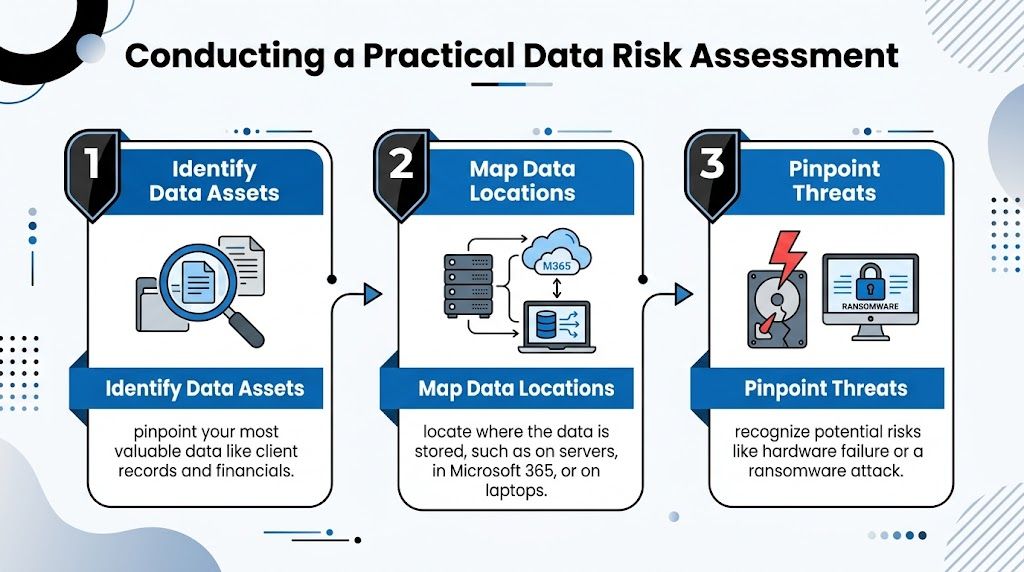
This assessment tells you exactly what "crown jewel" data needs this high level of protection, so you can build your backup strategy around it.
The Absolute Necessity of Backup Testing
Just having backups creates a dangerous false sense of security. The only way to know for sure if your strategy works is to test it. I don't mean just checking a log to see if the backup job "completed." I mean performing an actual restore. For more on this, check out our deep dive on why backups matter for business continuity.
Testing your backups really comes down to two things:
- Verification: Does the data restore without errors? Can you open the files and confirm the information is correct and intact?
- Timing: How long does a full restore actually take? Knowing your Recovery Time Objective (RTO) is essential for business planning.
Actionable Insight: Schedule a quarterly "restore drill." For one hour, have your most tech-savvy employee (or your IT partner) restore a critical file or folder to a test location. Document the steps and the time it takes. This simple exercise validates your entire backup process.
This simple test turns theory into proven capability and is how you prevent data loss from becoming a business-ending disaster.
Hardening Your Digital Defenses Against Threats
Okay, you’ve pinpointed your most critical data and have a backup plan ready to go. Now it’s time to play defense. We need to actively harden your computers, network, and cloud services to make it incredibly difficult for an attack—or even just a simple human error—to cause a data loss disaster.
This isn’t about building some impenetrable fortress overnight. It’s about creating smart, overlapping layers of security that work together. I’ve seen it happen time and again: a misconfigured firewall, a single weak password, or an unsecured cloud app is the only crack a threat needs to get through. Our job is to seal those cracks, one by one.

Fortifying Your Endpoints and Network
Let's start with the front lines: your endpoints. These are the laptops, desktops, and servers your team uses every single day, and they are, by far, the most common entry points for attacks. Think of each device as a potential gateway to your entire business. You have to guard each one.
This begins with security software that's much smarter than basic antivirus. You should be looking for an Endpoint Detection and Response (EDR) solution. While old-school antivirus just scans for known viruses, EDR actively watches for suspicious behavior. Practical Example: If an employee's computer suddenly starts trying to encrypt hundreds of files, an EDR solution can automatically isolate that machine from the network to stop the attack from spreading.
Next up, and this is absolutely non-negotiable, you must enforce strong access controls everywhere.
- Strong, Unique Passwords: A strict password policy is good, but a password manager is better. It ensures your staff isn’t reusing the same weak passwords across different services, which is a massive security risk.
- Multi-Factor Authentication (MFA): Turn on MFA for every single account that offers it. I’m talking email, financial software, remote access—everything. A stolen password is a dud if the attacker can't get past that second authentication prompt on a phone.
- Firewall Configuration: Your network firewall is not a "set it and forget it" appliance. It needs to be configured to block all incoming traffic by default, only allowing connections you explicitly approve for business. This "deny-all" starting point dramatically shrinks your attack surface.
I’ve seen businesses crippled by attacks that could have been completely stopped by MFA. It’s the single most effective security control you can implement. A recent IBM report found that breaches involving stolen credentials took an average of 292 days to identify and contain—MFA stops that threat cold.
Securing Your Cloud Services
More and more of your business data lives in the cloud, especially in platforms like Microsoft 365. These services are incredibly convenient, but they all operate on a shared responsibility model. What does that mean? Microsoft secures its global platform, but you are responsible for securing your data and how your team accesses it. One misconfiguration on your end can leave your company’s data wide open.
For a small business running on Microsoft 365, there are a few high-impact settings you need to check right now.
Get into your Microsoft 365 admin center and make sure MFA is enforced for every single user. It's not optional. Then, start using Conditional Access Policies. This is a powerful feature that lets you block sign-ins you know are risky. Actionable Insight: Create a simple policy to block all login attempts from countries where you don’t operate. This single step can shut down thousands of automated hacking attempts per month.
You also need to disable legacy authentication. Older email protocols (like POP and IMAP) don't support MFA and are a favorite target for hackers. Shutting them down forces everyone onto modern, more secure login methods.
Finally, think about who has access to what. Don't give every employee the keys to the entire kingdom. Instead of one giant "Shared Drive," create specific SharePoint sites or Teams for different departments. This Principle of Least Privilege contains the damage if an account is ever compromised.
Hardening your defenses is an ongoing process of chipping away at risk. By securing your endpoints, locking down your network, and correctly configuring your cloud services, you build a resilient foundation that protects you from the most common threats. For a closer look at a particularly dangerous threat, we have a complete guide on how to prevent ransomware attacks that you might find useful.
Turning Your Team into a Security Asset
You can spend a fortune on the best security software, but it all comes crashing down the moment a distracted employee clicks the wrong link. We've talked a lot about hardening your tech, but the biggest wild card in any data loss prevention plan is always your team. People can be your weakest link or, if you handle this right, your greatest security asset.
It’s easy to blame the technology, but human error is the real story behind most data loss. People are behind a shocking 60-95% of all data breaches. A huge chunk of that is just accidental deletion, which makes up 34% of data loss in SaaS tools. Throw in misconfigurations and risky app integrations, and it's obvious that simple mistakes are a massive threat. You can dig into more of these stats in this eye-opening guide from CrashPlan.
The goal here is to get past the boring annual PowerPoint and build a real, living security culture. This is how you turn your staff from a potential liability into a proactive firewall.
Move Beyond Training and Towards Simulation
Let's be honest: traditional security training rarely sticks. Watching a video or reading a PDF just doesn't build the muscle memory someone needs to spot a threat when they're busy. The single most effective way to teach your team is to let them face a threat in a totally safe environment.
This is where phishing simulations are a game-changer. We send realistic-but-fake malicious emails to your team to see how they react. The point isn’t to play "gotcha," but to create a powerful, teachable moment.
- When an employee clicks a link, they aren't called into the boss's office. Instead, they’re instantly sent to a quick, interactive training module that shows them exactly what red flags they missed.
- Practical Example: We send a fake password reset request from Microsoft 365. If an employee clicks, the training that pops up highlights the suspicious sender address (e.g.,
microsft-support.cominstead ofmicrosoft.com) and the urgent, threatening tone—classic phishing giveaways.
This method transforms a mistake into a hands-on lesson. Before you know it, your team is naturally conditioned to pause and think before they click.
Implement the Principle of Least Privilege
One of the simplest yet most powerful changes you can make is adopting the principle of least privilege. The idea is basic: people should only have access to the data and systems they absolutely need to do their jobs. Nothing more.
It’s staggering, but a recent survey showed that about 33% of all company folders are wide open for anyone in the business to access. That's just asking for trouble. If one of those employee accounts gets compromised, the attacker suddenly holds the keys to the kingdom.
Limiting access is a game-changer. I’ve personally seen it stop countless data loss incidents in their tracks. Your accounting clerk doesn't need the engineering blueprints, and a salesperson has no business in HR files. When you restrict access, you dramatically shrink the potential "blast radius" of any incident.
Here’s what this looks like in the real world. Instead of one giant shared drive, you create separate, permission-based folders in Microsoft 365 or on your server.
- The Finance Team gets access only to the "Accounting" folder.
- The Sales Team can only get into the "Client Proposals" folder.
- Actionable Insight: Conduct a quick access review. Ask each department manager to list who needs access to their main data folders. You will almost always find users who no longer need access, including former employees whose accounts were never properly disabled.
This one change is a cornerstone of any solid data loss prevention plan.
When to Partner with a Managed IT Service Provider
Let's be honest—you wear a lot of hats as a business owner. But becoming a full-time cybersecurity expert probably wasn't in the job description. Juggling everything is hard enough without having to worry about ransomware, data compliance, and the dozens of security alerts that pop up daily.
Recognizing when your internal team is stretched too thin isn't a sign of failure; it's a smart strategic move. The signs are usually subtle at first. Maybe you're struggling to keep up with security patches, or perhaps a "near-miss" incident—like an employee almost clicking a sophisticated phishing link—left you with a pit in your stomach. These are the moments that tell you it’s time to call in the experts.
The Tipping Point: From Reactive to Proactive
A Managed Service Provider (MSP) is far more than just an outsourced IT helpdesk. Think of us as a strategic partner, an extension of your team dedicated to keeping your business safe and running smoothly. We provide the deep expertise and round-the-clock monitoring that most small and mid-sized businesses simply can't build or afford in-house.
So, when do you know you've hit that tipping point?
- You're Constantly Putting Out Fires: If your days are spent dealing with one tech problem after another instead of focusing on growing your business, you’re stuck in reactive mode. A true partner shifts that focus to proactive prevention, stopping problems before they start.
- The Tech Has Outpaced Your Team: Modern threats, complex cloud setups, and ever-changing compliance rules require specialized knowledge. If you're feeling out of your depth, it’s a clear sign you need a team that lives and breathes this stuff.
- You've Already Had a Close Call: Whether it was a server failure that caused a few hours of downtime or a minor data leak, surviving one incident is a wake-up call. The next one could be far worse, and you need a rock-solid defense in place.
Partnering with an MSP is about reclaiming your peace of mind. It’s knowing a dedicated team is watching your back 24/7/365, actively managing your backups, and hunting for threats before they ever reach your network.
What a Real Partnership Looks Like
When you're looking for an MSP, the conversation should quickly turn to the Service-Level Agreement (SLA). This isn't just a document; it's the foundation of the partnership and a written promise to your business.
A good SLA goes beyond simple response times. You need to see clear, guaranteed metrics for your Recovery Time Objective (RTO)—how fast you’ll be back online after a disaster—and your Recovery Point Objective (RPO), which defines the maximum amount of data you can afford to lose. A strong partner doesn't just help you prevent data loss; we work with you to build a truly resilient business that can withstand anything.
Actionable Insight: When evaluating an MSP, don't just ask "Do you do backups?" Ask "Can you guarantee a 4-hour RTO and 1-hour RPO for my critical server, and show me how you test that?" The answer will tell you everything about their capabilities.
To get a better sense of what this kind of partnership can do, feel free to explore our overview of managed services and IT outsourcing and see how we align technology with your specific business goals.
Frequently Asked Questions About Data Loss Prevention
When it comes to protecting your business's data, you probably have a lot of questions. We get it. We hear the same concerns from business owners all the time.
Let's break down some of the most common questions we get asked so you can get the clear, straightforward answers you need to make the right decisions for your company.
Is Cloud Storage Enough to Prevent Data Loss?
This is a huge one, and the short answer is no. While fantastic tools for collaboration, platforms like Microsoft 365 and Google Drive are absolutely not a backup solution on their own.
These services all work on what's called a shared responsibility model. It's a simple concept: they promise their cloud infrastructure will stay up and running, but you are responsible for the data you put in it.
They won't protect you from the most common ways businesses lose data:
- An employee accidentally deleting a critical folder.
- A ransomware attack that encrypts all your files.
- A disgruntled ex-employee maliciously wiping data on their way out.
Once that data is gone from your cloud account, it's often gone for good—unless you have a separate, third-party backup.
Practical Example: A client once had an employee accidentally delete a shared folder containing three years of project files from Microsoft 365. The files went to the recycle bin and were permanently purged after 93 days—before anyone noticed they were missing. Their third-party cloud-to-cloud backup was the only thing that allowed us to restore the data.
How Often Should We Test Our Recovery Plan?
A recovery plan you've never tested is just a piece of paper with good intentions. To make sure you can actually get your business back on its feet after a disaster, you have to run drills.
We tell all our clients that a full recovery test should happen at an absolute minimum of annually. But for your truly mission-critical systems—your customer database, your accounting software—we strongly push for quarterly tests.
The point isn't just a simple "yep, it restored." You need to time the entire process from start to finish. Knowing it takes 12 hours, not 2, to get your server back online is a critical piece of information for your business continuity plan. These drills keep your plan sharp and your team ready to act, minimizing that painful and expensive downtime.
Do I Really Need to Worry About Ransomware?
Yes. Unquestionably. Small businesses are not flying under the radar; they are a prime target.
Hackers go after SMBs for a reason: they often have fewer security controls in place and are seen as an easier payday. An attack that a massive corporation could absorb can be a complete knockout blow for a smaller business without the deep pockets to pay a ransom or survive weeks of downtime.
For small businesses, the best defense is a good offense built on fundamentals. Things like multi-factor authentication (MFA), consistent and tested backups, and ongoing security training for your team are the most effective and affordable ways to stop a ransomware attack in its tracks.
Protecting your business data isn’t a one-and-done task; it requires a proactive strategy. The expert team at Cyberplex Technologies LLC designs customized solutions to harden your defenses, back up your critical data, and provide genuine peace of mind. To learn more about building a resilient IT foundation, visit https://www.cyberplextech.com.


