
A disaster recovery plan for a small business is one of those things everyone agrees is important, but it often gets pushed to the back burner until it’s far too late. The hard truth is that downtime is devastatingly expensive, and a single major disruption can, and often does, shutter a company for good.
This isn't an abstract corporate problem; it's a real, tangible threat to your livelihood.
Why Your Business Needs a Recovery Plan Now

Let's be direct—most small businesses are just one bad day away from closing their doors for good. This isn't a scare tactic; it's a business reality we've seen play out time and time again. The vast majority of companies that suffer a major data catastrophe without a recovery plan are out of business within a year.
We've seen this exact scenario happen to small businesses right here in North Carolina. Picture a small financial advisory firm in Henderson, NC, a lot like some of our clients. They walk into the office one morning to find every single computer screen locked, displaying a ransom demand. A ransomware attack has completely encrypted their network, sealing off all their client financial data, tax records, and years of internal communications.
In an instant, the business grinds to a dead halt. No client files. No transactions. Not even an email can be sent. The immediate costs are just the beginning, and they are staggering.
The Immediate Financial Cost of Doing Nothing
Downtime isn't a simple inconvenience. It's a firehose of cash draining directly from your revenue. Research shows the cost of downtime for small businesses ranges from $137 to $427 per minute. If an incident knocks you offline for just a few hours, you're already looking at tens of thousands of dollars in losses from revenue, wages for idle staff, and emergency recovery costs.
For that Henderson firm, every minute the systems were down meant:
- They couldn't execute trades or manage client portfolios, causing direct financial harm to their clients.
- They were at risk of missing critical tax filing deadlines, staring down potential penalties from the IRS.
- Their staff was completely paralyzed, unable to work, but still on the payroll.
With no plan in place, their options were terrible. They could pay a massive ransom with zero guarantee of ever seeing their data again. Or, they could try to rebuild everything from scratch, a process that could take weeks, if not months. This is the financial cliff so many unprepared businesses find themselves on.
The Irreversible Damage to Client Trust
Beyond the immediate financial bleeding, the long-term damage to your reputation can be even more catastrophic. Trust is the absolute bedrock of your business, especially if you're in a regulated industry like finance, law, or property management.
When you lose a client's data or can't deliver your service because your systems are broken, that trust vanishes. A practical example: a local accounting firm suffers a data breach. They must now legally notify every client that their Social Security Numbers and financial records may have been exposed. Even if no fraud occurs, the fear and anxiety this creates will cause many clients to leave immediately, and the firm’s reputation in the community is permanently damaged.
A disaster recovery plan is not merely an IT checklist; it's a business survival strategy. It demonstrates to your clients, partners, and employees that you are a resilient and trustworthy organization prepared to handle adversity.
Once that confidence is gone, winning it back is a monumental struggle. A single data breach or a prolonged outage can trigger a mass exodus of customers, a flood of negative online reviews, and a tarnished brand that takes years to repair. For our hypothetical financial firm, the breach would mean reporting the incident to regulatory bodies and then having to explain to every single client how their sensitive information was compromised.
This is precisely why a disaster recovery plan for a small business isn't just an "IT thing"—it's a fundamental investment in your company's survival, as critical as sales or accounting. Planning for a crisis before it happens is the only way to ensure you can respond quickly, minimize the financial fallout, and protect the hard-earned trust you've built.
Before you can build a disaster recovery plan for your small business, you have to know what you’re up against. It’s easy to think in vague terms like “hackers” or “bad weather,” but a real plan needs specifics. This is where a risk assessment and a business impact analysis (BIA) come in.
Don't let the corporate-sounding names fool you. A risk assessment is simply about identifying what could go wrong. The BIA then figures out how much it'll hurt your business when it does. Doing both turns a massive, intimidating task into a clear, prioritized to-do list.
Pinpointing Your Biggest Risks and Their Business Impact
A risk assessment isn’t about dreaming up doomsday scenarios. It’s a practical look at what is most likely to disrupt your day-to-day operations. For most small businesses I work with, the threats fall into three main buckets.
How to Conduct a Risk Assessment
You can't plan for everything, but you can plan for the most probable threats. Let's break them down.
Natural Disasters
This is all about your location. A business in California is going to worry more about earthquakes, while one in the Midwest has tornadoes on its mind. Here in North Carolina, we're always bracing for hurricanes, nasty thunderstorms, and the occasional ice storm that takes out the power for days.
- Actionable Insight: Check your local county's emergency management website. They often publish data on the most common natural hazards in your specific area.
Technical Failures
This covers a lot of ground, from a critical server giving up the ghost to a total internet outage from your provider. I’ve seen businesses crippled because their main office router died or because a software update corrupted their most important application.
- Actionable Insight: Log the age of your critical hardware (servers, routers, key workstations). Anything over five years old should be flagged as a higher risk for failure.
Human-Related Incidents
This one is huge and often overlooked. It includes the malicious stuff, like the phishing attacks and ransomware that are constantly in the news. But it also covers simple human error—an employee accidentally deleting a critical folder or a key person leaving without documenting anything.
- Actionable Insight: Conduct a simple phishing test on your team using a free online tool. The results will give you a real-world baseline for your vulnerability to this common attack.
To get started, just grab a whiteboard or open a spreadsheet. List every potential threat you can think of under these headings. Next to each one, give it a gut-check score from 1 (not likely) to 5 (very likely). This simple exercise forces you to move past abstract fears and focus on the real dangers your business faces.
Conducting Your Business Impact Analysis
Once you know your risks, you need to figure out what they’ll actually break. The BIA is all about connecting those threats to your bottom line. It identifies your most critical functions and puts a price tag on their downtime.
Let's walk through a real-world example. I once worked with a local property management company in Henderson, NC. Their entire operation ran on a handful of key systems:
- Accounting Software: For rent payments, vendor invoices, and financial reports.
- Tenant/Owner Portal: The main hub for maintenance requests and communication.
- VoIP Phone System: Their lifeline for calls from tenants and property owners.
- Client Database: The CRM holding all contact info, lease details, and property data.
Now, let's play out what happens when things go wrong.
A business impact analysis is your financial compass. It doesn't just list what's important; it quantifies the cost of losing it, pointing you directly to your most urgent recovery priorities.
If a hurricane knocks out power and internet for three days, their accounting software is offline. Rent can't be processed, which could delay tens of thousands of dollars in income. The financial impact is high.
If the tenant portal goes down, maintenance requests get lost in the shuffle and communication grinds to a halt. This damages trust and could even put them in breach of contract. The reputational impact is high, even if the immediate financial loss isn't obvious.
And if their VoIP system fails? Every single incoming call is dropped. Potential new tenants can't inquire about listings, and current tenants have no way to report an emergency. The impact on revenue and safety is critical.
For each of your own critical functions, you need to ask two simple questions:
- How long can we realistically operate without this? An hour? A day?
- What's the financial hit for every hour or day this is down?
By answering those questions, you’ll quickly see your recovery hierarchy. For the property manager, their accounting and phone systems were the top priorities because failure meant an immediate hit to revenue and client safety. This is the data you need to build a disaster recovery plan for a small business that’s grounded in reality, not guesswork.
Defining Your Recovery Goals and Backup Strategy
Okay, you’ve identified the things that can go wrong and what they could cost you. Now what? It's time to decide exactly how you’ll bounce back when disaster strikes. This is where we get practical, setting clear goals that will form the backbone of your entire backup strategy.
Let's be real—you probably can't afford to give every single file and system the Fort Knox treatment. That would be wildly expensive and overly complicated. The smart move is to focus on what matters most, which brings us to two of the most important terms in disaster recovery: RTO and RPO.
Demystifying RTO and RPO
Recovery Time Objective (RTO) is all about how fast you need to get back up and running. Think of it as your business's maximum tolerance for downtime. It answers the question, "How long can this system be offline before we start losing serious money or customers?"
Recovery Point Objective (RPO) deals with data loss. It’s the maximum amount of data, measured in time, that you can afford to lose and re-create from scratch. It answers, "How much work are we willing to do over again?"
Let's put this into a real-world scenario. Imagine an e-commerce store.
- Every minute their online payment system is down, they’re losing sales. They need it back online almost instantly. Their RTO for that system is extremely low—maybe just a few minutes.
- In contrast, if their internal reporting dashboard goes down, it's an inconvenience but not a crisis. They can likely live without it for a day while it's being restored. The RTO for that system could be 24 hours.
- For RPO, losing even a few seconds of transaction data is unacceptable. This means their RPO is near-zero, requiring constant backups.
- Actionable Insight: A dental office might set an RPO of 15 minutes for its appointment scheduling software but an RPO of 24 hours for its internal marketing files. This tiered approach saves money by not over-protecting less critical data.
RTO and RPO are the dials you turn to balance protection against cost. A near-zero RTO and RPO is the gold standard but comes with a hefty price tag. The goal is to find that sweet spot that keeps your business safe without draining your budget.
These aren't just technical acronyms; they are critical business decisions. A 5-minute RPO demands a completely different (and more expensive) backup solution than a 24-hour RPO.
The flowchart below gives you a simple way to start thinking about categorizing the different risks you face. This is a crucial first step before you can assign the right RTO and RPO to each one.
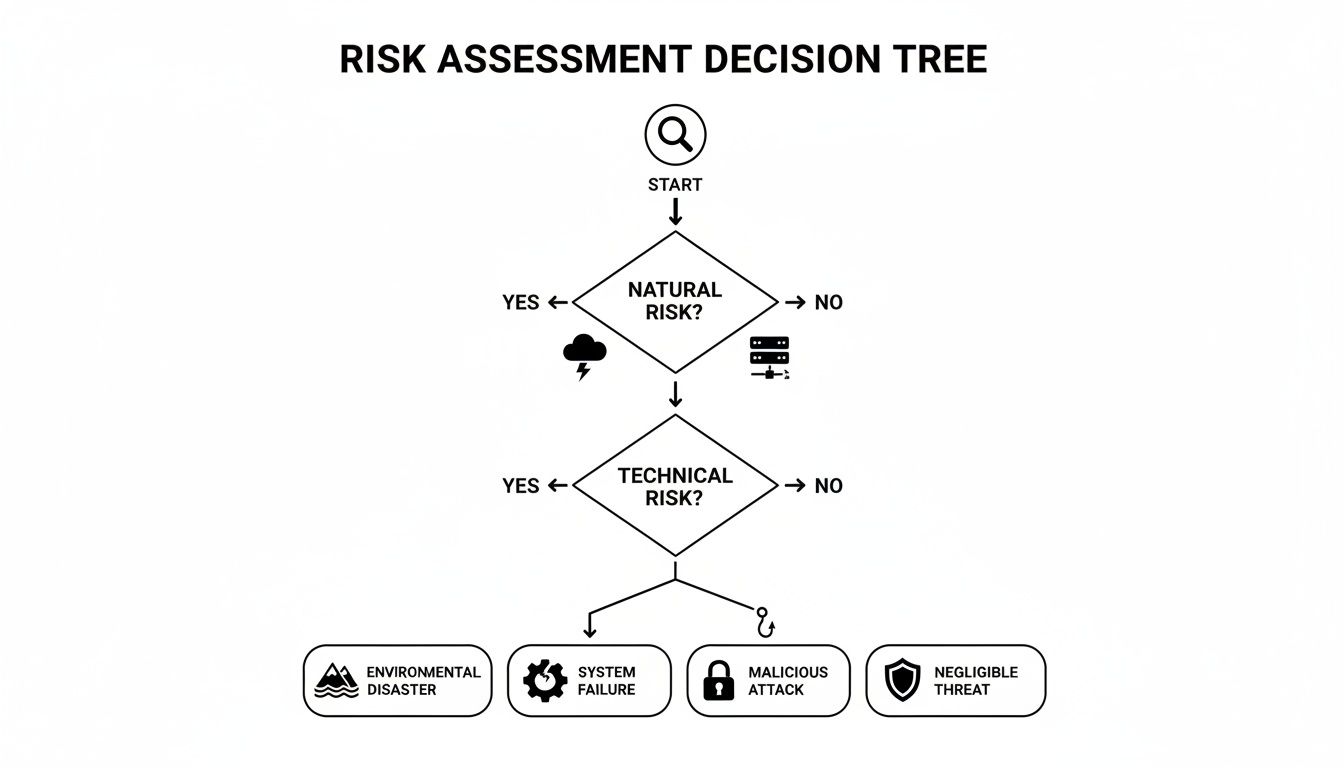
This kind of decision tree helps you sort threats into buckets—like natural disasters, tech failures, or human error—so you can apply the right recovery objectives to protect against each scenario.
Choosing the Right Backup Strategy
Once you have your RTO and RPO goals nailed down, you can finally choose a backup strategy that actually meets them. One of the most trusted and effective models for any business is the 3-2-1 rule.
The concept is simple but incredibly powerful:
- Keep at least three total copies of your data.
- Store your copies on two different types of media (e.g., a hard drive and the cloud).
- Keep one of those copies off-site.
This layered approach is your best defense against almost anything. If a burst pipe floods your office and ruins your server and local backup drive, your off-site cloud copy is still safe and sound. If your cloud provider has a temporary outage, you can still restore files from your local backup. It’s all about eliminating single points of failure.
- Actionable Insight: For your local copy, use a Network Attached Storage (NAS) device. For your off-site copy, subscribe to a business-grade cloud backup service like Backblaze for Business or a managed service. This is a perfect, real-world implementation of the 3-2-1 rule.
For a deeper look into picking the perfect service for that off-site copy, check out our guide on cloud backup solutions for small businesses.
Comparing Backup and Recovery Solutions for Small Businesses
Small businesses today have access to a ton of great options, from simple local drives to sophisticated cloud services. To help you decide what's right for your RTO/RPO goals and budget, we've put together this quick comparison table.
| Solution Type | Typical Cost | Recovery Speed (RTO) | Data Loss Tolerance (RPO) | Best For |
|---|---|---|---|---|
| Local Storage (NAS/External HDD) | $ – $$ | Fast (Hours) | Moderate (Hours to 1 day) | Quick, on-site file recovery and as one part of a 3-2-1 strategy. |
| Cloud Backup | $$ | Moderate (Hours to Days) | Low (Minutes to Hours) | Securing an essential off-site copy and protecting against local disasters. |
| Disaster Recovery as a Service (DRaaS) | $$$ | Very Fast (Minutes) | Very Low (Seconds to Minutes) | Businesses that need near-zero downtime for critical applications. |
As you can see, a solution like DRaaS offers the best performance, but it comes at a higher cost. A simple local drive is cheap, but it won't help you if your office is inaccessible. For most small businesses, a hybrid approach using local storage and cloud backup hits the perfect balance of cost and protection.
Assembling Your Incident Response Team and Comms Plan

Let's be honest. A perfect recovery strategy on paper is completely useless if nobody knows what to do when things actually go sideways. It’s the human element that's so often missed in a disaster recovery plan for small business, and that’s where things really fall apart.
When your systems are down, you need clear roles and a solid communication plan to turn chaos into a coordinated response. Forget the technology for a second; a confused, panicked team will only make a bad situation worse. This is where you build the command structure that guides your business through the storm.
Building Your Incident Response Team
During an emergency, ambiguity is the enemy. You need a small, designated incident response team, and every single person on it must know their exact job. In a small business, we all wear multiple hats, but during a crisis, roles have to be crystal-clear.
Think about a real-world scenario: a sudden power outage takes down your main office and a satellite location at the same time. Here’s how a defined team stops a complete meltdown from happening.
- Incident Lead: This is your decision-maker. They have the final say to declare an official disaster, kick off the recovery plan, and coordinate the entire response. This is typically the business owner or a senior manager.
- IT Lead: Your technical point person. They are completely focused on restoring systems, figuring out the technical damage, and talking with any outside partners, like your managed service provider. If you use an MSP, it's critical they know who this person is. For more on that, you can learn more about choosing a managed service provider in our detailed guide.
- Communications Lead: This role is all about controlling the story. They manage all internal updates to your staff and all external messages to clients, vendors, and the public. This person protects your reputation while the IT Lead protects your data.
- Operations Lead: This individual is laser-focused on keeping the business running. They figure out the workarounds—like switching to manual processes or telling employees to head to a backup work location.
In that power outage example, the Incident Lead would immediately tell the IT Lead to assess both sites. At the same time, the Communications Lead would fire off a pre-written text to all staff, while the Operations Lead gets the "power outage" playbook started. You get immediate, parallel action instead of a panicked free-for-all.
Crafting a Communication Plan That Works When Nothing Else Does
What happens when your main systems fail? Your usual communication tools, like email and office phones, probably fail right along with them. Your plan has to account for this with backup methods that are ready to go.
A solid communications plan isn't complicated. It just clearly defines who you need to talk to, what you need to tell them, and how you’re going to get the message out.
A crisis communication plan isn't about having all the answers. It's about controlling the flow of information, managing expectations, and showing your customers and team that you are in control even when your systems are not.
Your plan needs separate strategies for three different audiences:
1. Employees
Your own team has to be the first priority. Use a channel that doesn't depend on your internal network. A simple group text or a dedicated WhatsApp group is perfect for this. Send an initial alert right away, then follow it up with regular, scheduled updates—even if the update is just, "No new information to share yet."
- Actionable Insight: Create a shared, password-protected document in Google Drive or Dropbox with the cell phone numbers of all employees. Ensure at least two people have access to it from their personal devices.
2. Customers and Clients
Transparency is what builds trust in these moments. Have pre-written message templates ready to post on your website, social media, and a mass email list. Acknowledge the problem, state that you're actively working on it, and give them a timeframe for your next update.
- Actionable Insight: Draft a template now: "Our systems are currently experiencing an unexpected outage. Our team is working to restore service as quickly as possible. We will post another update here by [TIME]. We apologize for the inconvenience."
3. Key Vendors and Partners
Your supply chain and service providers need to be kept in the loop. Keep a separate, easy-to-access contact list with after-hours numbers for critical partners like your internet provider, key suppliers, and your bank. One quick call can be the difference between a small hiccup and a massive operational failure.
How to Test and Maintain Your Recovery Plan
Getting your disaster recovery plan written down feels like crossing a major finish line. But here's the honest truth from someone who's seen it all: the real work begins after you save that document.
A plan gathering digital dust on a server is just as useless as having no plan at all. To make sure it actually works when a crisis hits, you have to treat it like a living, breathing part of your business that needs regular check-ups.
This isn’t about just checking a box for compliance. It's about building muscle memory for your team and finding the weak spots before a real disaster does it for you. The statistics on this are brutal. A shocking 93% of companies that suffer major data loss without a recovery plan are out of business within a year. Think about that. It’s a sobering reality, especially when the average cost of a data breach can completely derail a small business. You can see more eye-opening disaster recovery statistics on Wifitalents.com to get the full picture.
Practical Ways to Test Your Disaster Recovery Plan
Now, "testing" doesn't have to mean shutting down your entire operation for a day. You can use several practical, low-impact methods to see if your plan holds water and get your team ready. The key is to start small and work your way up to more intense drills.
Here are a few testing methods we see work best:
- Plan Review: This is your ground zero. The response team simply reads through the plan from start to finish. You’d be amazed how many outdated contacts, wrong instructions, or missing steps you'll find just by doing a thorough read-through.
- Tabletop Exercise: Get your key people in a room and walk through a "what if" scenario. For example: "It's 9 AM on Monday. Ransomware has encrypted our main file server. Our IT Lead is on vacation. What's the first phone call we make? Who contacts the clients?" Each person talks through their specific actions based on the plan. It's a fantastic, low-stress way to spot gaps in logic and communication.
- Restore Test: This one is non-negotiable. You have to regularly test your backups by actually restoring something—a file, a folder, a small database—to a safe, non-production environment. This is the only way to prove your backups are not just running, but are actually usable.
- Actionable Insight: Schedule a "File Recovery Friday" once a month. Pick a random, non-critical file that was backed up the previous night and restore it. Time how long it takes. This simple, 15-minute exercise confirms your backups work.
The goal of testing isn't to pass or fail; it's to learn. Every gap you find in a drill is a potential catastrophe you've just prevented in a real disaster.
The technical side of your restoration goals plays a big role here. Understanding concepts like your disaster recovery time objective is crucial because it directly shapes how you test and what you're aiming for.
Creating a Maintenance and Update Schedule
Your business is always changing—new hires, new software, different vendors. If your disaster recovery plan doesn't change with it, it quickly becomes obsolete.
You need to set a firm schedule for keeping it current. A simple and effective approach is to have two different review cycles.
Quarterly Reviews
Every three months, your incident response leader should do a quick check-in for minor but critical updates.
- Update the master contact list for all employees, vendors, and key partners.
- Make sure any new critical software (like a new accounting tool or CRM) has been added to the backup list.
- Confirm login credentials for backup systems and cloud services are still active and correct.
Annual Overhaul
Once a year, it's time for a deep dive. This is when you should run a more comprehensive test, like a full restore or a bigger tabletop exercise involving more people. This is also the perfect time to look at your risk analysis again. For example, if your team has shifted heavily to remote work using Microsoft 365, your plan has to account for new risks tied to cloud platforms and home networks.
By making testing and maintenance a regular part of how you operate, you turn your disaster recovery plan from a simple document into a powerful tool for business resilience.
Answering Your Top Disaster Recovery Questions
Even with a solid guide, it's natural to have questions when you're staring down the task of creating a disaster recovery plan. Let's tackle some of the most common ones we hear from small business owners just like you.
How Much Does a Disaster Recovery Plan Cost?
This is the first question on everyone's mind, and the answer is more flexible than you might think. A DR plan isn't a one-size-fits-all product with a single price tag; it's an investment that scales with your business's specific needs.
For a very basic setup, you could be looking at just a few hundred dollars a year. This would typically cover simple documentation and a reliable cloud backup subscription, which is often enough to get a small operation started. A practical example is paying ~$100/year for a service like Backblaze B2 to store a nightly backup of your critical files.
If your business can't afford to be down for long, a more robust solution like Disaster Recovery as a Service (DRaaS) is a smart move. These plans usually run between $500 and $2,000 per month. Before that number gives you sticker shock, compare it to the staggering cost of downtime—which can easily hit thousands of dollars per hour.
A good rule of thumb is to dedicate 2-5% of your annual IT budget to disaster recovery and business continuity. This small percentage provides an immense return on investment by safeguarding your entire operation.
Think of it as an insurance premium. You're paying a manageable amount to ensure your business doesn't become one of the 75% of SMBs that admit they couldn't survive a major data disaster.
My Business Is Very Small. Do I Really Need a Formal Plan?
Yes, absolutely. In our experience, the smallest businesses are often the most vulnerable because one single event can completely wipe out their limited resources.
"Formal" doesn't have to mean a hundred-page legal document. For a sole proprietor or a company with a handful of employees, a formal plan might just be a straightforward 10-page guide.
What's important is that it clearly answers these questions:
- What is our critical data? (Think QuickBooks files, client lists).
- Where is it backed up and how often? (e.g., daily to a secure cloud service).
- Who is in charge of getting us back online?
- How will we talk to our customers if we have an outage?
Cyberattacks, hardware failures, and natural disasters don’t care how big your company is. A simple, practical disaster recovery plan for a small business is often the only thing standing between a minor hiccup and having to close your doors for good.
What Is the Single Most Important First Step to Take?
If you do only one thing today, make it this: identify your mission-critical data and ensure it is being backed up automatically and securely off-site. Everything else you do builds on this foundation. If you don't have safe data, you have nothing to recover.
Start by making a list of the information you absolutely cannot operate without. For most businesses, this includes:
- Client Records: Your customer list, contact details, and service history.
- Financial Data: Accounting files, payroll information, and transaction records.
- Operational Files: Project plans, contracts, and any proprietary information.
- Actionable Insight: Open your main file server or shared drive. Sort folders by "Date Modified." The folders your team uses most frequently are almost certainly your most critical data. Start there.
Once you know what's critical, your immediate next step is setting up an automated backup system that follows the industry-standard 3-2-1 rule.
This is a simple but powerful concept:
- Keep three total copies of your data.
- Store them on two different types of media (like an external hard drive and the cloud).
- Make sure at least one copy is stored completely off-site.
That off-site cloud backup is your ultimate safety net against a local disaster like a fire, flood, or office break-in. Once you know your data is secure, you have the breathing room to build out the rest of your plan.
Navigating the complexities of creating a robust disaster recovery plan can be challenging, but you don't have to do it alone. Cyberplex Technologies LLC has been helping small and midsize businesses in North Carolina protect their operations since 2008 with customized IT solutions. To ensure your business is resilient against any disruption, explore our business continuity and disaster recovery services.


