
If you're running a business in Henderson, there's a good chance your technology only gets attention when something breaks. The server freezes during month-end closing. Email slows to a crawl the same morning a client needs a signed document. A backup drive sits in the office, and nobody feels completely sure it would help if the building lost power after a storm.
That kind of setup creates a bad rhythm for a small business. You don't plan technology around growth. You plan around the next emergency, the next repair bill, and the next day of downtime your team can't afford.
For many local companies, that's the fundamental starting point for understanding cloud computing benefits for small business. It isn't about chasing a trend. It's about replacing fragile, expensive, office-bound systems with something more flexible, easier to manage, and far more forgiving when real life interrupts operations.
Is Your Old Tech Holding Your Business Back
A familiar pattern shows up in small offices across the Henderson area. A business buys a server years ago because that seemed like the responsible move. It handles file storage, maybe email, maybe line-of-business software. At first, it works fine.
Then the hidden costs start showing up.
The hardware ages. Software updates get delayed because nobody wants to risk breaking something in the middle of a busy week. Remote access feels clunky. If an employee works from home or from the field, they often need odd workarounds just to get to the files they need. When something fails, the whole office feels it immediately.
The real cost isn't just the repair
Most owners focus on the visible expense first. That's understandable. An emergency service call hurts. Replacing aging hardware hurts more.
The bigger cost is usually operational:
- Interrupted work: Your staff can't process invoices, answer customer requests, or update records.
- Constant uncertainty: Nobody is fully confident that backups are current and recoverable.
- Security gaps: Older systems often rely on outdated habits, shared passwords, and inconsistent patching.
- Limited flexibility: Teams in the office, on the road, or at home don't work from the same clean system.
A property manager feels this when leasing documents live on one office machine. A law office feels it when attorneys need secure access outside the office. A manufacturer feels it when production, purchasing, and accounting all depend on one aging system nobody wants to touch.
Old technology rarely fails at a convenient time. It usually fails when your team is busiest and least able to stop.
Why small businesses start looking at the cloud
Cloud computing changes the model. Instead of piling responsibility onto equipment sitting in your office, you move critical functions into professionally managed platforms that are designed for availability, backup, and secure access.
That doesn't make every problem disappear. It does move your business away from a reactive cycle. You stop treating technology like a machine you hope survives another year. You start treating it like a service built to support how your business operates.
What Is Cloud Computing Really
The simplest way to explain cloud computing is this.
Traditional IT is like owning a building. You buy it, maintain it, secure it, repair it, expand it, and worry about every leak, lock, and utility bill yourself. If your business outgrows the space, expansion is expensive and slow. If you need less space, you're still paying for the whole thing.
Cloud computing is more like leasing space in a modern office building. The building owner handles the core infrastructure. You use what you need, pay for what you use, and adjust as your business changes.
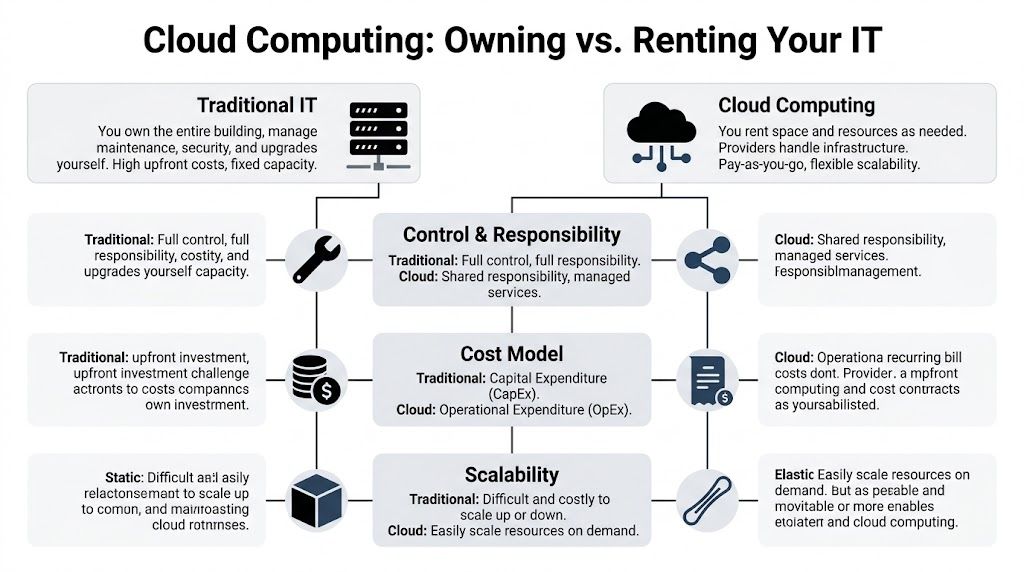
What that means in plain English
If your files live in Microsoft 365 instead of on a single office server, your team can reach them securely from the office, home, or a client site. If your backups are stored in the cloud, a broken piece of office hardware doesn't automatically become a business crisis. If your phone system or line-of-business application is cloud-hosted, you're less tied to one physical location.
For many owners, the most useful way to think about the cloud is this:
| Model | What you're responsible for |
|---|---|
| Traditional on-premise IT | Nearly everything, including hardware, upkeep, upgrades, and local resilience |
| Cloud services | Your users, your data practices, your business process decisions, and the parts of security that stay on your side |
That shared-responsibility mindset matters. The cloud doesn't mean "set it and forget it." It means you stop carrying the full infrastructure burden alone.
The three cloud service types most businesses encounter
You'll often hear three terms.
- SaaS: Software as a Service. This is the most common for small businesses. Think Microsoft 365, cloud email, document sharing, and web-based business apps.
- IaaS: Infrastructure as a Service. This is closer to renting servers, storage, and networking in the cloud instead of keeping those systems in your office.
- PaaS: Platform as a Service. This is more relevant when a business needs a platform for building or running custom applications without managing all the underlying infrastructure.
A non-technical owner doesn't need to memorize the acronyms. The practical question is simpler. Are you buying and maintaining technology assets yourself, or are you using a managed service model that gives you flexibility?
For a deeper plain-language explanation of hosted storage and file access, Cyberplex has a useful guide on what cloud storage is and how it works.
Practical rule: If your current system only works well when everyone is in the office and nothing breaks, you're probably carrying more infrastructure responsibility than you need to.
Why this model appeals to small businesses
Most small businesses don't want an in-house server room. They want dependable email, secure files, working backups, easier collaboration, and fewer surprise failures.
That's where the cloud earns its place. It shifts technology from fixed ownership to usable service. For a Henderson business owner, that often means fewer hardware decisions, less downtime pressure, and a setup that fits remote work, field work, and normal day-to-day operations much better than old office-bound systems.
The Five Core Cloud Benefits for Small Businesses
For a small business in Henderson, the cloud earns its keep in five practical ways. It usually makes costs more predictable, gives the business room to grow without another hardware purchase, improves security, keeps work going during outages or storms, and cuts down on the daily confusion that comes from scattered files and disconnected systems.

Lower costs and fewer surprise expenses
The first benefit many owners notice is financial. Cloud services shift technology spending away from large, occasional purchases and toward monthly operating costs that are easier to budget.
That does not mean every cloud bill is automatically lower. Poorly planned subscriptions, unused licenses, and too many overlapping apps can waste money fast. But for many small businesses, the cloud removes a familiar problem. A server fails, storage runs out, or an old workstation can no longer support the software the team depends on, and suddenly the business is facing an expense it did not plan for.
A Henderson owner usually sees the value right away. Paying a steady monthly amount for email, file access, backups, and security is often easier to manage than replacing office equipment in a rush.
Flexibility that fits real small business growth
Small businesses rarely grow in a straight line. A contractor adds crews for a busy season. A property manager takes on another building. A medical or legal office hires staff faster than expected. Old office systems tend to make each of those changes harder than they should be.
Cloud platforms make it easier to add users, adjust storage, and support another location without rebuilding everything behind the scenes. That matters because most small businesses in this area do not need enterprise-scale infrastructure. They need systems that can expand when business picks up, then settle back into a cost level that fits normal operations.
The practical benefit is simple. You stop buying technology for the busiest week of the year.
Security that is stronger than a back-office server and a hope
Security in the cloud still depends on good decisions. Weak passwords, broad permissions, missing multifactor authentication, and poor staff habits can create real risk whether your data is stored locally or in Microsoft 365.
Still, cloud platforms give small businesses access to protections that are hard to match with aging equipment in a supply closet. Account monitoring, encryption, login controls, patching, and centralized administration are all easier to manage in a well-configured cloud environment. For many Henderson businesses, that is a major improvement over a single office server that nobody has checked closely in months.
I tell owners the same thing often. The cloud is not magic. It is usually safer than the setup it replaces, but only when permissions, backups, and user access are configured with care.
Here's a short explanation that many owners find helpful:
Better continuity during storms, outages, and hardware failures
This point matters more in North Carolina than it does in plenty of other places. Hurricane season, power issues, and building access problems are part of doing business here. If your files, email, and line-of-business software all depend on equipment sitting in one office, one local event can stop the whole company.
Cloud systems reduce that risk because your data and services are not tied to a single box in a single building. A team may still deal with internet outages or local disruption, but the business has better options for working from another location, using mobile access, or restoring operations faster. Pairing cloud services with a cloud backup plan for small business continuity adds another layer of protection, especially for companies that cannot afford to lose records, schedules, or customer files.
For a Henderson business owner, this is not theory. If the office is closed after a storm, customers still expect answers.
| Situation | Traditional office-bound setup | Cloud-centered setup |
|---|---|---|
| Server hardware failure | Recovery depends on local equipment and recent backup quality | Core data and services are less tied to one device |
| Office inaccessible | Staff may lose access to key systems | Teams can often work from another location |
| Storm disruption | One location becomes a single point of failure | Operations are more geographically resilient |
Better teamwork with fewer file and version problems
A lot of owners describe this as a productivity issue, but it usually starts as a file issue. Staff save documents to desktops, email attachments back and forth, and keep separate copies because nobody trusts the shared drive. Over time, that creates delays, duplicate work, and mistakes.
Cloud-based collaboration tools clean that up. Teams can work from the same current files, access documents from the office or the field, and set permissions with more control. An accounting team can review one workbook instead of passing around three versions. A property management office can update records from a tablet at the property instead of waiting to get back to the desk. A law office can keep case documents organized without tying everything to one machine in one room.
The gain is not flashy. It is fewer interruptions, fewer "wrong version" problems, and less time spent chasing information.
The trade-off owners should understand
Cloud adoption works best when the business fixes process problems along with the technology. If file sprawl, unclear permissions, and inconsistent workflows move into the new system untouched, those problems stay with you.
The cloud gives small businesses better tools. It does not remove the need for planning, cleanup, and clear rules about who can access what. That is why the best results usually come from treating cloud migration as an operational upgrade, not just an IT purchase.
Cloud Computing in Action for NC Businesses
A Henderson business does not need a giant IT budget to see real value from the cloud. It needs systems that keep working during a summer storm, let staff get to the right information without driving back to the office, and reduce the risk tied to one aging server in a back room.
That plays out differently across industries, but the pattern is familiar. Older, office-bound systems slow people down at the worst times.
A law office that cannot afford delays
A small legal office in the Henderson area may have attorneys in court, paralegals in the office, and clients waiting on signed documents. If case files live on one local server or a single workstation, access gets harder the minute someone is out of the building or the hardware acts up.
Cloud-based document management and email give the practice a steadier setup. Staff can pull the same current file, apply cleaner permission controls, and keep work moving even if one machine fails. For firms handling sensitive information, the bigger advantage is tighter access control and less dependence on one room in one building.
That matters during hurricane season, too. If the office loses power or has to close for a day, client communication and document access do not have to stop with it.
A property management team that works across town all day
Property management companies around Vance County rarely operate from one desk for long. Leasing, inspections, maintenance follow-up, vendor coordination, and tenant communication happen in apartments, parking lots, and office spaces across the area.
A cloud-based workflow helps field staff update records while they are on site instead of scribbling notes and entering everything hours later. Office staff sees the same updates sooner. Owners get fewer missed details, fewer status-check phone calls, and a clearer picture of what has been handled.

Backup matters just as much as day-to-day access. If tenant files, maintenance records, or accounting data are only protected inside the office, one serious outage can create a long week. Cyberplex explains that in more detail in this guide to cloud backup for small business.
Public-facing organizations that need continuity
Local agencies, public safety departments, and community organizations face a different kind of pressure. Staff may need current records, email, and internal communication during weather disruptions or building issues. A cloud-hosted system reduces the chance that one office problem turns into a service problem for the public.
The same principle applies to small manufacturers, medical practices, and financial offices in the Henderson area. If production schedules, client records, or internal communication depend on one piece of local hardware, the business carries more risk than it needs to.
Small retail and food businesses benefit too
Even a small shop, restaurant, or service counter can gain from cloud tools. Scheduling, invoices, email, shared files, and vendor communication run more reliably when they are not tied to one old back-office computer.
I have seen owners put off this kind of upgrade because they assume cloud computing is only for larger companies. In practice, smaller businesses often feel the benefit faster because one hardware failure hits them harder. A better setup can mean the difference between losing a day of work and staying open.
Planning Your Cloud Migration and Avoiding Pitfalls
Moving to the cloud shouldn't feel like jumping off a dock and hoping you can swim. The businesses that get good results usually treat migration as a business decision first and a technical project second.

Start with business needs, not products
Before anyone talks about platforms, list what your business needs from the move.
- Access goals: Who needs to work from the office, from home, or from the field?
- Application priorities: Which systems are mission-critical, and which ones can stay as they are for now?
- Security requirements: What data needs tighter access control, retention rules, or audit visibility?
- Continuity expectations: If the office loses power or internet, what work must continue?
This early step prevents a common mistake. Owners sometimes buy cloud tools before deciding what problem they're solving.
Audit what you have before moving anything
Not every server, folder, or application deserves a direct move into the cloud. A lot of older environments contain stale files, duplicate user accounts, bloated permissions, and software nobody has reviewed in years.
A practical pre-migration review should look at:
| Area | Questions to ask |
|---|---|
| Files and data | What must be kept, archived, cleaned up, or reorganized? |
| Applications | Which ones are cloud-ready, and which depend on local hardware? |
| Users and access | Who needs what access, and where are permissions too broad? |
| Devices | Are staff computers ready for modern cloud workflows? |
A bad migration often starts with a lazy assumption: if it's on the old server, it belongs in the new environment. That's rarely true.
Key takeaway: Don't pay to relocate clutter. Clean it up before you move it.
Avoid the most common migration mistakes
Some cloud projects disappoint for predictable reasons.
- Lift-and-shift without redesign: Moving an old mess into a new platform doesn't modernize anything.
- Ignoring staff workflows: If your team doesn't understand the new system, they'll create workarounds that weaken security and productivity.
- Picking tools by brand alone: The right choice depends on how your business works, not what name sounds familiar.
- Underestimating internet dependence: Reliable connectivity planning matters more once core systems are cloud-based.
- Skipping testing: Backup restores, permissions, and line-of-business access should be tested before the old environment is retired.
Training matters more than many owners expect. Even a good migration can feel rough if people don't know how to find files, share documents properly, or use multi-device access safely.
A structured migration process helps reduce those risks. For a practical overview, see cloud migration for small business.
The right pace is usually phased, not rushed
Most small businesses don't need a dramatic all-at-once switch. A phased approach often works better. Email and collaboration tools may move first. Backups and file systems may come next. Some line-of-business applications may stay hybrid for a while if that serves the business better.
That approach gives owners room to validate each step, train staff, and fix issues before they spread. It also keeps the cloud from becoming another rushed project that creates new confusion instead of reducing it.
How Cyberplex Makes Your Cloud Journey Seamless
For most small business owners, the hardest part of cloud adoption isn't understanding the concept. It's turning that concept into a stable, secure environment without disrupting the business.
A local partner helps most when they can translate business needs into a workable plan. That usually starts with assessing your current systems, identifying what should move, deciding what should stay, and mapping out how your team will use the new environment day to day.
Practical support at the stages that matter
A good cloud rollout needs several things to happen in the right order.
- Roadmap first: Your business needs a migration plan tied to operations, not a generic checklist.
- Implementation support: Email, files, user accounts, permissions, and devices all need to line up correctly.
- Security configuration: Access control, account protection, backup strategy, and monitoring can't be afterthoughts.
- Ongoing management: Cloud systems still need oversight, updates, support, and periodic tuning.
Cyberplex works in that operating model for North Carolina organizations that need managed IT, Microsoft 365 support, cloud integration, backup planning, and ongoing monitoring. That matters for Henderson-area businesses because local context changes the advice. A property manager, accounting office, law firm, or public-facing agency doesn't all need the same setup.
Why local context matters
A small business in this area often faces a mix of office work, remote access, field activity, and weather-related disruption risk. That combination changes cloud planning.
A migration isn't successful just because data moved somewhere else. It's successful when:
| Good outcome | What it looks like |
|---|---|
| Less downtime pressure | Your staff can keep working when local hardware has a problem |
| Cleaner access | Users get the files and apps they need without broad, messy permissions |
| Better support experience | Staff know where to go when something isn't working |
| Ongoing resilience | Backups, monitoring, and maintenance continue after go-live |
What owners usually value most
Most business owners don't want to become cloud specialists. They want someone to handle the technical details while they stay focused on customers, staff, compliance, and cash flow.
That means the best support is rarely flashy. It's methodical. It shows up in proactive monitoring, live support, sensible permissions, tested backups, and a migration that doesn't create chaos on Monday morning.
The cloud should reduce operational stress. If a migration creates permanent confusion, the planning was wrong.
Your Next Step Toward a Modern Business
Old on-premise systems often keep a business stuck in a reactive mode. You wait for the next outage, the next upgrade bill, or the next scramble to recover a file. Cloud computing offers a different path. It gives small businesses a way to operate with more flexibility, better continuity, cleaner collaboration, and less dependence on fragile office hardware.
For Henderson-area companies, that shift is especially practical. Weather disruptions, remote work needs, compliance concerns, and limited internal IT capacity all make cloud planning worth serious attention.
If your current setup feels harder to maintain each year, it's probably time to look at a better model. The next step is simple. Talk through your systems, your risks, and your goals with someone who can help you decide what should move, what should stay, and how to do it without disrupting the business.
Frequently Asked Questions About Cloud Computing
Do I still own my data if it's in the cloud
In normal business cloud arrangements, yes, your business still owns its data. What changes is where the data is stored and how it's accessed. The important part is making sure your service agreement, account controls, user permissions, and backup plan are clear before migration begins.
What happens if our internet goes down
This is a fair concern. Cloud systems depend more on internet access than old office-only setups. The answer is planning, not denial.
Many businesses use a mix of redundant connectivity, mobile hotspot failover, and applications with offline capabilities for certain tasks. The right answer depends on how costly downtime is for your specific business functions.
Is the cloud really secure enough for sensitive data
For many small businesses, a properly configured cloud environment is safer than an aging server in a back office closet. The reason isn't magic. It's the combination of professionally managed infrastructure, stronger access controls, and more disciplined maintenance.
That said, cloud security still depends on user practices. Weak passwords, poor permissions, and careless sharing can still create risk.
Do we have to move everything at once
No. In fact, many small businesses shouldn't. A phased migration is often safer and easier to manage. Email and collaboration may move first, then files, then other applications as the business confirms what works best.
That approach usually gives staff time to adjust and reduces the chance of avoidable disruption.
If you're ready to discuss a practical cloud plan for your Henderson-area business, contact Cyberplex Technologies LLC for a no-obligation conversation about your current setup, your risks, and the next smartest step.


