
When your systems are down, you know every single minute is costing you money. For a small business in our area, a search for "business it support near me" isn't just about finding help—it's about finding an immediate fix to a problem that's draining your bottom line. This guide is your roadmap to finding a tech partner right here in Henderson who gets what our local businesses are up against, from financial compliance rules to supporting a team that works from home.
Why Local IT Support Is a Game Changer for Henderson Businesses

When your tech decides to take a day off, the real cost is so much more than a broken piece of hardware. Think about it. For a Henderson accounting firm in the middle of tax season, a server crash means lost billable hours and, even worse, a loss of client trust. For a local manufacturer, it’s a production line that’s dead in the water. This is exactly where having a local IT partner proves its worth.
An anonymous national helpdesk just can't compete. A local provider has a serious strategic edge because they understand the day-to-day realities and specific compliance headaches of our community’s businesses, whether you’re in finance or public safety.
The True Cost of Downtime
System downtime is a quiet but deadly threat to small and midsize businesses. The financial hit can be absolutely staggering. On average, server downtime can cost an SMB $301,000 per hour. A few prolonged outages can easily wipe out millions in a single year. By getting ahead of it with proactive managed IT, you can slash that risk by 40-60%, turning a huge liability into a predictable operational expense. You can dig into more data on these high costs and how businesses are fighting back over at CRN.com.
For Henderson businesses where things like compliance and system availability aren't optional, that risk is even bigger. A local partner isn't just there to fix things when they break; they’re building you a rock-solid technology foundation to stop problems from ever happening.
The real benefit of local IT support is switching from a reactive, break-fix model to a proactive, strategic partnership. It’s the difference between calling for help after a disaster and having a team working around the clock to make sure that disaster never strikes.
Practical Advantages of a Local Partner
Choosing a local team like Cyberplex Technologies gives you real, tangible benefits that directly impact your operations and give you some much-needed peace of mind.
- Faster On-Site Response: When a server or critical network switch fails, remote support can only do so much. A local technician can be at your office—fast—to get you back up and running with minimal disruption. For example, if your point-of-sale system goes down during a busy lunch rush, a local tech can be there in under an hour to replace faulty hardware.
- Community Accountability: Local providers build their entire reputation on the service they provide right here in our community. We're accountable to you not just as a client, but as a neighbor. Our reputation depends on your success.
- Deeper Understanding of Local Needs: A Henderson-based partner knows the local business scene inside and out. We’re familiar with everything from the quirks of local internet providers to the specific industry rules that affect businesses in our area, like navigating HIPAA for a local clinic.
At the end of the day, searching for business IT support near me is about more than just convenience. It’s a strategic move to invest in a partner who is physically and financially invested in your success, protecting your business and helping it grow.
What IT Services Does Your Business Actually Need?
When you start looking for business IT support near me, the tech-speak can feel overwhelming. Managed services, business continuity, cloud integration—it’s easy to get lost in a sea of jargon. Let's cut through that noise and talk about what these services really mean for your business here in Henderson.
Instead of just giving you a laundry list of tech terms, we'll connect them to real-world scenarios you might face. This way, you can look past the price tag and focus on the actual value a service brings to your operations. Getting this right is the key to building a tech strategy that doesn't just fix things but helps you grow.
Managed IT Services: Your Proactive Watchtower
Think of Managed IT Services as having a dedicated tech team on watch 24/7, but for a fraction of what it costs to hire an in-house department. It’s all about shifting from a reactive "break-fix" model to a proactive one, where we prevent problems from happening in the first place.
For a local Henderson manufacturer, this means we're monitoring server health to stop a system crash before it halts the production line. It's about getting an alert that a server's memory usage is spiking, allowing us to fix it before it dies, not scrambling to recover lost data after the fact. This covers everything from regular software updates and security patches to constant network monitoring, making sure your tech foundation is always solid.
Managed services create predictability. You get a predictable monthly cost, predictable performance, and a predictable response when you need help. It eliminates the chaos and high costs of surprise IT disasters.
Cybersecurity: Defending Your Digital Doors
Cybersecurity isn't just a "big city" problem anymore; it's a fundamental need for every business, big or small. The threats are very real, and criminals are increasingly targeting smaller companies they see as easy targets.
The stakes are high. One analysis projects that 60% of SMBs could suffer a breach in 2026, with the average incident costing anywhere from $25,000 to $50,000. We've seen a 300% jump in cyber incidents hitting financial services and the public sector in the U.S. since 2008, pushing 78% of SMBs to seek outsourced support. For Henderson businesses using common tools like Microsoft 365, we can slash these risks by up to 70% with customized system hardening. You can see the full analysis on nmsconsulting.com for more on how the market is responding.
A solid security strategy from us isn’t just about antivirus software. It includes:
- Firewall Management: Actively managing the gateway to your network to block intruders. An example is configuring rules to block traffic from known malicious countries, stopping threats before they reach your server.
- Email Security: Filtering out phishing scams and malicious attachments before they can fool your team. This means that fake "urgent invoice" email with a virus attached never even reaches your inbox.
- Endpoint Protection: Securing every single device that connects to your network, from desktops to employee smartphones.
- Employee Training: Turning your team from a potential vulnerability into your first line of defense by teaching them how to spot and avoid threats, like recognizing a phishing email by checking the sender's address.
For a Henderson law firm, this means protecting sensitive client files from a ransomware attack. For a local financial advisor, it means safeguarding investment data to meet strict compliance rules.
Matching IT Services to Your Henderson Business Needs
To make it even clearer, this table connects common local business challenges with the right IT solutions. It’s a quick way to see how investing in the right services delivers real-world value.
| Business Type (Henderson, NC) | Common Challenge | Essential IT Service | Example Benefit |
|---|---|---|---|
| Local Manufacturing Plant | Production line downtime from server failure | Managed IT Services | Proactive monitoring prevents equipment failure, ensuring continuous operation and protecting revenue. |
| Law Firm or Accounting Office | Protecting sensitive client data from cyberattacks | Cybersecurity Services | Advanced threat protection and email filtering prevent ransomware attacks and data breaches. |
| Property Management Company | Losing access to tenant systems during a power outage | Business Continuity (BCDR) | A cloud-based failover system allows staff to work from anywhere, ensuring zero downtime. |
| Retail Store or Restaurant | Unreliable Wi-Fi and slow point-of-sale (POS) systems | Managed IT Services | Network optimization ensures fast, reliable transactions and a better customer experience. |
| Healthcare Clinic | Meeting HIPAA compliance and securing patient records | Cybersecurity & BCDR | Secure data backups and compliant systems protect patient data and avoid regulatory fines. |
Ultimately, choosing the right services is about matching technology to your specific operational needs and goals, ensuring every dollar you spend on IT is working for you.
Business Continuity: Staying Operational, No Matter What
What would you do if a storm knocked out power to your office for a full day? What if a server completely failed, taking your primary systems offline with it? Business Continuity and Disaster Recovery (BCDR) is the service that ensures your business keeps running through any disruption.
This goes way beyond just backing up your files. A solid BCDR plan involves creating a complete replica of your critical systems that we can bring online in minutes.
Here’s a practical example: A Henderson-based property management company relies on its software to handle tenant requests and dispatch maintenance. A major storm hits, causing a power outage at their main office. With a robust BCDR plan in place, their team can instantly switch to a cloud-based version of their system, log in from home, and keep operating without missing a single tenant call. This protects their revenue and, just as importantly, their reputation for being reliable.
Your Vetting Checklist for Local IT Providers
Choosing an IT provider is one of the most important decisions you'll make for your business. It goes far beyond just buying a service; you're bringing on a partner who will be responsible for your security, your team's productivity, and your bottom line.
When you're searching for business it support near me, you have to get past the sales pitch. It’s time to ask the tough, practical questions that truly reveal if a provider has your back.
This isn't a theoretical exercise. This is our real-world checklist to help you confidently evaluate potential IT partners here in the Henderson area. We want you to dig deep and find out if a company really has the experience and follow-through to support your business when it counts.
Assessing Technical Expertise and Certifications
First things first: you have to know if they have the right skills. A provider’s technical know-how is the absolute foundation of the partnership. But it's not enough for them to just know "tech"—they need to prove they understand the specific challenges and compliance rules in your industry.
Don't be afraid to put them on the spot. Here are the questions you need to be asking:
- Industry-Specific Experience: "Can you give me a few examples of how you've helped other businesses in our field, like [financial services, property management, etc.]?"
- Compliance Knowledge: "Our practice is a covered entity under HIPAA. How do you ensure our compliance, and can you walk me through how your security services are designed for that?"
- Team Certifications: "What certifications do your technicians hold? Are they current on key technologies we use, like network security, Microsoft 365, or specific firewalls?"
A confident, experienced provider will have these answers ready to go. If you get vague responses or they can't provide clear examples, that’s a major red flag. They should be able to draw a straight line from their technical skills to your business goals.
The goal isn't just to see a list of certifications. It's to find out if they've actually applied that knowledge in real-world scenarios just like yours. A certificate on a wall is one thing; successfully helping a client navigate a HIPAA audit is something else entirely.
Scrutinizing the Service Level Agreement
The Service Level Agreement (SLA) is where promises become legally binding. It's one of the most critical documents you'll sign, and it separates verbal assurances from contractual duties. An SLA that's vague or full of confusing language is a serious warning sign.
Your SLA needs to spell out key performance metrics in black and white. Get specific about these areas:
- Response vs. Resolution Time: This is a big one. Response time is just how fast they acknowledge a problem. Resolution time is how fast they fix it. You need to ask, "What is your guaranteed response and resolution time for a critical event, like our entire server going down?"
- Business Hours and After-Hours Support: "What are your standard support hours? And what happens if we have an emergency at 8 PM on a Friday—what does that process look like?"
- Severity Levels: A professional SLA will categorize issues (e.g., Critical, High, Medium, Low) and tie different response times to each. A server outage should get a much faster response than a single user having a printer issue.
A solid SLA creates clarity and holds your provider accountable. It’s your guarantee that when you need help most, they are obligated to deliver within a specific timeframe. If a provider seems hesitant to commit to firm numbers, you should be, too.
Evaluating Onboarding and Migration Processes
The thought of switching IT providers can be nerve-wracking. We get it. Concerns about downtime, lost data, or just general disruption are completely valid. A true professional will have a structured, transparent plan to make the entire process smooth and painless.
Ask them to walk you through their game plan, step-by-step:
- Discovery and Planning: "What information do you need from us before you begin? How do you map out our current network, users, and software?"
- Implementation Timeline: "Can you walk me through a typical timeline for a business our size? How do you roll out your tools without interrupting our workflow?"
- The Cutover Process: "How exactly do you handle the final switch? Do you schedule it after hours or on a weekend to guarantee zero business impact?"
- Post-Migration Support: "What does support look like in the first few weeks? Do you have a 'hyper-care' period to tackle any initial problems right away?"
A detailed, well-thought-out plan shows they respect your business operations. For a deeper dive into what makes a great IT partnership, our guide on how to choose a managed service provider has even more valuable insights.
Verifying Security and Disaster Recovery Protocols
In today’s world, a provider's approach to security and business continuity is non-negotiable. A single breach or major data loss event can be catastrophic. You need absolute certainty that their protocols are robust, tested, and ready.
Your questions should zero in on their proactive measures and proven readiness:
- Backup Strategy: "How often do you back up our systems? Where is that backup data stored, and is it encrypted both during transfer and while at rest?"
- Testing and Validation: "When was the last time you fully tested your backup and disaster recovery plan? Can you show us the report from that test?" This is absolutely critical—an untested backup is nothing more than a hope.
- Incident Response Plan: "If we do get hit with a security breach, what is your step-by-step incident response plan? Who is our main point of contact, and what are the first things you do?"
A top-tier partner won't just have these plans written down; they'll be able to prove they work. They should be able to discuss their security stack, monitoring tools, and their Recovery Time Objectives (RTOs) with complete confidence. This level of preparation is what separates a basic IT vendor from a true security partner.
Real-World Scenarios: Henderson Businesses Winning with Proactive IT
It's one thing to talk about what proactive IT support can do, but it's another thing entirely to see it in action. Let’s set aside the service lists and hypotheticals for a minute. What really matters are the tangible results for businesses right here in the Henderson area.
These aren't just made-up stories. They’re based on real-world examples of how local companies, a lot like yours, completely changed their game by finally finding the right IT partner. It’s about more than just fixing what's broken; it's about building a more stable, secure, and profitable business.
The Financial Firm That Dodged a Ransomware Bullet
We work with a mid-sized financial firm here in Henderson that handles a staggering amount of sensitive client data. As you can imagine, they are a massive target for cybercriminals. A single data breach would be catastrophic for their reputation and would land them in serious regulatory hot water.
Their IT partner didn't just install basic antivirus and call it a day. They put a multi-layered security strategy in place, including 24/7 network monitoring, advanced email filtering to catch phishing attempts, and—most importantly—regular security training for every single employee.
One afternoon, an employee got a very convincing email that almost tricked them into clicking a malicious link. But because of the training, their gut told them something was off. They reported it instead of clicking. The security team jumped on it, confirmed it was a new ransomware variant, and neutralized it instantly. That simple, proactive approach saved them from a disaster that could have easily cost hundreds of thousands in fines and damages.
A proactive security posture turns your biggest vulnerability—your team—into your strongest line of defense. It’s not about if a threat will come, but being fully prepared for when it does.
The Property Manager Who Never Missed a Call
For a growing Henderson property management company, communication is the lifeblood of their business. They’re juggling dozens of properties, and a missed call from a tenant or a maintenance crew can quickly spiral into a major problem and a damaged relationship. Their old, clunky phone system kept their team chained to their desks and was notoriously unreliable.
This is a perfect example of what happens when a business invests in modernizing its tech. The managed services market is exploding—projected to hit USD 437.26 billion by 2026—because small and mid-sized businesses are seeing massive efficiency gains by outsourcing. We're talking about slashing downtime by up to 50% with proactive, 24/7 monitoring. This property manager's shift to a modern VoIP system and cloud-based software is a textbook case.
Now, their team can take calls from anywhere—the office, their home, or even on the road—right from their laptops or smartphones. When a big storm rolled through and knocked out power to their office building, it was business as usual. They didn't miss a single call from a tenant. That’s how you build a reputation for reliability.
This is exactly why having a solid vetting process for your IT partner is so critical. You need someone who can deliver these kinds of results.
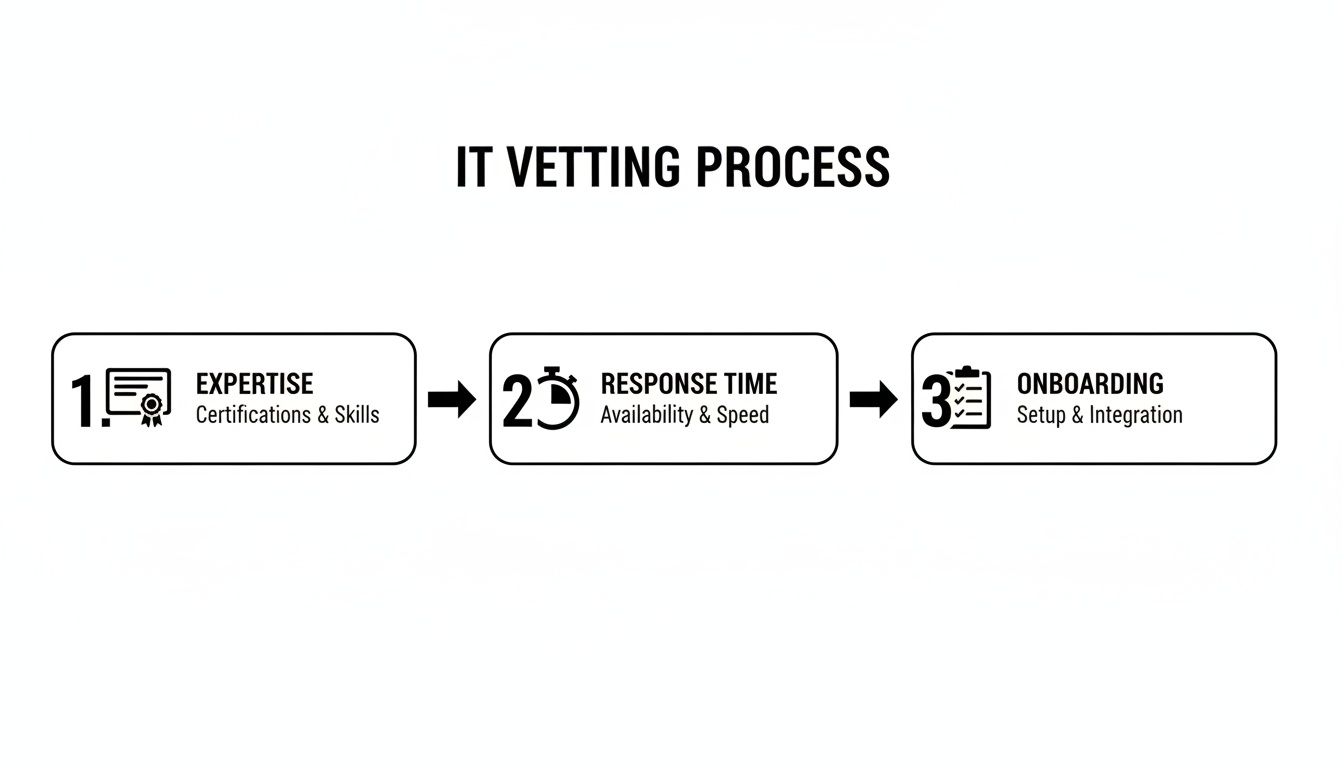
The takeaway here is that a great IT provider isn't just measured by their technical skills, but by how reliably and smoothly they can make those skills work for your business.
The Public Safety Agency That Guaranteed Uptime
Think about a local public safety agency in the Henderson area. They operate 24/7, and for them, downtime isn't just an inconvenience—it's a genuine public safety risk. The critical systems they use for dispatch and records have to be available 100% of the time. No excuses.
Their IT partner built a rock-solid business continuity and disaster recovery (BCDR) plan. This went way beyond just backing up some files. It was a comprehensive strategy that included:
- Redundant Internet Connections: If one provider goes down, another is ready to take over.
- On-Site and Cloud Backups: Multiple layers of protection with copies of data stored in different locations.
- Failover Systems: A full, live replica of their critical servers, ready to be activated in minutes.
The system was put to the test when a nearby construction crew accidentally cut a primary data line to their building. Instead of grinding to a halt, their systems automatically failed over to the backup solution. The team didn't experience a single second of downtime. Public services continued without a hiccup.
If you’re curious about what goes into these kinds of critical systems, our overview of backup and disaster recovery solutions is a great place to start.
Understanding IT Support Costs and Total Value
When you start shopping for IT support, the first thing you’ll notice is that pricing is all over the map. One company quotes a low hourly rate, another a flat monthly fee, and it’s hard to compare apples to apples. The trick is to look past the monthly invoice and think about the long-term value you’re getting.This isn’t about just finding the cheapest option. It's about making a smart financial investment that protects your business from expensive problems and helps you grow. A proactive support plan might cost more each month than a reactive, pay-as-you-go model, but it prevents the kind of crippling downtime that can cost you far more in a single afternoon.
Common IT Support Pricing Models
To really get a handle on the numbers, you need to understand how local IT providers structure their fees. Most managed service providers (MSPs) in the Henderson area use one of a few common models, and each has its own place depending on your business.
Here are the main types you’ll run into:
- Per-User Pricing: You pay a predictable, flat monthly fee for each employee. This is fantastic for budgeting because your costs scale directly with your team size. It's a great model for professional service firms where every employee is a heavy computer user.
- Per-Device Pricing: The fee is based on the number of devices you need managed—think desktops, servers, and firewalls. This can be a good fit if you have multiple people sharing a few key computers, like in a retail or manufacturing setting.
- All-Inclusive (or "All-You-Can-Eat"): This is a single flat fee that covers everything from helpdesk support and security monitoring to on-site visits and strategic advice. It offers the most certainty for your budget.
The cheapest IT support is almost never the most cost-effective. A rock-bottom price usually means you're getting a bare-bones, reactive service that leaves you wide open to downtime, data loss, or a security breach—the very things you're trying to prevent.
From Invoice to Total Cost of Ownership
Let's put this into a real-world context. Picture a 20-person accounting firm right here in Henderson, deep in the middle of tax season. They get two very different proposals for IT support:
- Option A (Break-Fix): No monthly fee, but they pay a $150/hour rate whenever something breaks. Looks like a great deal on paper.
- Option B (Per-User Managed Plan): A $125/month per user all-inclusive plan. That works out to $2,500/month.
At first, Option A seems like a no-brainer. But what happens when their main server goes down, taking ten accountants completely offline for half a day? Suddenly, they've lost 40 billable hours and are on the hook for an emergency 8-hour repair bill. That’s an immediate $1,200 in repair costs, not to mention the thousands of dollars in lost revenue and client frustration.
With Option B, the proactive monitoring included in the plan would have likely flagged the server issue before it caused a catastrophe, preventing the downtime altogether. That $2,500 monthly fee isn't just an expense; it's insurance against chaos. We see this all the time, which is why we wrote a guide on how to avoid the budget trap of cheap IT support in our dedicated article.
This brings us to the idea of Total Cost of Ownership (TCO). It’s a way of looking at the big picture—not just the monthly check you write, but also the hidden costs of technology failure, like lost productivity and reputational damage. A true IT partner helps you lower your TCO, not just your bill.
Your Questions About Henderson IT Support Answered
Choosing an IT partner is a big decision, and we know you have questions before you even think about signing a contract. You need to feel confident. We've heard all the common concerns from Henderson business owners just like you, so we've put together some direct answers to help.
Is Managed IT Support Worth the Cost for a Small Business?
Without a doubt. A lot of small business owners see managed IT as a luxury they can't afford, but from our experience, the truth is they can’t afford to go without it. Cybercriminals specifically target smaller companies because they know they often lack professional security.
Think about it this way: the cost of cleaning up after just one data breach or a few days of serious downtime can easily blow past an entire year's worth of IT support fees. A good local partner provides scalable, enterprise-grade protection that fits a small business budget. It’s not just another bill; it's an investment in keeping your doors open.
What Is Co-Managed IT Support?
Co-managed IT is a fantastic partnership model for businesses that already have an IT person or a small team on staff. It’s not about replacing them—it’s about giving them a major boost.
For instance, your on-site tech can keep handling the day-to-day things like password resets and printer fixes. Meanwhile, we'll manage the heavy-lifting in the background.
- Cybersecurity: We can provide 24/7 threat monitoring that your team simply doesn't have the time for.
- Infrastructure: We’ll handle complex server maintenance and keep your network humming.
- Strategic Projects: Need to move to the cloud or set up a new office? We can lead those big initiatives.
This hybrid approach fills expertise gaps and gives you access to high-end security tools without the massive expense of hiring more full-time specialists. It’s the best of both worlds.
Think of co-managed IT as giving your in-house technician a team of specialists. They get the backup they need, and you get the comprehensive protection and strategic oversight your business requires to grow securely.
How Disruptive Is Switching IT Providers?
Honestly, if it's done right, you and your team should barely notice it’s happening. A professional IT partner treats the transition like a carefully planned project, not a "flip the switch and hope for the best" event. The whole process usually takes about 2-4 weeks and is designed for zero business interruption.
It all starts with a thorough discovery process where your new provider maps out everything—your network, systems, and user accounts. Then, they quietly deploy their management tools in the background. The final "cutover" is almost always scheduled after hours or over a weekend to make sure there's no disruption. A great partner will also be on high alert for the first couple of weeks to handle any little hiccups and make sure your team feels supported.
Can a Local Provider Offer World-Class Security?
Yes, and frankly, this is where a local partner really shines. The best local IT companies combine the advantage of being right down the road with investments in the exact same advanced security platforms used by giant national firms.
We use global threat intelligence feeds and best-in-class security tools, but we deliver them with a personal touch. We understand the Henderson business community because we're part of it. You're our neighbor, not just a ticket number. That’s a level of accountability and trust you just can't get from a faceless national call center.
Ready to stop worrying about technology and start focusing on your business? The team at Cyberplex Technologies LLC has been helping Henderson businesses like yours increase productivity and reduce risk since 2008. Learn more about our proactive, local approach to IT support by visiting https://www.cyberplextech.com.


