
You’re busy running payroll, answering customer calls, chasing invoices, and trying to keep your team productive. Cybersecurity usually lands somewhere between “important” and “I’ll deal with that after the next fire drill.” That’s normal for a small business owner.
It’s also the exact opening many attackers count on.
When owners ask why do hackers hack, they usually expect one answer: money. That’s a big part of it, but it’s not the whole story. Some attackers want cash. Some want disruption. Some want access. Some want a staging ground they can use against someone else. For small and midsize businesses, that last part gets missed all the time.
A small company doesn’t have to be famous, wealthy, or controversial to be worth attacking. It only has to be reachable, under-defended, and connected to something useful. That could mean Microsoft 365 mailboxes, a cloud server, remote access tools, customer records, vendor portals, or an employee who clicks the wrong email at the wrong moment.
That’s why the right question isn’t “Why would anyone target us?” The better question is “What do we have that makes an attack easy, profitable, or useful?”
You Are Not Too Small to Be a Target
A lot of small business owners still believe size protects them. They assume hackers only go after hospitals, banks, national retailers, or government agencies. In practice, attackers often prefer organizations that don’t have a full security team, don’t patch consistently, and don’t monitor their systems after hours.
That’s the SMB targeting paradox. Small businesses feel too small to matter, but attackers often value ease more than prestige. As Imunify360’s analysis of why small sites get hacked notes, “any normal site, with an audience of as little as 30 visitors a day, can still be threatened by hacking and infection.”
Attackers don’t always want your data
Sometimes they do. Customer records, payment details, passwords, tax documents, and contract files all have value.
But sometimes your business is useful for other reasons:
- Your email is trusted. An attacker can hijack an account and send phishing emails that look legitimate.
- Your server has resources. Criminals can use it to host spam pages, malware, or fake login portals.
- Your network is connected. A smaller vendor can become a stepping stone into a larger customer or partner.
- Your systems are quieter. Fewer alerts, fewer controls, and less monitoring make it easier to stay hidden.
Practical rule: Attackers don’t need your company to be important. They need it to be easier than the next one.
That’s why “we’re too small” is a dangerous assumption. It leads to weak passwords, shared logins, stale user accounts, no MFA, and no real backup testing. Those aren’t minor gaps. They’re invitation letters.
Why this matters to local businesses
A property management company might hold lease applications, payment data, and building access information. A small accounting firm might have tax records and banking details. A law office might store contracts, case files, and privileged communications. Even a manufacturer with a modest office can have remote access tools, vendor credentials, and production systems worth disrupting.
Small business security has to start with one mindset shift. Vulnerability matters more than size.
If you’re still weighing how serious that risk is, this guide on why cybersecurity is a must for small businesses is a useful reality check. The short version is simple: if your business depends on email, files, devices, cloud apps, and internet access, you’re already exposed to cyber risks.
Beyond the Hoodie Understanding Hacker Archetypes
The movie version of a hacker is a lone genius in a dark room typing furiously. Real attacks usually look less dramatic and more organized. Different attackers behave differently because they want different outcomes.
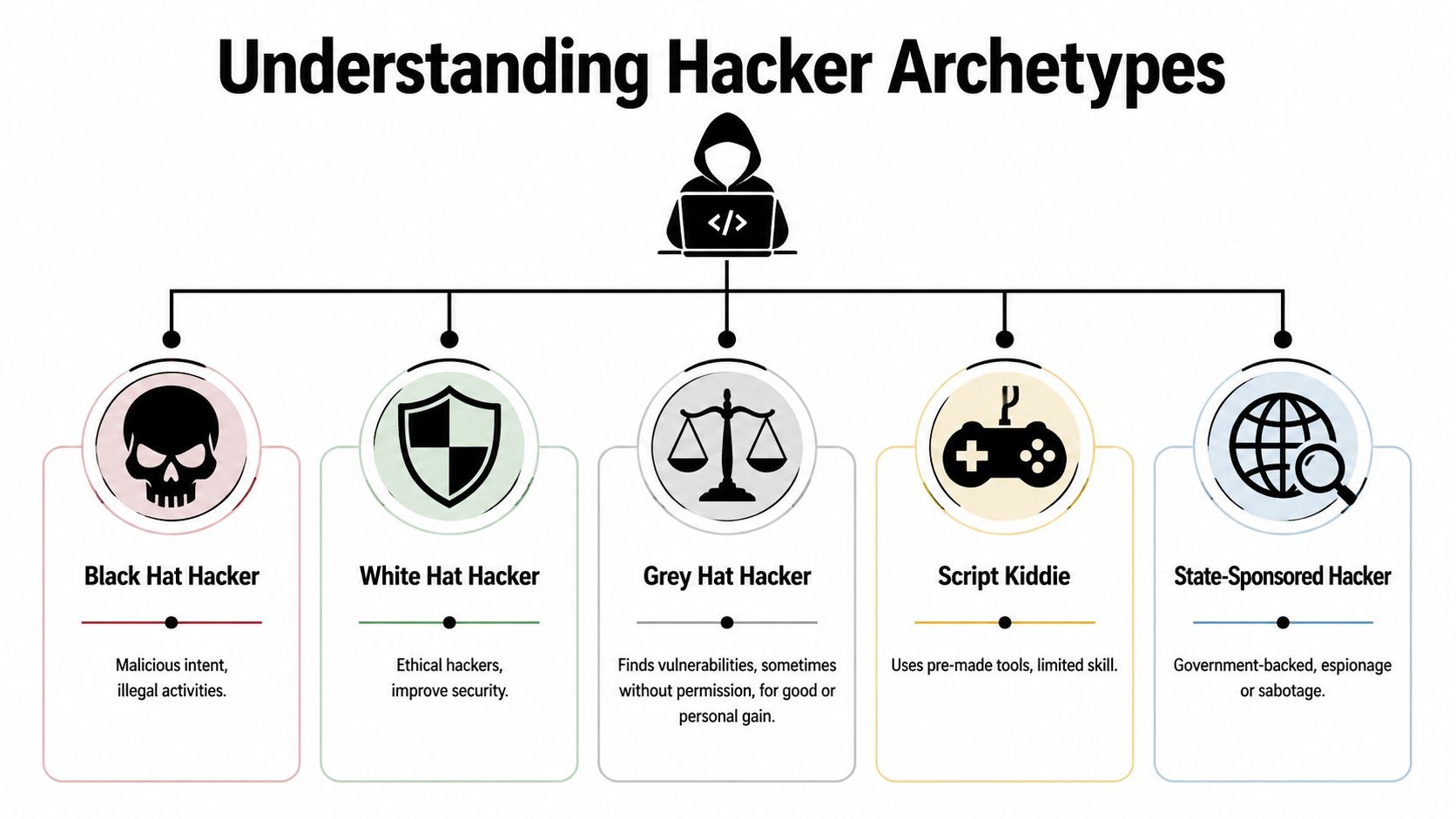
The financially motivated criminal
This is the digital version of a burglar who wants cash and doesn’t care how he gets it. These attackers steal account credentials, deploy ransomware, intercept payments, and exfiltrate data they can sell or use for extortion.
They often target businesses with weak email security, poor patching, and exposed remote access. They don’t need a dramatic breach. One employee who enters a Microsoft 365 password into a fake login page can be enough.
The hacktivist
Hacktivists attack for political, social, or moral reasons. They care less about quiet profit and more about disruption, embarrassment, or public messaging. Defacements, leaks, service interruptions, and public data dumps fit this profile.
According to Techwell’s summary of hacker motives, 9% of attacks stem from political hacktivism, and 14% are tied to revenge. That second number matters to small businesses because a disgruntled former employee can know exactly which shared folders, admin accounts, and shortcuts your team relies on.
Some attackers want your money. Others want your operations to stop on the worst possible day.
The state-sponsored operative
Most small businesses won’t think of themselves as nation-state targets, but that’s not the right lens. A state-backed attacker may care about your role in a supply chain, your contracts, your clients, or your access to a larger partner.
For an SMB, the practical takeaway is this: if you connect to regulated industries, public-sector organizations, or larger enterprises, your business can become the softer route in.
The insider threat
Not every attack starts outside the building. Employees, contractors, and former staff already know your environment. They know who approves invoices, where sensitive files live, and which systems nobody has cleaned up in years.
Some insider incidents are malicious. Others start as carelessness. A staff member forwards company files to a personal account, reuses a weak password, or ignores an access policy because it feels inconvenient. The result can look the same on the back end.
The opportunistic scammer
This attacker isn’t targeting your firm personally. They cast a wide net with fake invoices, credential-harvesting emails, tech support scams, and malware-laced attachments. Their business model is volume.
Small businesses get caught because they move fast and trust routine. A rushed employee sees “DocuSign,” “Microsoft 365 password expiration,” or “ACH update” and clicks before thinking.
Hacker motivations at a glance
| Hacker Archetype | Primary Motivation | Typical SMB Targets |
|---|---|---|
| Financially motivated criminal | Profit through theft, fraud, ransomware, or extortion | Firms with customer data, email-dependent operations, weak endpoint security |
| Hacktivist | Political, social, or ideological disruption | Public-facing organizations, controversial sectors, firms linked to larger causes |
| State-sponsored operative | Espionage, access, strategic disruption | Suppliers, contractors, regulated businesses, public-sector connected firms |
| Insider threat | Revenge, misuse of access, or carelessness | Any business with shared credentials, loose offboarding, or broad permissions |
| Opportunistic scammer | Fast returns from high-volume attacks | SMBs with limited training, no MFA, and weak email verification habits |
The point for owners
You don’t need to memorize attacker labels. You need to understand that different motives produce different patterns.
A business email compromise attempt usually comes from a profit motive. A noisy website defacement points to ideology or notoriety. A strange login from an old employee account points to weak offboarding and insider risk. Once you know the motive, your defensive decisions get sharper.
The Modern Hacker's Toolkit From Phishing to Ransomware
Attackers rarely break in with a single dramatic move. Most compromises look ordinary at first. An email arrives. A password gets reused. A workstation misses updates. Someone approves a prompt they didn’t understand. Then the damage spreads.
Phishing still works because business is busy
A typical phishing email doesn’t need perfect grammar anymore. Many are polished, on-brand, and timed to feel routine. An employee gets a message that looks like a Microsoft 365 sign-in alert, a shared document notification, or a voicemail notice. They click, land on a fake login page, and hand over credentials.
From there, the attacker signs into email, searches for invoice threads, and watches conversations. Then comes the wire fraud attempt, fake payment redirect, or internal impersonation message from the compromised mailbox.
What doesn’t work is telling users “be careful” once a year. What works is repeated training, MFA, mailbox monitoring, and limiting how much one stolen password can do.
Malware arrives through normal business channels
Malware often enters through attachments, browser downloads, fake software updates, or booby-trapped links. Once it lands, it may steal saved passwords, open a remote connection, or pull in additional tools.
For small businesses, the danger isn’t just infection. It’s what happens next. An attacker who lands on one employee laptop can start moving sideways through file shares, remote tools, and cached credentials if the environment is flat and poorly segmented.
Ransomware is a business shutdown tool
Ransomware isn’t just a file encryption problem. It’s an operations problem. Scheduling systems stop. Shared drives disappear. Accounting can’t post payments. Staff can’t access documents. Leadership has to decide whether backups work, whether systems are still trustworthy, and whether customers need to be notified.
Financial gain remains the dominant motive in external breaches, and the 2017 WannaCry ransomware attack infected millions of computers worldwide and caused billions in damages, showing how broad opportunistic attacks can hit any vulnerable organization, including small businesses, as noted in FTC.net’s discussion of common hacker motives.
For practical prevention steps, this guide on how to prevent ransomware attacks covers the basics every SMB should have in place.
A ransomware incident usually starts long before the encryption screen appears. The real failure often happens at the first click, the missing patch, or the dormant admin account nobody disabled.
Weak passwords and reused credentials
Owners often underestimate how many business systems still depend on passwords alone. Email, VPN access, payroll portals, remote desktop tools, vendor portals, and line-of-business apps all become easier targets when staff reuse passwords across systems.
Attackers buy or steal credentials from one place and try them somewhere else. If your accounting assistant uses the same password for a personal account and the company mailbox, the attacker doesn’t need to “hack” in the dramatic sense. They just log in.
Unpatched software and exposed services
Software flaws don’t stay secret for long. Once a vulnerability becomes known, attackers scan widely for systems that haven’t been updated. That’s one reason opportunistic campaigns can hit such a broad mix of victims. They don’t need to know who you are. They just need to find the systems nobody maintained.
Owners make a costly mistake by treating patching as a nuisance instead of risk reduction. Delayed updates on servers, firewalls, workstations, or network devices give criminals a short path in.
How attacks actually chain together
A real-world SMB compromise often looks like this:
- A user clicks a phishing email and enters credentials.
- The attacker signs into Microsoft 365 and searches prior conversations.
- The mailbox sends internal-looking emails to coworkers or customers.
- A device receives malware through a second-stage link or attachment.
- The attacker finds broader access through saved passwords, admin rights, or weak segmentation.
- Data is stolen or systems are encrypted, and the business is suddenly in crisis mode.
That chain matters because defense has to interrupt more than one step. Relying on antivirus alone won’t save you. Relying on backups alone won’t save you either if the attacker has already lived in the environment long enough to tamper with them.
The Real Business Impact of a Cyberattack
Most owners don’t feel the danger when they hear the words “credential theft” or “malware execution.” They feel it when the phones are ringing, tenants can’t pay rent, invoices can’t go out, and employees are locked out of files they need to do basic work.

The financial hit starts before recovery
The first cost is often the most obvious one. You may lose funds to fraud, pay for emergency response, restore systems, replace devices, notify affected parties, and pull key employees away from normal revenue-producing work.
The broader pattern is clear. Verizon’s 2023 Data Breach Investigations Report indicates that 97% of threat actors are financially motivated, and SMBs account for 43% of breach victims. On top of that, average breach detection times can stretch to 24 days, which gives attackers time to deepen the damage before the business even realizes what happened, as summarized in VC3’s breakdown of why hackers hack.
Downtime is what crushes small companies
Consider a property management firm. One employee laptop gets compromised through a fake lease document. The attacker reaches a shared drive, encrypts operational files, and suddenly the team can’t process maintenance requests, review tenant records, or send notices. Staff start using personal phones and old spreadsheets just to keep moving.
That kind of disruption creates secondary damage fast:
- Customer service suffers. Calls go unanswered or get delayed.
- Cash flow slows down. Billing, collections, and payment processing stall.
- Leadership gets pulled into response. Owners stop leading the business and start triaging chaos.
- Routine errors increase. People create workarounds that introduce even more risk.
A short technical event becomes a full business interruption.
Trust erodes quietly
Customers may forgive a brief outage. They’re less forgiving when private information is exposed, invoices are altered, or communications become unreliable. Professional firms feel this especially hard because trust is part of the product.
A law office, accounting firm, or financial services company doesn’t just sell time. It sells judgment, discretion, and reliability. Once clients question whether their information is safe, every future interaction gets harder.
This short video gives a useful plain-English view of how cyberattacks translate into business consequences.
Compliance and legal fallout
For regulated businesses, the technical cleanup is only part of the problem. You may also have to determine what data was accessed, whether notification is required, whether vendors were affected, and whether your documented safeguards reflected reality.
If your team can’t answer who had access, what was exposed, and whether your backups are clean, the incident stops being just an IT problem.
That’s why cyber risk has to be treated as an operational issue, not a side task for whoever “knows computers.” The business impact reaches finance, legal, service delivery, customer retention, and leadership credibility all at once.
Building Your Digital Fortress Actionable Defenses for Your Business
Good security doesn’t require enterprise complexity. It requires consistent basics done well. For most SMBs, the strongest gains come from tightening a small set of controls that interrupt the most common attack paths.
Start with technical controls that actually reduce risk
MFA comes first. If your Microsoft 365 tenant, remote access tools, and critical apps still rely on passwords alone, fix that before buying anything flashy. MFA doesn’t make phishing disappear, but it raises the cost of account takeover and blocks a huge amount of low-effort abuse.
Endpoint detection matters more than basic antivirus. Traditional antivirus looks for known bad files. Modern endpoint protection and EDR watch for suspicious behavior, lateral movement, script abuse, credential dumping, and ransomware activity. That difference matters when an attacker uses legitimate tools in malicious ways.
Patch management needs a schedule and accountability. “We install updates when we get around to it” is not a process. Workstations, servers, firewalls, business apps, and network gear all need regular review. Missed patches are one of the simplest ways an opportunistic attack turns into a serious incident.
Backups must be usable, not just present
Owners often say, “We have backups,” but they haven’t verified what’s included, how quickly data can be restored, or whether the backup system is isolated from the production environment.
A useful backup approach includes:
- Versioned backups so you can restore from before encryption or corruption.
- Offline or isolated copies so an attacker can’t easily tamper with them.
- Regular restore testing so you know recovery works.
- Clear recovery priorities so the team knows which systems come back first.
If your backup plan depends on one person remembering how it works under pressure, it isn’t a mature backup plan.
Policies should remove easy mistakes
Technology can only do so much when access is sloppy.
A few policy decisions close common gaps fast:
- Limit admin rights: Most users don’t need higher privileges on their day-to-day devices.
- Use least privilege: Give employees access only to the systems and data required for their roles.
- Tighten offboarding: Disable accounts promptly, collect company devices, and revoke app access the same day employment ends.
- Control BYOD and remote work: If personal devices touch company email or files, set standards for screen locks, updates, and acceptable access methods.
Small businesses often skip these controls because they feel bureaucratic. They’re not. They’re how you prevent one compromised user from becoming a company-wide incident.
Password policy still matters
Strong password hygiene isn’t old advice. It’s still core defense. The problem is that many businesses implement it badly. They frustrate users with arbitrary resets while still allowing reused or shared passwords in the places that matter most.
A better policy focuses on unique credentials, secure storage, and banning shared logins wherever possible. This guide on strong password policies for businesses lays out the practical standard.
The best password policy is the one people can follow consistently without creating new workarounds.
Train people on real scenarios
Security awareness training fails when it stays theoretical. Staff don’t need abstract lectures. They need realistic examples tied to daily work.
Train on situations they face:
- Invoice redirection emails that arrive during normal billing cycles.
- Microsoft 365 sign-in prompts that mimic real account alerts.
- Voicemail and shared document notices that push users to click quickly.
- Requests from executives asking for gift cards, wire transfers, or urgent document review.
- Vendor impersonation messages tied to ACH changes or contract updates.
Then make reporting easy. If users have to guess whether reporting a suspicious email will create hassle or embarrassment, they’ll stay quiet. Give them a one-click method or a simple mailbox they can use without drama.
Build an incident response habit before you need it
Most SMBs don’t need a giant incident response manual. They need a short, clear plan that answers practical questions:
- Who decides when to isolate a device
- Who contacts the IT partner or internal lead
- How employees report suspicious activity
- What systems get prioritized for recovery
- Who communicates with customers, vendors, or legal counsel if needed
Write it down. Review it. Run through it once in a tabletop exercise. The middle of an active breach is a terrible time to decide who owns what.
Partnering for Peace of Mind How Cyberplex Secures Your Business
Most small businesses don’t struggle because they ignore risk. They struggle because security requires time, follow-through, and specialized judgment that’s hard to maintain internally. Someone has to monitor alerts, review patch status, lock down Microsoft 365, tune endpoint protection, verify backups, and respond when something unusual happens at an inconvenient hour.
That’s where a managed security partner changes the equation.
What a good MSP should handle
A capable provider should take ownership of the fundamentals that small businesses often leave half-finished. That includes consistent patching, endpoint protection deployment, backup oversight, remote access hardening, and proactive monitoring that doesn’t stop at the end of the workday.
For organizations using Microsoft 365, cloud platforms, and VoIP, the work also includes secure configuration. Too many businesses assume the platform itself equals security. It doesn’t. The tenant still needs the right policies, identity controls, logging, and recovery planning.
Security should fit the business, not fight it
A property management firm has different risks than a law office. A manufacturer with shared workstations and line-of-business systems needs a different control set than a finance team working mostly in cloud apps. Good security support respects those differences.
That means asking practical questions. Which devices matter most. Which users have privileged access. Which systems can’t be down for long. Which compliance obligations apply. Which vendors connect into your environment. Generic checklists miss those details.
The operational value matters as much as the technical value
The right partner doesn’t just install tools. They reduce decision fatigue for owners and managers. They help you avoid buying security products you won’t manage well, and they keep routine maintenance from slipping until it becomes an emergency.
That support matters most in the moments you hope never happen. If an employee clicks a bad link, a device behaves suspiciously, or a mailbox starts sending messages it shouldn’t, you need a response path that’s already in place. You don’t want to start searching for help while your systems are actively under pressure.
A solid MSP gives you three things most SMBs can’t build alone: consistency, visibility, and accountability. Those are the difference between a close call and a prolonged outage.
Cyber risk doesn’t go away because a business is small. It grows wherever defenses are thin and daily operations are busy. If you want practical help securing Microsoft 365, protecting endpoints, strengthening backups, and building a security plan that fits how your company operates, talk with Cyberplex Technologies LLC.


