
A lot of Henderson-area business owners don’t decide to focus on budgeting for IT because they suddenly love spreadsheets. They do it after something breaks, a renewal hits harder than expected, or a client asks security questions the business can’t answer confidently.
A financial firm might get surprised by added security and retention requirements. A property management company might realize too late that supporting staff in the office, on the road, and at remote sites costs more than a few Microsoft 365 licenses and some laptops. Public sector teams often run into the same problem from a different angle. The systems have to stay available, the data has to stay protected, and the budget still has to make sense.
That’s why a solid IT budget matters. It gives you a way to decide what gets funded before urgency makes the decision for you.
Moving Beyond Guesswork in Your IT Budget
Reactive IT spending is expensive because it pushes every decision into emergency mode. When that happens, business owners usually pay for the fastest fix, not the right long-term choice.
A local example is easy to picture. A small accounting office replaces old workstations only when one fails. A property manager adds cloud apps one team at a time without reviewing overlap. A public safety office renews tools year after year because no one has time to compare what’s still needed versus what’s duplicated. The money gets spent either way, but it isn’t tied to a plan.
That approach gets harder as technology costs keep rising. Global IT spending is projected to reach $5.61 trillion in 2025 and over $6 trillion in 2026, with SMB annual per-user IT spending averaging $1,000 to $3,000, and 40% of businesses increasing budgets yearly to address technical debt and security according to The Network Installers' IT budget statistics roundup.
For a small or midsize business, that doesn’t mean you should spend more just because the market is spending more. It means you need more discipline about where the money goes.
Practical rule: If your IT budget only appears when something fails, you don’t have a budget. You have a repair fund.
The better model is to treat IT as a business support system. If your team depends on Microsoft 365, line-of-business applications, endpoint security, cloud storage, VoIP, and remote access, those are not side costs. They are operating requirements.
Good budgeting for IT does three things at once:
- Protects operations by reducing downtime, failed upgrades, and rushed purchases
- Supports growth when you add people, locations, or remote staff
- Improves decision-making because you can compare projects, renewals, and risks on purpose
That shift matters most in regulated and service-heavy businesses. If you handle financial records, tenant data, legal files, or public information, the question isn’t whether you’ll spend on IT. It’s whether you’ll spend proactively or under pressure.
Laying the Foundation for a Strategic IT Budget
A strategic IT budget starts with a plain business question: what has to keep working, what has to meet compliance requirements, and what would cost you the most if it failed for a day.
For a Henderson advisory firm, that usually means email, file access, retention, endpoint security, MFA, backups, and secure remote access for advisors. For a public safety or government-adjacent team, the priority shifts toward uptime, access control, logging, and recovery time. Those differences matter because regulated sectors carry costs that generic IT budget templates tend to understate.

Start with an operational review
Review the current environment before discussing new purchases. A proper inventory includes hardware, software, cloud services, internet circuits, security tools, backup systems, vendor contracts, and support agreements.
That review should answer a few practical questions:
- Which devices are close to end of life and likely to increase support tickets or security exposure
- Which licenses are still being paid for even though the user left or the role changed
- Which applications directly support operations and which are leftovers from an old process
- Where employees lose time every week because of login delays, weak Wi-Fi, printing issues, or poor file access
- Which systems depend on one employee or one vendor contact with no backup knowledge
Hidden cost usually shows up during this step. A server may still power on and run line-of-business software, but it can still be a budget problem if it no longer supports current security standards, encrypted backups, or vendor-supported operating systems. In financial services, that gap can turn into audit findings, higher cyber insurance friction, or expensive cleanup work after a failed review.
Tie technology to business priorities
Strong budgets connect spending to operating requirements and risk tolerance.
Start with leadership and department heads. Ask what is changing in the next 12 months, what client expectations are rising, and what obligations your industry already puts on the business. In regulated environments, the answer is rarely just “replace old computers.” It is usually a mix of retention, access control, monitoring, secure mobility, vendor oversight, and documented recovery capability.
A few examples make this easier to price correctly:
- A financial office may need secure document storage, advisor laptop replacements, MFA enforcement, email security, and retention controls that satisfy compliance expectations
- A property management company may need standardized devices for leasing staff, mobile access to shared systems, VoIP reliability, and tighter offboarding to protect tenant and owner data
- A public safety or government-adjacent organization may need stronger identity management, log retention, tested backups, and a recovery plan built around service availability, not just file restoration
Those are business requirements with technical costs attached.
If your team plans to standardize workstations and avoid large capital spikes, a hardware as a service model for business device lifecycle planning can make the budget more predictable. It also reduces the common problem of replacing too many aging systems in the same year.
Ask better questions in leadership meetings
Budget planning gets sharper when leadership answers operational questions instead of guessing at a percentage increase.
Ask:
- Are we adding staff, adding contractors, or opening another office
- Will more employees work remotely, in the field, or across multiple sites
- Do clients, regulators, or insurance carriers expect stronger security controls this year
- Which systems create revenue, protect records, or keep services running
- What planned business projects depend on IT support, configuration, or vendor coordination
- What would a day of downtime cost in missed work, delayed service, or compliance exposure
That last question matters more than many owners expect. In public safety and regulated financial environments, the hidden costs are often in documentation, testing, retention, access reviews, and incident response preparation. Those items are easy to skip in an early draft because they do not look like visible technology purchases. They still consume budget.
A useful IT budget ties each major expense to an outcome the business can name: faster onboarding, fewer support hours, cleaner audits, lower downtime, or a shorter recovery window.
Build the first draft around outcomes
Once priorities are clear, draft the budget by purpose so leadership can see what each expense is doing for the business.
A practical first draft often includes:
- Run the business for support, licensing, internet, backup, security operations, and routine maintenance
- Meet compliance requirements for retention tools, access controls, log collection, policy-driven configurations, testing, and documentation support
- Reduce operational risk for endpoint protection, user training, hardening, email filtering, and backup verification
- Support growth and service delivery for new users, location changes, cloud improvements, VoIP work, and workflow changes
- Replace aging assets for refresh cycles, unsupported systems, and infrastructure that no longer meets vendor or security requirements
That structure gives owners and managers a cleaner way to defend the budget. It also keeps regulated businesses from underfunding the quiet line items that become expensive later, especially security controls and compliance work that only gets noticed after an audit, claim, or outage.
Identifying and Categorizing Every IT Cost
A Henderson credit union approves a new lending platform, budgets the license, and signs the contract. Six months later, the full bill shows up in SSO integration work, log retention, staff training, after-hours cutover support, MFA tokens for new users, and extra backup storage to meet retention requirements. The platform was not the budgeting mistake. Treating the license as the full cost was.
That problem shows up in regulated businesses more than generic IT budgeting guides admit. Financial services firms, property managers handling trust accounts, and public safety organizations carry costs that sit outside the obvious invoice. Audit logging, device controls, retention rules, vulnerability remediation, and documented support processes all add spend. If those items are buried under general software or support, owners get a distorted view of what IT costs to run.
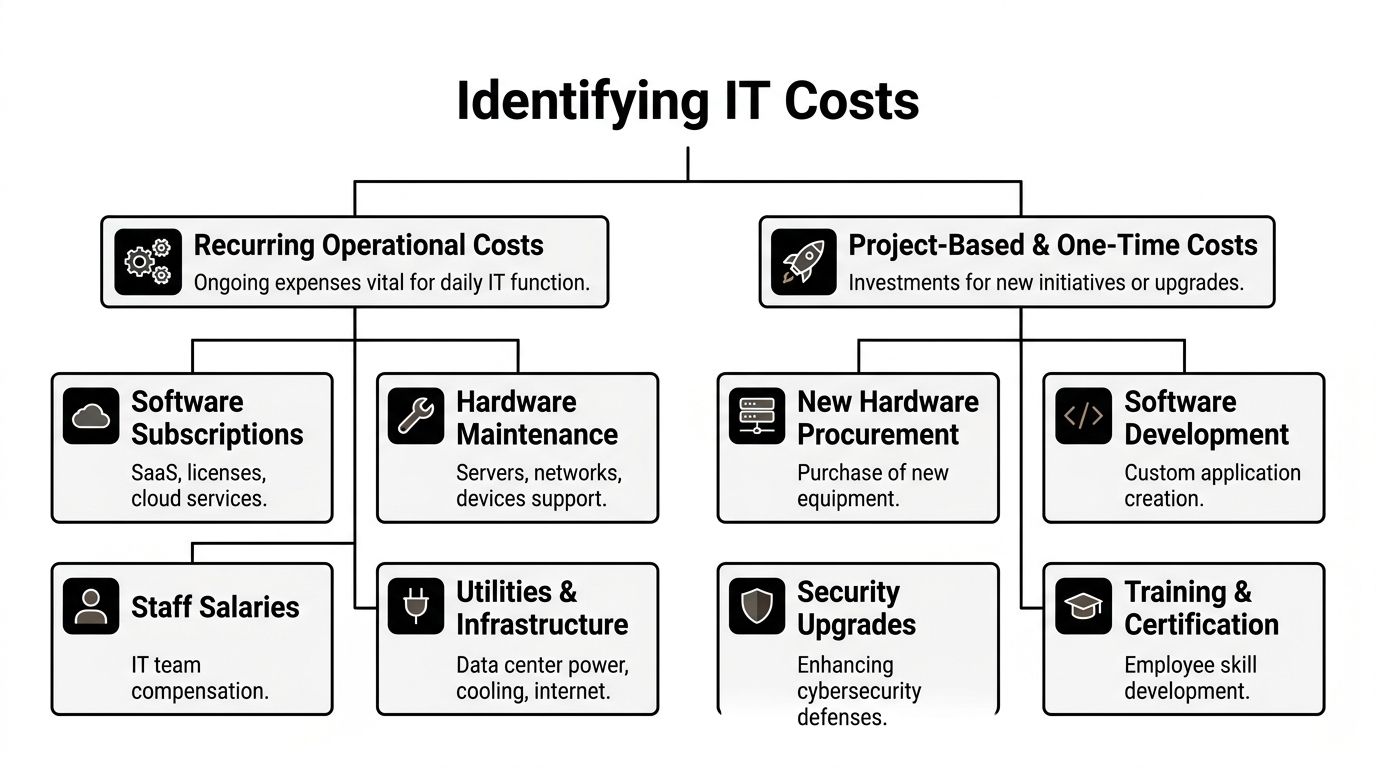
The cleanest method is to separate costs into two groups. Recurring operational costs keep the business running. Project-based and one-time costs change or improve the environment. That split sounds simple, but it prevents a common SMB mistake, using a low monthly spend to justify a project that creates large implementation and compliance costs later.
Recurring operational costs
Recurring costs are the bills that keep systems available, users productive, and controls in place every month. In regulated sectors, this category usually grows faster than leadership expects because compliance and security tools expand as the business adds staff, devices, locations, and vendors.
Here is what belongs in the recurring bucket.
Software and licensing
This includes Microsoft 365, line-of-business applications, endpoint protection, email security, remote access tools, document management systems, accounting platforms, and any compliance-specific add-ons.
The problem is rarely one expensive product. It is license sprawl.
Watch for:
- Unused seats that stayed active after turnover
- Wrong license tiers assigned by habit instead of role
- Duplicate tools for chat, e-signature, storage, or reporting
- Compliance add-ons purchased later because the base product did not meet retention, encryption, or audit needs
Property management firms run into this often. One team uses a property platform, another adds a separate file-sharing app, accounting needs its own approval workflow, and leadership adds e-signature for leases and vendor documents. Each tool solves a real problem. Together, they create renewal risk, integration work, and support overhead.
Connectivity and communications
Internet circuits, failover connections, firewalls with active subscriptions, VoIP, mobile plans, and site-to-site connectivity belong here.
For a public safety department or a firm with multiple branches, this is not just a utility bill. Redundancy, uptime expectations, call routing, and secure remote access change the cost. A single primary circuit may look cheaper on paper, but the trade-off is obvious if dispatch access, tenant communication, or payment processing goes down during business hours.
Security operations
Security needs its own line item, even when the charges are spread across different vendors and service agreements.
Include:
- Endpoint detection and response
- Email filtering and anti-phishing
- Firewall licensing and threat services
- Security monitoring
- Vulnerability scanning and remediation support
- Identity and access controls
- Mobile device management
- Security awareness training
For regulated businesses, this category often includes hidden labor. Someone has to review alerts, confirm changes, document exceptions, remove stale accounts, and verify that policies are enforced. Those are operating costs, not side tasks.
Backup, retention, and support
This category gets underestimated constantly.
Include backup licensing, cloud storage, immutable backup options, disaster recovery services, support contracts, patching, monitoring, warranty renewals, and after-hours support. Add retention costs required by your regulator or insurer. In financial services, longer retention periods increase storage and review costs. In public safety, records handling and recovery expectations can push backup design well beyond a basic file restore plan.
Device replacement planning belongs here too if you use a fixed monthly model instead of large surprise purchases. For businesses that want predictable hardware costs, hardware as a service for managed device lifecycle planning can shift refresh spending into a steadier operating expense.
Project-based and one-time costs
One-time costs do not stay one-time if they trigger new support, security, or compliance obligations. That is why these projects need their own budget category instead of being absorbed into general IT spend.
Hardware refreshes
Servers, firewalls, switches, laptops, desktops, wireless access points, cameras, and conference room systems fit here.
A common budgeting mistake is waiting for failure. That approach creates rush shipping, emergency labor, unplanned downtime, and short purchasing decisions. A scheduled refresh gives the business time to compare models, confirm software compatibility, and line up installation without disrupting operations.
Migrations and major upgrades
Cloud migrations, Microsoft 365 tenant cleanup, VoIP rollouts, office moves, network redesigns, and major security upgrades belong in this bucket.
The invoice for software or hardware is only part of the project cost. The full cost usually includes planning, implementation labor, testing, rollback preparation, vendor coordination, user communications, post-project cleanup, and extra compliance checks. In a financial services environment, a migration may also require policy updates, access reviews, retention validation, and evidence collection for auditors or cyber insurance.
Training and adoption work
Training is part of the project cost, not an optional extra.
If staff adopt a new document platform, stronger authentication, a records system, or a new phone workflow, the budget needs to cover setup time, admin training, end-user support, and process updates. I have seen good systems fail because the business paid for deployment but not for adoption. The result is predictable. Staff fall back to old habits, exceptions pile up, and the company pays for two systems longer than planned.
The real cost of a new tool includes setup, integration, user training, policy updates, support load, and the delayed retirement of the old system.
Why categorization matters
Categorization improves decision quality because it shows total cost of ownership before approval. It also exposes where regulated businesses are carrying hidden obligations.
For example, a public safety organization may price a server replacement as hardware only, then miss CJIS-related configuration work, logging, backup verification, after-hours cutover labor, and documentation time. A financial firm may budget for a cloud app and miss archive retention, MFA expansion, vendor risk review, and access control cleanup. Those omissions are why projects run over budget even when the original quote looked reasonable.
A quick review catches a lot. If a line item has no owner, no renewal date, no linked system, or no business purpose, it needs scrutiny. If a project has a purchase price but no training, support, security, or retention cost attached to it, the budget is still incomplete.
Forecasting Future Spend and One-Time Projects
The current budget tells you what the business is paying today. The forecast tells you whether today’s choices still work when your headcount changes, your vendors increase pricing, or your next big project lands at the same time as a hardware refresh.
That forward look is where many SMBs struggle. They know what they spent. They don’t always know what the environment will demand next.

Forecast recurring costs from business drivers
The best forecasts start with operational drivers, not wishful thinking.
A few examples:
- Headcount growth drives Microsoft 365 licensing, endpoint protection, support demand, and onboarding effort.
- Remote work expansion affects VPN alternatives, identity controls, device management, and VoIP usage.
- More locations or sites change internet, Wi-Fi, firewall, and support requirements.
- Higher compliance expectations increase logging, retention, security, and documentation needs.
For a property management company, a staffing plan matters as much as a technology plan. If more leasing, maintenance, and admin users need secure access from different locations, recurring cloud and communication costs will scale with them.
For a financial services firm, a forecast also has to consider what happens when security controls tighten. The business may not add many employees, but it may still add tools, reviews, and retention costs.
Use bottom-up estimates for projects
Project forecasts need more than a ballpark number. Break the project into tasks and estimate each layer.
A realistic estimate for a cloud migration or office relocation usually includes:
- Planning and discovery
- Licensing or infrastructure changes
- Implementation labor
- Testing and validation
- User communication and training
- Post-cutover support
- Retirement of old systems
Large project failure isn’t rare. Harvard Business Review reports that 1 in 6 major IT projects experience a cost overrun of 200% and a schedule overrun of almost 70%, with shifting requirements and poor scope definition among the major causes, as summarized in ONES’ article on common IT project budgeting pitfalls.
That’s a strong argument for defining scope early and resisting vague project language like “move everything to the cloud” or “upgrade security.” Those phrases hide complexity.
If the project can’t be broken into specific tasks, it can’t be budgeted accurately.
Build scenarios instead of one forecast
A single forecast assumes your business will unfold exactly as planned. It won’t.
Create at least three views:
| Scenario | What changes | Budget response |
|---|---|---|
| Steady state | Staffing and systems remain close to current levels | Focus on renewals, support, maintenance, and planned refreshes |
| Growth case | New hires, added sites, or expanded remote work | Increase licenses, device purchases, communication tools, and onboarding capacity |
| Risk case | Compliance change, incident response need, or urgent replacement | Pull from contingency, delay lower-priority projects, and protect core systems first |
Budgeting for IT becomes useful at the leadership level. It gives you a way to discuss trade-offs before a surprise forces one.
A short explainer is worth watching if you want a simpler framing for planning costs over time.
Don’t forget the slow-moving pressures
Forecasts often miss the costs that don’t feel urgent in the moment.
Those usually include:
- Vendor pricing changes
- Hardware lifecycle timing
- More security layers as threats evolve
- Training needed after platform changes
- Storage growth and retention needs
- Audit or policy work tied to client requirements
For SMBs, the goal isn’t perfect prediction. It’s fewer nasty surprises and better timing. If you know a firewall replacement, a Microsoft 365 cleanup, and a phone system change are all likely within the same planning window, you can stage them instead of getting cornered into funding all three at once.
Budgeting for Security, Compliance, and Disaster Recovery
Generic IT budget advice usually breaks down here. It treats every small business like a light-duty office with email, file storage, and a few laptops. That’s not how regulated organizations operate.
A financial services firm, public safety office, legal practice, or property management company handles different data, different risk, and different uptime expectations. Their budgets should reflect that.
Regulated businesses pay a real compliance premium
Broad benchmarks can be misleading. A standard SMB guide might suggest a modest revenue percentage for IT, but regulated sectors often sit well above that because the tooling and oversight are heavier.
While general guides suggest a 4% to 7% of revenue IT budget, regulated SMBs in sectors like finance or public safety often face 20% to 50% higher costs. A 10-employee financial firm may see its IT budget pushed toward 9% of revenue to cover advanced security and compliance tools costing an extra $50 to $75 per user per month, according to Tech Knowledgey’s breakdown of small business IT budget averages.
That difference isn’t fluff. It comes from concrete requirements such as stronger endpoint protection, tighter access control, logging, retention, email archiving, policy enforcement, secure remote access, and documentation that can stand up to scrutiny.
Underfunding compliance doesn’t save money. It delays the bill until it arrives as a failed audit, an avoidable incident, or a rushed cleanup under pressure.
A practical view by industry
Here’s a simple way to frame the adjustment for a regulated SMB.
| Industry | Baseline IT Budget (% of Revenue) | Compliance & Security Adder | Adjusted Total (% of Revenue) | Example Cost Drivers |
|---|---|---|---|---|
| Financial services | 4% to 7% | 20% to 50% higher than general SMB guidance | Toward 9% in some small firms | Advanced security tools, retention, secure remote access, audit readiness |
| Public safety | 4% to 7% | 20% to 50% higher than general SMB guidance | Higher than general SMB guidance | Continuity planning, stronger access controls, secure communications, retention |
| Property management | General SMB guidance varies | Qualitatively higher when teams are distributed and data access is broad | Higher than a basic office model | VoIP, cloud collaboration, mobile access controls, user provisioning across sites |
The exact percentage for an individual business depends on its systems, clients, and obligations. The point is that finance, public safety, and similar environments should not budget like a low-risk office.
Security is not a side category
Security should be visible, funded, and defended in the budget. Hiding it inside “software” makes it easier to undercut when money gets tight.
For many SMBs, a practical security budget includes:
- Identity protection for access controls and account security
- Endpoint protection on desktops, laptops, and mobile users
- Email security to reduce phishing and malicious attachments
- Network security through properly supported firewalls and segmentation
- Monitoring and response so issues don’t sit unnoticed
- User training because controls fail when people don’t understand them
Financial firms usually need more depth here because access to sensitive records, client communications, and retention requirements creates more audit and breach exposure. Public safety and public-serving organizations often need stronger continuity because service interruption is itself a serious operational problem.
Disaster recovery needs its own budget line
This category gets postponed too often because people hope they won’t need it.
That’s a mistake. In regulated and service-critical environments, backup and recovery are part of the service model. They support operations, client trust, and legal defensibility.
A practical continuity budget should cover:
- Backup of core systems and data
- Recovery testing
- Defined recovery priorities
- Offsite or cloud replication where needed
- Runbooks and responsibility assignments
- Support for remote or alternate work during disruption
If you’re reviewing this area, a focused backup and disaster recovery plan helps turn “we have backups” into a real recovery strategy.
What this looks like in practice
Take two businesses with similar headcount.
A retail-style office may need basic collaboration tools, standard endpoint protection, and routine support. A small financial firm with the same headcount may need stronger identity controls, more retention, tighter permissions, more security oversight, and more documented processes. Same number of users. Different risk. Different budget.
A property management company can hit the same issue from another direction. It may need secure communication across distributed staff, dependable mobile access, role-based access to systems, and stronger onboarding and offboarding discipline because users and locations change often.
That’s why the right question isn’t “What should a small business spend on IT?” The useful question is “What does our business need to operate securely, recover quickly, and satisfy the requirements attached to our data and clients?”
Optimizing, Measuring, and Defending Your IT Budget
A Henderson business owner usually feels IT budget problems in one of two moments. A regulator, auditor, or insurance carrier asks for something the budget did not cover. Or an owner looks at a rising monthly bill and asks what the business is getting for it.

Track a small set of meaningful KPIs
A useful IT budget needs operating metrics, not just expense lines.
For a small financial firm, I would rather see five numbers reviewed every month than a 40-line dashboard nobody uses. For a property management company, the right metrics often show whether technology is helping staff close work orders, manage tenants, and avoid repeated support issues. In regulated environments, the same scorecard also needs to show whether spending is controlling risk or just keeping systems running.
The KPIs that hold up best in real budget reviews are usually:
- Cost per employee so leadership can see whether support, licensing, and device costs are rising faster than headcount
- Budget variance so overages get addressed while they are still manageable
- Ticket volume and repeat issues because recurring problems often point to aging hardware, poor software fit, or underfunded support
- Time to resolve critical issues because slow response has a direct business cost
- Renewal exposure over the next 90 to 180 days so license, vendor, and telecom increases do not show up as surprises
- Security and compliance remediation status so required fixes are visible before an audit, exam, or policy renewal forces the issue
One more metric matters in regulated sectors. Measure the cost of controls that were postponed. Deferred MFA work, incomplete logging, skipped policy reviews, and delayed endpoint replacement do not disappear. They usually come back as audit findings, insurance exclusions, emergency projects, or higher legal exposure after an incident.
Protect the plan with contingency
Every IT budget needs reserved funds.
The obvious reasons are server failure, emergency hardware replacement, or an unexpected software increase. The less obvious reasons are usually more expensive. A financial services firm may need outside help to answer an exam request. A public safety agency may need to replace unsupported mobile devices sooner than planned because they affect field access or CJIS-related controls. A property management company may pick up a new portfolio and need licenses, phones, and onboarding work faster than expected.
A contingency line keeps those events from turning into bad decisions. Without it, owners often delay a necessary fix, pull money from another project, or approve a rushed purchase with poor terms.
Review monthly, decide quarterly
Monthly reviews should stay operational. Quarterly reviews should test the budget against business reality.
A good monthly review asks:
- Are actual costs tracking to plan
- Did a vendor, carrier, or software provider change pricing
- Did staffing changes affect licenses, endpoints, or support load
- Are repeated tickets pointing to a system we should replace instead of patching again
- Did any compliance requirement add work we did not budget for
Quarterly, leadership should reconsider the bigger choices:
- Which projects still support the business plan
- Which tools overlap or go underused
- Where are we paying for premium features nobody relies on
- Which risks have become more expensive since the budget was approved
- What would an outage, failed audit item, or delayed recovery cost us now
That last question matters more than many owners expect. In regulated businesses, the cost of weak IT is rarely limited to downtime. It can include client notification, legal review, lost contracts, higher cyber insurance friction, and staff hours pulled into remediation.
Use outside support when the environment is too complex
Some organizations have enough internal depth to manage support, security, vendor negotiations, lifecycle planning, and budget control. Many do not.
I see this often with firms that have one capable internal admin carrying too much. Day-to-day tickets get handled. Strategic work slips. Renewals renew by default. Security tasks stay half-finished. Budget discussions happen after the spend, not before it.
In that situation, a structured managed services and outsourcing model can make costs more predictable and give ownership a clearer picture of support scope, compliance work, renewal timing, and project demand.
Defending the budget to ownership or the board
The strongest budget defense is operational, financial, and specific.
Do not present security tools as abstract protection. Explain what risk they reduce, what requirement they satisfy, and what business cost they prevent. If a financial advisory firm needs email retention, tighter access controls, and documented incident response, tie those costs to exam readiness, client trust, and reduced exposure during a dispute. If a public-facing agency needs better backup verification and endpoint controls, tie that spend to service continuity and faster recovery.
This framing helps:
| Budget area | Leadership concern it answers |
|---|---|
| Security and compliance | Lowers the chance of audit issues, claim disputes, and avoidable incidents |
| Support and maintenance | Keeps staff working and reduces the cost of recurring problems |
| Cloud, communications, and remote access | Supports daily operations across offices, field staff, and hybrid teams |
| Refreshes and projects | Prevents emergency replacements and supports planned growth or expansion |
Owners approve IT budgets faster when they can see the trade-off clearly. Spend now on planned controls, tested recovery, and supported systems. Or spend later under pressure, usually at a higher cost and with fewer options.
If your business needs a clearer plan for budgeting for IT, Cyberplex Technologies LLC works with Henderson-area organizations that need practical guidance on support costs, security planning, cloud and VoIP decisions, and long-range budgeting tied to real business goals.


