
Your office is humming along. Someone is answering client calls. Someone else is updating invoices in Microsoft 365. A staff member stops for coffee on the way to a property showing, a court filing, or a client meeting, and their laptop disappears.
That moment is when endpoint security stops being an IT buzzword and becomes a business problem.
If that laptop held saved passwords, synced files, email access, or tenant and client records, the loss isn't just about replacing hardware. It can trigger downtime, disclosure obligations, insurance questions, and a scramble to figure out what was exposed. For many small businesses, that scramble starts too late.
Endpoint security for small business is about protecting the devices your team uses every day. Laptops, desktops, phones, tablets, and servers are where work happens. They're also where attackers look for the easiest opening. The challenge for Henderson-area businesses is that modern work has stretched well beyond the office. Devices move between homes, cars, coffee shops, job sites, and cloud apps. Security has to move with them.
Why Your Business Is a Bigger Target Than You Think

A lot of owners still assume attackers only chase hospitals, banks, or national brands. That assumption is expensive.
For small businesses, the risk is already well documented. 43% of all cyberattacks targeted small firms, yet only 61% used endpoint protection as of 2025. At the same time, endpoints are the origin of 90% of successful attacks, and the average breach cost for a small business reached $120,000. After an attack, 60% of victims shut down within six months. Those figures are summarized in this small business cybersecurity analysis.
Why attackers like small firms
Attackers usually don't need a dramatic Hollywood-style hack. They look for ordinary gaps:
- An unprotected laptop: A machine without strong endpoint controls can give an attacker a quiet way in.
- A reused password: If one employee uses the same password across multiple systems, one compromised account can spread quickly.
- A personal phone used for work: Business email on an unmanaged device creates a blind spot.
- A missed update: Old software often gives attackers a known path to exploit.
A small accounting office, law firm, property management team, or municipal department can be attractive because it stores valuable information but often lacks a full internal security team.
The business impact isn't just technical
When owners hear "endpoint compromise," they often think "virus." That's too narrow.
A compromised endpoint can mean:
- Operations stop: Staff can't access files, email, or line-of-business apps.
- Client trust erodes: Customers and tenants want to know their information is handled responsibly.
- Leadership loses time: Instead of serving clients, management is coordinating cleanup.
- Compliance gets harder: If you handle payment data, legal records, or sensitive resident information, a single device incident can create audit and reporting headaches.
Practical rule: If losing one laptop, one phone, or one user account would disrupt your week, endpoint security already matters to your business.
Small businesses aren't targeted because they're famous. They're targeted because many are easier to breach than larger organizations, while still holding data that can be monetized, extorted, or misused.
What Is an Endpoint and Where Are Your Weak Spots
Think of your business like a house. Your data, email, accounting system, and client records are inside. An endpoint is any door or window into that house.
The devices that count as endpoints
Most owners immediately think of office computers. Those matter, but the list is broader:
- Laptops and desktops: The obvious starting point.
- Smartphones and tablets: Often used for email, messaging, file access, and approvals.
- Servers: Whether on-site or connected to cloud workloads.
- Shared workstations: Front desk machines, dispatch terminals, or check-in stations.
- Printers and specialty devices: In some environments, these still connect to the network and hold sensitive workflows.
The key idea is simple. If a device connects to business systems, stores work data, or signs in to company accounts, it deserves attention.
The weak spots owners often overlook
The most common gaps aren't hidden in a server room. They're part of normal work.
Remote and hybrid work changed the shape of risk. According to this guide to small business endpoint detection and response, 92% of remote workers use personal devices for work tasks, and 46% store work files on them. The same analysis notes that 97% of executives access work accounts on personal devices. That's convenient, but convenience creates exposure when those devices aren't managed like company equipment.
A few weak spots show up again and again:
Personal devices doing company work
An employee checks business email from a personal phone. Another downloads a lease packet to a personal tablet. A manager signs into Microsoft 365 from a home computer shared with family members.
None of that feels dramatic. But each action creates another place where business data can sit outside your normal controls.
Public Wi-Fi and travel
Staff in real estate, field services, legal work, and local government often connect from hotels, coffee shops, courthouses, or job sites. That's practical, but it increases the chance of a stolen device, an unsafe network, or a rushed login on the wrong machine.
Cloud access from unmanaged endpoints
Owners sometimes think, "Our files are in the cloud, so we're safer." Cloud platforms help, but if an attacker logs in from a compromised laptop, the cloud won't magically fix that. The endpoint is still the front door.
Your cloud apps may hold the data, but the endpoint often decides who gets in.
A useful self-check
Walk through these questions:
- Who uses personal devices for work?
- Which devices can access email, Microsoft 365, VoIP apps, or file shares?
- Do you know which laptops are still in service and who has them?
- Can you remotely lock or isolate a device if it's stolen?
If those answers are fuzzy, that's normal. It's also where endpoint security for small business starts. First you identify the doors and windows. Then you decide how to secure them.
Decoding Your Security Options AV vs EDR vs MDR
Most small businesses don't need more cybersecurity jargon. They need a clear way to choose.
Here's the simplest framework I use with owners.
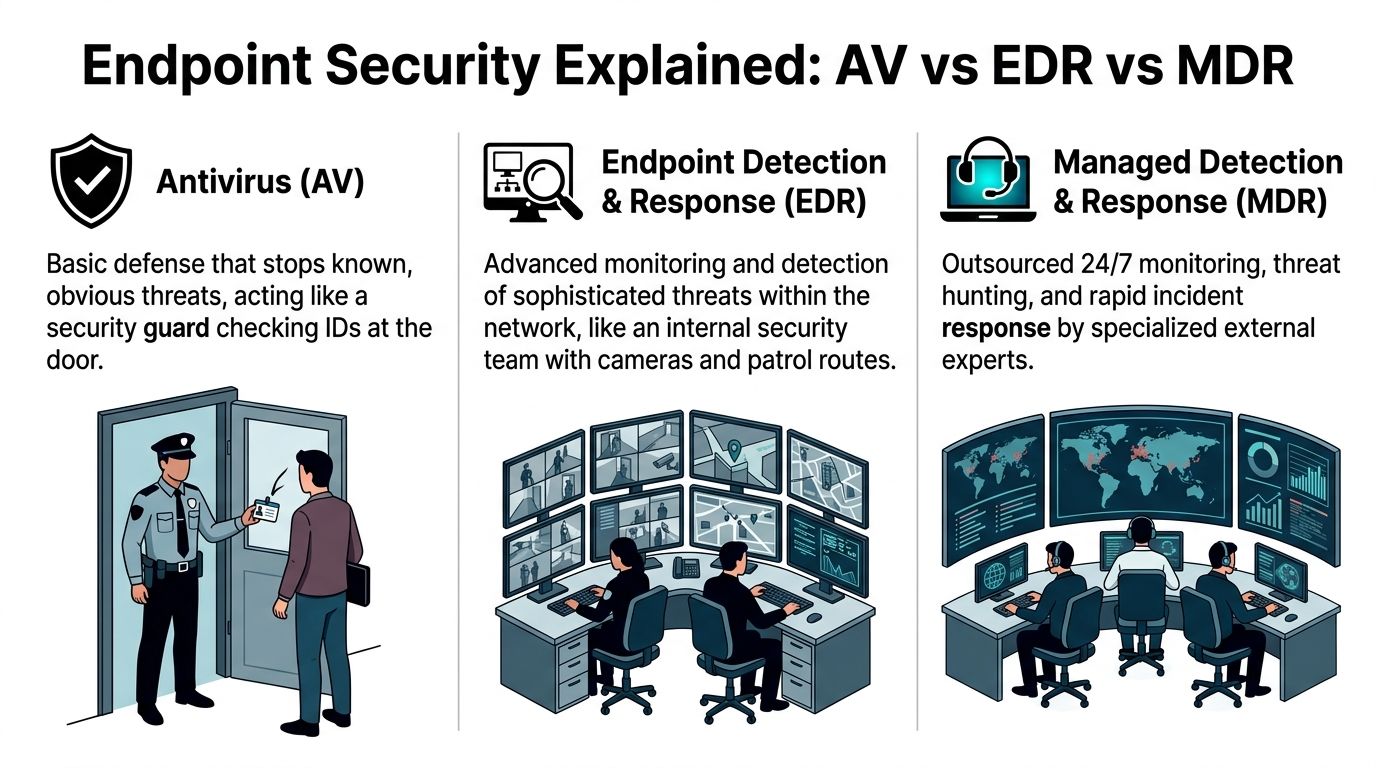
Antivirus (AV) is a bouncer checking IDs against a list of known troublemakers.
Endpoint Detection and Response (EDR) is a detective watching behavior inside the building.
Managed Detection and Response (MDR) is an outside security team that watches the cameras, investigates alerts, and responds around the clock.
Why traditional AV isn't enough on its own
Antivirus still has a place. It can block many common threats and it's better than having nothing. But AV mainly looks for known bad files or known patterns.
That becomes a problem when the attacker doesn't drop a traditional file onto the device.
The key difference in newer tools is behavioral analysis. EDR establishes a baseline of normal user and system behavior and watches for suspicious changes. It can spot fileless attacks, where malicious code runs in memory rather than showing up as a classic infected file. For example, it can flag a legitimate program like PowerShell if it suddenly tries to download a suspicious payload or access sensitive financial records at 2:00 AM, as described in this EDR overview for small businesses.
That distinction matters because many owners assume "we already have antivirus" means "we're covered." Often, it means you've covered one layer.
Endpoint Security Technology Comparison
| Technology | Protection Method | Best For | Key Limitation |
|---|---|---|---|
| AV | Signature-based detection of known threats | Very small environments needing basic prevention | Can miss suspicious behavior and fileless activity |
| EDR | Behavioral monitoring, alerting, investigation, and containment | Businesses that need visibility into modern threats | Requires setup, tuning, and active response |
| MDR | EDR plus human monitoring and response from an outside team | Small businesses without dedicated security staff | Ongoing service cost and provider selection matter |
How this looks in real life
AV example
A staff member downloads a fake invoice attachment that matches a known malware signature. AV may block it immediately. That's the good day.
EDR example
A normal Windows tool starts acting oddly. It launches a chain of processes that doesn't fit the user's usual pattern, reaches out to a suspicious network destination, and tries to gather sensitive files. EDR notices the behavior, not just the file.
MDR example
The EDR system generates an alert at night. Instead of waiting until your office opens, an outside security team reviews the alert, validates whether it's real, and begins response actions under the agreed process.
Which one fits your business
A Henderson accounting firm, law office, or property management company usually doesn't have the same needs as a national enterprise. But those businesses often handle sensitive records and can't afford extended downtime.
A practical way to choose:
- AV may fit if your environment is very small, low complexity, and you mainly need baseline protection.
- EDR may fit if you want stronger visibility and have someone who can own alerts, policy tuning, and response.
- MDR may fit if you want EDR-level protection without building your own security operations function.
If you're comparing baseline prevention tools before moving up to EDR or MDR, this guide on best antivirus software for small business can help frame what AV does well and where it stops.
A good buying question isn't "Which product is strongest?" It's "Who will watch this tool after it's installed?"
One local option in this category is Cyberplex Technologies, which provides managed endpoint security for small and midsize businesses as part of its MSP services. The important point isn't the logo on the dashboard. It's whether the solution fits your staff capacity, compliance needs, and response expectations.
Creating Your Foundational Endpoint Security Policy
Software matters. Rules matter just as much.
Without a clear policy, employees make security decisions on the fly. They use the nearest Wi-Fi, save a file to the quickest place, or keep company email on a personal phone long after they leave the office. Most of the time they aren't being careless. They just don't know where the line is.
Keep the policy short enough to use
A practical endpoint policy shouldn't read like a legal textbook. For most small businesses, it should be a plain-language document your team can understand and your managers can enforce.
Start with the basics.
Device use rules
State which devices can be used for business work. If personal devices are allowed, spell out the conditions. That might include screen lock requirements, approved apps, and the company's right to remove business access if a device is lost or the employee leaves.
Password and sign-in expectations
Set expectations for strong passwords and multi-factor authentication. Be clear that staff shouldn't share accounts, save passwords in unsafe places, or approve sign-in prompts they didn't initiate.
Public Wi-Fi and remote work
Employees need a simple rule for off-site work. If they connect from a coffee shop, hotel, courthouse, or tenant property, what apps can they use and what should they avoid? Keep the guidance concrete.
For example:
- Email access: Allowed through approved accounts and protected sign-in methods.
- Sensitive file downloads: Restricted unless done through approved tools.
- Shared computers: Never permitted for company account access.
Include a lost or stolen device process
This is one of the most useful parts of the policy because people tend to freeze when something goes wrong.
Give employees a short checklist:
- Report it immediately to the designated contact.
- Stop trying random fixes if the device may be infected.
- Describe what was on it such as email, saved files, or business apps.
- Wait for instructions before signing back in from another device, if compromise is suspected.
Owner's shortcut: If an employee can't explain your lost-device process in one minute, the policy is too vague.
Build policy around real work
A property manager might use phones at apartment complexes, a law office might carry laptops to court, and an accounting firm might move files during tax season under heavy time pressure. Write rules that match those routines.
A good policy answers the daily questions employees have:
- Can I use my own phone for work email?
- What do I do if my laptop goes missing?
- Can I print client documents at home?
- Who do I call if something looks suspicious?
When those answers are written down, endpoint security becomes a shared operating habit instead of an IT lecture.
Your Practical Endpoint Security Rollout Checklist
Buying the tool is the easy part. Rolling it out well is what protects the business.
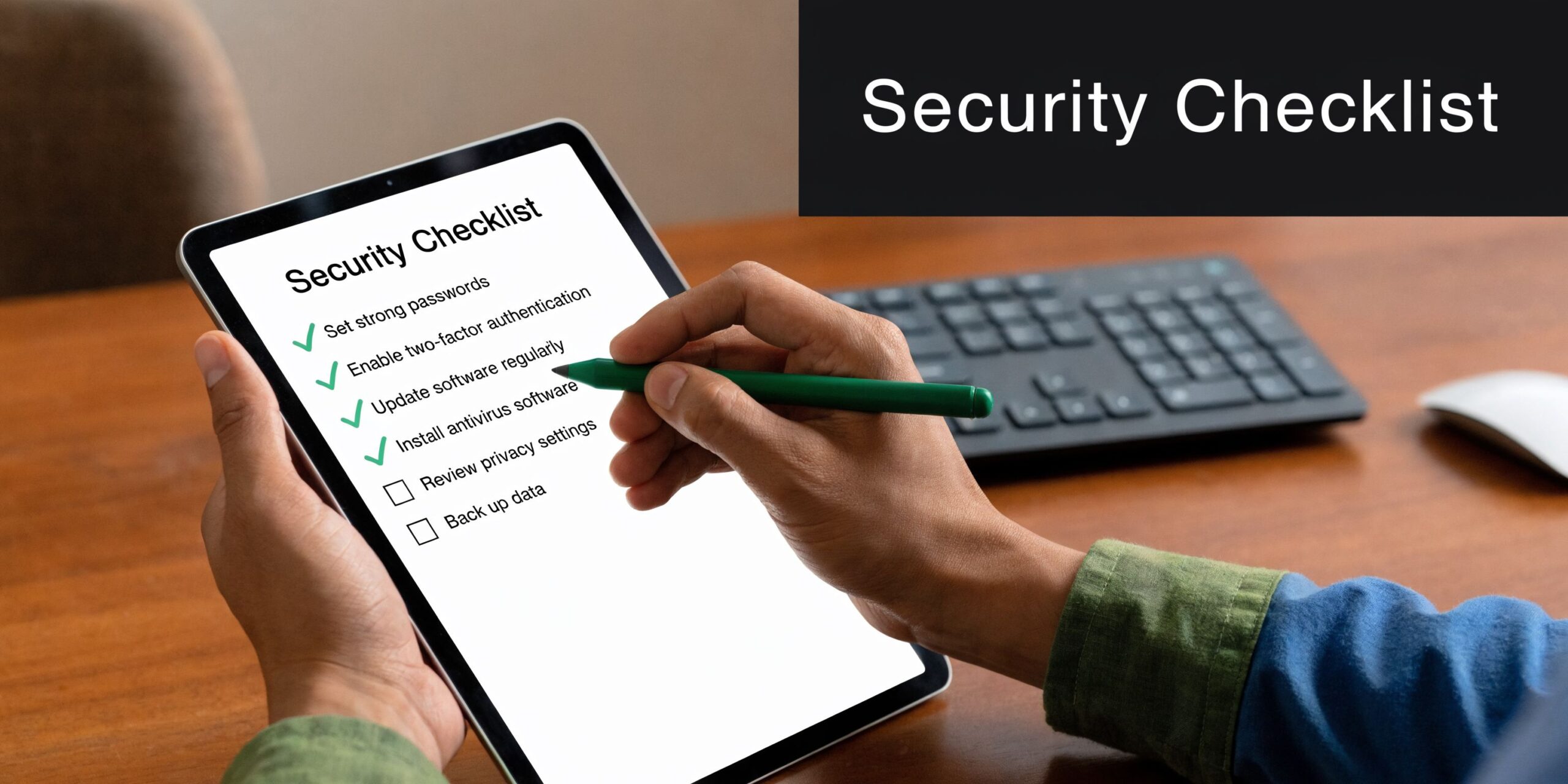
I've seen small businesses spend good money on security software, then leave half their devices uncovered, overwhelm staff with noisy alerts, or skip training entirely. A simple checklist prevents that.
Start with an inventory you trust
Before rollout, make a list of every device that touches business systems.
Include:
- Company laptops and desktops
- Personal phones or tablets used for work
- Shared front-desk or kiosk machines
- Servers and specialty systems
- Remote employee devices
The goal isn't perfection on day one. The goal is to stop guessing.
Roll out in phases
Don't push a new endpoint tool to every device at once unless your environment is extremely simple.
A better path looks like this:
Pilot group first
Choose a small set of users from different roles. One office admin, one manager, one remote worker, one field user.Test normal work
Make sure line-of-business apps, printers, Microsoft 365 access, and remote workflows still function properly.Adjust policies
Tighten what needs tightening, but avoid blocking everyday work unnecessarily.Expand in waves
Move department by department rather than all at once.
Tune alerts before they tune out your team
Many projects drift off course when this isn't done well.
Review:
- Which alerts require immediate action
- Which events should be logged but not escalated
- Who receives notifications
- What happens after an alert is confirmed
A quiet, meaningful alert stream is far more useful than a noisy dashboard nobody trusts.
Good endpoint security doesn't just detect. It creates a response path that real people can follow on a busy Tuesday.
Train users on the few actions that matter
Most employees don't need a deep lesson on malware analysis. They need to know what to do when something unusual happens.
Focus training on:
- Unexpected prompts: Don't approve sign-ins you didn't initiate.
- Suspicious behavior: Report odd pop-ups, locked files, or sudden slowdowns.
- Lost devices: Report immediately, even after hours.
- Work on personal devices: Follow the approved process, not improvised shortcuts.
A ransomware-specific response plan also helps. This article on how to prevent ransomware attacks is a useful companion because ransomware often shows up first on endpoints before it spreads.
Treat rollout as an operating process
After deployment, schedule regular review points. Look at new devices, departed employees, software changes, and repeated alert patterns. If you add Microsoft 365 tools, VoIP apps, or new remote staff, your endpoint controls should evolve with them.
The companies that get value from endpoint security for small business are usually not the ones with the fanciest tool. They're the ones that keep the inventory current, the policies realistic, and the response process alive.
The DIY vs Managed Service Decision for Your Business
At some point, every owner has to answer a blunt question. Are we going to manage this ourselves, or do we need outside help?

This isn't just about software pricing. It's about whether your business can operate the tool day after day.
Why DIY sounds simpler than it is
On paper, self-managed EDR can look reasonable. You buy licenses, deploy the agent, and watch the dashboard. In practice, the hard part begins after installation.
Self-managed EDR often fails in small businesses because of the operational burden. A single miscalibrated rule can create numerous false positives daily, which leads to alert fatigue. Without dedicated analysts reviewing alerts within hours, the value of the tool drops quickly even while licensing costs continue, according to this managed endpoint security analysis.
That failure usually doesn't happen because the product is bad. It happens because nobody has clear ownership of:
- Policy tuning
- Alert triage
- Incident investigation
- After-hours monitoring
- Documented response steps
Hidden costs owners underestimate
A DIY model can work for some businesses, but owners should count more than the license fee.
Time cost
Someone on your team has to monitor, tune, document, and respond. If that's your office manager, internal IT generalist, or operations lead, security becomes one more job piled onto an already full role.
Skill cost
EDR tools reward experience. Teams need to distinguish normal admin activity from suspicious behavior, understand containment choices, and avoid breaking legitimate workflows.
Coverage cost
Threats don't arrive neatly during office hours. If no one is watching after hours, the response window stretches.
A practical decision framework
Use these questions to decide which side you fall on:
| Question | If the answer is yes | If the answer is no |
|---|---|---|
| Do you have someone who can own alerts daily? | DIY may be workable | Managed support is usually safer |
| Can your team tune policies without disrupting work? | EDR can be practical | You'll likely struggle with noise or blind spots |
| Do you need after-hours response? | Internal capability must be real | Managed monitoring becomes more valuable |
| Are compliance records part of your security burden? | You need consistent process and reporting | Basic protection may be enough for now |
If your business can't confidently answer who investigates a serious endpoint alert at 9:30 PM, you don't just have a tooling question. You have an operations question.
For many small businesses, an MSP or managed security model makes more sense because it turns endpoint protection into a service rather than a spare-time responsibility. If you're weighing that route, this overview of securing your devices with an MSP is a helpful reference point.
The right answer isn't always "outsource everything." Sometimes it's co-managed. Sometimes it's full service. What matters is matching the tool to the people available to run it.
Meeting Industry Compliance Needs with Endpoint Security
For regulated and trust-sensitive businesses, endpoint security isn't just about blocking malware. It's also about proving that you protected data appropriately and can show your work when asked.
That's where many generic endpoint articles fall short. They compare brands and features but skip the operational question owners face: how does this help with compliance?
A critical gap for SMBs is compliance integration. A 2025 Verizon analysis noted that 43% of breaches in small financial firms involved endpoint compromises that failed compliance checks. The same discussion notes that modern EDR platforms can auto-generate compliance reports, but small businesses still need help configuring them for standards like PCI-DSS or HIPAA, especially in hybrid cloud and VoIP environments, as summarized in this endpoint security discussion for SMBs.
What compliance looks like at the endpoint level
An endpoint tool helps with compliance when it's configured to support practical controls such as:
- Access visibility: Knowing who signed in, from what device, and when.
- Device posture checks: Confirming the endpoint meets your security requirements before it accesses sensitive systems.
- Logging and reporting: Producing records that support audits and investigations.
- Containment actions: Isolating a device if suspicious behavior appears.
- Encryption and policy enforcement: Supporting data handling requirements on laptops and mobile devices.
How this applies to local industries
Financial services and accounting
If your team handles payment data, tax records, or financial statements, endpoint controls can support audit readiness by logging access, restricting unsafe device behavior, and helping document how sensitive data is protected on workstations and laptops.
Legal offices
Law firms may not always fall under a single universal framework the way healthcare or payment environments do, but they still manage confidential client data. Endpoint logs, controlled access, and documented response procedures help demonstrate reasonable care and support client trust.
Property management and real estate
Property managers often juggle tenant records, payment details, lease documents, and mobile work across offices and properties. Endpoint policies help control where files live, which devices can access them, and how lost phones or laptops are handled.
Public sector and law enforcement support environments
Agencies and related vendors often need stronger logging, chain-of-custody awareness, and tighter device control. In these settings, endpoint security supports documentation as much as prevention.
Compliance-ready endpoint security is less about buying a premium tool and more about configuring it so your controls can be demonstrated, repeated, and audited.
The part owners should ask vendors about
Don't just ask, "Do you support HIPAA?" or "Do you help with PCI?"
Ask narrower questions:
- What logs are retained from endpoints?
- How are policy exceptions documented?
- Can compromised devices be isolated quickly?
- How does this tie into Microsoft 365, cloud file access, and VoIP apps?
- What reports can we produce for an audit or client questionnaire?
Those questions move the conversation from marketing claims to operational fit.
How Cyberplex Delivers Endpoint Security Peace of Mind
By the time most owners reach out for help, they usually aren't looking for more terminology. They're looking for clarity.
They want to know which devices matter most, whether their current protection is enough, how to support remote staff safely, and what to do about compliance expectations that don't fit a one-size-fits-all template.
Cyberplex Technologies LLC fits that need as a North Carolina-based managed service provider with experience supporting small and midsize organizations across the Henderson area. Its services include managed and co-managed IT, endpoint protection oversight, Microsoft 365 and cloud support, VoIP, backup planning, and ongoing monitoring. For businesses that don't have an in-house security team, that kind of operational support matters because endpoint security only works when somebody is continuously maintaining it.
Where a local MSP can help most
A local business typically needs more than a product recommendation. It needs a working system.
That often includes:
- Device inventory and onboarding: Making sure new and existing endpoints are identified and protected.
- Policy alignment: Matching technical controls to the way your staff works.
- Microsoft 365 integration: Reducing gaps between user accounts, email access, and endpoint controls.
- Response support: Having a defined process when a device is lost, stolen, or acts suspiciously.
- Compliance documentation: Helping teams in financial, legal, property management, and public-sector-adjacent environments produce usable records.
Why peace of mind comes from operations
Owners sometimes think peace of mind comes from installing a stronger tool. In reality, it comes from knowing someone is watching the environment, responding when alerts happen, and helping the business adapt as devices, staff, and regulations change.
For a small business in Henderson, that might mean:
- a clearer process for remote employees,
- better oversight of personal-device risk,
- stronger alignment with Microsoft 365 access,
- and less dependence on one internal staff member to hold the whole security picture together.
The most useful endpoint security partner isn't the one that talks the most about threat intelligence. It's the one that helps your business make smart decisions, set practical rules, and keep protection running consistently.
If your environment includes mobile staff, cloud apps, VoIP, or regulated data, endpoint security deserves the same planning attention you'd give your accounting system or phone service. It supports continuity, trust, and day-to-day resilience.
If you'd like a practical review of your current device risks, compliance gaps, or remote-work setup, Cyberplex Technologies LLC can help you assess what endpoint security for small business should look like in your environment and map out a right-sized next step.


