
For most small business owners, the term "network security" sounds complicated, expensive, and like something only giant corporations need to worry about. It’s easy to think you’re too small to be a target for cybercriminals.
This is, without a doubt, the most dangerous assumption you can make about your business.
Why Network Security Is a Must-Have for Small Businesses
Let's be blunt: thinking you're "too small to hack" is an outdated mindset that could cost you everything. You wouldn't leave your shop unlocked overnight with cash in the register, right? Running your business on an unsecured network is the digital version of that, leaving your most valuable assets completely exposed.
We're talking about your customer lists, your financial records, your business plans—all ripe for the picking.
You Are a Bigger Target Than You Think
Here’s a hard truth most people don't realize: attackers love small businesses. They see you as the perfect target precisely because they assume you haven't invested in proper security. You're not a small fish in a big pond; you're often seen as an easy win.
Don't just take our word for it. The numbers are staggering.
This quick table puts the current risk into perspective.
Small Business Cybersecurity at a Glance
| Statistic | What This Means for Your Business |
|---|---|
| 43% of cyberattacks target small businesses. | You're not flying under the radar. You are a primary target. |
| 60% of small businesses close within six months of a cyberattack. | A single breach isn't just an IT problem; it's an existential threat. |
| The average cost of a data breach for a small business is over $100,000. | This isn't a small hit. It's a bill that can sink the company for good. |
These aren't just abstract figures. They represent real businesses—shops, firms, and service providers just like yours—that were forced to close their doors for good.
The data paints a very clear picture.
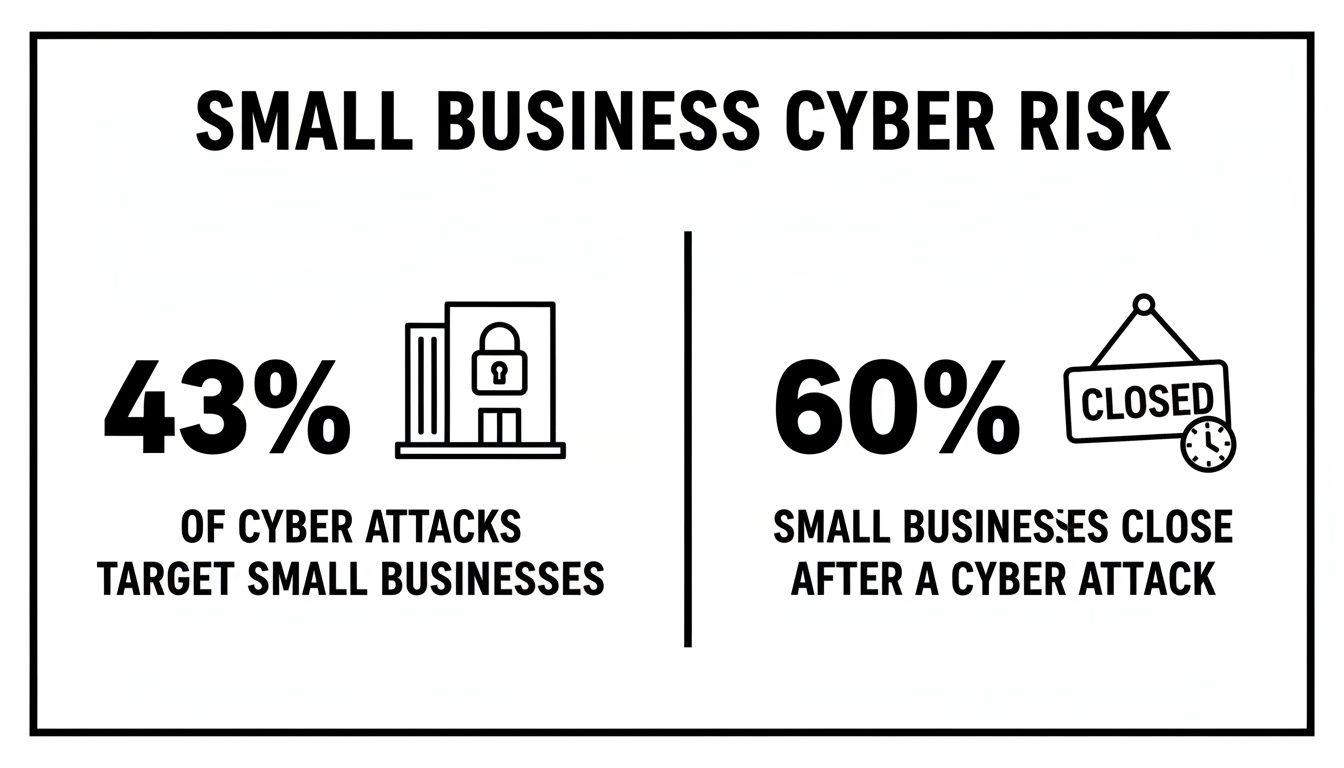
The reality is that small businesses are not only a prime target for attackers, but the fallout from a successful attack is often catastrophic.
The True Cost of a Security Lapse
A cyberattack isn't a clean, one-time event. It’s a messy, sprawling disaster that bleeds into every corner of your business, and the costs go far beyond just a technical fix.
A single security lapse can lead to crippling recovery costs, regulatory fines, and legal fees. More importantly, it erodes the one thing you can't buy back: your customers' trust.
Let's break down what this actually looks like with a practical example:
- Financial Drain: Imagine a ransomware attack locks up all your files at your accounting firm during tax season. Suddenly, you can't access client tax returns, process payroll, or send invoices. Every hour of downtime costs you billable hours, and that's before you even think about paying a ransom or hiring an expert to recover the data.
- Reputational Damage: Having to email your entire customer base to tell them their private financial data was stolen is a nightmare scenario. It shatters trust and sends your hard-won clients straight to your competitors who can prove they take security seriously.
- Operational Chaos: When your core systems go down—your accounting software, your CRM, your project management tools—your business grinds to a halt. Employees are idle, deadlines are missed, and the entire workflow collapses.
Every phone, tablet, and laptop connected to your company's network creates another potential doorway for an attacker. As your business grows, so does your risk. We wrote a guide on how you can defend your expanding attack surface that dives deeper into this.
Protecting your network isn't an IT expense. It’s a fundamental business investment that ensures you can keep your doors open, your customers happy, and your company growing.
Understanding the Top Cyber Threats to Your Business
Before you can build a solid defense, you need to know what you're up against. Cyber threats aren't some abstract concept; they're specific tactics criminals use to steal your money, lock up your data, and shut your business down.
Let's cut through the jargon and look at the real-world attacks we see targeting small businesses every single day.
Ransomware: The Digital Hostage-Taker
Ransomware is one of the most brutal and effective attacks a business can face. It's the digital equivalent of a bandit breaking into your office, chaining every file cabinet shut, and leaving a note demanding a huge payment for the keys.
All it takes is one wrong click on a bad link. In minutes, malicious software encrypts your customer lists, financial records, project files—everything. Your entire operation grinds to a halt. The attacker then demands a ransom, almost always in cryptocurrency, to restore your access.
- Practical Example: A local Henderson dental office gets an email with what looks like a patient referral from another specialist. An employee, trying to be helpful, opens the attached "X-ray file," which is actually a malware executable. Within minutes, every computer on the network flashes a ransom note. Their patient scheduling system and all digital dental records are encrypted and inaccessible, forcing them to cancel all appointments for the week and turn patients away at the door.
Phishing: The Art of the Digital Con
Phishing is all about deception. It’s a con artist in a digital disguise, trying to trick you or your team into handing over the keys to your business. These attacks usually show up as emails that look shockingly real, pretending to be your bank, a supplier, or even a trusted colleague.
The goal is always to create a sense of urgency—"Urgent Invoice Past Due" or "Action Required: Your Mailbox is Full"—to get someone to click a link or open a file without thinking. That click could lead to a fake login page designed to steal passwords or just install malware directly onto the computer.
Phishing isn't a high-tech assault; it's a psychological one. It banks on human trust and the daily chaos of running a business to get past your technical defenses.
- Practical Example: Your bookkeeper receives an email that looks like it's from Microsoft 365, warning that your company's shared drive is almost full and they need to "Click here to upgrade your storage." The link leads to a perfect replica of the Microsoft login page. The bookkeeper enters their email and password, and just like that, the attacker has full access to their account, including all company documents and emails.
Credential Theft: Stealing the Keys to the Kingdom
Credential theft is exactly what it sounds like: criminals stealing your usernames and passwords. It's like a burglar finding the key you left under the doormat. Once an attacker has working login credentials, they don't have to break in—they can just walk right through the front door.
This happens in a few common ways:
- Weak Passwords: Using simple, easy-to-guess passwords like "Company2026!" or "Admin123."
- Password Reuse: An employee uses their work email and the same password for a personal online shopping account. That shopping site gets breached, and now attackers test that same email/password combination on your business systems.
- Phishing: Tricking an employee into typing their login details on a fake website, as described in the example above.
With stolen credentials, an attacker can get into your email, financial software, and cloud storage, often going unnoticed for weeks while they quietly siphon off sensitive data or set up fraudulent wire transfers.
Ransomware, in particular, has become the weapon of choice against small businesses. The data is clear: 88% of small business breaches involved ransomware, a rate 2.3x higher than what larger companies face. Why? Because attackers know SMBs often lack the dedicated security teams and resources to fight back. In fact, 37% of ransomware victims have fewer than 100 employees, confirming that no business is too small to be a target.
To learn how to protect your files from being held hostage, check out our guide on how to prevent ransomware attacks.
Building Your Digital Fortress With Core Security Components
Okay, so you know the bad guys are out there. But knowing about the threats and actually building your defenses are two totally different things. The good news? Securing your small business network doesn't mean you need a bottomless budget or a dedicated team of IT geniuses.
It’s all about layering smart, practical defenses to build a digital fortress around your most important assets.
Think of it just like securing your office. You need strong walls, guarded doors, and a solid plan for when things go wrong. Here are the five core components every small business needs to put in place.
The Firewall: Your Digital Gatekeeper
Your firewall is the perimeter wall of that fortress. It stands between your internal business network and the wild west of the internet, acting as a gatekeeper that inspects every bit of data trying to get in or out. Its job is simple: block anything malicious or unauthorized before it gets anywhere near your computers.
Without a firewall, your network is basically a building with the doors wide open for anyone on the street to wander in.
- Actionable Insight: Your business router almost certainly has a built-in firewall. Log into its settings today and make sure it’s turned on. This is usually in a section labeled "Security" or "Firewall." While you're there, also ensure that remote administration is turned OFF so no one can change your settings from outside the network.
Endpoint Protection: Your Patrolling Guards
If the firewall is your outer wall, think of endpoint protection as the guards patrolling inside. Endpoints are simply any device connected to your network—laptops, desktops, servers, and yes, even smartphones. Every single one is a potential way for an attacker to get in.
Modern endpoint protection is so much more than old-school antivirus software. It uses sophisticated methods to spot and shut down malware, ransomware, and other shady activity as it happens. It’s the active, on-the-ground defense that catches threats that might have snuck past your firewall.
One of the biggest mistakes we see is businesses relying on free, consumer-grade antivirus. These tools just don't have the centralized control or advanced threat-spotting capabilities you need to properly secure a business environment.
Multi-Factor Authentication: The Secret Password and Handshake
Multi-Factor Authentication (MFA) is easily one of the most powerful security measures you can implement, and it's incredibly simple. Think of it as needing both a secret password and a secret handshake to get in. Even if a cybercriminal manages to steal your password (the first factor), they're stopped cold because they don't have the second factor—usually a one-time code sent to your phone.
The vast majority of data breaches involve stolen passwords. That makes MFA a non-negotiable in 2026. It is the single most effective way to stop an attacker from taking over your email, cloud accounts, and banking portals.
- Actionable Insight: Stop what you're doing and enable MFA on your business email (Microsoft 365, Google Workspace) and your online banking portal right now. Seriously. Log in, go to the security settings for your account, and look for "Two-Factor Authentication" or "Multi-Factor Authentication." Follow the steps to link it to your phone. It takes a few minutes and instantly shuts down a massive avenue of attack.
Secure Data Backups: Your Fireproof Vault
Let’s be realistic: no security system is 100% perfect. A determined attacker might eventually find a way through. When that day comes, your data backups are your absolute last line of defense. A good backup is like having a fireproof, off-site vault holding perfect copies of your most critical business information.
If a ransomware attack locks up all your files, you won’t even have to think about paying the ransom. You can just wipe the infected machines, restore your clean data from your backup, and be back in business within hours, not weeks. Of course, those backups need to be protected, too. For a deeper dive, you can learn more about how encryption works and why it matters in our detailed guide.
A proper backup strategy isn't just about copying files. It involves:
- Automation: Your backups should run automatically every single day, no exceptions and no manual effort needed.
- Redundancy: Live by the 3-2-1 rule: keep three copies of your data on two different types of media, with at least one copy stored off-site (e.g., one on a local server, one in the cloud).
- Testing: Don't just assume your backups are working. Once a quarter, perform a test restore of a non-critical file or folder to make sure you can actually recover your data when you need it most.
Employee Security Training: Your Neighborhood Watch
Your employees are your greatest asset, but they can also be your biggest security risk. A single, well-meaning employee who clicks the wrong link in a phishing email can instantly bypass all the expensive security tools you've put in place.
This is exactly why ongoing security awareness training is so critical. It transforms your team from a potential weak link into a vigilant neighborhood watch.
- Practical Example: During a team meeting, send a (safe) simulated phishing email to everyone. See who clicks it. Then, use that as a real-world teaching moment. Show them the red flags they missed: the slight misspelling in the sender's email address, the generic greeting, or the link that didn't go to the expected website. This hands-on experience is far more effective than just a memo.
When your people know how to spot a suspicious email, create strong passwords, and report anything that looks off, they become an active and essential part of your defense.
Your Prioritized Action Plan for Any Budget
Alright, we’ve covered the threats and the essential gear for your digital fortress. But theory is one thing—where do you actually start? It can feel overwhelming, especially when you’re juggling a dozen other business priorities.
Let's break this down into a simple, practical action plan that any small business can follow, no matter your budget or tech skills. We call it the "Crawl, Walk, Run" method. The goal is to get you some high-impact wins right out of the gate and then build from there.
Crawl Stage: High-Impact, Low-Cost Actions
Think of this as the stuff you can do this week. These foundational steps cost next to nothing but slam the door on the most common ways attackers get in.
Enforce a Strong Password Policy: It's time to get serious about passwords. No more "Password123" or reusing the same one everywhere. Insist that everyone on your team uses long, complex passphrases (e.g., four random words like "Park-River-Coffee-Bicycle!") and get them started with a reputable password manager (like Bitwarden or 1Password) to securely store and generate unique passwords for every site.
Enable Multi-Factor Authentication (MFA) Everywhere: Honestly, if you do only one thing from this list, make it this. Turn on MFA for every important account: business email, banking portals, cloud accounting software, and your CRM. It's your single most effective defense against credential theft.
It’s shocking how many breaches boil down to a simple password problem. Research shows that a staggering 80% of all hacking incidents involve stolen or weak credentials. Yet, according to this report on small business cyber security statistics, only about 20% of small businesses have actually turned on MFA, leaving a massive gap in their defenses.
Think of the Crawl stage as locking your doors and windows. It's the absolute baseline for preventing an easy break-in and the foundation for everything that follows.
Walk Stage: Essential Security Investments
Once you’ve nailed the basics, it’s time to add a few crucial layers of professional-grade protection. This stage requires a small, smart investment that will dramatically upgrade your ability to fight back.
Deploy Professional Endpoint Protection: That free antivirus software that came with your computer isn’t going to cut it. You need to invest in a business-class endpoint detection and response (EDR) solution. This gives you a single dashboard to see security alerts for all company devices and can automatically isolate an infected computer to stop a threat from spreading.
Implement a Managed Backup Service: A manual backup to a USB stick just doesn’t work. A professional service automates the whole process, follows the tried-and-true 3-2-1 rule (3 copies, on 2 different media types, with 1 off-site), and ensures your data is encrypted and ready to be restored when you need it most.
Conduct Basic Employee Security Training: Get your team together for a quick training session. The goal is to teach them how to spot a phishing email (show them real-world examples!), understand why clicking strange links is a bad idea, and establish a clear protocol for reporting suspicious activity (e.g., "Forward the suspicious email to security@yourcompany.com and delete it.").
These steps are like installing a monitored alarm system. They don’t just sit there; they actively watch for trouble and give you a reliable plan to recover if the worst happens.
Run Stage: Advanced Security Tactics
This is where you graduate from playing defense to having a proactive security posture. These advanced tactics are often where it makes sense to bring in an expert, like a Managed Service Provider (MSP), who has the specialized tools and experience.
Network Segmentation: This is just a fancy way of saying you divide your network into smaller, isolated zones. For example, your guest Wi-Fi should be on a completely separate network from your core business systems that handle point-of-sale transactions or client data. That way, a visitor's potentially compromised phone or laptop has no path to your sensitive information.
Proactive Threat Hunting: Instead of waiting for an alarm to go off, this is where an expert actively scours your network for faint signals of a compromise. They use sophisticated tools to find the subtle clues—like a single computer making an unusual connection to a server in Eastern Europe—that an attacker might be hiding in the shadows.
Regular Vulnerability Scanning: Think of this as hiring a professional inspector to periodically check your digital fortress for cracks. Automated tools scan all your computers and servers for missing security patches or common configuration errors that a hacker could easily exploit, giving you a prioritized list of what to fix first.
When you reach the "Run" stage, you’re no longer just ticking boxes on a checklist. You're running a dynamic, ongoing security program that shows you're serious about protecting your business from more sophisticated threats.
When to Partner With a Security Expert
The do-it-yourself approach to network security can get you pretty far, especially when you're just starting out. Following a solid action plan helps build a decent defense. But eventually, you're going to hit a wall where your time, energy, and know-how just aren't enough.
That's the moment you have to ask yourself a tough question: can I keep juggling this, or is it time to call in the pros? For most small businesses, this is when partnering with a Managed Service Provider (MSP) stops being a luxury and becomes a core part of your business strategy.
The Signs It's Time for an Expert
The first step is knowing when you’ve reached your limit. If you're a busy owner trying to handle security on top of payroll, sales, and everything else, some very clear pain points will start to pop up. Ignoring them is like hearing a smoke alarm go off and just hoping it stops on its own.
Keep an eye out for these practical triggers:
- You're Totally Overwhelmed: You see security alerts from your antivirus, but you have no idea which ones are real emergencies versus false alarms. The constant low-grade worry about a breach is pulling focus from what you're actually supposed to be doing—running your business.
- You're Out of Your Depth: You've enabled MFA and have a password policy, but you know deep down you don't have the skills to handle a sophisticated ransomware attack or recover properly if one gets through. You feel like you're always reacting to problems instead of getting ahead of them.
- Compliance Rules Are Knocking: Your business handles sensitive data, whether it's for healthcare (HIPAA), financial services (GLBA), or simply processing credit cards (PCI DSS). Failing an audit isn't just a slap on the wrist; it can mean huge fines and a ruined reputation.
- You've Already Been Hit: If you've suffered a breach, even a small one, trying to clean up the mess yourself is a huge gamble. An expert can make sure the threat is truly gone—not just hiding—and lock things down so it doesn't happen again.
Why a Security Partner Makes Business Sense
Bringing on an MSP might look like a big line item in the budget, but you have to think about it differently. You aren't just buying IT support; you're investing in the stability of your entire operation. The math actually works out in your favor.
For less than the cost of hiring a single, full-time IT person, an MSP gives you access to an entire team of dedicated security experts. They bring specialized tools, 24/7 monitoring, and years of experience that you could never replicate in-house.
Think of it this way: You’re an expert at what you do. A good MSP is an expert at one thing: keeping your technology safe and running smoothly so you can focus on your business.
A real partner like Cyberplex Technologies offers a lot more than just a help desk. Here’s what that kind of relationship actually looks like:
- Proactive Management: Instead of waiting for you to report a problem, they are always monitoring your network, applying critical security patches to your software in the background, and adjusting your defenses to keep you ahead of the latest threats.
- 24/7 Monitoring and Response: Hackers don't work 9-to-5. An MSP has eyes on your network around the clock, ready to shut down an attack the second it appears, whether it's a Tuesday afternoon or a holiday weekend.
- Expert Guidance: When it’s time to upgrade your systems or plan your tech budget for next year, you have a trusted advisor who understands your business goals and can give you practical advice on where to invest for the best ROI.
Ultimately, bringing in a security expert is about shifting the weight of network security from your shoulders to theirs. It frees you from the constant battle against digital threats and lets you get back to what you do best: growing your company.
Your Network Security Questions Answered
Even with a good game plan, navigating the world of network security can bring up some very practical questions. As a business owner, you need clear, straightforward answers—not a bunch of technical jargon—to make the right call for your company.
This section tackles the most common concerns we hear from small business owners every day. Our goal is to clear up any lingering doubts you might have and make sure the key takeaways from this guide really hit home.
My Business Uses Cloud Apps Like Microsoft 365. Aren't We Already Secure?
This is a common question, and honestly, it’s a dangerous misconception. While big providers like Microsoft and Google do an incredible job securing their global infrastructure (the cloud itself), you are responsible for securing your own data and accounts within their platform. This is what we call the Shared Responsibility Model.
Think of it like renting a storage unit in a high-security facility. The company provides guards, strong gates, and cameras for the whole property. But you’re still the one who has to put a solid lock on your own unit. If you leave your door unlocked, all that facility-level security won't protect what’s inside.
Here are the actionable steps you are responsible for with cloud services like Microsoft 365 or Google Workspace:
- Enable Multi-Factor Authentication (MFA): This is your personal lock. It ensures that even if a criminal gets ahold of a password, they can’t get into your account without a second approval from your phone.
- Configure Advanced Security Settings: Default settings are usually built for convenience, not real security. You have to go into the admin center and actively configure things like anti-phishing rules, malware filters, and safe link policies that scan URLs in emails before a user can click them.
- Control User Access (Least Privilege): Not every employee needs admin rights or access to the company financials folder. You are responsible for setting permissions so people can only see and touch the data they absolutely need to do their jobs.
- Back Up Your Data: A cloud provider is not a backup service. If an employee accidentally deletes a critical folder or ransomware encrypts all your SharePoint files, you need your own separate, third-party backup to get that data back quickly.
Hackers go after cloud accounts relentlessly because they are a goldmine of sensitive information. Simply relying on the default settings is like leaving that storage unit door wide open for them.
How Much Should a Small Business Budget for Cybersecurity?
There's no single magic number. While some experts will tell you to set aside 3-6% of your total IT budget, we find a more practical approach for small businesses is to start by looking at your risk. What data, if it were stolen or lost, would be completely catastrophic for your business? Your client list? Financial records? Protect that first.
From there, you can use the "Crawl, Walk, Run" framework we mentioned earlier to build your budget in stages.
The cost of proactive network security for a small business is always, without fail, a fraction of the cost of recovering from a breach. A single incident can easily run into tens or even hundreds of thousands of dollars in downtime, fines, and damage to your reputation.
Here’s a practical way to think about your budget:
- Crawl Stage (Low-Cost Essentials): Your initial investment here is mostly time, not money. This means creating strong password policies, enabling MFA everywhere possible, and doing some basic security training with your team. The financial cost is minimal, but the security payoff is massive.
- Walk Stage (Foundational Investments): This is where you’ll start spending some real dollars. You need to budget for a professional-grade endpoint protection platform (expect ~$5-15 per user/month) and a managed, automated backup service (costs vary by data amount, but often start around $50-100/month).
- Run Stage (Expert Partnership): As you grow, it's time to budget for a partnership with a Managed Service Provider (MSP). This gives you expert management and 24/7 monitoring for less than the salary of one full-time IT hire. It turns unpredictable problems into a predictable monthly cost.
Start by protecting what matters most, and then scale your investment as your business and revenue grow.
Are These Steps Really Necessary for My Specific Industry?
Absolutely. Cybercriminals are opportunists—they don't care about your industry, they care about your data. Every single modern business, no matter the sector, holds information that is valuable to an attacker.
Just think about these practical examples:
- A Law Firm: Holds confidential client files and privileged communications that must be protected. A breach doesn't just lose data; it breaks attorney-client privilege.
- A Non-Profit: Manages a trove of sensitive donor information, including names, home addresses, and payment details. A public breach could destroy donor trust overnight.
- A Manufacturing Plant: Relies on its intellectual property for product designs and needs its operational data to keep the machinery running. A ransomware attack on the plant's control systems could shut down production for weeks, costing millions.
- A Real Estate Agency: Stores financial documents, social security numbers, and other personal data needed for closing property deals. This is a prime target for wire transfer fraud, where attackers trick buyers into sending funds to the wrong account.
On top of that, many industries have strict legal and contractual obligations to protect data. Regulations like HIPAA in healthcare or PCI DSS for anyone processing credit cards come with heavy penalties for non-compliance.
The core principles of strong network security are universal. Controlling who has access, defending your devices, backing up your data, and training your people—these are the pillars that support the survival of any organization today.
Feeling overwhelmed by your security to-do list? You don’t have to handle it alone. Cyberplex Technologies LLC provides proactive, expert IT management that allows Henderson business owners to focus on growth, not threats. Let us secure your network so you can get back to what you do best.


