
For small businesses today, a phone system needs to do a lot more than just make and receive calls. The best VoIP phone systems—like RingCentral for its team analytics, Nextiva for customer support, or Allo for its practical AI tools—are complete communication hubs. They go far beyond basic calling by bringing together mobile apps, video meetings, and your other essential business software onto a single platform.
Why VoIP Is a Competitive Necessity for Small Businesses

Moving to a Voice over Internet Protocol (VoIP) system isn't just about saving a few bucks anymore; it’s a strategic decision that gives you a real competitive edge. For a modern small business, your phone system is the nerve center for productivity, client relationships, and staying afloat during disruptions. The right system transforms communication from a simple utility into one of your most powerful business assets.
A practical example is a local financial services firm in Henderson, NC. They use VoIP's secure, on-demand call recording to document client conversations for compliance, which builds trust and protects them from disputes. Another example is a local property management team juggling multiple sites; a VoIP provider’s mobile app ensures they never miss an emergency tenant call, even when they're out inspecting a property.
Drive Growth and Flexibility
The best VoIP phone systems for small business are built for how we work now. They create a scalable foundation that easily supports your remote and hybrid teams, letting employees use their business number on any device, from anywhere. That kind of flexibility is what keeps a business running smoothly.
Here are a few actionable insights that make VoIP a necessity:
- Seamless Integration: Connect your phone system with your CRM. When a client calls, their record can pop up automatically, giving your team instant context. After the call, a log and recording can be saved directly to the client's file. This eliminates manual data entry and ensures nothing falls through the cracks.
- Enhanced Productivity: Use voicemail-to-email transcription to turn voicemails into actionable tasks. Instead of dialing in, your team can scan messages in their inbox, forward a client request to the right person, or add a to-do item to their project management app—all in seconds.
- Operational Resilience: Program automatic call forwarding. For example, if your office internet goes down, set your VoIP system to automatically reroute all incoming calls to your team's mobile phones. This keeps you open for business and responsive to customers, turning a potential crisis into a minor hiccup.
The numbers don't lie. Over 60% of small and medium-sized businesses have already switched to VoIP, making them the biggest and fastest-growing part of the market. For startups, ditching hardware-heavy traditional phones can slash initial communication costs by up to 90%. Discover more important VoIP statistics.
Ultimately, adopting VoIP is about building a more agile, productive, and resilient business. It’s a practical step toward future-proofing your operations.
Essential VoIP Features That Drive Business Value
When you're looking at a new VoIP system, it’s easy to get lost in a long list of technical features. What really matters, though, is what those tools can actually do for your business. The best VoIP phone systems for a small business are the ones that directly make you more efficient, improve how you serve customers, and help your team stay connected, no matter where they are.
For example, for a busy Henderson law firm, the "Auto-Attendant" feature isn't just a technical term. It's the digital receptionist that greets a client, offers them options ("Press 1 for Real Estate, Press 2 for Family Law"), and connects them directly with the right paralegal. This provides a professional first impression and frees up front desk staff for higher-value work.
Core Features That Create Efficiency
To really see the power of VoIP, you have to look at how these features solve everyday problems. Most systems offer similar tools, but how you use them makes all the difference.
Mobile Softphone Apps: This turns an employee's smartphone into their office phone. Actionable Insight: A contractor can receive a call on their business line while at a job site, then seamlessly transfer that call to a project manager back at the office, all from the mobile app. This maintains professionalism and keeps their personal number private.
Voicemail-to-Email with Transcription: This is a massive productivity boost. Actionable Insight: An accountant receives a transcribed voicemail from a client with specific numbers. They can copy and paste those figures directly into a spreadsheet or email without having to replay the message, saving time and reducing the risk of error.
Call Recording: This is essential for both training and compliance. Actionable Insight: A manager at a service-based business can review a recorded support call to identify a training gap. They can then use that specific, real-world example in a team meeting to coach employees on how to better handle customer objections.
These aren't just minor conveniences; they are powerful tools that streamline your daily grind and have a direct impact on your bottom line. They make sure your team is always connected and responsive, whether they’re in the office or out in the field.
Advanced Capabilities for Strategic Growth
As your business grows, your communication needs will get more complex. A modern VoIP platform gives you the professional tools you need to manage that growth without missing a beat.
A great example is Ring Groups. Think of a sales team at a Henderson car dealership. When a hot lead calls the main sales line, a ring group can be configured to ring every available salesperson's phone simultaneously. The first person to pick up gets the call, ensuring you never lose a crucial opportunity because one person was on another line.
The global VoIP market is absolutely booming, projected to hit $195.39 billion by 2026, with small businesses driving that growth. It’s fueled by real ROI—we’re talking up to 40% lower phone bills and AI tools that can give each employee back 30 minutes a day. For Henderson businesses, this isn't some future trend; it's a proven way to get more secure and scalable communications right now. Find out more about VoIP trends and their impact.
Another key capability is multi-party Conference Calling. This goes way beyond a simple three-way call. It lets you host large virtual meetings with clients, vendors, and remote employees without needing separate, clunky software. It’s perfect for project kick-offs or quarterly reviews. If you want to master this feature, you can check out our guide on how to set up conference calls.
By putting these features to work, you stop thinking of your phone system as just another bill. It becomes a strategic asset that actively helps your business grow.
Comparing the Top VoIP Systems for Small Business Needs
Let’s get one thing straight: there's no single "best" VoIP system out there. The right choice for your business really boils down to matching a provider's strengths to what you actually do day-to-day. A real estate team that’s always on the road has completely different phone needs than a Henderson accounting firm that lives and dies by call logs and compliance.
Our goal here is to cut through the noise and compare some of the leading providers—like RingCentral, Nextiva, and 8×8—based on what really matters: ease of use, transparent pricing, and security. We're breaking it down with practical use cases to help you make a decision you can feel good about.
This decision tree is a great starting point for thinking about the features that will make the biggest impact on your team, depending on whether you're in the office or out in the field.
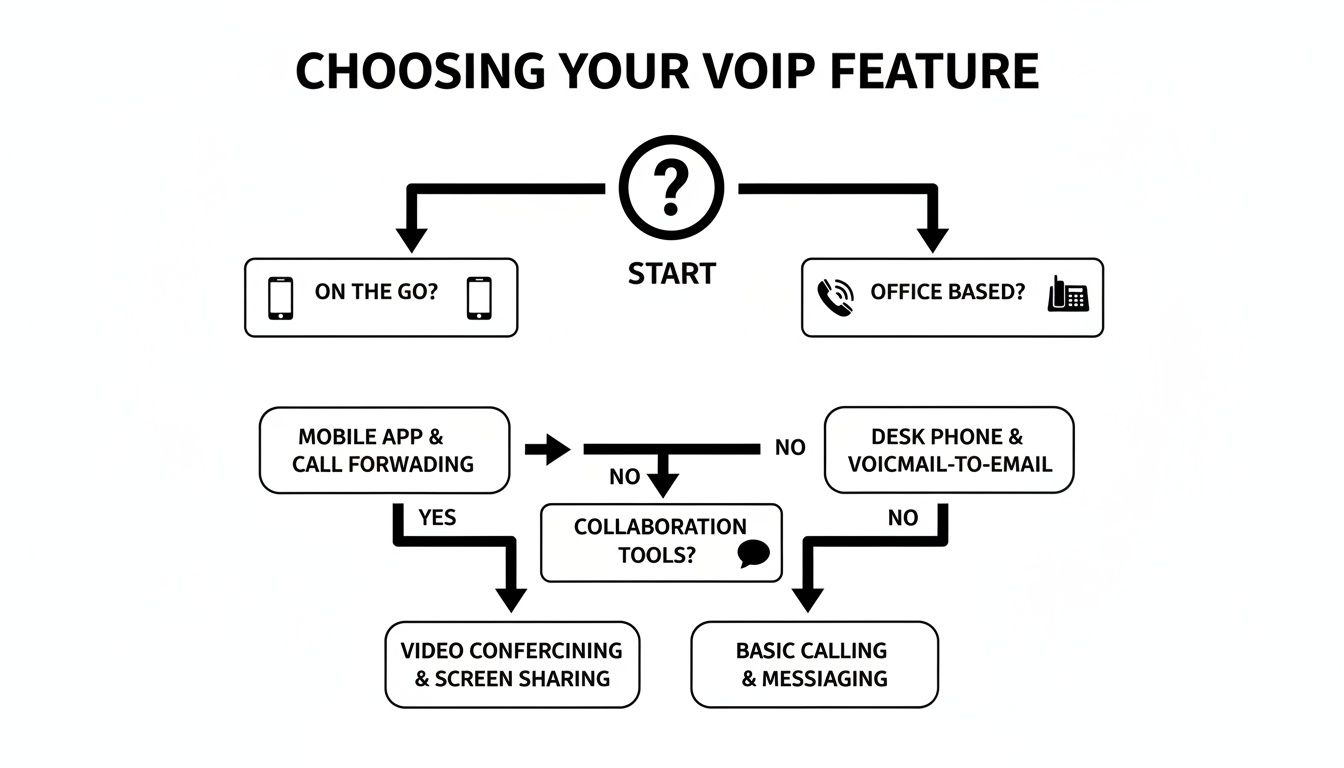
As you can see, where your team works is a huge factor. A mobile-first crew will need great softphone apps, while an office-based team might focus more on traditional desk phone capabilities.
2026 VoIP Provider Comparison for Small Businesses
To give you a clear, at-a-glance view, we’ve put together a head-to-head comparison of some top contenders. This table focuses on the criteria we see mattering most to small businesses right here in Henderson, NC.
| Provider | Best For | Starting Price (Per User/Month) | Key Security Feature | Microsoft 365 Integration |
|---|---|---|---|---|
| RingCentral | Data-driven teams needing deep analytics | ~$30 | End-to-end encryption (E2EE) | Excellent |
| Nextiva | Customer-centric businesses needing ease of use | ~$24 | SOC 2 and ISO/IEC 27001 compliance | Good |
| 8×8 | Businesses needing an all-in-one voice and contact center | ~$24 | HIPAA/HITECH compliance options | Excellent |
Each of these platforms offers a solid foundation, but the devil is in the details. The best fit really depends on your specific workflow and priorities.
RingCentral: Best for Data-Driven Teams
RingCentral has built a reputation as a true all-in-one platform. Its real power lies in its deep analytics and reporting, making it a fantastic choice for any manager who needs to track performance metrics like call volumes, wait times, and individual agent productivity.
- Practical Use Case: A growing e-commerce shop in Henderson can use RingCentral’s dashboards to discover that customer calls spike between 2 PM and 4 PM. Armed with that data, the manager can adjust staffing schedules to ensure no sales are missed, directly boosting customer satisfaction and the bottom line.
The trade-off? All those features can mean a steeper learning curve and a higher price. If your team just needs simple, reliable calling, RingCentral might be more than you need.
Nextiva: Best for Customer-Centric Businesses
Nextiva's entire game is built around a fantastic user experience and top-notch customer support. Their platform is designed to be intuitive right out of the box, bringing calls, team chat, and customer info into one clean interface. This makes it perfect for businesses where great service is everything.
Key Insight: We often find Nextiva is the best fit for teams that aren't especially tech-savvy. Its straightforward setup means you can get your people up and running fast without needing a ton of IT help or training.
- Practical Use Case: A local law firm needs every client call handled professionally. Nextiva’s reliable auto-attendant and call routing gets clients to the right paralegal quickly, while its platform stability minimizes the risk of dropped calls during sensitive client conversations.
The main thing to watch for is its third-party integrations. The library isn't as massive as some competitors, so if you rely on a niche CRM, you’ll want to double-check that it plays nicely.
8×8: Best for Integrated Voice and Contact Center Needs
8×8 is a standout for businesses that are starting to need more than just a basic phone system. It neatly combines a standard business phone system (UCaaS) with contact center features (CCaaS) on a single platform. This gives you a seamless way to scale up as your customer service demands get more complex.
It’s an especially smart move for teams that wear multiple hats, handling both sales and support.
- Practical Use Case: A small manufacturer uses their phone system for internal calls, supplier coordination, and customer tech support. With 8×8, they can start with a basic plan and later add advanced features like skills-based routing or supervisor dashboards for their support team, all without the cost and complexity of switching providers.
This shift to integrated cloud systems is driving massive growth, with the global VoIP market projected to jump from $66.02 billion in 2026 to $132.33 billion by 2034. Small and medium businesses are leading the charge, and for Henderson companies, the benefits are obvious—many see savings of up to 50% on their communication costs. For a full look at this trend, you can explore the complete VoIP phone market forecast.
When you’re making the final call, think about how your business might look in two or three years. A system that’s perfect today might not support the remote working phone system you'll need tomorrow. The best choice always aligns with how you work now while giving you a clear path to grow.
Choosing Your Path: Managed VoIP Versus a DIY Approach
Once you've settled on a provider, you hit your next major fork in the road. How are you actually going to run this new VoIP system? For any small business, this really boils down to two options: you can take a do-it-yourself (DIY) approach or you can partner with a Managed Service Provider (MSP).
This isn't a minor detail—it's a choice that will directly shape your system's security, the quality of your calls, and how much time you spend tinkering with tech instead of running your company.
Tackling VoIP On Your Own: The DIY Route
The DIY path can look pretty tempting, especially if you're a startup trying to watch every penny. You sign up directly with a big name like RingCentral or Nextiva and take on the setup and day-to-day management yourself. But this route comes with a steep learning curve and responsibilities that go way beyond just plugging in a few phones.
When you go DIY, you’re not just the business owner anymore—you’re also the on-call IT department. While VoIP providers offer support, it stops at their service. They won't configure your office router or fix network issues causing poor call quality.
Here are the real-world hurdles you’ll be responsible for:
- Network Configuration: To get clear, crisp calls, your network needs a setting called Quality of Service (QoS). This creates a "fast lane" for voice traffic. Actionable Insight: Without configuring QoS on your router, a large file download by one employee could cause choppy audio and dropped calls for everyone else. Figuring this out on your own can be a frustrating and time-consuming process.
- Ongoing Security Management: A VoIP system is a potential entry point for cyber threats. You'll be responsible for managing user access, updating device firmware, and monitoring for suspicious activity. A misconfigured firewall rule could leave your entire communications system vulnerable.
- Complex Troubleshooting: When a call fails, is it your internet provider, your router, your firewall, or the VoIP service? You can burn hours trying to diagnose a problem that an expert could pinpoint in minutes, all while your business can't make or receive calls.
The DIY path really only makes sense for businesses that already have a dedicated IT pro on staff with real networking and security experience. For most small businesses, any initial savings are quickly eaten up by downtime, lost productivity, and major headaches.
The Strategic Value of a Managed VoIP Solution
The alternative is to bring in an MSP that lives and breathes business communications. In this setup, the MSP becomes your technology partner, handling everything from the initial plan and migration to proactive monitoring and 24/7 support. For business owners who would rather focus on operations than IT, this is the way to go.
An MSP adds a critical layer of expertise that makes sure your phone system is reliable, secure, and just plain works. For a Henderson business, this gives you a local partner who gets the landscape and can provide actual hands-on help when you need it.
Consider these practical scenarios where a managed approach is a game-changer:
- For an Accounting Firm: With no internal IT staff but strict compliance rules, a managed solution is a must. The MSP configures the system to ensure call recordings and messages are encrypted and stored securely, meeting industry standards and providing genuine peace of mind.
- For a Property Management Company: Agents are always on the move, so reliable mobile access is critical. An MSP properly configures the softphone apps on every agent's device and ensures call routing is seamless, preventing missed emergency calls from tenants.
Ultimately, choosing a managed solution is an investment in reliability. It turns your VoIP system from another thing you have to worry about into a powerful asset that helps you grow your business.
Your VoIP Implementation and Migration Checklist

Making the jump to a new VoIP phone system shouldn't be a chaotic overhaul. With the right plan, it’s a smooth, controlled upgrade. A successful switch all comes down to a clear, organized process that covers everything from checking your network to training your team.
This is our actionable blueprint for a seamless migration, guiding you through each critical phase so you can avoid common headaches and start seeing benefits on day one.
Phase 1: Pre-Migration Planning
Before you even think about plugging in a new phone, you need to lay the groundwork. This is the strategy phase—it’s all about making sure your business is truly ready for the switch and that your new system is set up to deliver.
Actionable Insight: The #1 cause of poor VoIP quality is the local network. Run an internet speed test during peak business hours. You'll need about 100 kbps of stable upload and download bandwidth for each simultaneous call. If you have 10 employees and expect up to 5 calls at once, you need at least 500 kbps of dedicated, stable bandwidth.
Next, you need to decide exactly how calls will be handled. This is your chance to build a better, smarter workflow from the ground up.
- Map your Auto-Attendant: Sketch out how callers will be greeted and what options they will hear (e.g., "Press 1 for Sales, Press 2 for Support"). Write the script for your greetings.
- Define Ring Groups: Decide which teams share incoming calls. For example, when someone calls your main support line, every customer service phone should ring.
- Plan After-Hours Routing: Determine where calls go when you're closed. Will they go to a general voicemail box, or be forwarded to an on-call number for emergencies?
Finally, get your number porting request initiated right away. This process transfers your existing business number over to the new provider, and it can take several business days to complete. Starting early is the best way to prevent any last-minute holdups.
Crucial Tip: Whatever you do, do not cancel your old phone service until your new provider gives you the green light that the number port is 100% complete. Canceling too soon is the fastest way to permanently lose your business phone number.
Phase 2: Implementation and Go-Live
With a solid plan in hand, it’s time to make the switch. This phase is all about execution: installing equipment, configuring your account, and getting your team up to speed. A structured rollout here is what makes the transition feel seamless.
Actionable Insight: Set up the new system in parallel with the old one. This allows you to test everything internally without disrupting live customer calls. Have your team make and transfer test calls between new devices before you go live.
Once the hardware is good to go, you can dive into your provider's admin portal and start configuring your system features. This is where your call flow map comes to life.
- Build the Auto-Attendant: Record your professional greetings (or use text-to-speech) and build out the menu you planned.
- Set Up Users and Extensions: Create an account for each team member, assign their extension, and add them to the correct ring groups.
- Configure Voicemail: Make sure every user’s voicemail is activated and enable voicemail-to-email for key staff to improve responsiveness.
The last thing to do before you flip the switch is train your team. A quick 30-minute session on core functions—making calls, transferring, checking voicemail, and using the mobile app—will prevent days of frustration and support questions later.
Phase 3: Post-Migration and Optimization
You're live! But the job isn't quite finished. The first few weeks are all about monitoring, listening, and fine-tuning the system to make sure it's working exactly as your Henderson business needs it to.
Right after going live, monitor your call quality and system performance. Actionable Insight: Use your provider’s dashboard to check analytics for jitter, latency, or failed calls. If you see issues, it often points to a local network problem. If you hired a managed service provider, they’ll be handling this for you.
Just as important is getting feedback directly from your team. They're the ones using it every day, so ask them what's working and what isn't. Their input is gold for catching small annoyances before they turn into major problems. With that feedback, you can start optimizing your call routing and greetings to perfectly match your real-world workflow.
How to Partner for VoIP Success
Picking out a great VoIP phone system is a solid first step, but it’s really just the beginning. The real success—or failure—of your new system comes down to how it’s installed, secured, and managed day-to-day. Without an expert in your corner, even the most advanced platform can turn into a source of dropped calls, security risks, and major headaches.
This is exactly why bringing a dedicated technology partner into the picture is so important. Instead of just selling you equipment and walking away, a managed service provider (MSP) ensures your VoIP solution is a perfect fit for your business from the get-go. It’s all about making your phone system a dependable asset, not another IT problem you have to solve yourself.
A Process Built for Peace of Mind
Here at Cyberplex Technologies, we’ve been helping businesses right here in Henderson, NC succeed since 2008. Our way of handling VoIP is both practical and strategic, because we know that a one-size-fits-all approach just doesn’t work.
Our process kicks off with a deep dive into how your business actually runs:
- Assess and Design: First, we perform a network readiness assessment and analyze your daily workflow and security needs. From there, we design a custom VoIP solution that integrates with your other critical systems, like Microsoft 365, so you can click-to-call directly from Outlook.
- Manage and Migrate: Our team handles the entire migration, from porting your numbers to configuring call routing based on your business hours. We manage the project to ensure zero downtime for your business.
- Support and Secure: We deliver proactive, 24/7 monitoring of your system's health and security. If an issue arises, we fix it—often before you even know there's a problem.
Partnering with an expert turns a complex technical project into a strategic business upgrade. It’s about having a local team that understands your challenges and is committed to your long-term success.
Choosing the right partner is just as critical as choosing the right software. You can learn more about what to look for when you read our guide on how to choose a managed service provider.
Ready to see how a professionally managed VoIP solution can elevate your business? Let's talk.
Frequently Asked Questions About Business VoIP
Switching your phone system is a big decision, and it’s natural to have questions. We find that most business owners are concerned with the practical, day-to-day details of how these platforms actually perform. We've compiled a few of the most common questions we hear to give you the straightforward answers you need.
Will My Call Quality Be as Good as a Landline?
Yes, and honestly, it’s usually much better. Modern VoIP systems deliver high-definition (HD) voice quality, which sounds noticeably richer and clearer than an old-school analog line. The one thing that truly matters for crystal-clear calls is a solid, high-speed internet connection.
Actionable Insight: Before any installation, a professional IT partner runs a full network assessment. We then configure Quality of Service (QoS) on your router, a critical setting that tells your network to prioritize voice traffic above all other data. This simple step prevents annoying jitter or dropped calls, even when your office is using the internet heavily for other tasks like video streaming or large downloads.
Can I Keep My Existing Business Phone Number?
Absolutely. Keeping your established business number is a standard, legally protected process called "number porting." You can bring your existing local and toll-free numbers over to your new VoIP provider, guaranteeing a seamless switch for your customers. From their perspective, nothing changes.
Actionable Insight: A managed service provider handles the entire porting process for you, coordinating with your old and new providers. It's critical that you do not cancel your old phone service until you get confirmation the number port is 100% complete. Canceling too early is the #1 way businesses accidentally lose their primary phone number for good.
What Happens to My Phones if the Internet Goes Down?
This is a huge concern for business continuity, and it’s where VoIP systems really leave traditional landlines in the dust. An old phone line just goes dead during an outage. A modern VoIP system, on the other hand, is built with smart failover rules to keep you in business.
Actionable Insight: You can pre-program automatic call forwarding rules. For example, if your office internet goes down, you can have the system instantly reroute all incoming calls to:
- A manager's cell phone.
- A "ring group" that calls multiple employees' mobile phones at once.
- A dedicated voicemail box that immediately emails you the transcription.
This built-in disaster recovery means you'll never miss that critical client call. It gives you a level of resilience that landlines simply can't offer.
At Cyberplex Technologies LLC, we don't just sell you a phone system; we design, implement, and manage a complete communication solution that guarantees performance and security. Schedule a consultation today to discover how a professionally managed VoIP system can provide true peace of mind for your business.


