
Recovering from a ransomware attack isn't about luck; it’s about having a clear, immediate plan. That first hour—when you find the ransom note or a user reports their files are scrambled—is everything. The moves you make right then will determine whether you're dealing with a contained incident or a full-blown business catastrophe.
This isn't theory. This is our playbook, honed from real-world incidents, for immediate damage control and actionable recovery.
Your First 24 Hours: What to Do Immediately
That moment of discovery is when speed and a level head matter most. Panic is your biggest enemy. A structured, pre-planned response ensures every action is deliberate and moves you toward recovery, not deeper into chaos.
First things first: you activate your incident response team. From there, you isolate the infection and start assessing the scope of the damage.
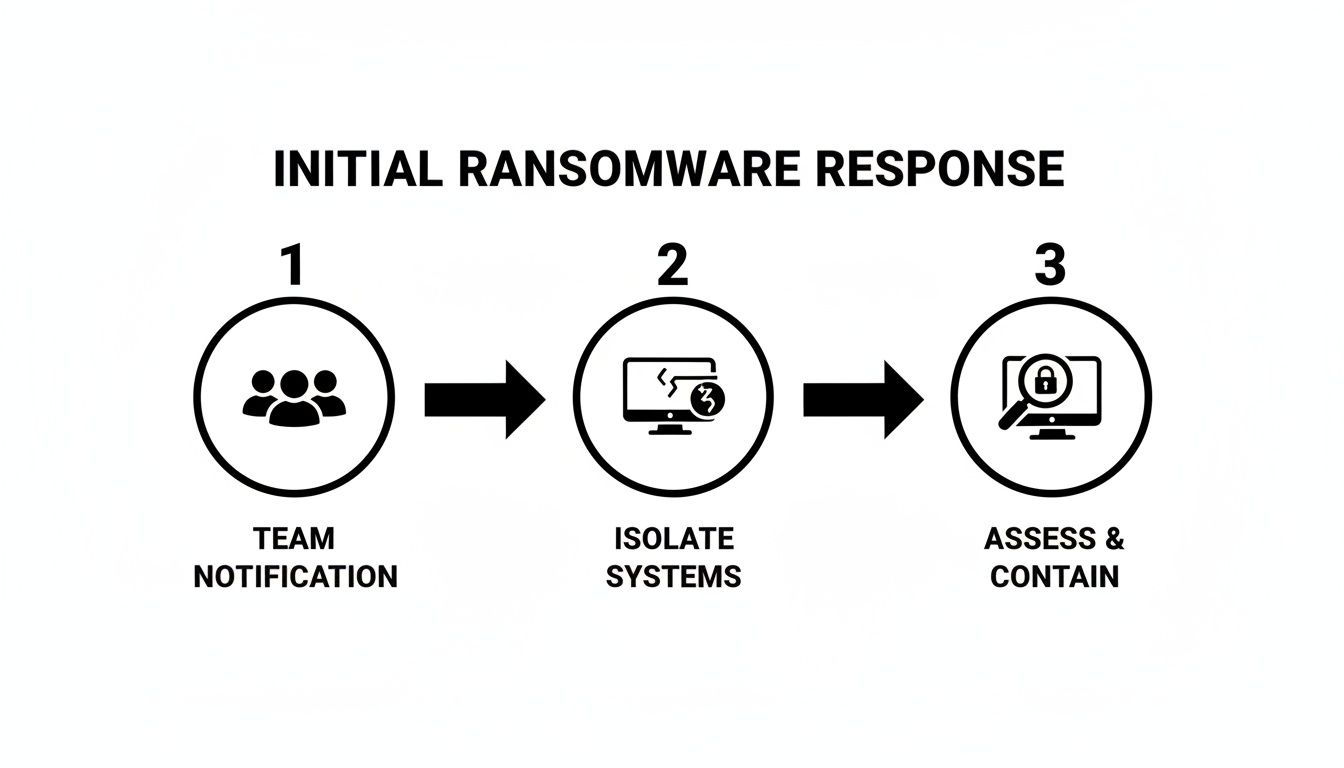
This simple flow—Team, Isolate, Assess—is the bedrock of an effective response. It prevents the kind of disorganized reaction that only makes things worse.
Activate Your Incident Response Team
Before you touch a single keyboard, get your team on the same page. This is a business crisis, not just an IT problem, and you need clear roles to avoid confusion when the pressure is on.
We recommend having these roles defined long before you ever need them:
- Incident Commander: The final decision-maker, usually a senior leader (like a COO or CEO) who coordinates the entire effort. Practical Action: This person’s phone number should be at the top of a printed-out call list in your emergency kit.
- Containment Lead: Your top technical expert. They're hands-on, in charge of identifying and isolating infected systems. Practical Action: They should have admin access to network switches, firewalls, and endpoint management tools ready to go.
- Communications Lead: A manager or executive who handles all messaging—internal and external—to keep the narrative calm and consistent. Practical Action: Have pre-drafted email templates for internal staff and key clients ready.
- Legal/Compliance Liaison: The point person for talking to your cyber insurance carrier, legal counsel, and, if necessary, law enforcement. Practical Action: Keep the 24/7 hotline number for your cyber insurance policy physically written down.
When everyone knows their job, you can execute immediately instead of wasting precious time figuring out who’s in charge.
Isolate Affected Systems—Strategically
Your next priority is to stop the bleeding. You have to prevent the ransomware from spreading to more computers, servers, and—most critically—your backups. But how you do it is just as important as how fast you do it.
One of the worst mistakes we see is the panicked, network-wide shutdown. Simply pulling the plug on infected machines can destroy crucial forensic evidence stored in volatile memory (RAM). This data is often your only clue to how the attackers got in and what they did.
Instead, isolate with precision. Start by disconnecting affected devices from the network. Actionable Step: Unplug the Ethernet cable from the back of the desktop. For a laptop, turn off its Wi-Fi via the hardware switch or operating system settings. For a server, you can disable its specific port on the network switch. This severs the malware's lifeline to the rest of your network and its command-and-control servers.
Think of it like this: an infected laptop is one thing. You can pull it off the network right away. But a critical server running your main business application? You might want to try and stop the specific malicious process first before disconnecting it to avoid corrupting data. Knowing what automated backup solutions you have gives you the confidence to make these tough calls.
This measured approach stops the spread without destroying the crime scene. It preserves the evidence you'll need for forensics—something your cyber insurance carrier will almost certainly require—and sets you up for a much cleaner recovery.
Immediate Ransomware Response Checklist
| Priority | Action Item | Role Responsible (Example) | Purpose |
|---|---|---|---|
| 1 (Critical) | Activate the full Incident Response Team via the pre-established communication channel (e.g., a dedicated Signal group). | Incident Commander | To ensure all key personnel are aware and engaged immediately. |
| 2 (Critical) | Disconnect identified infected devices from the network (unplug Ethernet, disable Wi-Fi). Do NOT power off. | Containment Lead / IT Staff | To stop the immediate spread of ransomware to other systems. |
| 3 (High) | Secure your backups. Verify they are offline, isolated, and immutable. (e.g., physically unplug the backup drive). | Containment Lead | To protect your most critical recovery asset from being encrypted. |
| 4 (High) | Change all administrator and high-privilege account passwords. (e.g., Domain Admin, cloud Global Admin). | IT Staff | To lock out attackers who may have compromised admin credentials. |
| 5 (Medium) | Preserve evidence. Take a forensic image or memory dump of an infected system if possible. | Containment Lead | To capture volatile data for forensic analysis, required for insurance/legal. |
| 6 (Medium) | Notify your cyber insurance carrier and legal counsel using the pre-saved hotline number. | Legal/Compliance Liaison | To initiate the formal claims process and receive legal guidance. |
This checklist isn't exhaustive, but it covers the non-negotiable first steps. Executing these actions decisively will stabilize the situation and give your team the breathing room needed to move on to the next phase of recovery.
Containing the Breach and Preserving Evidence

Okay, your response team is in motion and you’ve started pulling the first few infected machines offline. Now comes the hard part: stopping the bleeding while perfectly preserving the crime scene.
Getting this phase right is absolutely essential. It directly impacts your technical recovery, whether your insurance claim gets approved, and any legal steps you might take down the road. This isn't just about pulling plugs anymore—it's about making smart, strategic moves that will help you regain control.
Broaden Your Containment Strategy
That first wave of isolating infected machines was triage. Now it's time to think bigger and hunt down every single system the ransomware could have possibly reached. We've got to look at everything from your on-site servers to your cloud accounts.
Modern ransomware is designed to spread laterally, quietly moving through your network to find the most valuable data. Your job is to slam every door shut and cut off its escape routes.
Here's an actionable checklist we use to expand containment:
- Servers and Workstations: Don't stop with the machines that are obviously hit. Use your network and endpoint tools to spot other devices acting strangely. Example: Look for a server suddenly writing thousands of
.lockedfiles or a workstation making unusual connections to other devices on the network. - Connected IoT Devices: It's easy to forget about things like security cameras, smart sensors, and even VoIP phones. We've seen these become backdoors for attackers. Actionable Step: Move all IoT devices to a separate, isolated VLAN (Virtual LAN) immediately to cut them off from your core network.
- Cloud Accounts: A single stolen password can hand an attacker the keys to your kingdom in the cloud. Check your recent login activity in Microsoft 365 or other cloud platforms. Example: Look for successful logins from unusual geographic locations (e.g., a login from Eastern Europe when all your employees are in the US). If you see anything suspicious, revoke those sessions and disable the accounts until you can secure them.
The Non-Negotiable Step of Forensic Imaging
Before you even think about wiping a machine or restoring from a backup, you have to create a forensic image of at least one infected system. This isn't a suggestion; it’s a hard requirement from law enforcement and cyber insurance carriers.
A forensic image is an exact, bit-for-bit copy of a digital storage device, including all active files, deleted files, and unallocated space. It’s the digital equivalent of bagging evidence at a physical crime scene—it preserves the state of the system exactly as it was, which is crucial for investigators to understand how the attackers got in and what they did.
To do this correctly, you must use a write-blocker. This piece of hardware sits between the infected drive and your workstation, physically stopping any new data from being written to the original drive. It guarantees the evidence remains untampered with.
Practical Example: Let’s say your main accounting server gets encrypted. The very first thing your IT team should do is connect its drive to a forensic workstation using a write-blocker. They use a tool like FTK Imager to create a perfect image of the disk. This image file is then handed to a forensics team. This one move preserves all the evidence for your insurance claim, letting your team get on with restoring the server from a clean backup with minimal delay.
Isolating Your Cloud Infrastructure
If you run a hybrid environment, your containment plan has to include the cloud. We often see attackers use a compromised account to encrypt SharePoint sites or steal data from mailboxes in Microsoft 365.
If you think your Microsoft 365 tenant is compromised, you can take quick action to fence it off. Actionable Step: Use the "Sign out all active sessions" feature in the Azure AD portal. This forces everyone to log back in—ideally with multi-factor authentication (MFA)—and kicks out the attacker who may be using a stolen session token. These steps can stop an attacker from using a foothold on your local network to cause chaos in the cloud.
Focusing on solid containment and evidence preservation is more important than ever, especially as more companies are refusing to fund these criminals. In a really encouraging trend, global ransomware payments dropped to $813.55 million in 2024, a massive 35% decline. A full 64% of victims are now refusing to pay. You can dig into more of these numbers in the full ransomware statistics report from VikingCloud.
This shift empowers you to focus on a real recovery, knowing you're in good company when you decide not to pay.
Restoring Your Operations from Clean Backups
Now that you've contained the threat and preserved the evidence, it's time for your business continuity plan to shine. Debating whether to pay the ransom is a dead-end street with no guarantees. The only proven path forward is knowing how to recover from a ransomware attack using your own clean backups.
This is where you shift from defense to offense. We’re going to methodically rebuild your environment, bring critical systems back online, and get your business running again. A successful restoration isn't a race; it's a deliberate, secure process that absolutely must prevent reinfection.
Find Your Cleanest Backup
First things first: we need to find a "known good" restore point. Your most recent backup isn't automatically the best one. If the ransomware was hiding on your network for days or even weeks, those recent backups are probably infected, too. You have to find a snapshot from before the attackers got in.
Your incident logs and forensic analysis will give you a timeline. Practical Example: If forensics shows the breach occurred on Wednesday, you must go back to a backup from Tuesday or earlier. Your nightly backup from Wednesday is likely compromised.
This is exactly why we consider air-gapped (physically disconnected) or immutable (unalterable) backups the gold standard. They create a fortified barrier that ransomware can't touch, giving you a guaranteed clean recovery point when you need it most.
Once you’ve locked in the correct snapshot, the real work of restoration can begin. This process has to follow a strict order of operations, rebuilding your entire infrastructure from the ground up on a clean foundation.
The Correct Order of Operations for Restoration
Restoring systems randomly is just asking for trouble. It creates chaos and leaves you wide open to getting reinfected. A structured, phased approach is the only way to rebuild a secure and stable environment.
- Rebuild Core Infrastructure First: Your network is useless without its brain and central nervous system. Actionable Step: Start by restoring foundational services like Active Directory and DNS from your clean backup. These have to be restored to completely clean, isolated hardware before anything else comes online. This means wiping the original servers and reinstalling the OS before restoring data.
- Restore Critical Business Applications and Data: With the core infrastructure stable, you can turn your attention to the applications that actually make you money. This is where prioritization becomes critical.
- Bring Endpoints Back Online Last: User workstations and laptops are always the final piece of the puzzle. They should only be reconnected after they have been completely wiped and reimaged from a known-good, clean source (like a standard corporate image file).
Following this order prevents a compromised laptop from immediately reinfecting the servers you just spent hours carefully restoring.
A Practical Example of Prioritized Recovery
Let's imagine a property management firm gets hit. Their tenant portal is down, financial records are encrypted, and employee laptops are locked. It's easy to panic and try to fix everything at once.
The smart, actionable move is to follow the order of operations:
- Priority 1: Restore the servers running their accounting software (e.g., Yardi) and tenant database. This gets rent payments flowing and allows them to manage property issues, bringing core business functions back.
- Priority 2: Next, they can restore the file server holding property blueprints and vendor contracts from the known-good backup.
- Priority 3: Finally, they can systematically wipe and restore employee laptops one by one using a tool like Microsoft Endpoint Manager, making absolutely sure each one is clean before it touches the newly restored network.
By prioritizing, they get the most critical parts of their business back online in hours, not days. This minimizes the financial hit and protects their reputation. To be ready for a moment like this, it's wise to explore your options ahead of time. You can learn more about how a well-structured cloud backup plan for your small business can make this process infinitely smoother.
The Importance of Testing Your Backups
A backup you haven't tested isn't a strategy—it's a prayer. You absolutely cannot afford to discover your backups are corrupted or incomplete in the middle of a live attack. Regular, scheduled testing is completely non-negotiable.
Here's a practical quarterly protocol any business can follow:
- Select a small, non-critical dataset: Grab a few files from a shared drive or a small database from a test application.
- Restore to an isolated environment: Never restore test files over your live production data. Actionable Step: Spin up a new virtual machine on a segregated network and restore the files there.
- Verify data integrity: Open the files. Check a few database records. Confirm the data is usable and exactly what you expect. Example: Open a test spreadsheet and confirm the formulas still work.
- Document the results: Log the date, what you tested, and the outcome in a shared document. This simple log is invaluable for compliance and for your own peace of mind.
This simple exercise transforms your backup system from a theoretical safety net into a proven recovery tool. It gives you the confidence to act decisively when it matters most.
Managing Communications and Legal Obligations

You can have the best technical recovery plan in the world, but if your communication strategy falls apart, you’re still in deep trouble. How you talk to your team, your clients, and your partners—and how you handle your legal duties—is just as important as restoring your servers.
This isn’t just about damage control. It's about leading through a crisis, maintaining trust, and making sure you don't accidentally create a legal or financial nightmare on top of the technical one.
Your First, Most Important Call
Before a single email goes out to your staff or clients, you need to make one phone call: contact your cyber insurance provider. This should be one of the very first things your Incident Response Team does. No exceptions.
Why the urgency? Because many policies have incredibly strict reporting windows and procedures. If you start trying to fix things yourself or hire your own vendors without their approval, they can—and often will—deny your claim.
Practical Example: We saw a manufacturing firm get hit with ransomware and immediately call their usual IT consultant to start the recovery. By doing so, they unknowingly violated their insurance policy, which required them to use a pre-approved forensics vendor from the insurer's panel. Their claim was denied, and they were stuck with a six-figure bill they never expected.
Your insurance carrier isn't an adversary; they are your most critical partner. They'll connect you with a breach coach, legal team, and forensic experts who live and breathe this stuff. Make the call.
Managing Internal Communications
Your employees are looking to you for answers. They're anxious, they can't work, and the rumor mill is probably already spinning. Clear, calm communication is your best tool for keeping morale from cratering.
Here are a few actionable talking points you can adapt for that first internal message:
- Acknowledge the problem head-on: "We are currently managing a significant IT outage. We believe it's the result of a cybersecurity incident and are investigating now."
- Set clear expectations: "Our team is working around the clock to resolve this, but we expect systems will be down for some time. We will provide updates every two hours via the company-wide text alert system."
- Give concrete instructions: "Please do not use your work computers or log into any company systems until you hear otherwise. We'll send instructions for alternate work plans via personal email and text."
This keeps your team informed and helps them feel like you have a handle on the situation, even when everything feels out of control.
Notifying Clients and Partners
This is where things get delicate. Deciding when and what to tell your customers is a tough call, but the key is to project confidence and control.
Stick to the facts and focus on the actions you're taking to make things right. Avoid speculating on who the attacker is or getting bogged down in technical jargon.
Example Client Notification Template:
Subject: An Important Update on Our Services
"We're writing to let you know we're managing a technical disruption that is affecting some of our systems, including [Specific System, e.g., our client portal]. Our team is working with outside experts to restore full service as safely and quickly as possible. While some services might be temporarily impacted, we have a plan in place for critical operations. We are committed to keeping you in the loop and will provide another update by [Time/Date]."
This simple message is honest, reassuring, and shows you're in command of the recovery.
Navigating Legal and Regulatory Duties
If your forensic team confirms that sensitive data was stolen—think personal identifiable information (PII) or protected health information (PHI)—you've officially entered a new world of legal obligations.
If you're in a regulated field like healthcare or finance, the requirements are even more stringent. Practical Example: A healthcare clinic that suffers a breach involving more than 500 patient records must notify the Department of Health and Human Services within 60 days.
Your cyber insurance carrier will connect you with legal counsel who can guide you through specific obligations under laws like:
- State-specific data breach laws: Nearly every state has its own rules about what counts as a breach and how quickly you have to report it.
- Industry regulations: Frameworks like HIPAA for healthcare or GLBA for finance carry strict reporting deadlines and heavy fines for non-compliance.
- Law Enforcement: You should report the attack to law enforcement, like the FBI's Internet Crime Complaint Center (IC3). They can provide resources and fold your case into larger investigations against known ransomware gangs.
Handling these communications and legal steps correctly isn't just good practice—it’s a fundamental part of a successful recovery that protects your reputation and your bottom line.
Hardening Your Systems to Prevent a Recurrence
Getting your systems back online after a ransomware attack isn't the finish line. In fact, it's the starting line for building a much stronger organization. The recovery process is painful, but it provides a rare, unfiltered look at your security weaknesses. Now is the time to turn that awful experience into a powerful catalyst for a stronger defense.
This phase is all about making sure this never, ever happens again. We'll help you move from reactive recovery to proactive hardening, closing the gaps the attackers exploited.
Conduct a Thorough Post-Mortem Analysis
Before you change a single setting, you absolutely must understand how the attack happened. A "post-mortem" or root cause analysis isn't just a good idea; it's non-negotiable. This isn't about placing blame—it's about gathering hard facts to make intelligent security decisions.
Your forensic report will be your roadmap. Was the entry point an unpatched VPN appliance? Did an employee click on a sophisticated phishing email? Or did attackers brute-force a weak password on a server exposed to the internet?
The goal is to trace the attacker's path from their initial entry point all the way to the final encryption. Understanding their every move is the only way to ensure you block that specific path and others just like it.
Practical Example: The forensic report shows the attackers got in via a Remote Desktop Protocol (RDP) port that was open to the internet on a server. The immediate action is to close that port on your firewall. The long-term fix is to implement a VPN with MFA for all remote access.
Implement Modern Security Tools and Controls
With the "how" identified, we can now deploy the right tools and strategies to prevent a repeat performance. This is your chance to upgrade your security stack to a modern, layered defense.
- Deploy Endpoint Detection and Response (EDR): Traditional antivirus misses modern threats. Actionable Step: Deploy an EDR solution (like SentinelOne or CrowdStrike) that can detect suspicious behaviors—like the mass file encryption typical of ransomware—and automatically isolate a device before an infection can spread.
- Tighten Microsoft 365 Security: If your business runs on Microsoft 365, you must configure advanced security rules. Actionable Step: Enable "Attack Surface Reduction" rules to block common malware behaviors, like Office apps creating executable content.
- Use Network Segmentation: Imagine a fire door in a building; network segmentation does the same thing. Practical Example: Create a separate network segment (VLAN) for your critical servers, another for user workstations, and a third for guest Wi-Fi. A firewall between them ensures an infection on a workstation can't easily jump to a server.
These proactive measures are crucial. The global average cost to recover from a ransomware attack, excluding any ransom payment, is $1.53 million. Organizations with robust backups and 24/7 monitoring restored operations much faster, proving that preparation pays off. You can explore more data on these trends and how North Carolina businesses are affected by reviewing the latest ransomware statistics.
Establish Ongoing Security Hygiene
Great security isn't a one-and-done project. It's a continuous process of vigilance and improvement. Turning the hard-earned lessons from the attack into daily habits is what builds true, long-term resilience.
Here's a practical checklist for ongoing security hygiene:
- Enforce Multi-Factor Authentication (MFA) Everywhere: This is the single most effective security control you can implement. Actionable Step: Use conditional access policies in Azure AD to require MFA for all remote access, email, cloud apps, and privileged accounts. No exceptions.
- Run Regular Phishing Simulations: Don't just tell your team about phishing; show them. Actionable Step: Use a service like KnowBe4 to send safe, fake phishing emails. Employees who click are automatically enrolled in a short, targeted training video.
- Schedule Quarterly Disaster Recovery Tests: Your backup plan is only as good as your last test. Actionable Step: Once a quarter, perform a test restore of a critical application (like your accounting software) to an isolated environment to ensure both the data and the application are recoverable.
- Maintain a Strict Patch Management Cadence: Unpatched software is one of the biggest welcome mats for attackers. Actionable Step: Establish a "Patch Tuesday + 7 days" policy, where all critical security patches from vendors like Microsoft are tested and deployed within one week of release.
By embedding these practices into your operations, you shift from a reactive, panicked stance to a proactive, confident one. An attack is a painful but effective teacher, and by applying its lessons, you can learn how to prevent ransomware attacks before they ever have a chance to start.
Frequently Asked Questions About Ransomware Recovery
When a ransomware attack hits, the questions start flying. It's a high-stress situation, and we've been in the trenches with businesses navigating this exact chaos. Here are the answers to the questions we hear most often from leaders who find themselves in the hot seat.
Should I Pay the Ransom?
Let's get this one out of the way first. Our advice, and that of the FBI, is a hard no. Paying the ransom just proves to the criminals that their business model works, and it directly funds their next attack.
There’s also zero guarantee you’ll even get your data back. We've seen it happen: attackers take the money and disappear. Or they provide a decryption key that's so flawed it just corrupts your files, leaving you worse off than before.
Your first and only real move should be to execute your incident response plan and get to work on restoring from clean, tested backups. Payment is the absolute last resort, something to even consider only after every single other option is off the table and you’ve had serious discussions with your legal team and cyber insurance carrier.
How Do I Know if My Backups Are Safe to Use?
This is a fantastic question because attackers are sneaky. Ransomware can hide on a network for days or even weeks before it strikes, which means your most recent backups could already be infected. The real goal is to find a "known good" restore point from before the initial breach happened.
This is exactly why immutable or air-gapped backups are so important. Because they are either locked from being changed or completely disconnected from the network, the live attack can't touch them.
A smart way to test is by restoring a backup to an isolated "sandbox" environment—think of it as a digital cleanroom, totally cut off from your main network. Actionable Step: Restore a single server's backup to a new virtual machine that has no network card enabled. Boot it up, log in, and run a malware scan on it before you even think about connecting it to a network. This ensures it's clean before you proceed with a full recovery.
Do I Have to Report the Attack to Authorities?
While it might not be a legal requirement for every single business, we strongly recommend reporting the attack. You can file a report with the FBI's Internet Crime Complaint Center (IC3). They use this information to track cybercriminal groups, and sometimes, they can even provide resources to help.
The situation changes, however, if the attack involved sensitive data. If customer or employee personally identifiable information (PII) was stolen, you likely have a legal obligation under data breach notification laws to report it. Your cyber insurance provider and legal counsel are your best guides here—they'll walk you through your specific compliance duties.
How Long Does Ransomware Recovery Usually Take?
There's no single answer here; recovery time can be anything from a few days to several weeks. The timeline really depends on a few key things:
- How good are your backups and how easy are they to access?
- How big and complex is your network?
- How prepared is your incident response team?
Practical Example: We’ve seen a small firm with well-tested, air-gapped backups get its critical systems back online in 48-72 hours. On the other hand, a larger company with a tangled web of systems and no practiced recovery plan could be looking at weeks of painful, from-scratch rebuilding. The biggest factor that speeds up recovery is having a documented plan that you've actually tested.
Navigating the complexities of how to recover from a ransomware attack requires a steady hand and deep expertise. If you're in the middle of a security incident or want to make sure you're prepared for one, the team at Cyberplex Technologies LLC is ready to help. We provide the strategic guidance and hands-on support to protect your business and build a resilient recovery plan. Contact us today for a confidential consultation.


