
Picking the right managed service provider (MSP) isn't about finding the one with the longest list of services. It's about finding a strategic partner whose expertise directly solves your business problems. To do that, before you start looking at what they can do, you must first get brutally honest about what you actually need.
Defining Your IT Needs Before Starting Your Search

Walking into meetings with potential IT partners without doing your homework is like going grocery shopping hungry without a list. You'll end up with a cart full of expensive gadgets you don't really need and forget the essentials. The first actionable step is a thorough self-assessment of your own operations.
Start by mapping out your current IT setup. This doesn't need to be a complex technical diagram. A simple spreadsheet listing the core tools that keep your business running is a perfect start.
Identify Your Mission-Critical Systems
What software and hardware are absolutely vital for you to operate and make money? An honest inventory here will immediately highlight where your IT support needs to be rock-solid. A potential MSP needs this list to understand your business's pulse.
For a financial services firm in Henderson, NC, this might be their specific accounting platform (like QuickBooks Enterprise), a secure client portal, and the CRM they use for client management. For a local property management company, it’s probably their leasing software (like AppFolio) and maintenance ticketing system.
Actionable Insight: Create a simple spreadsheet with three columns: System/Software, What It Does, and Impact If Down (1-10). This gives you a prioritized list to share with potential MSPs.
Think about it in these terms:
- Daily Operations: What does your team rely on every single day? Think email (Microsoft 365 or Google Workspace), VoIP phones, and your internal chat app like Slack or Teams.
- Core Business Applications: What industry-specific software is the backbone of your business? This could be case management software for a law office (like Clio) or estimating software for a manufacturing firm.
- Customer-Facing Technology: How do clients interact with you online? This includes your website's contact forms, any online payment systems (like Stripe or Square), and appointment schedulers (like Calendly).
Pro Tip: Don't just list the systems—note how they talk to each other. For example, if your accounting software needs to pull data from your property management tool, that integration is a critical detail. An actionable question for an MSP would be: "Have you ever supported an integration between AppFolio and QuickBooks? What challenges did you face?"
Pinpoint Recurring Technical Headaches
Next up, it’s time to air your grievances. Make a list of all the recurring tech issues that drive your team crazy and kill productivity. These pain points are often the quickest wins an MSP can deliver and are a great way to judge their initial performance.
What are the common complaints you hear around the office?
- Does the team constantly battle with slow Wi-Fi in the conference room or a spotty network connection in the warehouse?
- Are there frequent meltdowns with printing, scanning, or just trying to access a shared file on the server?
- Does your primary business application crash at least once a week, forcing reboots and losing work?
Actionable Insight: For one week, ask your team to log every single tech issue they face in a shared document. Note the time, the problem, and how long it took them to get back to work. This data is gold when talking to an MSP, turning vague complaints like "the Wi-Fi is slow" into a specific problem: "We lose connectivity in the back office three times a day, costing us an estimated 2 hours of productivity per week."
These "small" issues snowball into a massive productivity drain. A clear list helps you find an MSP that focuses on proactive maintenance, not just putting out fires.
The managed services market is expected to hit a staggering $1.01 trillion by 2030. A huge driver for this is the 93% year-over-year jump in ransomware attacks and the new reality of remote work. For a small business, this is why partnering with an established provider like Cyberplex Technologies, with 18 years of experience since 2008, is so crucial. It gives you proven stability and access to the tools you need to compete and stay secure.
Essential Criteria for Vetting Potential MSPs

Alright, you've figured out what you need. Now comes the real work: cutting through the sales pitches to find a partner who can actually deliver. It’s time to critically evaluate your shortlist of providers.
Remember, not all MSPs are created equal. A slick website and a confident presentation don't tell you the whole story. Your mission is to find the provider whose technical chops, industry knowledge, and service model are a true match for your business.
Verify Technical Expertise and Industry Specialization
An MSP that truly gets your industry speaks your language. They already know the software you rely on, the specific regulations you have to follow, and the security threats that keep you up at night. That kind of built-in context is invaluable.
Think about it this way: a law firm needs an MSP who lives and breathes confidential client data security and compliant remote access. You can’t just take their word for it. An actionable question is: "Walk me through how you’ve helped another legal practice implement and maintain secure document sharing that complies with client confidentiality rules." Their answer will be far more telling than any marketing brochure.
The same goes for a financial services firm. A vague promise of "top-notch security" is meaningless. You need them to show you, with documentation, how they've helped similar firms meet specific compliance standards like those from FINRA.
Actionable Insight: Here’s how you can start digging for real proof:
- Ask for Industry-Specific Case Studies: Don't just ask for references; ask for specific examples of problems they've solved for businesses just like yours. A good response isn't just a client name, but a story: "We helped ABC Accounting firm migrate their legacy server to a secure cloud environment, reducing their hardware costs by 40% and enabling secure remote work for their team during tax season."
- Check Their Certifications: Look for credentials relevant to your business, like CISSP for security or Microsoft Certified Professional for M365 expertise. Ask if their engineers hold these, not just the company.
- Assess Their Security Stack: Have them detail the exact tools they use for things like endpoint detection and response (EDR), threat monitoring, and data backup. Ask why they chose those specific tools over competitors.
A huge green flag is a provider's willingness to prove their expertise without hesitation. If an MSP gets cagey or vague when you ask for details or client references, that’s a major red flag. It likely means their experience doesn’t quite live up to their claims.
Evaluate Scalability and Support Structure
Your business won’t stand still, and your IT partner shouldn't hold you back. You have to ask how an MSP will support your growth. Can they handle you adding 20 new employees? What about opening a new office or shifting to a fully remote team?
This is also where you need to consider the value of a local presence. For many Henderson, NC, businesses, having a provider who can be on-site in a hurry for a critical hardware failure is non-negotiable. While most things can be fixed remotely, nothing beats having an expert in the room when your main server goes down.
The U.S. market makes up over 41% of the global managed services market. That regional strength means providers rooted in the local community—like Cyberplex Technologies has been since 2008—bring a level of understanding you just can't get from a national call center. For small and midsize businesses, a proactive local partner can cut IT costs by up to 50% and boost productivity by 25%.
Actionable Insight: When you're vetting their support structure, get specific answers to these questions:
- Team Composition: How deep is their bench of engineers? Ask: "How many Level 1, Level 2, and Level 3 technicians do you have? What's your technician-to-client ratio?"
- On-Site vs. Remote: What’s their actual policy for on-site visits? Do they cost extra? Ask for a real-world example: "If our office internet is down and we suspect a firewall failure, what's the process and timeline for getting a technician on-site?"
- After-Hours Support: What happens when a critical server dies at 2 AM on a Saturday? Get the specifics on their 24/7/365 availability. Ask: "Who is on call? Are they a full-time employee or a third-party service?"
MSP Evaluation Scorecard
To keep this process from becoming a "gut feeling" decision, use a scorecard. It helps you objectively compare providers side-by-side, focusing on capabilities rather than just a good sales pitch. Rate each provider on a scale of 1 to 5 across the categories that matter most to you.
| Evaluation Criterion | Provider A Score (1-5) | Provider B Score (1-5) | Notes & Specific Questions |
|---|---|---|---|
| Industry Specialization | Do they have case studies in our industry? | ||
| Technical Certifications | What relevant credentials do their engineers hold? | ||
| Security Stack Quality | What EDR/backup tools do they use? Why? | ||
| Scalability Plan | How do they handle adding 10 new users at once? | ||
| On-Site Support Policy | What are the terms and costs for on-site help? | ||
| SLA & Response Times | What are the guaranteed times for critical issues? | ||
| Client References | Can we speak to 2-3 current clients of a similar size? | ||
| Pricing Transparency | Are projects like office moves included or extra? |
This data-driven approach ensures you're selecting a partner truly equipped to support your business now and as you grow. If you're still exploring what's out there, check out our deep dive on managed services and IT outsourcing.
Critical Questions to Ask Any Potential MSP
So, you've narrowed down your list of potential IT partners. Now the real work begins. The sales pitches are over, and it's time to see what’s actually under the hood.
To do that, you have to ask the right questions. Vague questions will get you vague, practiced answers. You need to dig in with specific, scenario-based questions that force them to show their hand and prove their expertise.
Instead of asking, "Do you do security?" try this: "Describe your complete security stack for me. What EDR solution do you use, and can you walk me through how you handled the last major zero-day threat for your client base?" That's the kind of question that separates the real experts from the pretenders.
How Do They Handle Support and Proactive Care?
An MSP’s true worth shines brightest when things go wrong. You have to understand their support process inside and out before you sign anything. A promise of "24/7 support" is just marketing fluff without a solid, guaranteed plan of action. Every minute of downtime costs you money, so you need a partner who treats your emergency like their own.
Actionable Insight: Here's how you can get to the bottom of it:
- "What's your guaranteed response time versus your resolution time for a critical server outage? And how exactly do you define those in your SLA?" This question makes them distinguish between just opening a ticket and actually solving the problem.
- "Walk me through your after-hours support process. If our main application server dies at 10 PM on a Friday, who gets the alert, what is the first thing they do, and what is my expected time to resolution?" This gives you a clear picture of their real-world emergency response.
- "How do you monitor our systems to stop problems before they start? Give me a concrete example of a time you caught an issue for a client before they even knew something was wrong." This is the ultimate test: are they truly a proactive partner, or just a reactive break-fix shop in a fancy disguise?
A great MSP won't just list their monitoring tools; they’ll tell you a story. They might say something like, "We noticed unusual disk activity on a client's server, identified a failing drive was imminent, and replaced it overnight. The client experienced zero downtime." That's the proactive story you want to hear.
What's Their Real-World Security and Incident Response?
Let’s be clear: cybersecurity isn't just another service on a checklist. It's the entire foundation of modern IT. With security skill gaps costing businesses over $800,000 a year in lost productivity, you simply can't afford an MSP with a weak security game.
You need to know exactly how they'll protect you when—not if—a threat hits.
Actionable Insight:
- "Walk me through your incident response plan from start to finish. Let’s use a real scenario: one of my employees clicks a phishing link and we suspect a ransomware infection. What are your immediate first three steps?" A prepared MSP will have a documented, clear plan they can explain without hesitation.
- "What's your specific experience with security and compliance in the financial services (or your) industry? How do you perform and document risk assessments to make sure our data handling meets all necessary requirements?" This is a non-negotiable question for any regulated business.
- "Would you be willing to perform a security assessment of our current setup as part of your proposal? What would that involve, and what deliverable would we receive?" Their answer here shows you how confident and methodical they are about security.
How Will the Partnership and Onboarding Actually Work?
Finally, you need to understand what day one and beyond will look like. A messy start can sour the entire relationship and is a huge red flag about their organizational skills.
Actionable Insight: Ask these questions to see if they're a good long-term fit:
- "What does your client onboarding process look like? Who will be my dedicated project manager, and what should I expect to see accomplished in the first 30, 60, and 90 days?"
- "How often will we meet for strategic reviews? Will we have access to a vCIO (Virtual Chief Information Officer)? What does a typical quarterly business review (QBR) agenda look like?"
- "How do you deal with our other vendors, like our internet provider or specialized software company? Can you share an example of a time you took the lead to resolve a multi-vendor issue for a client?"
The answers you get here go way beyond a simple feature list. They reveal how an MSP thinks, how they act under pressure, and whether they'll be a genuine strategic partner invested in your success.
Decoding Contracts: SLAs and Pricing Models
A sales pitch is full of promises, but the contract is where the rubber meets the road. This is the moment to put on your reading glasses and get granular with the Service Level Agreement (SLA) and pricing model.
Getting this right is what separates a great partnership from one filled with vague terms, surprise fees, and a provider who’s nowhere to be found when you need them most.
Decoding the Service Level Agreement (SLA)
A strong SLA is your single best guarantee of service quality. It’s the document that translates marketing claims like "24/7 support" into specific, measurable commitments. Without it, you have no real leverage if a critical issue drags on for days.
Think of the SLA as the official rulebook for your relationship. It should leave absolutely no room for interpretation.
Vague SLAs are a massive red flag. If a provider can't commit to specifics in writing, it’s because they aren't confident they can actually meet them.
Actionable Insight: A solid SLA must clearly define:
- Priority Levels: It needs to classify different types of issues, like P1 (Critical – Entire Company Down), P2 (High – Department or critical function impacted), P3 (Medium – Single user impacted), and P4 (Low – Minor request). For instance, a P1 could be a full server outage, while a P4 might be a single user needing a password reset.
- Response Times: This is how quickly the MSP contractually agrees to acknowledge your ticket. This should vary by priority—you’d expect a 15-minute response for a P1, but maybe a 4-hour response for a P4.
- Resolution Times: This is the metric that truly matters. It’s the guaranteed time frame in which the MSP will solve the problem. Too many weak SLAs only focus on response time. Ask: "What are the financial penalties or service credits if you miss a guaranteed resolution time?"
Watch out for SLAs that only guarantee a fast response. A quick email acknowledging your server is down is useless. You need a contractual guarantee on how quickly it will be back online. If an MSP won't commit to a resolution time for critical issues, walk away.
Comparing Common MSP Pricing Models
Once you've confirmed the SLA is rock-solid, it’s time to dig into the pricing. Your goal is to find a structure that aligns with your budget and your growth plans, not just the lowest number on a proposal.
The cheapest option is rarely the best. A low monthly fee riddled with exclusions can quickly balloon with expensive project fees and overage charges. As we've said before, the budget trap of cheap IT support is often an expensive mistake.
Actionable Insight: Here’s a breakdown of the models you’ll most likely see:
- Per-User: You pay a flat monthly fee for each employee. This is fantastic for businesses with a stable headcount, like a law firm or an accounting practice, because it's predictable and scales directly with your team.
- Per-Device: You pay a fee for every managed device (server, computer, firewall, etc.). This can work well if you have many users sharing just a few devices. However, it gets pricey fast if each user has a laptop, desktop, and tablet.
- All-You-Can-Eat (Flat-Fee): This all-inclusive model covers all support and services for one fixed monthly price. It offers the best budget predictability and actually encourages proactive care—the MSP is incentivized to prevent problems to protect their own bottom line.
So, which model is best? It completely depends on your business. A property management company with a fixed office staff might prefer a per-user model. A fast-growing startup adding new team members and devices constantly, on the other hand, might find a scalable flat-fee model offers better value.
Always ask for a detailed breakdown of what is—and isn't—included. An actionable question is: "Show me in the contract where it specifies that new employee setups, office moves, and cybersecurity training are covered and not billed as extra projects."
Ensuring a Smooth Onboarding and Migration Process
You’ve signed on the dotted line and chosen your new managed service provider. That’s a huge step, but the real test of your new partnership is just beginning.
A messy, chaotic transition is the fastest way to sour a new relationship. It creates immediate friction, disrupts your entire business, and erodes the trust you’ve worked so hard to build. A smooth, well-documented onboarding process isn’t just a "nice-to-have"; it's the foundation of a successful long-term partnership.
Any MSP worth their salt won’t just show up and start unplugging things. They should come to the table with a structured onboarding plan, complete with a dedicated project manager. This is a detailed roadmap with clear timelines, key milestones, and a solid communication plan.
What a Strong Onboarding Plan Looks Like
The entire transition should feel less like a frantic scramble and more like a carefully planned operation. A great MSP knows they need to understand your environment inside and out before they make a single change.
Actionable Insight: This process usually involves a few key stages:
- Deep-Dive Discovery: They'll start with a comprehensive audit of your network, systems, and software. This is where they map out every server, desktop, software license, and user account to know exactly what they’re working with.
- Strategic Agent Deployment: Next, they’ll install their remote monitoring and management (RMM) agents on all your devices. This is what allows them to proactively monitor system health and provide instant remote support. Ask them how they will do this with minimal disruption to your team.
- Phased Service Migration: Big-ticket items, like moving your company email over to Microsoft 365, will be handled in a planned, phased approach—often after hours or on a weekend to have zero impact on your day-to-day operations.
Of course, before you even get to the onboarding stage, you've already done the critical work of vetting their contract.
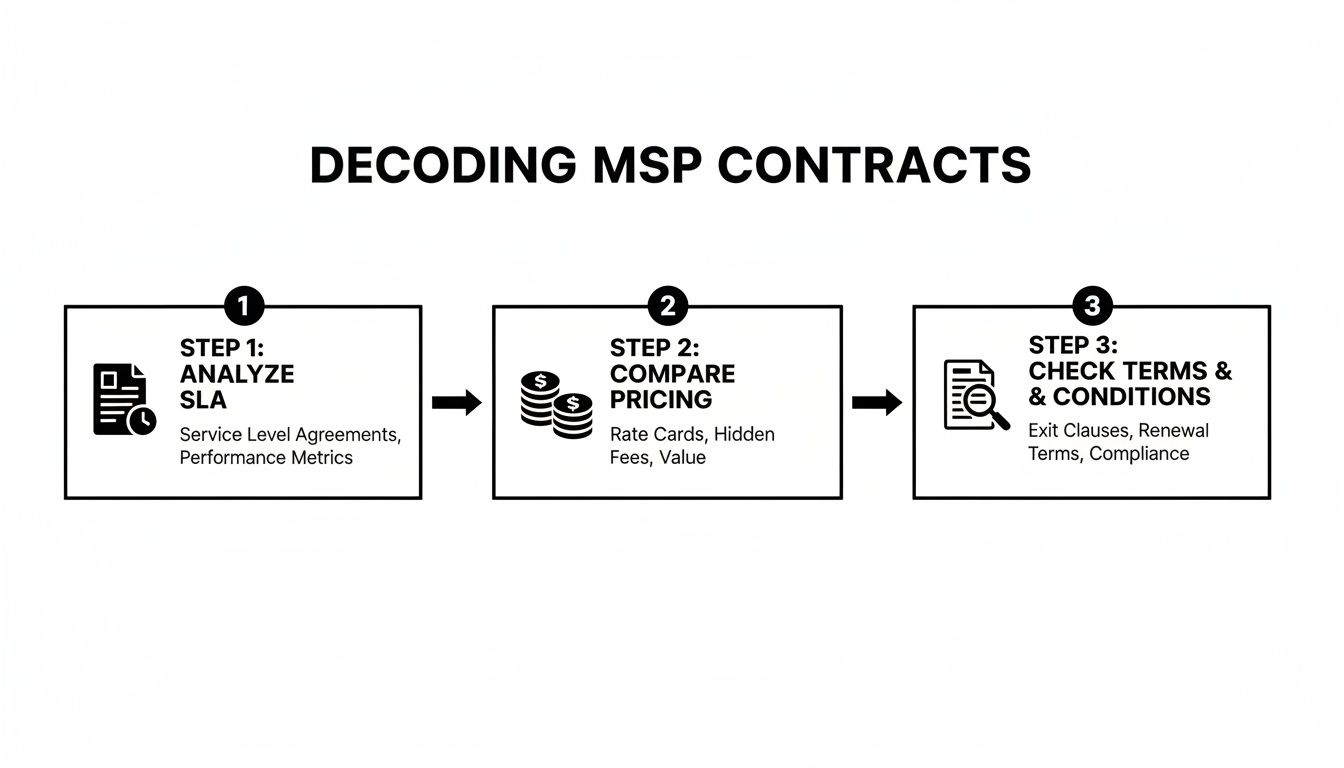
As you can see, the work starts early. You have to analyze the SLA, compare the pricing models, and check all the fine print to make sure the promises they made are legally binding.
Real-World Scenario: A Property Management Firm's Transition
Let’s put this into perspective. Imagine a Henderson property management firm with 30 employees switching to a new MSP. A rough transition is a nightmare scenario—leasing agents can't access contracts, maintenance requests get lost, and revenue takes a direct hit.
Their new MSP started with a thorough discovery phase. They identified the biggest risk: migrating the company’s massive file server, which housed thousands of active lease agreements, to a new cloud platform.
The Actionable Insight: Instead of a risky "big bang" migration over a single weekend, the MSP performed a staged synchronization over several nights. They only cut over to the new system after confirming every single file was perfectly mirrored. They even had a team on standby during the next business day to immediately troubleshoot any user access issues. The result? Zero disruption. This is the kind of detailed, risk-averse planning you should look for.
Your Role in a Successful Onboarding
A smooth transition is a two-way street. The truth is, you have a huge role to play in making it successful. The more organized you are from the start, the faster your new MSP can get to work.
Think of it like this: Before day one, you can hand them a "transition toolkit" that gives them everything they need. This is a game-changer.
Actionable Onboarding Information Checklist:
- A Complete User List: An up-to-date spreadsheet with every employee's name, title, department, and contact details.
- Vendor and Service Contacts: A list of all your tech-related vendors (internet provider, specialty software companies, domain registrar) with account numbers and support contacts.
- Software Licenses and Keys: All the documentation for business-critical software licenses your company owns.
- Administrator Credentials: A secure way to hand over the admin keys to your most important systems, servers, and network hardware (using a password manager like Bitwarden or 1Password).
When you provide this information upfront, you’re empowering your new partner to take ownership and start delivering value immediately. This proactive approach is the first real step in building a true strategic alliance.
Your Top MSP Questions, Answered
Even with all your homework done, a few questions are bound to pop up. Picking a managed service provider is a huge decision, and you should feel completely confident before you sign.
We get it. We’ve been helping businesses make this choice since 2008. To clear up those last few details, here are the most common questions we hear—and our straight-to-the-point answers.
What's the Difference Between Co-Managed and Fully Managed IT?
This is probably the most frequent question we get, and it really boils down to one simple thing: do you already have an in-house IT person or team?
Fully Managed IT: Think of this as your complete, outsourced IT department. The MSP handles everything from daily helpdesk calls and server upkeep to long-term tech strategy. It’s the perfect fit for most small businesses that don't have their own dedicated IT staff.
Co-Managed IT: This is a strategic partnership. Here, the MSP works alongside your existing IT staff, filling in the gaps. Your team might handle the day-to-day user support, while the MSP brings in specialized expertise for things like 24/7 cybersecurity monitoring, advanced server management, or complex projects.
Actionable Example: We see this all the time: a company has a fantastic, but completely overwhelmed, IT manager. A co-managed plan lets them offload time-consuming tasks like patch management and backups. This frees up their expert to focus on high-value projects that drive the business forward, all without the cost of hiring another full-time employee.
How Much Should I Expect to Pay for Managed IT Services?
There’s no magic number. The cost of managed services depends on your company’s size, technological complexity, and the specific services included in your plan.
Most MSPs will charge a recurring monthly fee, usually based on one of two models:
- Per User: A flat monthly fee for each employee, which can range anywhere from $100 to $250 per user.
- Per Device: A set rate for each computer, server, or other network device under management.
But you have to look beyond that monthly number. A cheap plan can get expensive fast if it doesn't cover things like on-site visits, after-hours support, or project work.
Actionable Insight: Always insist on a detailed proposal that spells out exactly what is and isn't included. A transparent provider won't hesitate to break down their pricing. Ask them to price out a common scenario for you: "If we hire three new employees next quarter, what would be the total one-time and recurring cost to get them fully set up with hardware and software access under our agreement?"
What Are the Biggest Red Flags When Vetting an MSP?
Knowing what to avoid is just as crucial as knowing what to look for. If you spot any of these warning signs, it's time to be extra cautious.
First up, a vague or non-existent Service Level Agreement (SLA) is a complete deal-breaker. If a provider isn’t willing to put their promises about response and resolution times in writing, you have no real guarantee of support when you're in a jam.
Next, watch out for the one-size-fits-all sales pitch. A great MSP will take the time to really understand your business, your industry, and your goals. If they’re just pushing a generic package without asking probing questions about your operations, they aren't truly invested in your success.
Finally, a lack of solid client references or case studies is a major red flag. If they can't provide you with a contact at a company similar to yours that you can actually speak with, it's fair to question if they have the experience you need. Add high-pressure sales tactics to that list, too—good service should speak for itself.
How Important Is a Local MSP Presence?
This is a great question, and the answer has changed over the years. Modern remote support tools are incredibly powerful—over 90% of IT issues can be fixed quickly and efficiently without anyone ever setting foot in your office.
That said, a local presence is irreplaceable for those critical 10% of situations. You'll be glad your MSP is nearby for things like:
- Serious hardware failures, like a dead server that needs physical repair or a network switch that goes offline.
- New office setups or moving your equipment to a new location.
- Complex network wiring or infrastructure projects that require hands-on work.
For businesses here in the Henderson, NC, area, working with a local provider like Cyberplex gives you the best of both worlds. You get the lightning-fast efficiency of remote support for everyday issues, plus the absolute peace of mind that an expert technician can be on-site when you need them most. A local partner just gets the regional business landscape in a way others can't.
Ready to partner with an MSP that offers proactive support, clear communication, and a deep understanding of your business needs? Cyberplex Technologies LLC has been providing reliable IT outcomes for businesses in Henderson, NC, and beyond since 2008. Learn how we can align your technology with your goals.


