
At its core, a cloud migration for a small business is about moving your company's digital life—your data, your applications, and your core IT operations—from an in-house server to a cloud environment. It’s a strategic move to replace expensive, aging hardware with flexible, secure, and surprisingly affordable cloud services, all wrapped up in a predictable monthly fee. It's how modern businesses get ahead and stay there.
Why Cloud Migration Is No Longer Optional
For today's small businesses, the reality is clear: the cloud isn't just another tech trend. It's becoming essential for survival and growth. Shifting from that blinking server in the back closet to a powerhouse platform like Microsoft Azure or Amazon Web Services (AWS) directly solves the common headaches that keep business owners up at night.
But this is far more than just a simple tech upgrade; it’s a fundamental business decision. We're seeing small and midsize businesses (SMBs) embrace cloud services at an incredible pace. Public cloud workloads for SMBs shot up from 55% to 63% in just one year.
By 2026, 60% of all corporate data will be stored in the cloud—a number that has doubled since 2015. For a small business, this kind of move can slash capital spending by up to 38%. You can dig into more of this data by checking out the 2026 Flexera State of the Cloud Report.
From On-Premise Problems to Cloud Solutions
Think about a classic scenario we see all the time. A local Henderson accounting firm is running its entire business on an old, wheezing server tucked away in a supply closet. Right in the middle of tax season, it crashes. The whole office grinds to a halt. No one can access client files, file returns, or even send an email.
On top of the immediate crisis, they're constantly juggling other worries:
- Skyrocketing Maintenance Costs: The hardware is on its last legs, and finding parts is a nightmare.
- Major Security Gaps: An outdated system is a wide-open door for ransomware, which could lock them out of critical data and destroy their reputation.
- No Remote Work: Their team is chained to their desks. Productivity plummets if they can't be physically in the office.
The real problem here isn't just a piece of failing equipment. It's the immense business risk—lost revenue from downtime, potential fines from a data breach, and the inability to adapt to how people work today.
The Real-World Benefits of a Cloud Shift
Now, let's picture that same accounting firm after making the switch to Microsoft 365 and Azure. The change is immediate and powerful.
That noisy old server? Gone. In its place, they have a secure, centralized system that delivers benefits you can feel right away:
- Drastically Lower Hardware Costs: They've completely sidestepped the need for expensive server hardware, painful maintenance contracts, and future replacement cycles.
- A Truly Mobile Team: Accountants can now securely access everything they need from anywhere—a client's office, their home, or even a coffee shop.
- Ironclad Data Security: Client financial data is now guarded by Microsoft's enterprise-grade security, complete with automatic backups, disaster recovery plans, and advanced threat protection.
- Predictable Monthly Bills: Instead of being blindsided by huge repair invoices, they pay a consistent monthly fee that scales up or down with them. Budgeting just became a whole lot easier.
With a cloud migration for small business, technology stops being a liability and starts acting like the strategic asset it's supposed to be. It paves the way for growth, boosts efficiency, and delivers some much-needed peace of mind.
Building Your Pre-Migration Readiness Plan
If you’re thinking about moving your business to the cloud, you’ve probably heard that the planning phase is everything. It’s absolutely true. A successful cloud migration isn’t just about the tech; it’s about having a rock-solid blueprint before you start moving a single file.
Skipping this step is the fastest way to run into unexpected costs and major headaches. A smooth cloud migration for small business owners always starts with a detailed readiness plan that ties every technical decision back to your core business goals.
Think of this first phase as a discovery mission. You need a crystal-clear picture of what you have before you can figure out what to move. This means rolling up your sleeves and taking a complete inventory of your entire IT world—every server, every app, and every database.
This diagram shows exactly how that kind of strategic migration turns common business problems into real, tangible cloud benefits.
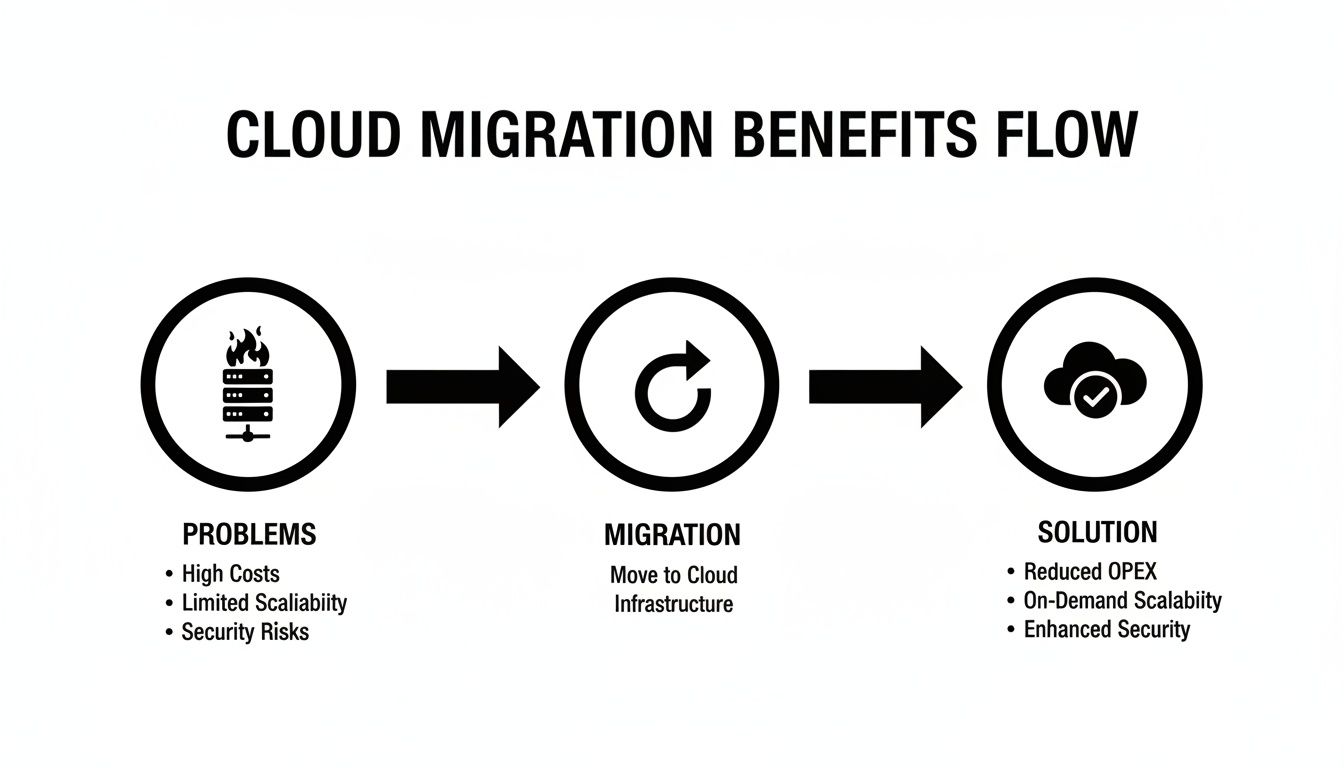
It’s all about creating a clear path from an old, unstable on-premise server to a secure and reliable cloud environment that actually helps your business grow.
Inventory Your Current IT Assets
First things first: you have to catalog everything. This isn’t just a list of hardware; it’s about understanding the technology that powers your business day-to-day. A practical way to start is by creating a simple spreadsheet. For each asset, document:
- Physical and Virtual Servers: List every server's name (e.g., "MAIN-FILE-SVR"), its specs (CPU, RAM, storage), its operating system, and its primary function (e.g., "Hosts QuickBooks company file and shared documents").
- Applications and Software: Identify every piece of software. For example, list "QuickBooks Desktop 2021," "Microsoft Office 2016," and even "Adobe Acrobat Pro." Note which server or computer they run on.
- Databases and Data Stores: Pinpoint where all your critical information lives. For example, "Customer_List.xlsx on MAIN-FILE-SVR," "Project Files folder," and "Financial_Records.qbw." Make a note of the size and how fast each database is growing.
- Network Infrastructure: Document your routers, switches, and firewalls. Most importantly, run an internet speed test at different times of the day to check your bandwidth—is it robust enough to handle a cloud-first operation?
Yes, this process can feel a bit tedious, but it’s the only way to get a true picture of your current IT landscape and define the scope of your migration. We get into the nitty-gritty of this in our guide to cloud service networks.
Identify Critical Dependencies and Business Processes
Once you know what you have, the real work begins: understanding how it all connects. This is where you map out application dependencies. We’ve seen countless businesses get tripped up here when they realize how interconnected their systems really are.
For instance, a law firm’s case management software might be tied to an old, on-premise database server. If you just lift and shift the software to the cloud without its database, it will immediately break. Likewise, that plan to switch to a cloud-based VoIP phone system is completely dependent on a stable, high-speed internet connection. You can’t afford to be dropping calls with clients.
A successful migration is 70% planning and 30% execution. The goal of this readiness phase is to uncover potential roadblocks before they become expensive emergencies during the migration itself.
To keep your analysis focused, ask these business-first questions:
- Which of our applications are absolutely mission-critical? Actionable Insight: Create a "tier" system: Tier 1 for "can't operate without it" (e.g., billing software), Tier 2 for "important but has workarounds," and Tier 3 for "nice to have." This helps prioritize your migration.
- What are our team’s peak usage times? Actionable Insight: For a retailer, this might be Black Friday. For an accounting firm, it's tax season. Schedule your final migration activities well outside these windows.
- Do we have any compliance requirements? For businesses in finance or healthcare, the cloud environment must meet strict data protection standards like HIPAA or FINRA.
Define Your Migration Objectives
Finally, get specific about what you’re trying to accomplish. Moving to the cloud shouldn't just be about getting rid of old hardware. It’s an opportunity to fundamentally improve how your business operates.
What’s the end game? Is it to empower your team with secure remote work? Do you need a more reliable data backup and disaster recovery plan?
Let’s take a property management company, for example. Their main goal might be to give agents on-the-go access to tenant records and maintenance requests from a tablet. That simple objective immediately informs their migration strategy, pointing them toward a solution like Microsoft 365 and a cloud-native property management app.
By setting clear business goals from the start, you ensure your cloud migration delivers real, measurable value from day one.
Choosing the Right Cloud Migration Strategy
Once you’ve mapped out your current IT setup, it's time to decide how you're actually going to get to the cloud. This isn't just a technical detail—it’s a choice that shapes the cost, speed, and ultimate success of your entire project.
There isn't a single "best" way to do this. The right path for your business depends entirely on your goals, your budget, and how quickly you need to make the move.
We see this decision boil down to three main strategies. Let's walk through them with some real-world examples so you can see which one fits your company.
Lift-and-Shift (Rehosting)
This is the most direct route, often called rehosting. Think of it as moving houses but taking all your old furniture with you, exactly as is. You’re simply taking your servers, applications, and data and moving them from your on-site hardware to a cloud provider's infrastructure.
Practical Example: A small manufacturing firm ran its critical inventory software on a server that was nearly a decade old. A lift-and-shift was perfect for them. We created a virtual server on Microsoft Azure that matched the old server's specs and moved their entire application over, untouched. The team experienced no change in the user interface, minimizing training time.
The main advantage here is speed. It’s the quickest way to get away from aging, unreliable hardware. The trade-off? You don't get all the fancy cloud features right away, and you might bring some old inefficiencies along for the ride.
Replatforming (Lift-and-Tinker)
Replatforming is the happy medium. It’s like moving to a new house and deciding to swap out your old washing machine for a new high-efficiency model in the process. You move the core application but make a few smart tweaks to get more out of the cloud.
Practical Example: A real estate agency we helped migrate their on-premise customer database. Instead of just moving the old database server, we replatformed it to a managed cloud database service (Azure SQL). This one change meant they no longer had to worry about manual backups or patching, which instantly improved reliability and freed up their team to focus on clients.
Replatforming often hits the sweet spot. It lets you get real cloud benefits without the huge cost or time commitment of a total redesign. It’s a very popular choice for a reason.
This approach gives you a much better return on your investment than a simple lift-and-shift because you’re fixing specific problems along the way.
SaaS Adoption (Replacing)
The third route is to replace your old application entirely with a modern Software-as-a-Service (SaaS) solution. This isn't really a "migration"—it's an upgrade. You retire the old software and move your data into the new, ready-made system.
Practical Example: An accounting firm finally gets rid of its clunky, server-based accounting software and moves everything to QuickBooks Online. Instead of migrating the old software, we export their customer and financial data and import it into the new SaaS platform. Another common one is replacing an old file server with the collaborative tools in Microsoft 365 and SharePoint.
Sometimes, this can even mean shifting to a fully managed virtual desktop setup. For businesses curious about that, you can learn more about how a Desktop-as-a-Service cloud model works in the real world.
Comparing Cloud Migration Strategies for Your Business
Picking the right strategy depends on what you're trying to achieve. To help you weigh your options, this table breaks down how each approach stacks up.
| Strategy | Best For | Typical Speed | Initial Cost | Long-Term Optimization |
|---|---|---|---|---|
| Lift-and-Shift | Businesses needing a fast, low-complexity exit from on-premise hardware. | Fastest (Weeks) | Lowest | Low |
| Replatforming | Gaining specific performance or cost benefits without a full redesign. | Moderate (Weeks to Months) | Moderate | Medium |
| SaaS Adoption | Replacing outdated software with modern, cloud-native tools. | Varies (Data migration can be complex) | Varies (Subscription model) | High |
In reality, your cloud migration for small business will probably use a mix of these strategies. You might lift-and-shift a legacy app that just has to work, replatform your main database for better performance, and replace your old email system with a SaaS solution. An experienced partner can help you look at each piece of your business and build the right roadmap to make your transition a true success.
Executing a Secure and Compliant Migration Process

When you're moving to the cloud, security can't just be on the to-do list. It has to be the list. We’ve seen it time and again: businesses treat security like a final checkbox, and that’s a recipe for disaster. A successful move means weaving security into every single step—before, during, and long after the migration is complete.
The goal here isn't to create new risks; it's to make the cloud your single greatest security asset.
This mindset is more important than ever. With SMB cloud spending in the USA projected to soar to $176 billion by 2030, it’s clear that small businesses are seizing the opportunity to access enterprise-grade security that was once completely out of reach. For many, a professionally managed migration, like a full Microsoft 365 migration we can complete in 4-8 weeks with a 96% success rate, is a direct path to better business continuity and protection from cyber threats. You can dig deeper into these trends in this insightful analysis of SMB cloud spending.
Implement Foundational Security Controls
Before you even think about moving your first file, there are a few non-negotiable security controls you have to get right. Think of these as the foundation for your new cloud home.
Here's an actionable checklist to get started:
- Turn on Multi-Factor Authentication (MFA) for All Users: This is your most critical line of defense. Actionable Insight: Don't make it optional. Enforce MFA across all accounts, especially for administrators. Use an authenticator app like Microsoft Authenticator for the best protection.
- Encrypt Data Everywhere: Your data needs to be locked down at all times. Actionable Insight: When setting up your cloud storage, ensure that both encryption "at rest" (on the server) and "in transit" (as it travels over the internet) are enabled. Most major cloud providers do this by default, but always verify.
- Establish Strict User Access Policies: Not everyone needs the keys to the kingdom. Actionable Insight: Create user groups like "Sales," "Admin," and "Marketing." Grant the "Sales" group access only to customer data folders, while the "Admin" group has broader permissions. This is the Principle of Least Privilege in action.
Just because you're in the cloud doesn't mean you can offload all security responsibility. Your provider secures the infrastructure, but you're still on the hook for securing the data and applications you run on it. It’s a partnership.
Address Industry-Specific Compliance
If your business is in a regulated industry like finance, healthcare, or legal, compliance is just as critical as security. The cloud environment you choose—and how you move into it—must meet strict regulatory standards.
For instance, a financial services firm migrating to Microsoft 365 can't just move its data. They need to configure specific controls, like:
- Setting up Data Loss Prevention (DLP) policies to stop sensitive info like social security or credit card numbers from leaving the company.
- Enabling eDiscovery and legal hold to preserve data for audits or legal requests.
- Configuring data retention policies to ensure information is kept for the required time and then securely deleted.
Getting this wrong from the start can lead to massive fines and legal headaches. A proper cloud migration for small business always puts a thorough compliance check front and center.
Build a Robust Business Continuity Plan
So, what happens if something goes wrong? One of the biggest wins of moving to the cloud is the ability to build a rock-solid Business Continuity and Disaster Recovery (BCDR) plan. This is about more than just backing up files; it's about making sure your business can keep running, no matter what.
Your cloud BCDR plan needs to clearly define a few things:
- Backup Frequency and Scope: How often will data be backed up, and which data is absolutely mission-critical? Practical Example: Use your cloud platform's tools to automatically back up your entire virtual server daily and your critical customer database every hour.
- Recovery Time Objective (RTO): How fast do you need to be back up and running after an outage? Practical Example: An RTO of "under one hour" means your recovery plan must be automated and well-tested to restore services quickly.
- Recovery Point Objective (RPO): How much data can you afford to lose? Practical Example: An RPO of "15 minutes" for your sales data means you need transaction log backups that run every 15 minutes, ensuring you never lose more than a few minutes of work.
Modern cloud solutions turn this from a dreaded chore into a seamless, automated safety net. For a closer look, our guide on cloud backup solutions for small businesses lays out the practical steps for building a bulletproof strategy.
When you execute your migration with security and compliance leading the way, you’re not just moving your data—you’re making your entire business stronger and more resilient.
Managing Costs and Optimizing Your New Cloud Environment

The promise of cost savings is a huge driver for any cloud migration for small business, but let's be honest—that promise is only realized through smart, ongoing management. Just moving to the cloud doesn't magically slash your bills. To see a real return on your investment, you have to get hands-on with understanding where your money is going and actively optimize your new environment.
The cloud server hosting market is booming, with some analysts projecting it could hit $65 billion in North America by 2030, thanks in large part to small and midsize businesses. A huge part of the appeal is swapping a big, upfront capital expense (CapEx) for a predictable operational expense (OpEx).
But you need to be aware of the whole picture. It’s crucial to account for hidden costs like data egress fees, which can sneakily add up to 6-12% of a total bill. Fortunately, with reports showing 69% of SMBs spend less than $50,000 per month on public cloud, it’s a very accessible model when managed correctly. You can dig into more details about the growing cloud server market and SMB adoption on EIN Presswire.
This whole transition requires a new way of thinking about your expenses. Instead of one-time hardware purchases, you're now managing a subscription where costs can flex up and down with your usage.
Understanding Your Cloud Bill
Your first few cloud invoices can be a bit of a shock. They often break down into several key areas, and knowing what to look for is the first step toward getting your spending under control.
You’ll typically see line items for:
- Compute Services: This is the core cost for the virtual servers and processing power your applications run on. It's often billed by the hour or even by the second.
- Storage Fees: This is what you pay for the amount of data you're storing. The price can vary a lot depending on if you need fast, immediate access or cheaper archival storage.
- Software Licensing: This bucket includes your subscriptions for platforms like Microsoft 365. Each plan, from Business Basic to Business Premium, comes with a different price and feature set.
- Data Egress Fees: This is a cost that catches a lot of people by surprise. Providers charge you for data you move out of their cloud network, which can add up if you're frequently transferring big files.
The biggest mistake we see small businesses make is treating their cloud bill like a fixed utility. It's not. It’s a dynamic expense that reflects exactly what you're using, and it demands active monitoring.
The Power of Right-Sizing and Optimization
Once you have a handle on your spending patterns, the real work begins. The single most effective way to lower your cloud bill is through right-sizing. It’s a simple concept: match your cloud resources to your actual needs and stop paying for capacity you don't use.
So many businesses overestimate their needs during the initial migration, which leads to oversized and underused virtual machines. Think of it like renting a 10-bedroom house for a family of three—you're paying for a lot of empty rooms.
Here's how we help clients take control:
- Analyze Usage Reports: Cloud providers like Azure and AWS give you incredibly detailed dashboards showing CPU, memory, and network usage. Actionable Insight: Schedule a monthly review of these reports. Look for any virtual machine with an average CPU usage under 20%.
- Adjust Server Instances: If a server is only using 10% of its capacity, you can easily downgrade it to a smaller, cheaper instance. This one change can cut its cost by 50% or more.
- Implement Auto-Scaling: For applications with spiky demand, you can set up auto-scaling rules. Practical Example: An e-commerce site can be configured to automatically scale from one server to three during a holiday sale, then scale back down when the traffic subsides. You truly only pay for the peak capacity when you need it.
Let me give you a practical example. We recently worked with a property management company to migrate their operations. Three months in, we helped them analyze their usage reports and discovered the virtual server running their main app was only hitting 20% of its CPU capacity, even on the busiest days.
By downsizing that single server to a more appropriate size and adjusting their Microsoft 365 licenses for a few part-time employees, they cut their monthly cloud bill by 15% without any impact on performance. That’s real savings that went straight back to their bottom line. Taking an active role here ensures your cloud migration delivers the financial benefits you were promised from the start.
Common Questions About Small Business Cloud Migration
Moving your business to the cloud is a big step, and it’s completely normal to have some lingering questions, even after you’ve decided it’s the right move. We get it.
To help clear things up, let's tackle some of the most common questions we hear from business owners every day.
How Long Does a Typical Cloud Migration Take?
Most small businesses we work with are fully migrated to a platform like Microsoft 365 in about four to eight weeks. Of course, this isn't a hard-and-fast rule.
The timeline really hinges on how complex your current setup is. A company with one server and a few core applications will get there much faster than one with several interconnected systems. How much data you have and the migration path you choose also play a big part.
- A "Lift-and-Shift" migration, where we move your systems over as-is, is usually the quickest route.
- Replatforming or SaaS Adoption can take a bit longer since we’re updating applications or shifting data into entirely new platforms.
The real goal is to move at a pace that works for your business, ensuring everything is done right the first time.
Will My Business Experience Downtime During the Migration?
With a solid plan, any downtime should be minimal to non-existent. No IT partner worth their salt would ever suggest moving your critical operations in the middle of your busiest workday.
A well-managed migration should feel almost invisible to your team and your customers. The key is scheduling the actual cutover during off-peak hours, like on a weekend or overnight, to ensure zero disruption to your daily operations.
Another great strategy we use is a phased migration. Rather than moving everything in one go, we can migrate your business in stages. For example, we could handle email one weekend and then tackle your file storage the next. This keeps your essential systems up and running throughout the process.
Is the Cloud Really More Secure Than My On-Premise Server?
When it’s set up correctly, the answer is a resounding yes. A major cloud environment is far more secure than the server sitting in your office closet. It all comes down to resources and dedicated expertise.
Cloud providers like Microsoft and Amazon pour billions into their security infrastructure—an investment that's simply out of reach for most small businesses.
This gives you a serious security advantage:
- 24/7 Threat Monitoring: Entire teams of security pros are watching for suspicious activity around the clock.
- Advanced Threat Detection: They use sophisticated AI tools to spot and block threats before they can ever reach you.
- Automated Security Patching: The provider takes care of security updates automatically, so you're never exposed because of outdated software.
When you layer your own security habits on top of that—like requiring Multi-Factor Authentication (MFA) and using strong encryption—your data is safer in the cloud than it ever was on-premise.
What Are the Biggest Hidden Costs I Should Watch For?
Beyond your predictable monthly subscription, a few "hidden" costs can pop up if you aren't looking out for them. Knowing what they are is the first step to keeping your budget in check.
One common one is data egress fees, which are charges for moving data out of the cloud. This isn't a huge line item for most businesses, but it can add up if you're constantly sending large files to outside partners. Other things to budget for include fees for integrating third-party tools and the time your team will need for training.
But honestly, the biggest surprise cost usually comes from paying for services you don’t need. This is why ongoing cost optimization is so important. By regularly reviewing your usage and "right-sizing" your plan, you stop that monthly bill from creeping up and make sure you’re only paying for what you actually use.
Navigating your cloud migration journey can feel complex, but you don't have to do it alone. Cyberplex Technologies LLC provides the expert guidance and hands-on support to ensure your move to the cloud is secure, cost-effective, and perfectly aligned with your business goals. Contact us today to build your migration roadmap.


