
Monday starts normally. Staff log into Microsoft 365, the phones come up, the shared drive opens, and work moves. Then one employee clicks a poisoned attachment. A ransomware screen locks a Henderson accounting office out of its files. The tax documents are unreadable. Email is still up for a moment, but nobody knows whether it is safe to use. Clients are calling. The owner is asking the same question every business owner asks in that moment: what do we do first?
That is the core job of a business continuity plan template. It is not paperwork for a binder. It is the difference between a controlled response and a panicked one.
Generic templates usually stop at broad categories like “identify risks” and “list contacts.” That is not enough for a small or midsize business running cloud apps, VoIP phones, remote access, line-of-business software, and regulated data. A usable plan has to reflect how your team works today, including Microsoft 365, cloud backups, mobile staff, vendor dependencies, and cyber events.
Why Your Business Can't Afford Another Day Without a Plan
A continuity failure rarely begins with a hurricane or a fire. It often starts with something smaller and more common. An employee cannot open the practice management system. A public safety office loses access to shared files. A property management team cannot receive tenant calls because the internet circuit is down and nobody knows the failover steps.

Those incidents turn into business crises when there is no written decision path. Who isolates devices. Who contacts legal counsel. Which systems come back first. Which staff can switch to manual workarounds. Which vendors need to be involved immediately.
The stakes are not theoretical. 75% of small businesses lack any disaster recovery plan, and of those that suffer a major data disaster, 93% cease operations within one year according to RingCentral’s business continuity plan template guide.
A plan is a survival tool, not an IT project
Business owners often assume continuity planning is mostly for large enterprises. In practice, smaller firms feel outages harder because they have fewer spare people, less redundant infrastructure, and less room for trial-and-error decisions.
A law office may depend on one case management platform. A finance team may rely on one line-of-business application plus Microsoft 365. A dispatcher may need phone service and internet access to stay operational. When one of those systems fails, there usually is no second shift, no backup department, and no extra location ready to absorb the work.
A good template gives your business four things immediately:
- Clear priorities: It identifies what must be restored first.
- Named ownership: It assigns responsibility before stress clouds judgment.
- Practical fallbacks: It documents how to keep operating while systems are impaired.
- Faster vendor coordination: It tells your team when to call the ISP, cloud provider, phone vendor, insurance carrier, and MSP.
A continuity plan works best when it reads like an operating manual for a bad day, not like a compliance essay.
What makes an SMB plan different
Small and midsize businesses in finance, public safety, legal, property management, and manufacturing need more than a generic checklist. They need a template that accounts for regulated data, cloud adoption, remote workers, and cyber response.
That means your business continuity plan template should include ransomware decision points, Microsoft 365 access dependencies, VoIP fallback procedures, and a realistic sequence for restoring operations. If those details are missing, the plan may look complete on paper and still fail the first time your team needs it.
Assembling Your BCP Toolkit
Before anyone fills in a template, they need to know what belongs in it. Most solid plans rest on four working parts. If one is weak, the rest of the document becomes guesswork.
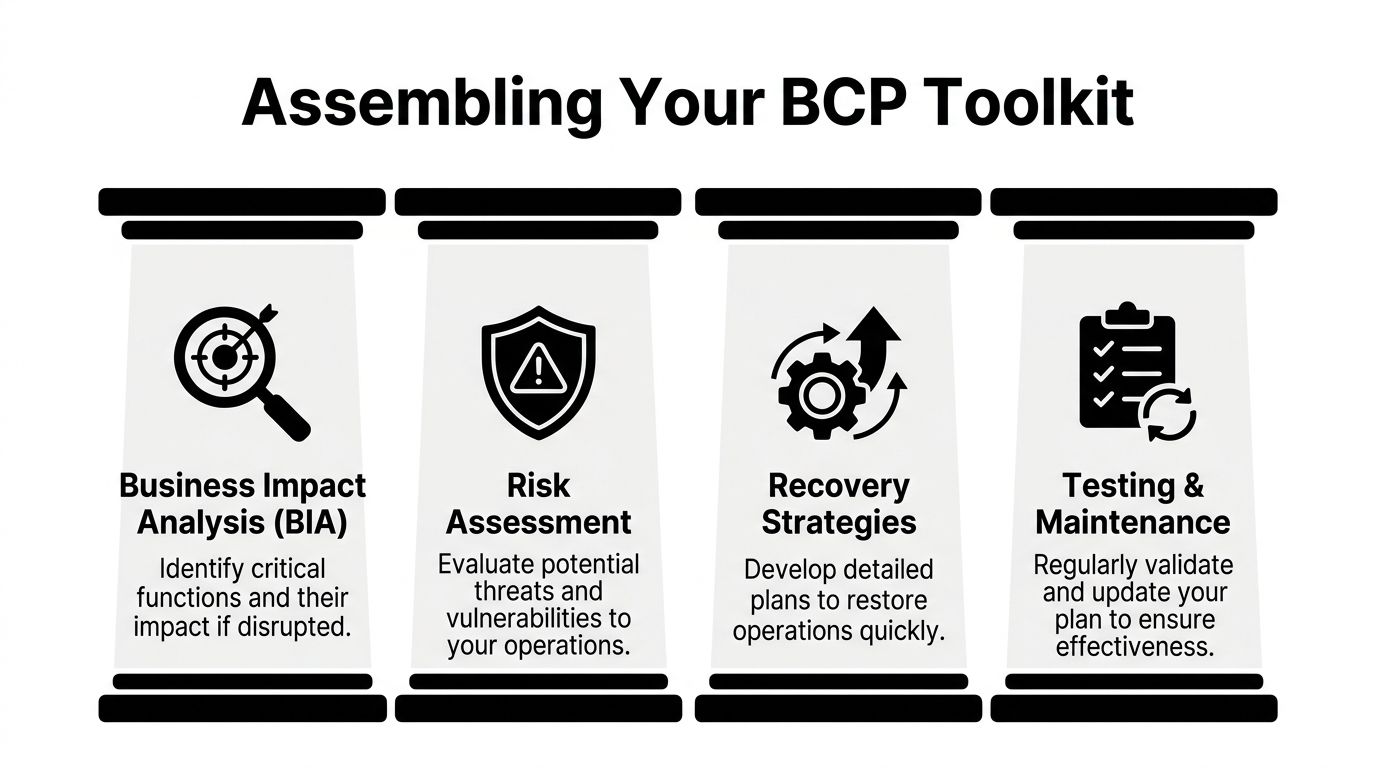
Business impact analysis
A business impact analysis, or BIA, answers a simple question. What hurts first if this process stops?
Take a property management company. Rent collection, maintenance dispatch, tenant messaging, and accounting do not all carry the same urgency. If the tenant portal goes down, staff may be able to log requests manually for a short window. If the accounting platform is unavailable during payroll, the impact lands differently. The BIA forces those distinctions.
The useful version of a BIA does not list every application with equal importance. It ranks functions by business consequence and identifies the people, systems, and vendors each one depends on.
A practical BIA usually captures:
- Critical function: The work that must continue.
- Supporting systems: Microsoft 365, line-of-business apps, file shares, VoIP, internet access.
- Operational dependency: Which employee, vendor, or location the process depends on.
- Tolerance for downtime: How long the business can function before the issue becomes unacceptable.
- Workaround options: Paper forms, alternate devices, mobile hotspots, temporary rerouting.
Risk assessment
The risk assessment identifies what could interrupt the business and how exposed you are.
For a Henderson manufacturer, a supply chain disruption and a phishing attack are both legitimate risks. They demand different planning. A supply chain issue may call for alternate vendors, inventory visibility, and communication protocols with customers. A phishing incident may require email isolation, credential resets, endpoint response, and backup validation.
Strong risk assessments avoid two mistakes.
First, they do not focus only on dramatic events. Server failures, expired certificates, misconfigured backups, and accidental deletions cause real downtime. Second, they do not stop at “cyberattack” as a label. They break incidents down into conditions your team can act on, such as mailbox compromise, ransomware encryption, internet outage, cloud application lockout, or phone system failure.
Recovery strategies
A recovery strategy explains how you get through the outage, not just that you intend to recover.
That may include moving staff to cloud apps, restoring from backup, failing over phone numbers, shifting to mobile communication, or temporarily processing work manually. The right answer varies by function.
For many SMBs, the biggest trade-off is cost versus speed. Immediate failover across every system sounds ideal, but most firms do not need that level of redundancy everywhere. The practical move is to reserve the fastest recovery options for the few services that drive revenue, service delivery, compliance, or public trust.
If your team needs outside help for design and support, many businesses pair continuity planning with managed IT services for small businesses so backup monitoring, endpoint management, and recovery coordination are already in place before an incident.
Testing and maintenance
A plan that nobody rehearses degrades. Contact lists age out. Staff leave. Vendors change procedures. Cloud apps get added without being reflected in the document.
Testing is what separates a template from a working continuity capability. Even a brief tabletop drill can expose obvious gaps, such as a missing after-hours contact, an undocumented admin account, or a recovery dependency that only one employee understands.
The best continuity plans are short enough to use under pressure and specific enough to drive action.
What belongs in your toolkit from day one
Some businesses overcomplicate the starting point. You do not need a giant manual to begin. You need a core set of materials your team can maintain:
- A current application inventory: Include business-critical software and cloud platforms.
- A contact hierarchy: Internal owners, outside counsel, insurance, telecom, ISP, cloud vendors, and MSP.
- A recovery worksheet: For each critical system, note the restoration path and fallback process.
- An incident log template: Record decisions, times, actions, and approvals during an event.
Tailoring the Plan to Your Operations and Risks
At 8:10 a.m., your office opens, but staff cannot reach Microsoft 365, the phones are down, and the one employee who knows the line-of-business system best is out sick. That is the moment a generic business continuity plan fails. SMBs in finance, legal, property management, and public safety need a plan built around the way they operate, including cloud apps, VoIP, remote access, vendor dependencies, and compliance obligations.
A template only becomes useful after you shape it to your workflows, systems, and risk tolerance. I usually see the same mistake first. The business lists hardware instead of business functions. That approach misses what really needs to stay available.
A law firm may say its server is the critical asset. In practice, the firm needs access to the case management platform, document storage, secure email, scanned records, and a way for attorneys and staff to communicate. If those functions are available, the underlying server matters less. If those functions are down, the server being powered on does not help.
Start with the work your business must keep doing
Write down the activities that cannot stop for long. Use plain language your operations team will recognize, not IT shorthand.
Examples:
- Process client transactions
- Dispatch field staff
- Access incident reports
- Collect tenant payments
- Handle inbound calls
- Approve payroll
- Send regulated client communications
Then map what each activity depends on. For SMBs working with an MSP, this step usually exposes a mix of internal systems and outside services that were never documented in one place.
- People: Who performs the work, approves exceptions, or handles escalations
- Applications: Microsoft 365, QuickBooks, legal software, CAD, records systems, CRM, dispatch tools
- Data: Shared files, email archives, SharePoint libraries, cloud storage, local databases
- Connectivity: Internet, firewall, VPN, remote desktop, multifactor authentication, VoIP
- Vendors: ISP, telecom provider, cloud vendor, software vendor, payment processor, MSP. Hidden risk often shows up quickly here. A public safety office may discover that incident documentation depends on a cloud records system, a scanner, and a shared folder on a local file server. A financial office may find that payment approvals stall if one executive cannot receive MFA prompts while traveling. A small business with cloud-first systems may learn that internet failure creates the same operational outage as a server failure once did.
Rank systems by business impact
Do not give every tool the same priority. If everything is critical, nothing is.
Use a tiering model tied to business consequence. For a small law firm, it might look like this:
- Tier 1: Case management, document storage, secure email, internet connectivity, phone service
- Tier 2: Billing, calendaring add-ons, internal knowledge base
- Tier 3: Marketing systems, archive access, nonessential reporting tools
For a public safety agency or regulated finance office, the order will differ. Call handling, records access, secure communications, and logging may outrank back-office reporting. That is the point. The priority should reflect operational and regulatory impact, not software subscription cost or whoever complained most recently.
Once the tiers are set, define recovery objectives that match reality.
RTO is the maximum downtime you can accept before business impact becomes too severe.
RPO is the amount of data loss you can accept, measured in time.
These numbers need to come from actual operating conditions. If backups run nightly, a 15-minute RPO is not credible. If your cloud vendor requires a support ticket and manual approval before restoration, a one-hour recovery promise may also be unrealistic. I would rather see a finance client set a six-hour target they can meet than a one-hour target nobody can deliver under pressure.
Recovery targets should reflect your environment, your vendors, and your staffing model.
Ask questions that expose real trade-offs
Good continuity planning is not an IT-only exercise. Department managers, compliance leads, and your MSP all need input because each group sees different failure points.
Use questions like these during planning sessions:
- What happens if this system is unavailable for one hour?
- What happens if the last few minutes or hours of data are lost?
- Can staff switch to a manual process for a limited period?
- Does this outage trigger a client, regulator, or public communication requirement?
- Can the vendor support the target we want?
- What breaks if internet access fails but the office still has power?
- What breaks if users lose MFA, email, or VoIP but core data is still intact?
Those questions usually lead to better decisions than technical wish lists do.
A property management company may decide maintenance requests can be logged by phone and entered later, but online rent payments and tenant communications need faster restoration. A financial advisory office may prioritize secure email, document access, and voice communications ahead of internal reporting dashboards. A public sector team may need records access and call routing restored before anything else because service interruption affects the public directly.
Add cyber resilience to the plan itself
Many templates still treat continuity as a weather and facilities document. That is too narrow for a modern SMB.
For businesses using Microsoft 365, cloud file sharing, remote access, and VoIP, cyber events belong inside the continuity plan, not in a separate binder nobody opens during an incident. Ransomware, account takeover, suspicious outbound email, malicious encryption, and cloud admin lockout can interrupt operations just as completely as a power event or ISP outage. Your continuity process should also connect to preventive controls and staff training, including practical guidance on preventing ransomware attacks before they interrupt operations.
A usable cyber section should answer:
- When do we isolate a device or subnet?
- Who can disable user accounts or revoke sessions?
- When do we stop using corporate email and switch to another channel?
- How do we verify backups are clean before restore?
- Which systems return first after containment?
- Who handles regulatory, client, insurance, or law enforcement notifications?
In regulated environments, continuity and security overlap every time. The same team may need to preserve evidence, restore access, document decisions, and maintain compliant communications within the same hour. If those steps live in separate documents with separate owners, response slows down.
Assign named ownership
Plans break down when responsibility is vague. "Management" is too broad. "IT" is not a person. Use names or job titles tied to specific decisions.
Here is a practical starting point:
| Role | Primary Responsibility |
|---|---|
| Executive sponsor | Approves continuity priorities, major recovery decisions, and outside communications |
| Continuity coordinator | Maintains the plan, schedules reviews, and activates the response process |
| IT lead or MSP lead | Assesses technical impact, coordinates restore actions, and validates system recovery |
| Department manager | Defines critical workflows, manual workarounds, and staff assignments |
| Communications lead | Handles internal updates, customer notices, and approved message flow |
| Compliance or legal contact | Reviews reporting obligations, records retention, and regulated communications |
| Vendor coordinator | Contacts telecom, ISP, software vendors, and other external providers |
For SMBs with an MSP, the handoff points matter. Be explicit about who declares an incident, who approves emergency spending, who contacts the cyber insurer, and who has authority to engage vendors after hours. I have seen solid technical teams lose time because nobody documented who could authorize the next step.
Keep the working version short enough to use
A continuity plan should help people make decisions under stress. If the live document reads like a policy manual, it will not get used.
Keep the active version concise. Use short checklists, decision trees, contact paths, and system priority tables. Put technical detail in appendices or linked runbooks maintained by your MSP or IT lead.
A manager using the plan during an outage should be able to answer six questions quickly:
- What happened?
- Who owns the next decision?
- Which systems matter first?
- What can staff do right now?
- Which vendor or provider gets called first?
- How do we confirm the business function is restored?
That last question matters. A server can be online while users still cannot sign in, calls still cannot route, or compliance logging is still broken. Recovery is not complete when infrastructure is up. Recovery is complete when the business function works again.
Building Your IT Recovery Playbook
A continuity plan fails in practice when it stops at priorities and never reaches execution. At 8:10 a.m., staff cannot sign in to Microsoft 365, phones are dropping because the internet circuit is unstable, and your line-of-business app vendor is pointing at your firewall. In that moment, nobody needs a generic template. They need a recovery playbook with a clear order of operations, named owners, and technical steps that match the way the business runs.
For SMBs working with an MSP, that playbook has to cover more than servers. It needs to account for Microsoft 365, VoIP, cloud file platforms, identity systems, remote access, endpoint security, and the outside vendors tied to all of them. A finance office and a public safety organization may use different applications, but the pattern is the same. Recover the business function, not just the hardware.
Data backup and recovery
Backups are the first control to verify because every recovery target depends on them.
Many SMBs assume Microsoft 365 protects everything they need. It does not. Mailbox deletion, SharePoint version loss, ransomware encryption, and compromised accounts all create recovery problems that require their own backup plan. The continuity document should name what is backed up, how often snapshots run, where immutable or isolated copies are stored, and who is responsible for test restores.
If those answers are vague, fix that before refining anything else. Teams that need to tighten restore readiness usually start by reviewing options for cloud backup for small business and then map those backup sets to each critical business process.
Document the restore decisions that cause delay during an actual incident:
- Recovery order: Which systems and datasets come back first
- Approval authority: Who can authorize a restore, mailbox rollback, or file recovery
- Clean restore points: Which backup copies are safe to use after a cyber event
- Validation steps: How users confirm the application, file share, or mailbox works
That last point gets missed often. A restore is incomplete if the database mounts but staff still cannot transact, dispatch, or meet retention requirements.
Communications continuity
Communication usually breaks at the same time as production systems. If email is part of the incident, the team needs another approved channel before anything goes wrong. If the ISP is down and phones rely on hosted VoIP, the plan needs mobile failover, call forwarding instructions, and a simple process for updating clients, staff, and vendors.
This matters fast in regulated environments. A financial firm may need to control client communications and preserve records. A public safety agency or field team may need to keep inbound calls moving even while core systems are degraded. In the first hour, call handling and internal coordination can matter more than restoring a shared drive.
A usable communications playbook includes:
- Primary and backup channels: Email, mobile, Teams or another collaboration platform, emergency call tree
- Approval path: Who can send internal notices or client-facing updates
- Phone failover steps: Forwarding targets, alternate answering points, voicemail or recorded advisories
- Update cadence: Who sends status reports and how often
This walkthrough is useful for teams that need to visualize what coordinated recovery looks like before they write their own procedures.
Vendor management under pressure
Every outside dependency needs an owner, a contact path, and an escalation rule. That includes your ISP, voice provider, cloud vendors, line-of-business software vendors, cyber insurer, and MSP.
The common failure point is simple. One employee knows the account number, support portal, and after-hours number, and everyone else assumes they can find it later. During an outage, later is too late. Put that information in the plan and store it somewhere the response team can reach even if corporate systems are unavailable.
For each vendor, record:
- Service supported: Internet, firewall, M365 backup, VoIP, accounting system, CAD or dispatch platform
- Support path: Portal, phone, emergency escalation route
- Outage-relevant contract details: Response commitments, named contacts, after-hours process
- Dependency notes: Which internal systems and business functions rely on that vendor
For MSP-supported SMBs, I also recommend defining the handoff threshold. State when the internal team troubleshoots first, when the MSP takes lead, and when the software or telecom vendor must be engaged directly.
Infrastructure and security response
Infrastructure recovery and security containment have to run together. Separating them on paper creates rework during a real incident.
As noted earlier, many SMB continuity templates still understate cyber resilience. That gap shows up quickly in regulated sectors, where restoring the wrong system first can reopen the incident, corrupt evidence, or create a reporting problem. A good recovery playbook should tell the team exactly when to isolate endpoints, suspend accounts, stop synchronization, preserve logs, verify clean backups, and reconnect systems in a controlled order.
Use a sequence that protects identity and trust first, then restores service:
- Isolate affected devices
- Disable or reset compromised accounts
- Pause sync tools or integrations if they could spread damage
- Preserve logs, alerts, and other evidence
- Verify backup integrity before restoring
- Restore systems by business priority
- Confirm endpoint protection, logging, and monitoring are active before users reconnect
Sequence matters. Restoring file access before securing identities can recreate the same compromise. Bringing a laptop back online before it is cleared can spread malware again. Fast recovery helps, but clean recovery is what keeps the business operating.
Keeping Your Continuity Plan Alive and Effective
Most failed continuity plans did not fail because the original document was empty. They failed because nobody touched it after the kickoff meeting.
A plan decays faster than people expect. Staff leave. Phone systems change. Microsoft 365 permissions shift. Vendors merge. Backup platforms get replaced. Office workflows move into new apps that were never added to the document. Then an outage happens, and the contact list is wrong, the recovery order is outdated, and the “owner” of a critical task left months ago.

Testing is what makes the plan real
You do not learn whether a continuity plan works by admiring the document. You learn by exercising it.
Best practices mandate tabletop exercises every 6 months and full interruption simulations annually to combat plan degradation, as untested plans often fail during real-world disruptions according to PrometAI’s guide to creating a business continuity plan.
A tabletop exercise is manageable for almost any SMB. Gather department leads, walk through a scenario, and force real decisions. If ransomware hits shared files at noon, who shuts down what. If the office internet fails during payroll processing, what is the fallback. If VoIP dies but staff are remote, how do customer calls get answered.
A full interruption simulation is more technical. It validates whether restore paths, failover procedures, and communication workflows work in practice.
What to test for a small regulated business
Testing does not need to become a giant event. It needs to be useful.
For financial services, legal, and public safety organizations, the most practical tests often include:
- Ransomware scenario rehearsal: Device isolation, communication switch, backup validation, executive approvals.
- Cloud access disruption: Lost access to Microsoft 365, multifactor authentication complications, alternate communications.
- Internet and VoIP outage: Mobile fallback, call rerouting, hotspot use, remote work continuity.
- Line-of-business application failure: Vendor escalation, manual workaround, data recovery checkpoint.
A manageable maintenance rhythm
SMBs often avoid maintenance because they assume it requires a dedicated continuity department. It does not. What it requires is a recurring review cycle and one owner who can keep people honest.
A simple quarterly review can cover most of the failure points that show up during real incidents.
Quarterly review checklist
- Verify contact lists: Internal leads, emergency contacts, vendors, legal, insurance, and after-hours support paths.
- Check system inventory: Add new cloud apps, retire old platforms, confirm Tier 1 systems are still correctly classified.
- Review backup scope: Make sure new mailboxes, sites, devices, and data stores are covered.
- Confirm vendor details: Support portals, escalation procedures, and account ownership.
- Update role assignments: New managers, changed responsibilities, offboarded employees.
- Refresh quick guides: One-page runbooks for common incidents.
- Train new staff: Especially department managers and anyone with approval authority.
If a new tool enters your environment and your continuity plan does not change, your plan is already drifting out of date.
What works better than a giant annual rewrite
The worst maintenance model is the big annual rewrite nobody wants to do. Teams postpone it, then rush it, then ignore it again.
What works better is lightweight maintenance with targeted exercises. Review the document quarterly. Rehearse key scenarios on a regular cadence. Update the plan after every meaningful system change, office move, vendor change, or real incident.
After a real event, add a short post-incident review:
| Question | Why it matters |
|---|---|
| What slowed the response | Reveals decision gaps and missing approvals |
| Which contacts or vendors were hard to reach | Exposes documentation weaknesses |
| Which workaround helped | Keeps practical steps in the next version |
| What assumptions proved wrong | Prevents repeating outdated recovery logic |
This approach keeps the plan operational instead of ceremonial.
From Plan to Peace of Mind
A strong business continuity plan template does more than organize information. It forces decisions before stress takes over. It tells your team what matters most, who owns each action, how technology recovery supports business operations, and how to keep the document useful after the first draft is done.
For SMBs in finance, legal, public safety, property management, and manufacturing, the difference between a generic template and a real-world plan is huge. A real plan accounts for cloud services, VoIP, remote work, regulated data, vendor dependencies, and cyber response. It does not stop at “recover systems.” It connects technical recovery to the work your staff must continue doing.
Peace of mind comes from that alignment. Not from knowing a file exists on a shared drive, but from knowing your people can use it when a bad day arrives.
Download the template. Fill it out accurately. Keep it short enough to use. Test it often enough to trust it.
If your organization needs help building or testing a practical business continuity plan template for Microsoft 365, cloud, VoIP, and regulated workflows, contact Cyberplex Technologies LLC. Their team supports small and midsize organizations with business continuity planning, backup strategy, cybersecurity, and managed IT services designed for real operating environments, not generic checklists.


