
You’re probably dealing with one of these setups right now. A few office PCs, a handful of laptops, maybe one employee-owned phone checking company email, Microsoft 365 running the day-to-day, and a free or basic antivirus product that was “good enough” a few years ago.
That setup feels normal until somebody clicks the wrong attachment, OneDrive starts behaving oddly, Teams calls stutter during scans, or an alert appears and nobody knows whether it matters. At that point, the question is no longer “do we have antivirus?” It becomes “do we have business-grade endpoint protection that someone can manage?”
The best antivirus software for small business is not just the product with the longest feature list. It is the one that fits your risk level, your staff capacity, and your existing stack without turning daily work into an IT chore.
Beyond Basic Protection What Small Businesses Need Today
A small business owner usually notices the antivirus problem in a very ordinary moment. Someone says the laptop is slow. A phishing email gets through. Outlook hangs while attachments scan. Or a staff member working from home asks whether the personal antivirus on their device is enough for company files.
That is when the gap shows up. Consumer antivirus is built to protect one user. Small business endpoint protection is built to protect users, devices, files, cloud apps, and the business itself when something goes wrong.

For a property management firm, that might mean a leasing agent using a laptop on the road, syncing files through Microsoft 365, and connecting over VoIP all day. For an accounting office, it might mean staff opening client attachments during tax season with no room for false alarms or workstation slowdowns. For a legal office, it means client files cannot be locked by ransomware while someone is in court or on deadline.
The risk is not hypothetical. SMBs represent 43% of all cyberattack targets, yet 73% of small businesses in major cities lacked adequate antivirus protection, according to the CloudOrbis summary of the 2025 Statistics Canada survey and related reporting. That is exactly why basic protection is no longer enough.
What modern protection needs to do
A useful business antivirus platform should handle more than known viruses. It should also help with:
- Ransomware behavior that starts encrypting files before a signature exists
- Phishing-driven malware launched from email links or fake file shares
- Fileless attacks that abuse legitimate tools already on the device
- Remote work exposure from home networks and unmanaged locations
- Cross-platform coverage for Windows, macOS, Android, and iPhone or iPad users
A lot of owners still think in terms of “antivirus software.” In practice, the better question is endpoint protection. That includes detection, containment, rollback, alerting, and management.
If you cannot answer who gets the alert, who reviews it, and who isolates the device, you do not just have a tool problem. You have an operating model problem.
If you want a plain-language foundation before evaluating products, Cyberplex’s cyber security 101 guide is a useful starting point.
How to Evaluate Antivirus Software for Your Business
Most small businesses compare antivirus products the wrong way. They look at price first, then logos, then a feature checklist. That leads to bad fits.
A better evaluation starts with five practical questions. Can it stop real threats? Can it clean up properly? Will it slow users down? Can your team manage it? Will it work cleanly with the systems you already depend on?

Detection matters more than marketing
The first job is obvious. Stop malware before users feel it.
That sounds simple, but there is a big difference between catching a known file and stopping a new ransomware strain that arrives through a phishing link. Products such as Bitdefender GravityZone and ESET PROTECT are strong here because they combine signatures with machine learning, behavior analysis, and cloud reputation.
If you are comparing vendors, ask a direct question. “How does this tool handle a suspicious process that has never been seen before?” If the answer is vague, keep looking.
Remediation decides whether a bad day stays bad
Detection is only half the story. The true test comes after the alert.
A small business product should let you quarantine the file, isolate the endpoint, investigate what happened, and restore normal operations without guessing. Features such as ransomware rollback, remote scans, exclusions, and device isolation matter far more in practice than flashy dashboards.
For a business owner, remediation means this: if an employee opens something malicious at 9:15 a.m., can your team contain the device before the shared drive, Microsoft 365 account, or synced folders are affected?
Performance is not a side issue
A security product that frustrates users becomes an operational problem. Many SMBs get surprised by this. Independent tests from AV-Comparatives in 2025 found that some third-party antivirus tools can add 15% latency to Office 365 workloads on endpoints with under 8GB RAM, according to Security.org’s business antivirus review. In a small office, that shows up as slow Outlook searches, laggy SharePoint sync, delayed file opens, and complaints that “the cloud is acting weird.”
What to test before you buy
Do not evaluate on a clean demo machine only. Test in the environment your staff uses.
- Open Outlook with large attachments and see whether scanning delays message handling.
- Sync OneDrive and SharePoint files while a background scan runs.
- Run a Teams or VoIP call from a typical office laptop, not an overpowered IT machine.
- Check older devices with lower RAM. These often reveal performance problems first.
A product can score well in lab protection tests and still be the wrong fit if it drags down Microsoft 365 or voice traffic on the hardware your staff uses.
Manageability is where many SMBs fail
Even a strong security product becomes weak if nobody watches it.
This is the hidden part of antivirus selection. Who reviews detections? Who tunes policies? Who knows the difference between a nuisance event and a real compromise? If the answer is “our office manager can probably look at it,” you need a simpler platform or outside help.
Good SMB tools reduce the admin burden with cloud consoles, policy templates, and automated actions. That matters because most small businesses do not have a dedicated security analyst.
Integration affects the whole office
Compatibility deserves more attention than it gets. Endpoint protection has to live alongside Microsoft 365, remote access tools, cloud backup, printers, line-of-business software, and VoIP applications.
For practical evaluation, look at these areas:
- Microsoft 365 fit. Does it interfere with Outlook, Teams, OneDrive, or SharePoint workflows?
- VoIP sensitivity. Can real-time scanning create call quality issues on lower-powered systems?
- Line-of-business apps. Will it flag accounting, legal, or property management software as suspicious?
- Compliance support. Can it provide logs, reporting, and policy control your industry may require?
The best antivirus software for small business is the one that protects endpoints without forcing your staff to work around it every day.
Comparing Your Endpoint Protection Options
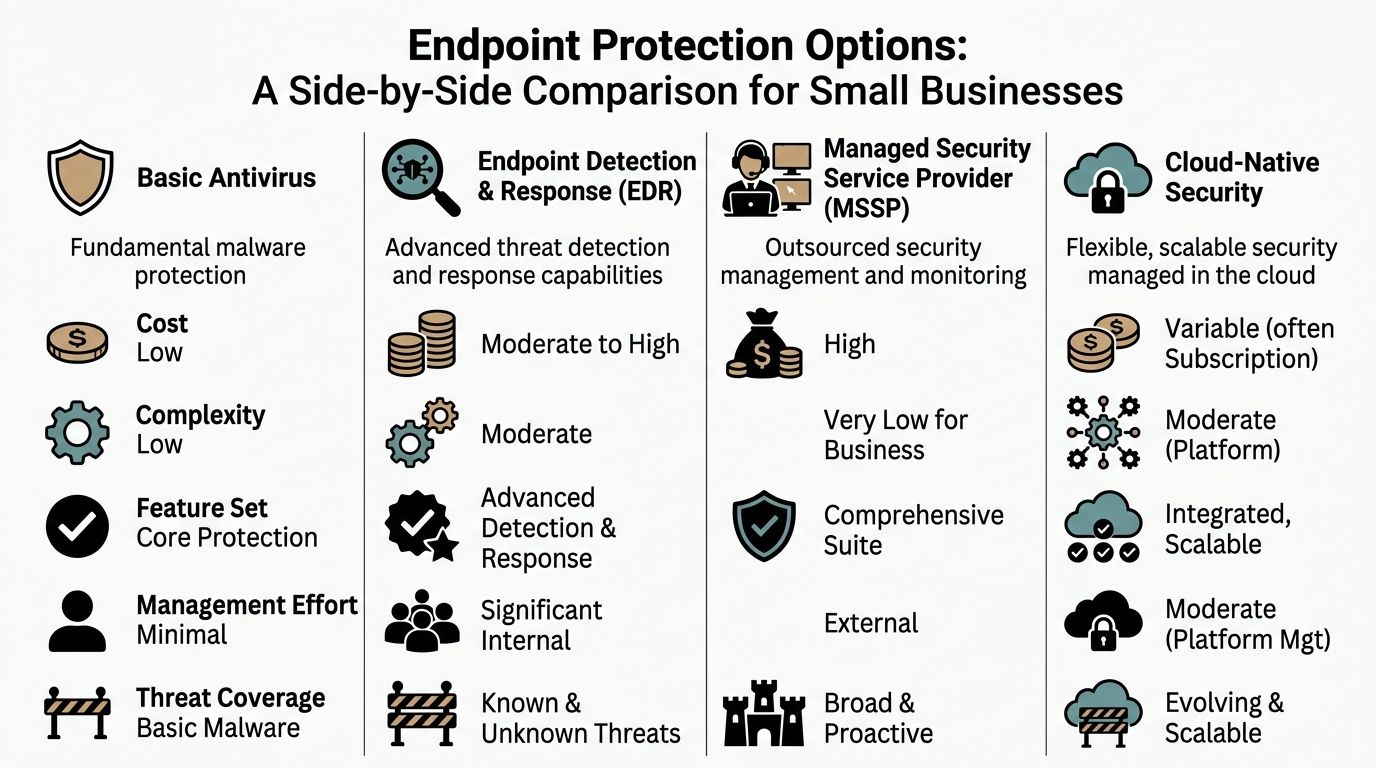
The market is easier to understand if you stop comparing brands first and compare solution types instead. Most small businesses are deciding between four models: basic antivirus, EDR, integrated suites, and managed security.
Here is the quick view.
| Endpoint Protection Solution Types at a Glance | Typical Cost | Management Overhead | Best For |
|---|---|---|---|
| Basic antivirus | Lower | Low to moderate | Very small businesses with simple risk profiles |
| EDR | Moderate to higher | High | Businesses with internal IT maturity and stronger security needs |
| Integrated security suites | Variable, often bundled | Moderate | Microsoft 365-centric businesses that want one ecosystem |
| Managed antivirus or MDR | Higher sticker price, lower internal labor | Low for the business | SMBs that want protection without running security in-house |
Basic antivirus
This is the traditional model. Install an endpoint agent, manage scans, block malware, and rely on a central dashboard if the business edition includes one.
Products in this category often work well for micro-businesses that need straightforward protection without a lot of policy complexity. Norton Small Business is a good example of a product aimed at smaller environments. It is designed for businesses with fewer than 20 devices and focuses on easy setup and cloud management. That simplicity is valuable if you have no in-house IT.
The downside is depth. Basic antivirus can cover core malware protection well, but it may not give you strong investigation tools, richer response workflows, or the tuning flexibility needed once the business grows.
Best fit: a small office with a handful of endpoints, low regulatory pressure, and no appetite for advanced security operations.
Basic antivirus is easy to buy. It is not always easy to run well once alerts, remote users, and cloud file sync enter the picture.
EDR
Endpoint Detection and Response goes beyond blocking malware. It collects endpoint activity, helps identify suspicious behavior, and gives security staff more ways to investigate and respond.
This approach is attractive for businesses that need stronger visibility, especially if they handle sensitive client data or have a larger mix of endpoints. The trade-off is management effort. EDR tools generate more telemetry, more alerts, and more decisions. That is a strength only if someone is available to interpret it.
For a small manufacturer with shop-floor systems, office machines, and remote laptops, EDR can be the right technical answer. Operationally, though, it often overwhelms a small internal team unless paired with outside oversight.
Best fit: businesses with internal IT staff, higher risk tolerance for complexity, and a need for deeper investigation capability.
Integrated security suites
This category matters most for Microsoft 365-heavy organizations. Microsoft Defender for Business is the obvious example. It fits naturally into a Microsoft-centric environment and often feels easier to adopt because it already sits close to the identity, email, and device stack many SMBs use.
That convenience is real. So is the trade-off. Bitdefender demonstrated 100% detection of 10,000+ malware samples in 2026 AV-TEST certifications, compared with Microsoft Defender for Business at 98.5%, according to SafetyDetectives’ review of business antivirus options. That does not make Defender unusable. It does mean convenience and protection depth are not always identical.
For businesses already standardized on Microsoft 365, an integrated suite can still make sense if the priority is simpler administration, tighter native integration, and fewer moving parts.
Best fit: firms that want one ecosystem, especially those already using Microsoft 365 heavily and preferring fewer vendors.
Here’s a short video overview if you want a visual comparison before deciding between categories.
Managed antivirus and MDR
This is the done-for-you model. The software still matters, but the service layer becomes the bigger differentiator. A provider deploys the agent, tunes policies, reviews alerts, and handles response steps based on the agreement.
For many SMBs, this is the most practical answer. The business is not trying to buy a dashboard.
A managed service can be built around products like Bitdefender, ESET, Defender for Business, or other endpoint tools. The value comes from oversight and execution. One local option is Cyberplex’s managed endpoint security approach, which focuses on securing business devices as part of a broader MSP model.
Best fit: small and midsize businesses that want accountability, lower internal overhead, and faster action when something suspicious appears.
Product examples inside those categories
A few products stand out for specific reasons.
- Bitdefender GravityZone works well for SMBs that want strong detection, centralized cloud management, and automation.
- ESET PROTEECT is a strong choice when low system impact and fewer false alarms matter.
- Norton Small Business fits very small teams that value easy setup over deep security operations.
- Microsoft Defender for Business makes sense where the Microsoft ecosystem is already the center of gravity.
- Webroot often appeals to MSP-managed environments because of its lightweight footprint.
The right question is not “which brand wins?” It is “which operating model fits our staff, devices, cloud tools, and tolerance for managing security ourselves?”
Understanding the Total Cost of Endpoint Security
Small businesses often focus on subscription price because it is the visible cost. That is understandable, but it misses the bigger picture.
The true expense of endpoint protection includes deployment time, policy setup, exception handling, alert review, user support, and cleanup when something goes wrong. A cheaper product can become expensive fast if it needs constant babysitting.
The hidden labor cost
Consider two different approaches.
One business buys a lower-cost tool and manages it internally. That can work, but somebody still has to remove the old antivirus, deploy the new agent, verify coverage, tune scan schedules, review alerts, and troubleshoot conflicts with Microsoft 365 apps or line-of-business software.
Another business chooses a product with stronger automation and simpler centralized management. The license may cost more on paper, but the labor burden drops. That is often the more honest measure of value.
Bitdefender GravityZone’s automation reduces admin overhead by 40% per endpoint, and plans start around $16+/10 devices, according to Synchronet’s business antivirus comparison. For a resource-strapped SMB, that kind of reduction matters because the primary bottleneck is usually staff time, not just licensing.
Why sticker price can mislead
A product is not cheap if it creates constant interruption.
You pay for endpoint security in several ways:
- Setup effort when devices need onboarding, policy creation, and testing
- Operational drag when scans interfere with work or cloud sync
- Alert handling when someone must decide what is urgent
- User confusion when prompts appear and staff click the wrong option
- Recovery effort after malware, ransomware, or false positives
The cheapest antivirus is often the one that costs the most in owner attention.
A better buying lens
When comparing the best antivirus software for small business, ask these questions instead of “what is the monthly fee?”
- How much staff time will this consume each week?
- Who handles after-hours alerts or suspicious behavior?
- Who confirms a suspicious login or endpoint event is contained?
- Who keeps policies aligned with your Microsoft 365, VoIP, and remote work setup?
- Will this product create exceptions and troubleshooting work around Microsoft 365 or VoIP?
For most SMBs, the true cost comes from management burden and downtime risk. That is why a well-automated tool or a managed service often beats the cheapest line item.
Your Antivirus Implementation Checklist
Buying the product is the easy part. Most antivirus rollouts fail on planning, not licensing.
A clean deployment protects the business without interrupting daily work. A sloppy one creates duplicate agents, broken sync clients, scan conflicts, and staff distrust before the system has a chance to prove itself.
Start with an endpoint inventory
Before you deploy anything, list every device that touches business data.
That includes office desktops, laptops, shared kiosks, mobile devices, home PCs with company email access, and any machines used by remote staff. If a device can open Outlook, access OneDrive, or log into a business application, it belongs in scope.
A simple inventory should answer:
- Who uses the device
- What operating system it runs
- Whether it is company-owned or BYOD
- Which business apps and cloud services it accesses
- Whether it needs exceptions for specialized software
Define policy before installation
Do not install first and sort rules out later.
Decide ahead of time how aggressive the protection should be, who can approve exclusions, whether USB use is allowed, how scans should be scheduled, and what happens if a device is suspected of compromise. This matters most in environments with legal, accounting, public sector, or property management workflows where software exceptions are common.
Roll out in phases
A pilot group saves time.
Start with a small set of users from different roles. Include at least one person who lives in Outlook, one who uses Teams heavily, and one user on older hardware. That gives you real feedback on performance and application conflicts before you push to everyone.
Remove old antivirus correctly
This step gets skipped all the time.
Do not layer a new endpoint agent on top of a previous one unless the vendor explicitly supports that configuration. Old services, drivers, and quarantine folders can cause instability, slowdowns, and false detections. Verify the old product is fully removed before broad deployment.
If machines get slower right after rollout, check for remnants of the previous antivirus before blaming the new one.
Tell employees what will change
Security software should not surprise users.
Give staff a short explanation of what they will see, what alerts might look like, and what they should do if a file gets blocked or a device acts differently. Keep it plain. They need to know who to contact and what not to click.
Set an incident path
Every deployment needs a response owner.
If an alert fires after hours, who gets notified? If a device is isolated, who approves the next step? If a user reports suspicious activity, who checks the console and decides whether it is a true incident? The best antivirus software for small business still depends on a clear process behind it.
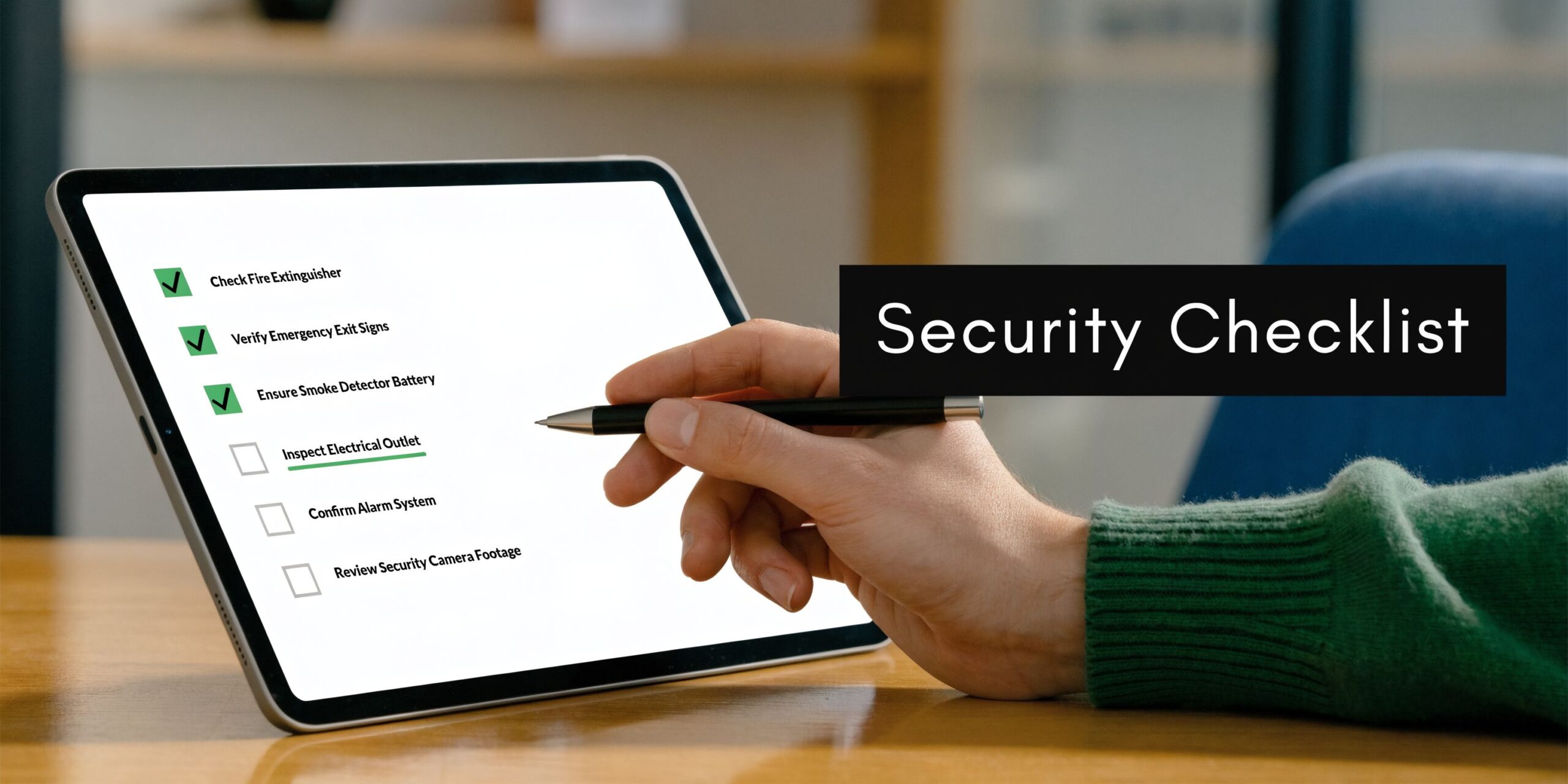
A practical implementation checklist looks like this:
- Inventory every endpoint that touches company systems.
- Choose your management model before choosing settings.
- Document scan schedules and exclusions for business apps.
- Pilot on a mixed user group before full deployment.
- Fully remove old tools to avoid conflicts.
- Train employees on basic alerts and reporting steps.
- Assign incident ownership so no alert goes unanswered.
- Review the rollout after launch and adjust policies based on real use.
Making the Right Choice for Your Small Business
There is no single winner for every company. The right choice depends on staff size, risk profile, cloud dependence, and how much internal time you can realistically devote to security management.
If you run a very small office
A five-person firm with straightforward needs may not need a full security operations model. In that case, ease of deployment matters a lot.
Norton Small Business is often a sensible fit when you want quick setup and simple cloud management for a small number of devices. It is not the deepest platform in this space, but it can be appropriate where the goal is clean coverage without much tuning.
If false alarms would disrupt the office
For accounting, legal, or administrative teams, false positives create real cost. They interrupt work, trigger panic, and send someone hunting for answers when there may be no incident at all.
ESET PROTECT achieved a 99.5% malware protection rate with zero false alarms in the AV-Comparatives Business Security Test 2025, according to Tekpon’s cybersecurity tools analysis. That matters for small businesses because fewer false alarms means less wasted time and less friction between security and daily work.
If you are deep in Microsoft 365
If your business already lives in Outlook, Teams, SharePoint, OneDrive, and Entra-managed identities, Microsoft Defender for Business deserves a serious look. The main advantage is operational simplicity. The closer your security tooling sits to the rest of your stack, the fewer separate consoles and workflows your team has to learn.
That said, integrated does not automatically mean strongest in every area. If protection depth is your top priority, compare it carefully against stronger standalone business platforms.
If you want a stronger dedicated platform
Bitdefender GravityZone is a strong fit for SMBs that need better detection, centralized management, and automation without jumping into a heavier enterprise platform. It makes particular sense for businesses with mixed devices, remote workers, and a need for clear policy control.
Persona-based recommendations
Here is the practical version.
- Small accounting or legal office: Favor low false positives, good reporting, and clean Microsoft 365 coexistence. ESET or a carefully managed Microsoft-centric setup often fits well.
- Property management or real estate team: Prioritize remote device coverage, simple cloud administration, and dependable protection for distributed staff. Bitdefender or a managed model is usually easier to sustain.
- Manufacturing company with mixed endpoints: Look for stronger policy control, low performance impact, and an incident response path that does not rely on one busy internal employee.
- Public sector or compliance-sensitive organization: Choose the option that gives clear visibility, defined response procedures, and support for formal security oversight.
The best antivirus software for small business is the product and management approach your team can operate consistently six months from now, not just the one that looks strongest on a comparison page.
When to Partner with a Managed Service Provider
DIY security works up to a point. Then the business outgrows it.
That usually happens when alerts start showing up after hours, remote devices multiply, compliance questions become more serious, or nobody on staff has time to investigate whether a detection is harmless or urgent.
Signs the in-house approach is running thin
Ask yourself a few direct questions.
- Who checks alerts when the office is closed?
- Who approves exclusions safely when a business application gets flagged?
- Who confirms a suspicious login or endpoint event is contained?
- Who keeps policies aligned with your Microsoft 365, VoIP, and remote work setup?
- Who owns the response if a user reports something suspicious but your internal IT contact is busy or unavailable?
If those answers are unclear, the business is carrying more security risk than the dashboard suggests.
Why an MSP model often makes sense
A managed service provider can take endpoint protection from a product purchase to an operational process. That includes deployment, policy tuning, monitoring, escalation, and coordination when something needs action.
For many small businesses, that is the primary value. Not more software. Better follow-through.
This is especially true if you are dealing with distributed teams, limited internal IT time, or security requirements that are getting harder to interpret on your own. In those cases, a service model such as cybersecurity as a service can be more practical than trying to piece together tools and responsibilities internally.
If your team spends more time reacting to technology issues than serving customers, security management has become an operations problem, not just an IT one.
Cyberplex Technologies LLC helps small and midsize organizations manage endpoint security as part of broader IT support, including monitoring, Microsoft 365 environments, cloud integration, and security operations. If your business needs a practical path to better endpoint protection without adding more internal overhead, you can learn more at Cyberplex Technologies LLC.


