
Picture your business data as a document you're working on all day long. Your Recovery Point Objective, or RPO, is the answer to a simple but crucial question: how often are you hitting the 'Save' button?
It's all about how much recent work—how much data—you can stand to lose and re-do from scratch after a disaster strikes. This metric is your line in the sand for data loss, measured in the minutes or hours of work leading up to an outage.
What Does Your Recovery Point Objective Really Mean?

Don't think of the Recovery Point Objective as some technical jargon your IT team worries about. It's a core business decision. It represents the absolute maximum age of the files you need to recover from a backup to get your operations running again.
If you set your RPO at one hour, you're telling your team and your technology that losing up to 60 minutes of data is acceptable. This directly dictates your backup schedule—your systems must be backed up at least once every hour. If your RPO is 24 hours, a nightly backup will do the trick.
Actionable Insight: Look at your company's core operations. For a law firm, every billable minute matters. An RPO of 15 minutes for their billing system might be non-negotiable, meaning they need backups running every quarter-hour. For their internal marketing blog, a 24-hour RPO is likely fine.
It All Comes Down to Your Tolerance for Data Loss
At its heart, your RPO is all about calculating risk. It forces you to look at each part of your business and ask, "How much data can we afford to lose here without it causing a major disaster?" We're not just talking about a minor inconvenience; data loss directly hits your revenue, your customers' trust, and can even have legal consequences.
For example, an e-commerce site that processes hundreds of orders an hour can't afford to lose more than a few minutes of transactions. Their RPO has to be incredibly low. On the other hand, an internal file server for your marketing team that only gets updated a few times a day could probably handle a higher RPO of several hours without anyone panicking.
Your Recovery Point Objective is the anchor for your entire data protection strategy. It’s the business-level handshake that defines how often you back up, drawing the line between an acceptable hiccup and a business-ending catastrophe.
Getting this right is more critical than ever. With ransomware gangs pulling in a record $1.1 billion in 2023—nearly double the previous year—attackers are getting bolder, and the cost of losing your data is skyrocketing. For small and midsize businesses, a smart RPO is often what separates a bad day from going out of business. You can get more details on why RPO is a critical metric over at Metallic.io.
RPO Tiers: What They Mean for Your Business
To make this more concrete, let's break down what different RPOs look like in the real world. The tier you fall into determines the technology you need and the costs involved.
| RPO Tier | Maximum Data Loss | Example Business Use Case | Typical Backup Method |
|---|---|---|---|
| Near-Zero | Seconds to minutes | A busy e-commerce store, a stock trading platform, or a bank processing transactions. | Continuous data replication or mirroring to a live, secondary system. |
| Low | 15 to 60 minutes | A customer relationship management (CRM) system or a busy accounting department. | Frequent snapshots or virtual machine replication (every 15-60 minutes). |
| Medium | 4 to 12 hours | An internal file server, a project management tool, or marketing content repositories. | Twice-daily or hourly backups scheduled during off-peak hours. |
| High | 24 hours | Archival systems, internal development servers, or non-critical administrative files. | A single, comprehensive backup that runs automatically every night. |
Actionable Insight: Most businesses don't need a single RPO; they need a tiered strategy. Identify your "crown jewel" applications (like a customer database) and assign them a low RPO. For less critical data (like HR policy documents), a higher RPO is more cost-effective. This tiered approach optimizes your spending on data protection.
RPO vs. RTO: Clearing Up the Confusion
It's incredibly common for people to mix up RPO with its partner in disaster recovery, the Recovery Time Objective (RTO). They sound similar, but they answer two completely different questions.
- Recovery Point Objective (RPO): This is all about your data. It looks backward and asks, "What's the last good save point we can restore from?"
- Recovery Time Objective (RTO): This is all about your downtime. It looks forward and asks, "How quickly do we need to be back up and running?"
Here’s a simple way to remember it: RPO = Data, RTO = Time.
Your business might decide it can't lose more than 15 minutes of data (an RPO of 15 minutes), but that it can tolerate the systems being down for up to an hour while you restore everything (an RTO of one hour). Both numbers are critical for a solid business continuity plan, but they tackle separate problems.
RPO vs RTO The Twin Pillars of Your Recovery Plan
Talk to anyone about disaster recovery, and you'll hear the terms RPO and RTO thrown around. While they sound similar and often get mentioned together, they represent two completely different—but equally critical—parts of your recovery plan.
Getting the distinction right is the difference between a plan that works and one that fails when you need it most.
Let's break it down. Think of it this way: RPO is all about your data, while RTO is all about your operations.
- RPO asks: How much data can we stomach losing? This measures the gap back in time from the moment a disaster hits.
- RTO asks: How quickly do we need to get back up and running? This measures the time moving forward from the disaster.
Confuse the two, and you might have a plan that saves your data but keeps your business offline for days, or vice-versa. To get a handle on the operational side of the clock, take a look at our complete guide to understanding the disaster recovery time objective.
A Practical Scenario: The Manufacturing Plant
To see this play out in the real world, imagine a small manufacturing business. A sudden power surge at 10:45 AM completely fries the server running their inventory management system. It's a disaster. Now, their recovery plan, guided by RPO and RTO, kicks into high gear.
First, let's look at their Recovery Point Objective (RPO). The leadership team decided this system was critical, so they set an RPO of one hour. This means their system is set up to automatically back up all inventory data every hour, on the hour.
Because the disaster struck at 10:45 AM, and the last good backup was at 10:00 AM, the company knows exactly what they’ve lost: 45 minutes of data. Every part received and every shipment logged in that window is gone. The RPO has defined this 45-minute loss as an acceptable business risk.
RTO: The Race Against Downtime
Now for the other side of the coin: the Recovery Time Objective (RTO). The plant’s management determined that the assembly line, which depends on that inventory data, absolutely cannot be down for more than two hours. That’s their RTO.
The clock starts ticking the second the server fails at 10:45 AM. The IT team has until 12:45 PM to get everything back online. Their job is to restore the server, load the last good backup from 10:00 AM, and get the system running. The RTO isn't concerned with how much data was lost—it's purely about stopping the operational bleeding as fast as possible.
RPO measures the gap between your last good backup and the disaster. RTO measures the gap between the disaster and when you're back in business.
This scenario shows you why these two metrics are separate but deeply connected.
- If their RPO was 24 hours: They would have lost an entire day of data, throwing production and shipping into total chaos.
- If their RTO was 8 hours: The assembly line would sit idle for a full shift, resulting in huge productivity losses and missed customer deadlines.
Aligning Objectives With Business Reality
The main takeaway here is that you can't just pick one RPO and RTO for your whole business. You have to set these values for each system based on how critical it is.
A near-zero RPO for a customer database demands constant, frequent backups. A tight RTO requires a fast, efficient recovery process, which might mean investing in more advanced hardware and software.
Actionable Insight: Create a simple two-column chart for your key systems. In one column, write the system name (e.g., "QuickBooks Server"). In the next, write the maximum data you could afford to re-enter manually (e.g., "30 minutes of invoices"). This simple exercise gives you a rough, real-world RPO to start with. Repeat this for downtime to get your RTO.
How to Calculate the Right RPO for Your Business
When it comes to your disaster recovery point objective, a "one-size-fits-all" approach just doesn't work. You'll either end up paying for protection you don't need or leave yourself dangerously exposed when an outage hits.
Let’s be honest: not all of your data is created equal. Your job is to match the level of protection to the actual business value of that information.
Figuring out the right RPO for different systems isn't some dark art; it's a practical business exercise. It all starts by asking the right questions—not just about tech, but about the real-world impact on your business.
Start with a Simplified Business Impact Analysis
"Business Impact Analysis" (BIA) might sound like a stuffy corporate term, but we can boil it down. The main goal is to figure out which parts of your business are most critical and what data they depend on to function.
This isn’t just an IT conversation. You need to pull in your department heads, because they know what makes their teams tick.
Actionable Insight: Send a simple one-page survey to department heads. Ask them to rank their top 3 most critical applications and estimate the cost of one hour of lost data for each. This gives you immediate, business-focused data to build your RPO tiers.
Ask the Right Questions to Pinpoint the Impact
For every application and piece of data on your list, you need to quantify the pain of losing it. This is where we move from theory to actual dollars and cents.
Ask these questions for each system:
- Financial Impact: How much money do we lose for every hour of data that’s gone for good? Think lost sales, unbillable hours, or transaction fees that just disappear.
- Operational Impact: What work stops dead in its tracks? Can we still take orders, manage our inventory, or talk to clients if this data is wiped?
- Customer Trust: What happens to our reputation if we lose customer data? A lost transaction history or missing project files can destroy trust much faster than a bit of downtime.
- Regulatory Penalties: Are we on the hook for legal or compliance fines if this specific data is lost? For businesses in law, finance, or healthcare, this is a massive consideration.
The answers will naturally sort your systems into different tiers of importance, and each tier will need its own RPO.
A tiered approach is the most effective way for small and midsize businesses to manage risk without overspending. It focuses your budget and resources on protecting what truly matters most to your daily operations.
Let’s use a law firm as an example. Their client billing system tracks every single billable minute. If they lost even an hour of that data, it could mean thousands of dollars in revenue they can never get back. That system obviously needs a very low RPO—maybe 15 minutes or less.
On the other hand, the firm's internal HR portal with employee handbooks and vacation schedules has a much lower impact. If they lost a few hours of data, it would be an inconvenience, but not a catastrophe. A 24-hour RPO for that system would be perfectly acceptable.
Tiering Your Systems for a Practical RPO Strategy
Going through this process is absolutely essential for any SMB that wants to compete. Setting a smart Recovery Point Objective isn't a luxury; it’s about survival.
Experts and organizations like Veeam champion a tiered model, and for good reason. They often suggest targets like Tier 1 workloads aiming for RPOs under 15 minutes, Tier 2 under four hours, and Tier 3 within 24 hours. This kind of strategy lines up your spending with real business impact, helping you get back on your feet faster and more efficiently when something goes wrong.
This tiered approach gives you a clear, actionable game plan. You’re no longer just guessing. You're making smart decisions that balance cost, technology, and what your business actually needs. This is the foundation of any solid backup and disaster recovery strategy.
Matching Technology to Your RPO Targets
So, you’ve defined your disaster recovery point objective. You know how much data your business can afford to lose. That’s a huge step. But now for the practical part: how do you actually make it happen?
Choosing an RPO is a business decision, but hitting that target is all about the technology. It’s like picking the right tool for the job. You wouldn’t bring a sledgehammer to fix a watch, and you don’t need a multi-million dollar system to back up a few non-critical files. The tech you choose has to line up perfectly with the RPO you’ve set for each part of your business.
Let’s break down what that looks like.
Technologies for Higher RPOs (12 to 24 Hours)
For systems that can handle losing up to a day's worth of data, the classic, old-school backup approach is often your most cost-effective bet. Think of this as your safety net for less-critical data.
- Technology: This usually means scheduled backups to an external hard drive, a network-attached storage (NAS) device, or even a basic cloud storage account.
- How it Works: It's pretty straightforward. We set up an automated backup to run once every 24 hours, typically overnight when no one is working and the network is quiet.
- Practical Example: The marketing department's server, which stores large design files and brand assets, is backed up every night at 2 AM. This meets their 24-hour RPO without impacting network performance during business hours.
Technologies for Mid-Range RPOs (1 to 4 Hours)
What happens when losing a whole day of data is just too painful to think about? If you need to shrink that potential loss down to just a few hours, you need to back up more frequently. This is where modern snapshot technology really shines, giving you a fantastic balance between cost and protection.
This approach has become incredibly popular because it fills the gap between once-a-day backups and the really complex, expensive stuff. You can read more about how small businesses are using these flexible strategies in our guide to cloud backup for small business.
A snapshot is like taking a point-in-time "picture" of your entire system—files, apps, settings, and all. The magic is that after the first one, they only record the changes made since the last snapshot, which makes them incredibly fast and lightweight.
Practical Example: A mid-sized accounting firm uses snapshots to back up their main file server every hour. This meets their 60-minute RPO for client financial documents and ensures that, in a worst-case scenario, the team only has to re-create a maximum of one hour of work.
Technologies for Low and Near-Zero RPOs (Under 60 Minutes)
Now we're talking about the crown jewels—the systems that are the absolute lifeblood of your company. For these, any significant data loss is simply not an option. To hit an aggressive RPO of minutes or even seconds, you have to move past periodic backups and embrace continuous data protection.
This tech doesn't work on a schedule. It captures and saves data changes pretty much as they happen.
- Technology: We’re talking about Continuous Data Replication (CDR) or high-availability failover systems.
- How it Works: Instead of taking backups at set intervals, replication technology constantly sends a copy of your data changes to a secondary location in real-time or near real-time. If your main system goes down, you can switch over to the replica with almost zero data lost.
- Practical Example: An online retailer uses continuous replication for its e-commerce database. Every new order, customer sign-up, and inventory change is instantly copied to a standby server. This achieves a near-zero RPO, ensuring no sales are lost even if the primary server fails.
It’s amazing to see how the disaster recovery point objective has evolved. Before 2020, most small businesses thought a 24-hour RPO was good enough. Today, thanks to the cloud, even near-continuous replication is within reach. As we all create more data than ever, this tiered approach is the key to balancing costs with solid protection. You can see how other experts are tiering RPOs at TierPoint's resource page.
Practical Example: A Medical Clinic's RPO Strategy
Let’s make this real. Imagine a small medical clinic trying to protect its patient records and appointment schedules.
Their Electronic Health Record (EHR) system is, without a doubt, their most critical asset. Losing patient data would be a clinical, legal, and reputational nightmare. For this, they set a very aggressive RPO of 15 minutes. To pull this off, they use virtual machine snapshot replication, which copies their entire EHR server every 15 minutes to a separate, secure cloud location.
But for their administrative files—think staff schedules and office supply orders—a 24-hour RPO is perfectly fine. For that, they use a simple, automated cloud backup that runs once every night. This tiered strategy lets them put their money where it matters most, protecting their critical systems without overspending on the ones that don't need the same level of intense protection.
Putting Your RPO Strategy into Action
Okay, so you’ve defined your disaster recovery point objective. That's a great start, but it’s just a number on a spreadsheet until you bring it to life. A recovery plan is only as good as its implementation—and more importantly, its testing.
Now it's time to turn those RPO targets from theory into a reliable, actionable part of your business’s defense. This is about more than just setting up backups; it involves clear documentation, talking to your team, and a real commitment to testing. After all, you don't want to find a crack in your armor during an actual crisis.
Document and Communicate Your RPOs
Once you’ve locked in the RPOs for your different systems, the very first thing to do is write them down. This isn't just busywork; it's about creating accountability and making sure everyone is on the same page.
Your RPOs should be a cornerstone of your official business continuity or disaster recovery plan. This document needs to spell things out clearly:
- The RPO for each application or dataset (e.g., "CRM System – RPO: 15 minutes").
- The technology and process you're using to hit that target (e.g., "Hourly snapshots replicated to cloud storage").
- The person or team responsible for managing and checking the backups.
Actionable Insight: Create a simple, one-page "RPO Cheat Sheet" and share it with department heads. This quick-reference guide should list each major system, its RPO, and what that means in plain English (e.g., "Sales CRM – 1 Hour RPO – Maximum of 1 hour of customer notes could be lost"). This makes the plan tangible for non-technical staff.
The Power of Regular RPO Testing
An untested backup is really just a hope. You can’t be truly confident in your recovery plan until you’ve actually walked through the steps. Regular testing is the only way to prove that your tech and your team can deliver on your RPO when it counts.
A recent study found that while 77% of companies have a disaster recovery plan, a shocking 23% never test it. An untested plan is a failed plan waiting to happen.
Think of it like a fire drill. You don't wait for a real fire to see if the alarm works and if people know where to go. The same logic applies to your data. Testing transforms your RPO from a theoretical goal into a proven capability.
This is where you match your technology to your RPO goals, creating a strategy you can actually test.
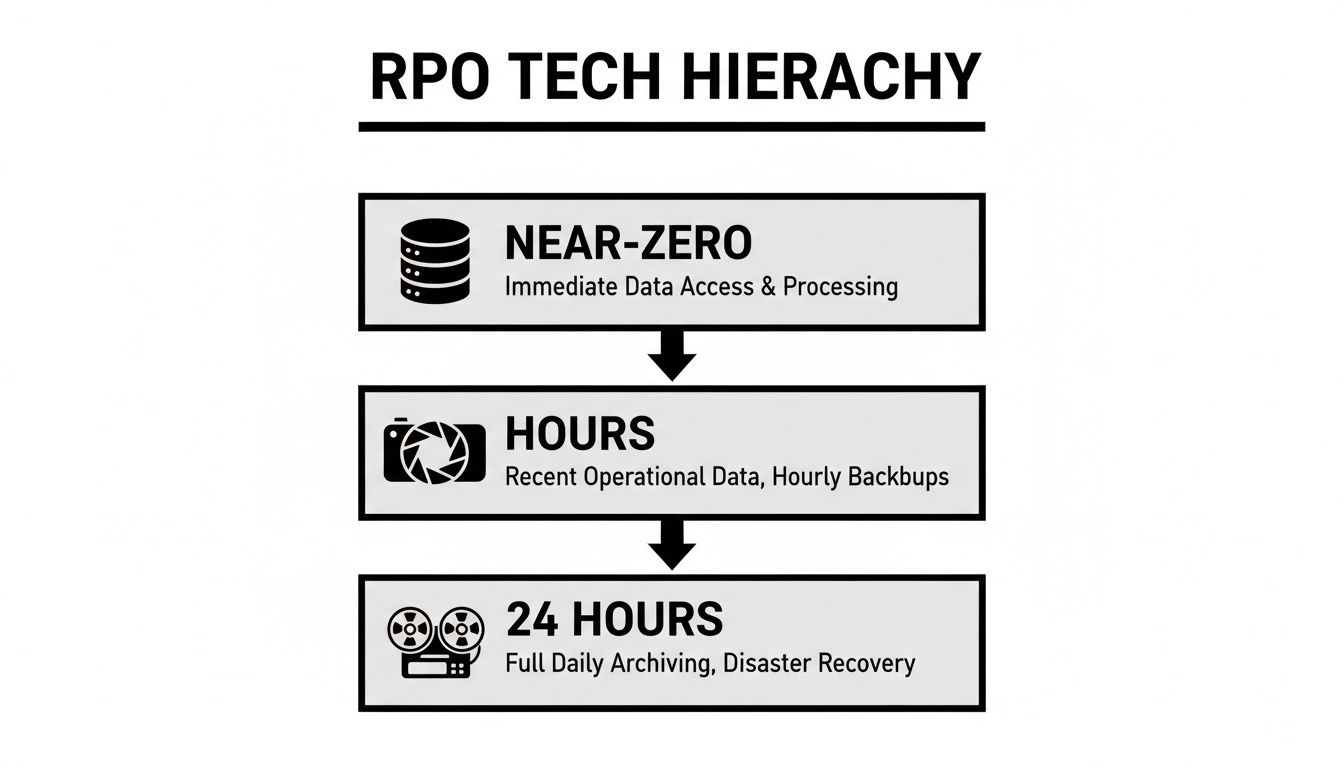
As you can see, hitting a near-zero RPO demands advanced tech like continuous replication, while a 24-hour RPO might just need traditional daily backups. Each tier requires its own unique testing method.
How to Conduct Effective RPO Drills
The good news? Testing doesn't have to bring your business to a halt. You can run drills that validate your entire process without ever touching your live systems.
Here’s an actionable checklist to guide you:
- Schedule Regular Tests: Plan on testing your most critical systems quarterly and everything else at least once a year. Put it on the calendar—make it a non-negotiable part of your IT routine.
- Perform Test Restores: Don't just check if the backup "succeeded." Actually restore a file, a folder, or a whole database to an isolated test environment. Practical Example: Restore last Tuesday's backup of the "Shared" drive to a new folder called "Restore_Test" and have a user verify the files are correct.
- Verify Data Integrity: Once the restore is done, check the data. Open the files. Run a query on the database. Make sure the data is uncorrupted and looks exactly as it should for that point in time.
- Time the Process: While RTO (Recovery Time Objective) is a different metric, timing your restore is incredibly useful. If it takes way longer than you thought, you've just found a bottleneck you can fix before a disaster.
- Document Everything: Keep a log of every test. Note the date, the system tested, who did it, the result, and any snags you hit. This log is gold for compliance audits and for making your strategy even better over time.
By making testing a regular habit, you build real resilience and confidence. You ensure your team and your tech are ready, turning your disaster recovery point objective into a promise you know you can keep.
Frequently Asked Questions About RPO
Knowing the theory behind a disaster recovery point objective is one thing. Figuring out what it means for your business is something else entirely. We get it.
To help bridge that gap, we’ve put together answers to the common questions we hear from business owners who are getting serious about their RPO strategy. These are the practical, real-world answers you need to navigate the costs and complexities.
What Is a Realistic RPO for a Small Business?
There’s no one-size-fits-all answer here. The "right" RPO depends completely on how your business operates and which data you can't live without. A smart, budget-friendly strategy is to group your applications and data into tiers based on how critical they are.
For your most essential systems—think the accounting software that processes every dollar or the CRM holding your entire sales pipeline—you’ll want an aggressive RPO of 1 to 4 hours. This ensures that if the worst happens, you only risk losing a very small window of valuable data.
On the other hand, for less critical data like internal project files, marketing materials, or archives, a 24-hour RPO is often more than enough. Losing a day's work on a marketing brochure is an inconvenience, not a business-ending disaster.
Actionable Insight: The key question to ask is: "Which data, if lost, would cause the most immediate and severe financial or reputational damage?" Start there. That's where you need to focus your resources for the tightest RPO.
Working with a managed service provider like us can help you nail this analysis. We'll help you find that perfect balance between robust protection and a budget that actually works for your business.
How Much Does It Cost to Implement a Low RPO?
It's a simple trade-off: a lower RPO—meaning less data loss—is going to cost more. That’s because hitting a tight disaster recovery point objective requires more frequent backups and, often, more sophisticated technology.
Getting to a 15-minute RPO, for example, is much more demanding than a 24-hour one. It chews up more storage for all those backup copies, needs more network bandwidth to move the data, and requires systems that can handle the load without slowing you down.
Practical Insight: While costs vary, a 24-hour RPO might be achieved with simple cloud backup software for a low monthly fee per server. A 1-hour RPO using snapshots could double that cost. A near-zero RPO with replication technology could be five to ten times more expensive, depending on the system.
The most important math isn't the price tag of the backup solution; it's the potential cost of data loss. If losing just one hour of transaction data would cost your business thousands, then a powerful backup system stops being a cost and starts being a critical investment.
Can I Set My RPO to Zero for Everything?
While you technically can get to a zero or near-zero RPO for specific systems with real-time replication, trying to do this for your entire company is almost always impractical and financially out of reach for most businesses.
Achieving a true zero RPO across the board would require a massive investment in high-availability hardware, specialized software, and dedicated high-speed networks. That's the kind of setup you see at stock exchanges and major international banks, not your typical SMB.
A much smarter, more strategic approach is to tier your systems. Apply that near-zero RPO only to the absolute most critical, high-transaction parts of your business. A perfect example is the live order database for a busy e-commerce site, where every single transaction is priceless.
For everything else, you can use more affordable RPOs that still give you excellent protection. This tiered model gives you maximum security where it counts most without forcing you to overspend on systems that simply don't need it.
How Often Should I Test My RPO?
Let's be blunt: an untested recovery plan isn't a plan at all. It’s just a hopeful document. You need to be absolutely confident that you can actually hit your RPO targets in a real disaster, and testing is the only way to get there.
We recommend a two-part testing schedule:
- Full Plan Test (Annually): At least once a year, you should run through your entire disaster recovery plan from start to finish. This is a bigger effort that validates everything from your backups to your team's response.
- Critical System Test (Quarterly): For your most important systems—the ones with the tightest RPOs—you need to test more often. We recommend doing this every quarter.
Actionable Insight: Add a recurring calendar event for your IT team or provider titled "Quarterly Critical System Restore Test." The description should list the specific systems to test (e.g., "Restore one client file from CRM backup") to ensure it becomes a routine, actionable task.
The goal is simple: verify that your backups are working and that you can recover usable data within your RPO window. Regular testing is your best defense against ugly surprises. It finds the gaps in your process before a crisis hits, giving you the chance to fix them when the stakes are low.
Defining, implementing, and testing the right RPO strategy can feel overwhelming. At Cyberplex Technologies LLC, we specialize in taking the guesswork out of disaster recovery for businesses just like yours. We'll help you build a practical, affordable plan that protects what matters most. Learn more about our managed IT and business continuity services.


